在研究 Launcher 源碼時,我接觸並學習了 SlidingDrawer 類,也就是一般所說的「抽屜」控制項。
其實 SlidingDrawer 的用法相當簡單,關鍵在於 handle 與 content 兩部分。handle 就是當你點擊它時,content 要嘛被拉出來、要嘛被收起來。廢話不多說,具體步驟如下:
1、新建 Android 工程,命名為 SlidingDrawer。
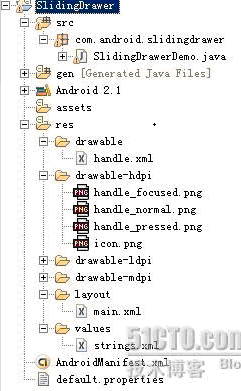
2、準備素材。這裡我的圖示取自 Launcher2,放在 drawable-hdpi 資料夾中,目錄結構如下圖:
3、設定 main.xml 版面配置,程式碼如下:
- <?xml version="1.0" encoding="utf-8"?>
- <LinearLayout xmlns:android="https://schemas.android.com/apk/res/android"
- android:orientation="vertical"
- android:layout_width="fill_parent"
- android:layout_height="fill_parent"
- android:background="#808080"
- >
- <SlidingDrawer
- android:id="@+id/slidingdrawer"
- android:layout_width="fill_parent"
- android:layout_height="fill_parent"
- android:orientation="vertical"
- android:handle="@+id/handle"
- android:content="@+id/content">
- <Button
- android:id="@+id/handle"
- android:layout_width="88dip"
- android:layout_height="44dip"
- android:background="@drawable/handle"
- />
- <LinearLayout
- android:id="@+id/content"
- android:layout_width="fill_parent"
- android:layout_height="fill_parent"
- android:background="#00ff00">
- <Button
- android:id="@+id/button"
- android:layout_width="wrap_content"
- android:layout_height="wrap_content"
- android:text="Button"
- />
- <EditText
- android:id="@+id/editText"
- android:layout_width="fill_parent"
- android:layout_height="wrap_content"
- />
- </LinearLayout>
- </SlidingDrawer>
- </LinearLayout>
4、設定 handle 圖示的樣式,在 drawable 裡新增 handle.xml,程式碼如下:
- <?xml version="1.0" encoding="utf-8"?>
- <selector xmlns:android="https://schemas.android.com/apk/res/android">
- <item android:state_window_focused="false" android:state_enabled="true" android:drawable="@drawable/handle_normal" />
- <item android:state_pressed="true" android:drawable="@drawable/handle_pressed" />
- <item android:state_focused="true" android:state_enabled="true" android:drawable="@drawable/handle_focused" />
- <item android:state_enabled="true" android:drawable="@drawable/handle_normal" />
- <item android:state_focused="true" android:drawable="@drawable/handle_focused" />
- </selector>
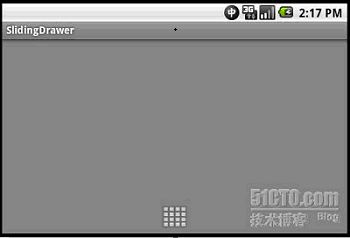
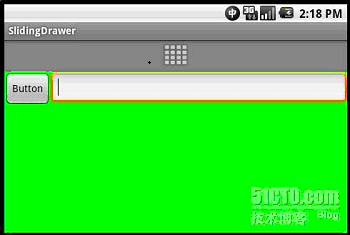
5、運行,就會得到如下效果:
本文所講內容較為簡單,若想深入研究 SlidingDrawer 抽屜,可以查閱 Launcher 源碼。


 RecyclerView 實作下拉刷新與自動加載完整教學
 Android 開發環境搭建與第一個程式實作:Eclipse + ADT 完整流程
 別再硬編路徑了:用 getFilesDir 與 getCacheDir 讀寫內部存儲
 Android 定位實戰:基於百度地圖實現定位功能