

編輯:關於 Android 開發
本文將一步步完善手機衛士的「功能列表」,重點實現設置中心界面中一個條目的布局結構。
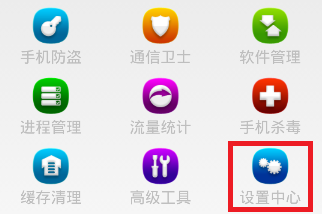
要點擊九宮格中的條目並跳轉,需要為 GridView 註冊 OnItemClickListener:
// 註冊九宮格單個條目的點擊事件
gv_home.setOnItemClickListener(new OnItemClickListener() {
 // position 為點中列表條目的索引
 @Override
 public void onItemClick(AdapterView<?> parent, View view, int position, long id) {
 switch (position) {
 case 0:
 break;
 case 8:
 Intent intent = new Intent(getApplicationContext(), SettingActivity.class);
 startActivity(intent);
 break;
 default:
 break;
 }
 }
});
點擊「設置中心」條目後需要跳轉,因此新建 SettingActivity.java:
package com.wuyudong.mobilesafe.activity;
import com.wuyudong.mobilesafe.R;
import android.app.Activity;
import android.os.Bundle;

public class SettingActivity extends Activity {
 @Override
 protected void onCreate(Bundle savedInstanceState) {
 super.onCreate(savedInstanceState);
 setContentView(R.layout.activity_setting);
 }
}
先實現設置中心中的一個標準條目,包含標題、描述與右側的 CheckBox,並用一條分割線分隔:
<?xml version="1.0" encoding="utf-8"?>
<LinearLayout xmlns:android="https://schemas.android.com/apk/res/android"
 android:layout_width="match_parent"
 android:layout_height="match_parent"
 android:orientation="vertical" >
 <RelativeLayout
 android:layout_width="match_parent"
 android:layout_height="wrap_content"
 android:padding="5dp" >
 <TextView
 android:id="@+id/tv_title"
 android:layout_width="wrap_content"
 android:layout_height="wrap_content"
 android:text="自動更新設置"
 android:textColor="#000"
 android:textSize="18sp" />
 <TextView
 android:id="@+id/tv_des"
 android:layout_width="wrap_content"
 android:layout_height="wrap_content"
 android:layout_below="@id/tv_title"
 android:text="自動更新已關閉"
 android:textColor="#000"
 android:textSize="18sp" />
 <CheckBox
 android:id="@+id/cb_box"
 android:layout_alignParentRight="true"
 android:layout_centerVertical="true"
 android:layout_width="wrap_content"
 android:layout_height="wrap_content" />
 <View
 android:layout_below="@id/tv_des"
 android:background="#000"
 android:layout_width="match_parent"
 android:layout_height="1dp" />
 </RelativeLayout>
</LinearLayout>
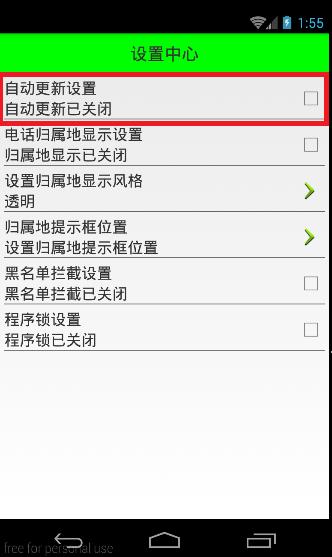
至此,設置中心的第一個條目布局結構便完成了,如下圖紅色方框所示:
 Android 應用程序的啟動流程解析
在 Android 系統中,一個應用程序的主體由 ActivityThread 構成。但要真正理解啟動流程,還需要弄清楚幾個細節:ActivityThread 是由誰建立
 Android 開發實戰(十):應用程式間的四種溝通方式——Handler、通知欄、廣播與 Intent
Android 在程式之間通訊這件事上,介面設計得相當豐富。這一節把最常打交道的四種溝通方式一次講清楚:各自解決什麼問題、怎麼實作、又有哪些容易忽略的細節。 一、用 Ha
 Android 學習筆記:Adapter 如何完成視圖與數據的綁定
做 Android 開發遲早會意識到一件事:界面上那些滾動的列表、翻動的卡片、切換的頁面,背後其實都是同一套機制在支撐——Adapter。理解它,比記住任何一個具體控件的
 深入 Android 消息機制:Handler 的原理與用法
搞懂 Android 消息機制中的 Handler 為什麼 Android 需要 Handler Android 官方建議我們不要在 UI 執行緒中執行耗時操作,因為這很