

編輯:關於 Android 開發
這篇記錄現代軟體工程第一週的第 14 題,分別用 Android 與 J2EE 兩套技術各做一個 HelloWorld。
開發環境:Android Studio 1.5,搭配 Android 5.1.1 的真機。
建立流程:
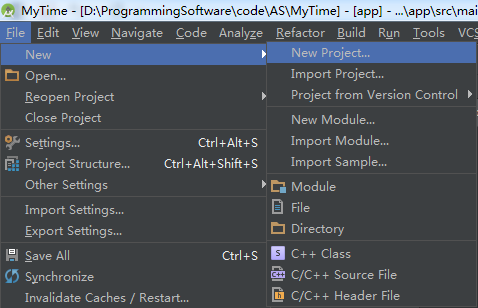
1、File → New → New Project
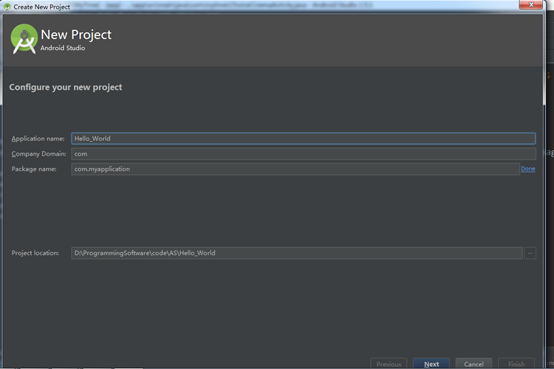
2、輸入專案名稱 Hello_World,選擇專案存放位置,按 Next
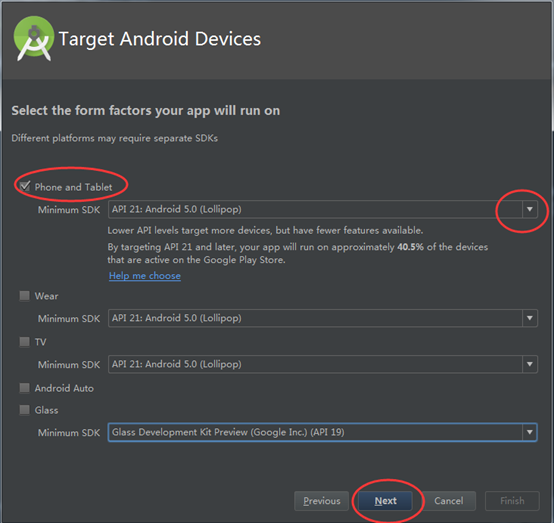
3、選擇要支援的平台與對應的 SDK 版本,按 Next
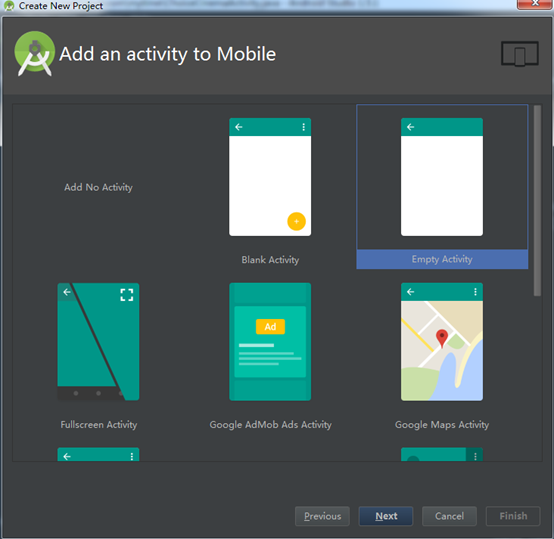
4、選擇一個預設的 Activity 樣板,按 Next
5、為 Activity 命名,按 Finish
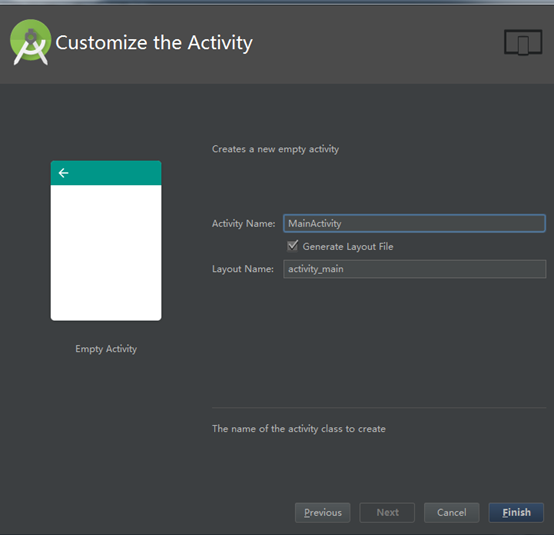
6、專案建立完成。
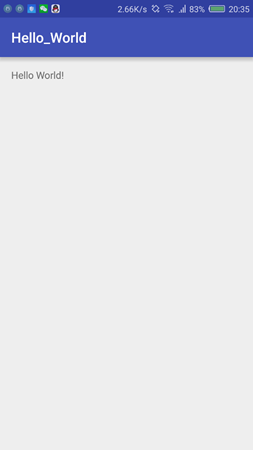
在真機上的執行結果:
Activity 的主要程式碼:
public class MainActivity extends AppCompatActivity {

    @Override
    protected void onCreate(Bundle savedInstanceState) {
        super.onCreate(savedInstanceState);
        setContentView(R.layout.activity_main);
    }
}
activity_main.xml:
<?xml version="1.0" encoding="utf-8"?>
<RelativeLayout xmlns:android="https://schemas.android.com/apk/res/android"
    xmlns:tools="https://schemas.android.com/tools"
    android:layout_width="match_parent"
    android:layout_height="match_parent"
    tools:context="com.myapplication.MainActivity">

    <TextView
        android:layout_width="wrap_content"
        android:layout_height="wrap_content"
        android:text="Hello World!" />
</RelativeLayout>
開發環境:MyEclipse 2015 + Tomcat 8.0 + 瀏覽器。
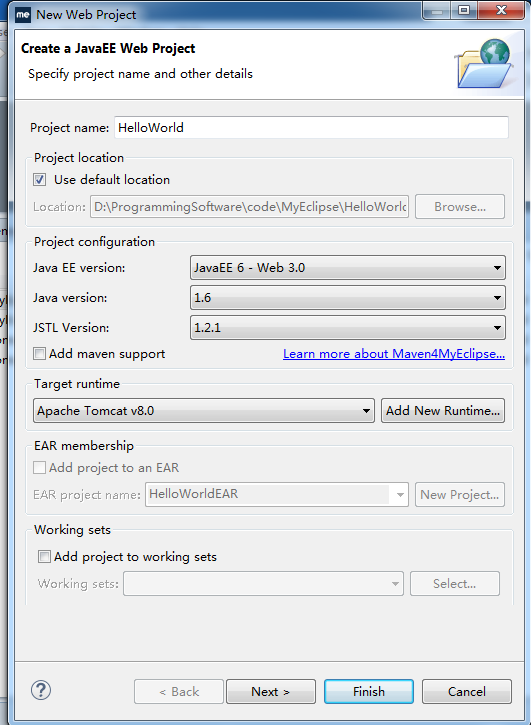
1、File → New → Web Project
2、輸入專案名稱 HelloWorld,選擇 Java 版本與執行環境,完成後按 Finish 建立專案。
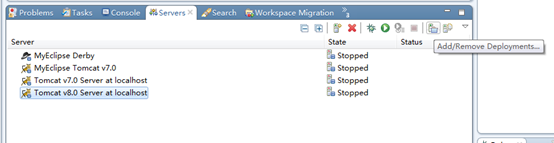
3、選擇對應的 Tomcat 伺服器,按 Add Deployments 把專案加入伺服器:
4、啟動 Tomcat,開啟瀏覽器前往 https://localhost:8080/HelloWorld/ 就能看到畫面:

index.jsp 的內容:
<%@ page language="java" import="java.util.*" pageEncoding="ISO-8859-1"%>
<%
String path = request.getContextPath();
String basePath = request.getScheme() + "://" + request.getServerName()
        + ":" + request.getServerPort() + path + "/";
%>

<!DOCTYPE HTML PUBLIC "-//W3C//DTD HTML 4.01 Transitional//EN">
<html>
  <head>
    <base href="<%=basePath%>">
    <title>My JSP 'index.jsp' starting page</title>
    <meta http-equiv="pragma" content="no-cache">
    <meta http-equiv="cache-control" content="no-cache">
    <meta http-equiv="expires" content="0">
    <meta http-equiv="keywords" content="keyword1,keyword2,keyword3">
    <meta http-equiv="description" content="This is my page">
  </head>

  <body>
    This is my JSP page. <br>
  </body>
</html>
做完這兩個範例,可以清楚感受到兩套技術典範的不同。Android 端是「元件 + 版面配置檔 + 資源 ID」的三層結構,setContentView 把 XML 描述的四方形式還原成 View 樹,UI 與邏輯分離得很徹底。J2EE 端則是直接在 JSP 中把 Java 片段嵌進 HTML,由 basePath 的計算動態產生資源路徑,再交給 Servlet 容器編譯執行。
前者關注的是裝置上的呈現與生命週期,後者關注的是請求與回應的處理。理解這個差異,之後學習 MVC 分層時會更有感。
 Android 源碼解析(五)——Log 日誌類的底層實現全解讀
從 framework 源碼走進 Log 的內部世界 本系列走到第五篇,已經正式進入 Android framework 層的源碼地帶。在動手翻閱之前,先推薦一個非常好用
 Android 各種 Span 詳解:打造豐富多彩的 TextView 文本樣式
在 android.text.style 包下,提供了大量 Span 類,幫助我們實現 TextView 中的特殊文本效果,例如讓部分內容呈現不同的顏色、字體、大小,甚至
 Android UI 組件深入:ImageButton 與 ZoomButton 圖文解析
透視 ImageButton 與 ZoomButton:讓圖片按鈕真正「活」起來 單看 ImageButton 這個名字,很容易以為它就是一個普通的圖片按鈕,把圖片往上一
 自定義 PinnedHeaderListView:實現仿聯繫人分組懸浮列表
 像聯繫人那樣的分組懸浮列表,是很多應用常見的需求。本文透過自定義 PinnedHeaderLi