

編輯:關於 Android 開發
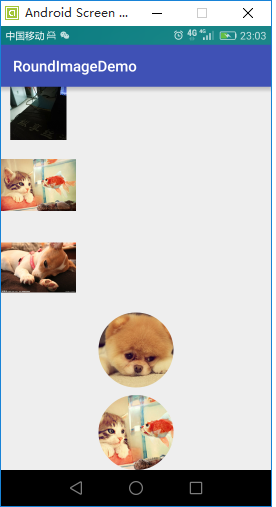
專案裡到處都在載圖片:有時來自 assets、有時來自 res、有時來自網路。與其在每個 Activity 重寫一遍,不如封裝成一個自訂 ImageView。本文的 NetImageView 就是這樣的產物,同時支援「是否顯示為圓形」的切換。
package liu.roundimagedemo.view;

import android.content.Context;
import android.graphics.Bitmap;
import android.graphics.BitmapFactory;
import android.graphics.drawable.Drawable;
import android.os.Handler;
import android.os.Message;
import android.support.v4.graphics.drawable.RoundedBitmapDrawable;
import android.support.v4.graphics.drawable.RoundedBitmapDrawableFactory;
import android.util.AttributeSet;
import android.widget.ImageView;

import java.io.FileInputStream;
import java.io.FileNotFoundException;
import java.io.IOException;
import java.io.InputStream;
import java.net.HttpURLConnection;
import java.net.MalformedURLException;
import java.net.URL;

public class NetImageView extends ImageView {

    Bitmap mBitmap;

    /** 是否顯示為圓形 */
    private boolean isRound = false;

    public void setRound(boolean round) {
        isRound = round;
    }

    Handler mHandler = new Handler() {
        @Override
        public void handleMessage(Message msg) {
            if (!isRound) {
                setImageBitmap(mBitmap);
                return;
            }
            Drawable drawable = createRoundBitmap(mBitmap);
            setImageDrawable(drawable);
        }
    };

    /** 建立圓形圖片 */
    private Drawable createRoundBitmap(Bitmap src) {
        Bitmap dst;
        if (src.getWidth() > src.getHeight()) {
            dst = Bitmap.createBitmap(src,
                    src.getWidth() / 2 - src.getHeight() / 2, 0,
                    src.getHeight(), src.getHeight());
        } else {
            dst = Bitmap.createBitmap(src,
                    0, src.getHeight() / 2 - src.getWidth() / 2,
                    src.getWidth(), src.getWidth());
        }
        RoundedBitmapDrawable roundedBitmapDrawable =
                RoundedBitmapDrawableFactory.create(getResources(), dst);
        roundedBitmapDrawable.setAntiAlias(true);
        roundedBitmapDrawable.setCornerRadius(dst.getWidth() / 2);
        return roundedBitmapDrawable;
    }

    public NetImageView(Context context) {
        super(context);
    }

    public NetImageView(Context context, AttributeSet attrs) {
        super(context, attrs);
    }

    /** 載入本機檔案 */
    public void setLocalImage(String url) {
        FileInputStream fis = null;
        try {
            fis = new FileInputStream(url);
            mBitmap = BitmapFactory.decodeStream(fis);
            mHandler.sendEmptyMessage(0x1324);
        } catch (FileNotFoundException e) {
            e.printStackTrace();
        } finally {
            if (fis != null) {
                try {
                    fis.close();
                } catch (IOException e) {
                    e.printStackTrace();
                }
            }
        }
    }

    /** 載入資源檔 */
    public void setResourceImage(int resId) {
        mBitmap = BitmapFactory.decodeResource(getResources(), resId);
        mHandler.sendEmptyMessage(0x133);
    }

    /** 載入網路圖片 */
    public void setUrlImage(final String url) {
        new Thread() {
            @Override
            public void run() {
                try {
                    URL uri = new URL(url);
                    HttpURLConnection conn = (HttpURLConnection) uri.openConnection();
                    if (conn.getResponseCode() == 200) {
                        InputStream is = conn.getInputStream();
                        mBitmap = BitmapFactory.decodeStream(is);
                        mHandler.sendEmptyMessage(0x343);
                        is.close();
                    }
                } catch (MalformedURLException e) {
                    e.printStackTrace();
                } catch (IOException e) {
                    e.printStackTrace();
                }
            }
        }.start();
    }
}
把執行緒切換交給 Handler。三個載入方法都在背景完成解碼,最後統一用 sendEmptyMessage() 通知 Handler,由 Handler 在主執行緒更新畫面。這符合「UI 只能在建立它的執行緒上操作」的鐵則,也讓「是否裁圓」的判斷集中在 handleMessage() 一處,不必在三個方法裡各寫一遍。
圓形化的邏輯只有一份。createRoundBitmap() 被封成獨立方法,不論圖片從哪個來源來,都走同一條裁切路徑。這是好封裝的關鍵。
沒有快取。網路圖片每次都重新下載,在列表中滾動時會造成大量重複請求與流量浪費。影像庫(Glide、Fresco、Coil)之所以存在,正是為了解決記憶體快取、磁碟快取與請求合併這些問題。
沒有解析度限制。BitmapFactory.decodeStream() 會原尺寸解碼。載入一張 4000×3000 的照片進 ImageView,極可能直接觸發 OutOfMemoryError。正確作法是先用 BitmapFactory.Options 搭配 inJustDecodeBounds 讀取尺寸,再以 inSampleSize 降採樣到目標大小。
魔法數字應該換成常數。0x1324、0x133、0x343 這三個 message what 值缺乏語意,日後維護很容易混淆,建議改用有名字的常數甚至 what 的 enum 對應。
缺少錯誤與載入中狀態。網路失敗、圖片不存在時畫面會一片空白,使用者無從判斷。實務上通常會加上 placeholder 與 error 圖,並在背景 thread 中妥善 disconnect() 釋放連線。
 天氣 App 布局練習(三):LinearLayout 與 layout_weight
天氣 App 布局練習 本練習重點在於使用 LinearLayout 與 layout_weight 完成天氣首頁的垂直與水平排列。 畫面可拆分為頂部城市與天氣資訊、中
 Android 自定義控件:obtainStyledAttributes 系列函數詳解
 在開發自定義控件時,經常需要讀取 XML 中設定的屬性。這時通常會用到 obtai
 Android RecyclerView 使用指南:適配器、版面配置與分割線
RecyclerView 簡介 RecyclerView 是 Android 中用於顯示大量資料的靈活列表元件,可視為 ListView 與 GridView 的現代化版
 Android 屬性動畫實戰:用 ValueAnimator 與 ObjectAnimator 做出跳跳球
在動手做效果之前,先把屬性動畫的幾個核心概念理清楚,後面的程式碼才不會只是「抄來能用」。 一、從兩種動畫到第三種 Android 3.0 之前,系統提供兩種動畫機制: