

編輯:關於 Android 開發
這篇做一個簡單練習,釐清 style 與 theme 最基本的差別:樣式(style)是加在個別 View 上,主題(theme)則是加在 Application 或 Activity 上。
先看 styles.xml。這裡示範了樣式的繼承——MyFontSon 用 parent 指向 MyFont,只覆寫字級大小,其餘屬性自動沿用:
<?xml version="1.0" encoding="utf-8"?>
<resources xmlns:android="https://schemas.android.com/apk/res/android">

    <!-- 自定義樣式 -->
    <style name="MyFont">
        <item name="android:textColor">#ff0000</item>
        <item name="android:textSize">40sp</item>
    </style>

    <style name="MyFontSon" parent="@style/MyFont">
        <item name="android:textSize">30sp</item>
    </style>

    <!-- 自定義主題 -->
    <style name="MyTheme">
        <item name="android:windowNoTitle">true</item>
        <item name="android:background">#ffffff</item>
    </style>
</resources>
布局裡放兩個 TextView:
<?xml version="1.0" encoding="utf-8"?>
<LinearLayout xmlns:android="https://schemas.android.com/apk/res/android"
    android:layout_width="match_parent"
    android:layout_height="match_parent"
    android:orientation="vertical">

    <TextView
        android:layout_width="match_parent"
        android:layout_height="wrap_content"
        android:text="樣式和主題" />

    <TextView
        android:layout_width="match_parent"
        android:layout_height="wrap_content"
        android:text="樣式和主題" />
</LinearLayout>
主題則在 Manifest 的 application 節點上套用:
<application
    android:allowBackup="true"
    android:icon="@drawable/ic_launcher"
    android:label="ss"
    android:theme="@style/MyTheme" >
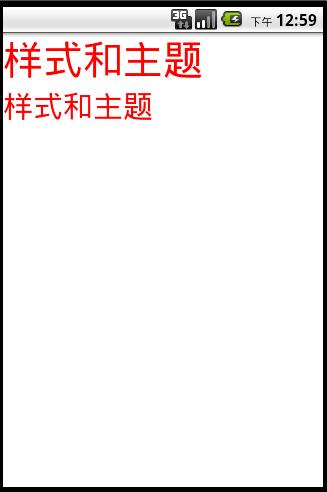
簡單記憶:style 是一組屬性的集合,用 View 的 style 屬性引用;theme 本質上也是 style,只是套用在 Application 或 Activity 這種帶有「視窗」概念的元件上,會影響整個畫面的外觀,例如隱藏標題列、設定全域背景色等。
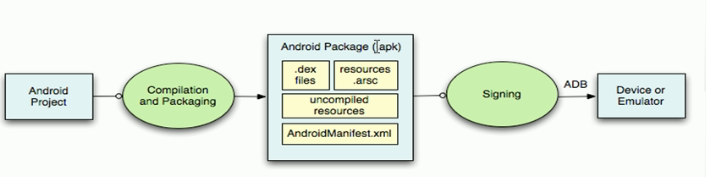 Android 應用安裝過程解析
 一個 Android 專案從開發到安裝,會經歷編譯、打包、簽名與部署等階段。理解這個流程,有助於釐清 APK 的組成,也能在除錯與發佈時
 基於 MVVM 的知乎日報 Android 源碼解析
此專案以 MVVM 為核心,結合 Data Binding、Dagger 2、Retrofit 2 與 RxJava,展示現代 Android 應用常見的分層方式。技術重
 PyQt5 教學:使用 Qt Designer 快速設計 GUI 介面
Qt Designer 的角色在 PyQt5 開發中,Qt Designer 是專門用來設計 GUI 介面的視覺化工具。開發者可以透過拖曳元件、設定屬性、建立配置,快速完
 二手交易平台的 Android 端實作:Dagger2 + MVP + Bmob 雲後端
專案概況 這是我的畢業設計專案,一個二手交易平台。技術主線是 Dagger2 搭配 MVP 分層,後端使用 Bmob 雲服務,並整合了百度地圖與友盟第三方登入。 系統架