

編輯:關於 Android 開發
本文整理了一批在檔案處理與網路傳輸中經常用到的 Android 工具方法,方便日後查閱取用。
@SuppressLint("SimpleDateFormat") public String getFileDataTime(File file) { Date date = new Date(file.lastModified()); SimpleDateFormat sdformat = new SimpleDateFormat("yyyy-MM-dd HH:mm:ss"); String LgTime = sdformat.format(date); return LgTime; }
@SuppressLint("SimpleDateFormat") public int compareDataTime(String date1, String date2) { java.text.DateFormat df = new java.text.SimpleDateFormat("yyyy-MM-dd HH:mm:ss"); java.util.Calendar c1 = java.util.Calendar.getInstance(); java.util.Calendar c2 = java.util.Calendar.getInstance(); try { c1.setTime(df.parse(date1)); c2.setTime(df.parse(date2)); } catch (java.text.ParseException e) { System.err.println("error"); } return c1.compareTo(c2); }
找出第二個陣列相對於第一個陣列多出的資料:
public String[] compareStringPre(String[] Source, String[] Object) { String[] result = new String[Math.max(Source.length, Object.length)]; int n = 0; for (int i = 0; i < Object.length; i++) { boolean flag = false; for (int j = 0; j < Source.length; j++) { if (Object[i].equals(Source[j])) { flag = true; } } if (!flag) { result[n] = Object[i]; n++; } } return result; }
private boolean saveCrash(String crash) { String fileName = "cache.txt"; try { File file = new File(mstrFilePath, fileName); FileOutputStream fos = new FileOutputStream(file); fos.write(crash.toString().getBytes()); fos.close(); } catch (Exception e) { return false; } return true; }
public String readCrashData() { String strDataLine = ""; String filePath = mstrFilePath + "/cache.txt"; File file = new File(filePath); if (file.exists() == false) return strDataLine; long fileSize = file.length(); if (fileSize >= 1 * 1024 * 1024) { file.delete(); return strDataLine; } if (file.canRead() == false) return strDataLine; try { FileInputStream in = new FileInputStream(file); BufferedReader reader = new BufferedReader(new InputStreamReader(in)); strDataLine = reader.readLine(); reader.close(); } catch (FileNotFoundException e) { e.printStackTrace(); return strDataLine; } catch (IOException e) { e.printStackTrace(); return strDataLine; } return strDataLine; }
提醒:緩存檔案存放在 SD 卡時,記得在 manifest 中加上相應的讀寫權限。
 使用 AIDL 呼叫遠端服務設定系統時間
需求背景 某些裝置或專案需要由程式設定系統日期與時間,但一般應用沒有權限直接修改系統時間。可行做法是建立一個使用系統簽名的服務,讓具備權限的應用透過 AIDL 呼叫。
 Android 聯網實作:HttpURLConnection GET/POST 與 AsyncHttpClient
Android 聯網請求實作 Android 應用常需要與伺服器交換資料,常見方式包括 GET 與 POST。GET 會將參數附加在網址後方,POST 則將資料放入請求主
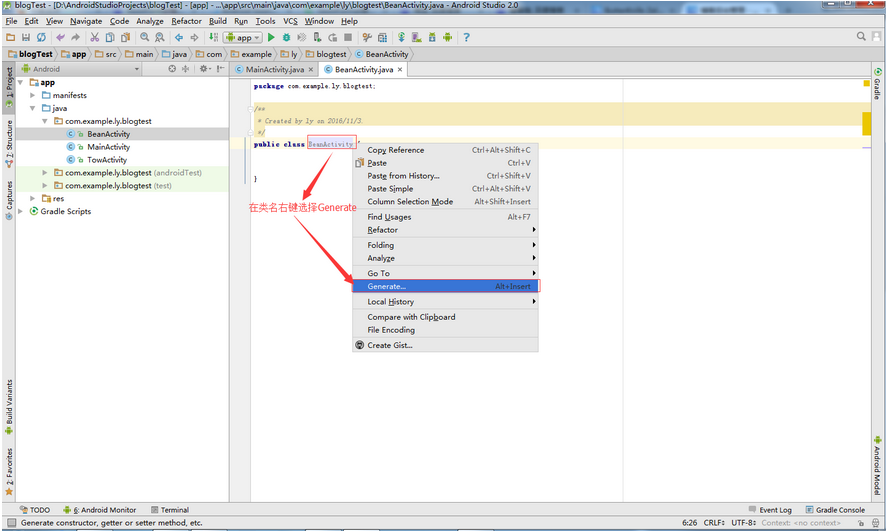 GsonFormat 插件從配置到使用
 在 Android 開發中,伺服器常以 JSON 格式回傳資料。若需要建立對應的 Java 物件,GsonFormat 插件可以快
 Activity 詳解(一):配置、啟動與關閉
先看效果圖: Android 為我們提供了四大組件:Activity、Service、Broadcast Receiver 和 Content Provider,它們是