

編輯:關於 Android 開發
轉載來源:https://blog.csdn.net/luohai859/article/details/39347583
這個問題幾乎每個人都會遇到:ListView 或 GridView 單獨使用時顯示正常,一旦外面包了一層 ScrollView,就只跑出一行。
我的理解是:單獨使用 GridView 與 ListView 時,內部內容固定,底層系統很容易算出控制項該佔多寬多高。但外面多包一層 ScrollView 之後,內容變成可上下滑動,而「總共能滑多遠」系統並不知道,這時就需要你手動算出一個可滑動區域交給 ScrollView。而這個數值,正是 GridView/ListView 中所有子項的高度總和。若有更精確的解釋,歡迎指教。
遍歷 Adapter 的每一項,量測後累加,再把結果設給 ListView:
public void setListViewHeightBasedOnChildren(ListView listView) {
    ListAdapter listAdapter = listView.getAdapter();
    if (listAdapter == null) {
        return;
    }
    int totalHeight = 0;
    for (int i = 0; i < listAdapter.getCount(); i++) {
        View listItem = listAdapter.getView(i, null, listView);
        listItem.measure(0, 0);
        totalHeight += listItem.getMeasuredHeight();
    }
    ViewGroup.LayoutParams params = listView.getLayoutParams();
    params.height = totalHeight
            + (listView.getDividerHeight() * (listAdapter.getCount() - 1));
    ((MarginLayoutParams) params).setMargins(15, 15, 15, 15);
    listView.setLayoutParams(params);
}
這個做法直觀,但每次資料變動都要重算,而且 ListView 會因此失去自身的捲動與 Recycling 優勢,導致記憶體佔用偏高。
改寫 ListView:
public class MyListView extends ListView {
    public MyListView(Context context) {
        super(context);
    }

    public MyListView(Context context, AttributeSet attrs) {
        super(context, attrs);
    }

    public MyListView(Context context, AttributeSet attrs, int defStyle) {
        super(context, attrs, defStyle);
    }

    @Override
    protected void onMeasure(int widthMeasureSpec, int heightMeasureSpec) {
        // 把高度規格改成「最多這麼多」,讓 ListView 依內容自行撐開
        int expandSpec = MeasureSpec.makeMeasureSpec(
                Integer.MAX_VALUE >> 2, MeasureSpec.AT_MOST);
        super.onMeasure(widthMeasureSpec, expandSpec);
    }
}
改寫 GridView:
public class MyGridView extends GridView {
    public MyGridView(Context context, AttributeSet attrs) {
        super(context, attrs);
    }

    public MyGridView(Context context) {
        super(context);
    }

    public MyGridView(Context context, AttributeSet attrs, int defStyle) {
        super(context, attrs, defStyle);
    }

    @Override
    public void onMeasure(int widthMeasureSpec, int heightMeasureSpec) {
        int expandSpec = MeasureSpec.makeMeasureSpec(
                Integer.MAX_VALUE >> 2, MeasureSpec.AT_MOST);
        super.onMeasure(widthMeasureSpec, expandSpec);
    }
}
如果列表本來就不需要獨立捲動(例如只有三五筆資料的設定項),用第二種改寫最省事。但若資料量大,把 ListView 硬撐開反而會一次把全部項目都配置出來,記憶體與效能都吃虷——這種情況更合理的做法是放棄 ScrollView,讓 ListView 自己承擔捲動,或改用 RecyclerView 搭配多種類型的 ItemView 來拼出同一個畫面。
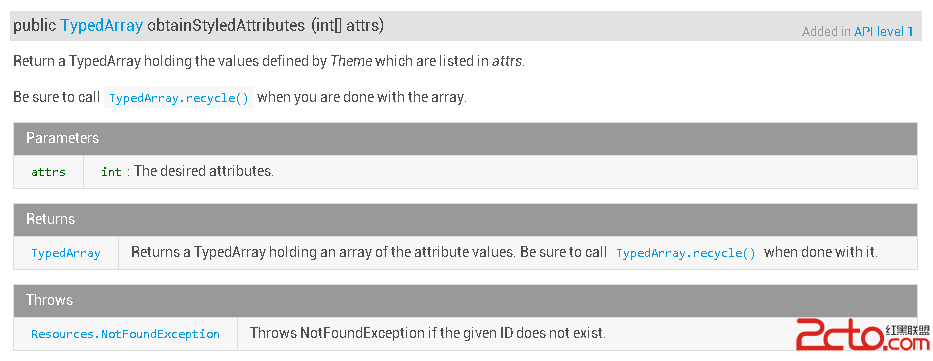 Android 自定義控件:obtainStyledAttributes 系列函數詳解
 在開發自定義控件時,經常需要讀取 XML 中設定的屬性。這時通常會用到 obtai
 Android 新手入門 2016(12)——基於 Layout 檔的 AlertDialog
 上一章學習了 AlertDialog,後來發現還有「基於 Layout 檔
 Android 手機衛士實作教學(一):打造 Splash 啟動頁
 1. minSdkVersion、targetSdkVersion、maxSdkVersion、ta
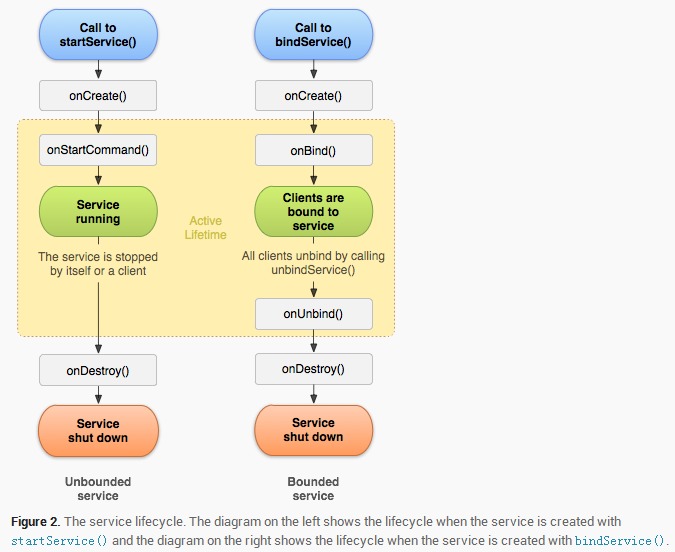 Android Service 面試重點整理:執行緒、生命週期與 IntentService
Android Service 面試重點整理Service 是 Android 四大元件之一,也是面試中經常被追問的環節。以下整理了幾個高頻考點,幫助你在面試中從容應對。