

編輯:Android 刷機技巧
想讓狀態欄的時間更清楚一點?改一個屬性就好。以下示範改成白色。
用 apktool 把 /system/app 下的 SystemUI.apk 反編譯出來。
開啟 SystemUI.apk\res\layout\tw_status_bar.xml,找到 Clock 這個節點,原貌如下:
<com.android.systemui.statusbar.policy.Clock
android:textSize="@dimen/status_bar_clock_text_size"
android:ellipsize="none" android:gravity="left|center" android:id="@id/clock"
android:paddingLeft="3.0dip" android:layout_width="wrap_content"
android:layout_height="fill_parent" android:singleLine="true"
android:includeFontPadding="false" />
在 singleLine 之後插入一行:
android:textColor="#ffffffff"
#ffffffff 就是不透明的白色。想換別的顏色,把後六位換成對應的色碼即可(例如 #ff34b4e3 是 ICS 藍)。
改完的節點長這樣:
<com.android.systemui.statusbar.policy.Clock
android:textSize="@dimen/status_bar_clock_text_size"
android:ellipsize="none" android:gravity="left|center" android:id="@id/clock"
android:paddingLeft="3.0dip" android:layout_width="wrap_content"
android:layout_height="fill_parent" android:singleLine="true"
android:textColor="#ffffffff"
android:includeFontPadding="false" />
回編譯整個專案,取出輸出的 tw_status_bar.xml 與 resources.arsc,覆蓋回原始 APK 的對應位置,再把 APK 推回 /system/app,修正權限後重開機。
改 SystemUI 之前務必先備份原檔。它是開機必載的服務,一旦回編譯失敗或 XML 格式有誤,後果是開機後不斷重啟、連桌面都進不去。此時只能靠 Recovery 或 adb 把原檔推回去搶救。
 vivo X6 智能切換開啟教學 兩步搞定接聽動作
不少使用者問過同一件事:智能切換到底在哪裡開。這個功能讓來電時只要把手機舉到耳邊就能接通,不必先解鎖再找按鈕,設定起來其實只有兩步。 1)先開啟【設定】,找到【智能體
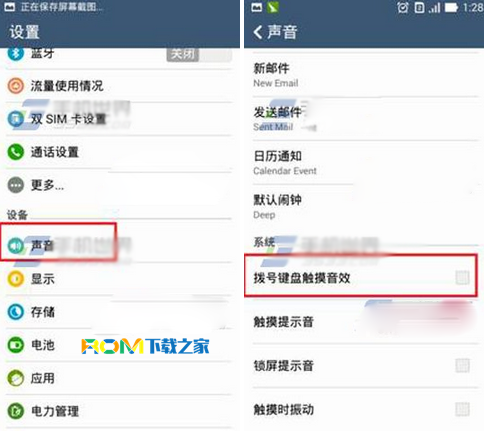 華碩ZenFone2關閉撥號按鍵音,設定路徑一次記
華碩ZenFone2的撥號按鍵音想關掉,卻在設定裡翻不到?它藏在聲音設定的細項裡。 設定路徑進入華碩ZenFone2的【設定】介面,找到並點擊【聲音】,取消勾選【撥號鍵盤
 一加手機X解鎖教程:一鍵OEM解鎖與常見問題排解
今天來分享咱們的一加手機X解鎖教程,也就是 OEM 鎖解鎖。這一步很關鍵,沒解鎖的話手機無法正常刷機或 root。之前看到有幾位機友一直在找方法卻無所獲,因此把完整流程整
 聯想A366T刷入Recovery圖文教學(含ROOT)
本文整理聯想A366T刷入Recovery的圖文流程。刷機前務必先取得ROOT權限,並準備好Recovery檔案與