

編輯:中興刷機教學
想讓 U930 的狀態欄更順眼一點?透過 apktool 反編譯 SystemUI,就能自己改版面與配色。以下分三部分說明,工具只需要 apktool 與 Notepad++。
1. 反編譯 systemui.apk。
2. 找到 systemui\res\layout\status_bar.xml。
3. 搜尋這段字串:
xmlns:android="https://schemas.android.com/apk/res/android">
4. 在其下方加入:
<com.android.systemui.statusbar.Clock android:textAppearance="@android:style/TextAppearance.StatusBar.Icon" android:gravity="left|center" android:paddingRight="6.0dip" android:layout_width="wrap_content" android:layout_height="fill_parent" android:layout_gravity="center_horizontal" android:singleLine="true" />
5. 回編譯 systemUI 資料夾。
6. 把回編譯後的 status_bar.xml 取出,覆蓋回原本的 apk 內。
1. 一樣是 \res\layout\status_bar.xml。
2. 搜尋:
<LinearLayout android:orientation="horizontal" android:id="@id/icons" android:layout_width="fill_parent" android:layout_height="fill_parent">
3. 在其下方加入:
<com.android.systemui.statusbar.CarrierLabel android:textAppearance="@android:style/TextAppearance.StatusBar.Icon" android:gravity="left|center" android:paddingLeft="6.0dip" android:layout_width="wrap_content" android:layout_height="fill_parent" android:singleLine="true" />
4. 回編譯 systemUI 資料夾。
5. 取出 status_bar.xml 覆蓋回原 apk。
做法很直觀:在對應的節點裡插入 textColor 屬性即可。以時間置中那段為例,加上 ICS 藍的色碼:
android:textColor="#34b4e3"
加上之後整段會長這樣:
<com.android.systemui.statusbar.Clock android:textAppearance="@android:style/TextAppearance.StatusBar.Icon" android:gravity="left|center" android:paddingRight="6.0dip" android:layout_width="wrap_content" android:layout_height="fill_parent" android:layout_gravity="center_horizontal" android:singleLine="true" android:textColor="#34b4e3"/>
電信商名稱的顏色改法完全相同,色碼可自行上網查詢,換成喜歡的顏色。
把改好的 status_bar.xml 放回你手機內的 SystemUI.apk 之 \res\layout 資料夾中。替換方式是:將 systemUI.apk 拉到電腦並改名為 systemUI.zip,用 RAR 之類的軟體開啟,找到 res\layout 資料夾,解壓取得 status_bar.xml 後拖曳進去完成替換,關閉視窗。
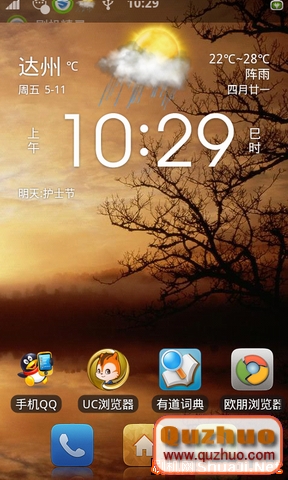
接著把副檔名改回 systemUI.apk,複製回手機,用 RE 管理器調整權限,覆蓋到 system\app 資料夾,重啟即可看到時間置中且為 ICS 藍的狀態欄。
提醒:改動系統 apk 前請務必先備份原檔,一旦回編譯失敗還有退路。
 中興 V889D 完整刷機教學:刷 Recovery、取 ROOT、刷第三方 ROM
本文回答三個問題:V889D 怎麼刷機、怎麼刷 Recovery、怎麼取 ROOT。順序不能顛倒,請照著章節走。(作者第一次刷機的心得整理) 一、刷機的原理 智慧型手機其
 中興 U950 刷 Recovery 與卡刷 ROM 完整教學
一、準備工作 1. 下載 ROM 刷機包。若手上已有其他 ROM 包也可以,只要支援卡刷即可,一般是 ZIP 格式。 2. 手機裡必須先刷入 Recovery。 第一步:
 中興 N880S 2.3.7 仿 iPhone 美化 ROM
本 ROM 為中興 N880S 的 2.3.7 仿 iPhone 美化版本,流暢度優於原廠 ROM,即使界面華麗也不影響速度。 主要特色 所有功能正常,採用全新 UI,降
 中興 U807 恢復官方系統兼救磚圖文教學
U807 刷成磚、開不了機怎麼辦?只要還能進入 Recovery,用官方固件強制刷回來的成功率相當高。 準備工作 1. 一台 ZTE U807 手機。 2. SD 卡需有