編輯:Android技術基礎
上節中我們對Android涉及的網絡編程進行了了解,也學習了下Http的基本概念,而本節我們 要學習的是Http的請求頭與響應頭,當然,可以把也可以把這節看作文檔,用到的時候來查查 即可!
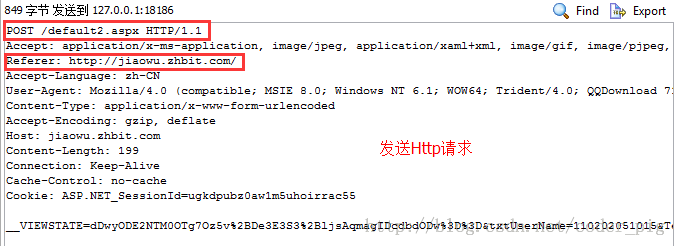
這裡貼下上一節給出的圖,根據下面給出的表,大家自己感受下相關請求頭的作用吧: PS:第一行是請求行:請求方式 + 資源名稱 + HTTP協議版本號,另外請求頭只是給服務端的一個 信息而已或者說一個簡單,至於怎麼處理,還是由服務端來決定的!
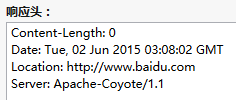
同樣給出上節的圖: PS:第一行依次是:協議版本號 狀態碼 302表示這裡沒有,但是另外一個地方有,通過Location頁面重定向了
好了,看了那麼多概念的東西,不動動手怎麼行呢?是吧,那我們就寫一些簡單的代碼來驗證一些 常用的響應頭的作用吧,以便加深我們的了解,這裡的話服務端就用最簡單的Servlet來實現,如果不會 Java Web的朋友只需將代碼拷一拷,配置下web.xml,把Servlet的類名扣上,比如:
<servlet>
	<servlet-name>FirstServlet</servlet-name>
	<servlet-class>com.jay.server.FirstServlet</servlet-class>
</servlet>
<servlet-mapping>
	<servlet-name>FirstServlet</servlet-name>
	<url-pattern>/FirstServlet</url-pattern>
</servlet-mapping>
改成對應的類名即可!
實現代碼:
package com.jay.http.test;

import java.io.IOException;
import javax.servlet.ServletException;
import javax.servlet.http.HttpServlet;
import javax.servlet.http.HttpServletRequest;
import javax.servlet.http.HttpServletResponse;

public class ServletOne extends HttpServlet {
	@Override
	protected void doGet(HttpServletRequest req, HttpServletResponse resp)
			throws ServletException, IOException {
		//告訴浏覽器響應碼,以及重定向頁面
		resp.setStatus(302);
		resp.setHeader("Location", "http://www.baidu.com");
	}
	@Override
	protected void doPost(HttpServletRequest req, HttpServletResponse resp)
			throws ServletException, IOException {
		this.doGet(req, resp);
	}
}
運行結果:
當我們去訪問:http://localhost:8080/HttpTest/ServletOne的時候,我們會發現頁面跳轉到了百度, 接著我們用FireFox的開發者工具:可以看到我們發出的HTTP的內容:
實現代碼:
package com.jay.http.test;

import java.io.ByteArrayOutputStream;
import java.io.IOException;
import java.util.zip.GZIPOutputStream;
import javax.servlet.ServletException;
import javax.servlet.http.HttpServlet;
import javax.servlet.http.HttpServletRequest;
import javax.servlet.http.HttpServletResponse;

public class ServletTwo extends HttpServlet {
	@Override
	protected void doGet(HttpServletRequest req, HttpServletResponse resp)
			throws ServletException, IOException {
		String data = "Fresh air and sunshine can have an amazing effect on our feelings. "
				+ "Sometimes when we are feeling down, all that we need to do is simply to go "
				+ "outside and breathe. Movement and exercise is also a fantastic way to feel better. "
				+ "Positive emotions can be generated by motion. So if we start to feel down,"
				+ " take some deep breathes, go outside, feel the fresh air, "
				+ "let the sun hit our face, go for a hike, a walk, a bike ride, "
				+ "a swim, a run, whatever. We will feel better if we do this.";
		System.out.println("原始數據長度:" + data.getBytes().length);
		// 對數據進行壓縮:
		ByteArrayOutputStream bout = new ByteArrayOutputStream();
		GZIPOutputStream gout = new GZIPOutputStream(bout);
		gout.write(data.getBytes());
		gout.close();
		// 得到壓縮後的數據
		byte gdata[] = bout.toByteArray();
		resp.setHeader("Content-Encoding", "gzip");
		resp.setHeader("Content-Length", gdata.length + "");
		resp.getOutputStream().write(gdata);

	}
	protected void doPost(HttpServletRequest req, HttpServletResponse resp)
			throws ServletException, IOException {
		doGet(req, resp);
	};
}
運行結果:
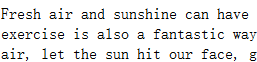
控制台輸出:

浏覽器輸出:
再看看我們的HTTP內容:
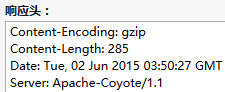

這個gzip壓縮字符串對於簡單的字符串壓縮,效率不高,比如小豬本來寫的是一個一首靜夜詩的字符串, 後來發現壓縮過後的大小,竟然比原先的還要大=-=...
服務端返回的有時可能是一個text/html,有時也可能是一個image/jpeg,又或者是一段視頻video/avi 浏覽器可以根據這個對應的數據類型,然後以不同的方式將數據顯示出來!好吧,這裡我們弄一個讀PDF的
實現代碼:
package com.jay.http.test;

import java.io.IOException;
import java.io.InputStream;
import java.io.OutputStream;

import javax.servlet.ServletException;
import javax.servlet.http.HttpServlet;
import javax.servlet.http.HttpServletRequest;
import javax.servlet.http.HttpServletResponse;

public class ServletThree extends HttpServlet {
	@Override
	protected void doGet(HttpServletRequest req, HttpServletResponse resp)
			throws ServletException, IOException {
		resp.setHeader("content-type", "application/pdf");
		InputStream in = this.getServletContext().getResourceAsStream("/file/android編碼規范.pdf");
		byte buffer[] = new byte[1024];
		int len = 0;
		OutputStream out = resp.getOutputStream();
		while((len = in.read(buffer)) > 0)
		{
			out.write(buffer,0,len);
		}
	}

	protected void doPost(HttpServletRequest req, HttpServletResponse resp) throws
	   ServletException ,IOException
	{
		doGet(req, resp);
	};
}
運行結果:
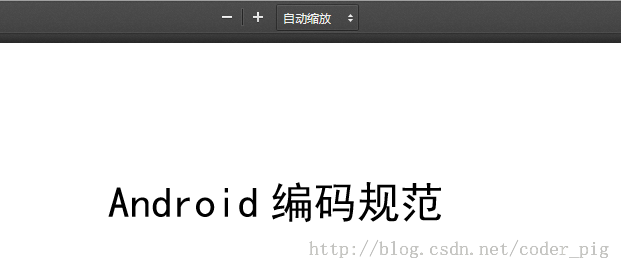
在浏覽器上輸入:http://localhost:8080/HttpTest/ServletThree
好哒,果然可以讀到PDF了,對了,這個PDF我已經丟在webroot的file目錄下,不然會報空指針哦~:
當然,你也可以試著去播放一段音樂或者視頻,只需修改下content-type這個參數而已
下面順便給出個HTTP Content-type的對照表吧: HTTP Content-type的對照表
恩呢,一般我們可能有這樣的需求,比如每隔幾秒刷新一次頁面,又或者加載某個頁面幾秒後 又跳轉至另一個頁面,那麼refresh可以滿足你的需要~
實現代碼:
package com.jay.http.test;

import java.io.IOException;

import javax.servlet.ServletException;
import javax.servlet.http.HttpServlet;
import javax.servlet.http.HttpServletRequest;
import javax.servlet.http.HttpServletResponse;

public class ServletFour extends HttpServlet {
	public int second = 0;
	@Override
	protected void doGet(HttpServletRequest req, HttpServletResponse resp)
			throws ServletException, IOException {
		//1.浏覽器每隔2秒定時刷新頁面
//		resp.setHeader("refresh", "2");
//		resp.getWriter().write(++second + "");
//		System.out.println("doGet方法被調用~");

		//2.進入頁面5s後,然頁跳到百度~
		resp.setHeader("refresh", "5;url='http://www.baidu.com'");
		resp.getWriter().write("HE HE DA~");
	}

	protected void doPost(HttpServletRequest req, HttpServletResponse resp) throws ServletException ,IOException
	{
		doGet(req, resp);
	};
}
運行結果:
- 1的話每隔2秒刷新一次頁面,我們可以看到顯示的數字是遞增的,另外doGet方法也一直被調用, 說明頁面真的是刷新的!
- 2的話進入頁面後5s,就自己跳轉到百度了~
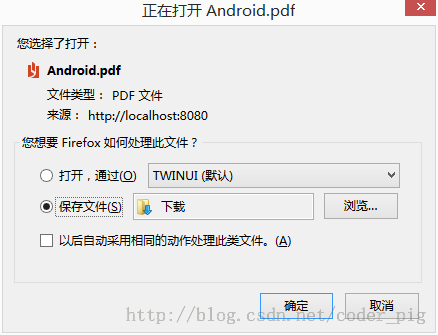
這個很簡單,我們只需把③中設置Content-type的一行去掉,然後加上: resp.setHeader("content-disposition", "attachment;filename=Android.pdf");
實現代碼:
package com.jay.http.test;

import java.io.IOException;
import java.io.InputStream;
import java.io.OutputStream;

import javax.servlet.ServletException;
import javax.servlet.http.HttpServlet;
import javax.servlet.http.HttpServletRequest;
import javax.servlet.http.HttpServletResponse;

public class ServletFive extends HttpServlet {

	@Override
	protected void doGet(HttpServletRequest req, HttpServletResponse resp)
			throws ServletException, IOException {
		resp.setHeader("content-disposition", "attachment;filename=Android.pdf");
		InputStream in = this.getServletContext().getResourceAsStream("/file/android編碼規范.pdf");
		byte buffer[] = new byte[1024];
		int len = 0;
		OutputStream out = resp.getOutputStream();
		while((len = in.read(buffer)) > 0)
		{
			out.write(buffer,0,len);
		}
	}

	@Override
	protected void doPost(HttpServletRequest req, HttpServletResponse resp)
			throws ServletException, IOException {
		doGet(req, resp);
	}
}
運行結果:
本節給大家介紹了Http中的請求頭和響應頭,也寫了幾個關於響應頭調浏覽器的一些示例, 相信經過本章,大家對於Http協議更加了解了,下節我們來學習Android給我們提供的Http 請求方式:HttpURLConnection!好的,本節就到這裡,謝謝~ 對了,本節demo下載:下載 HttpTest.zip
 8.3.2 繪圖類實戰示例
本節引言:前兩節我們學了Bitmap和一些基本的繪圖API的屬性以及常用的方法,但心裡總覺得有點不踏實,總得寫點什麼加深下映像是吧,嗯,本節我們就來
 2.6.3 ViewPager的簡單使用
本節引言:本節帶來的是Android 3.0後引入的一個UI控件——ViewPager(視圖滑動切換工具),實在想不到如何來稱呼這個控件,他的大概功
 4.5.2 Intent之復雜數據的傳遞
本節引言:上一節中我們學習了Intent的一些基本使用,知道了Intent的七個屬性,顯式Intent以及隱式Intent,以及如何自定義隱式Int
 2.5.8 Notification(狀態欄通知)詳解
本節引言: 本節帶來的是Android中用於在狀態欄顯示通知信息的控件:Notification,相信大部分 學Android都對他都很熟悉,而網上很多關於Notif