編輯:關於android開發
  1 package com.lixu.letterlistview;
  2
  3 import java.util.ArrayList;
  4 import java.util.List;
  5 import org.apache.http.NameValuePair;
  6 import org.apache.http.message.BasicNameValuePair;
  7 import com.lixu.letterlistview.letter.LetterBaseListAdapter;
  8 import com.lixu.letterlistview.letter.LetterListView;
  9 import com.lixu.lianxirenlist.R;
 10 import android.app.Activity;
 11 import android.content.ContentResolver;
 12 import android.database.Cursor;
 13 import android.graphics.Color;
 14 import android.net.Uri;
 15 import android.os.Bundle;
 16 import android.view.Gravity;
 17 import android.view.View;
 18 import android.view.ViewGroup;
 19 import android.widget.TextView;
 20
 21 public class MainActivity extends Activity {
 22     private ArrayList<String> dataArray;
 23
 24     @Override
 25     protected void onCreate(Bundle savedInstanceState) {
 26         super.onCreate(savedInstanceState);
 27         setContentView(R.layout.activity_main);
 28         // 通過獲取手機通訊錄的姓名
 29         dataArray = new ArrayList<String>();
 30
 31         Uri uri = Uri.parse("content://com.android.contacts/contacts");
 32         ContentResolver resolver = this.getContentResolver();
 33         // 給query傳遞一個SORT_KEY_PRIMARY,讓ContentResolver將獲得的數據按照聯系人名字首字母排序
 34         Cursor cursor = resolver.query(uri, null, null, null,
 35                 android.provider.ContactsContract.Contacts.SORT_KEY_PRIMARY);
 36         while (cursor.moveToNext())
 37
 38         {
 39             // 聯系人的id
 40             String id = cursor.getString(cursor.getColumnIndex(android.provider.ContactsContract.Contacts._ID));
 41             // 將聯系人按姓名首字母分組
 42             String sort_key_primary = cursor
 43                     .getString(cursor.getColumnIndex(android.provider.ContactsContract.Contacts.SORT_KEY_PRIMARY));
 44             // 獲取聯系人的名字
 45             String name = cursor
 46                     .getString(cursor.getColumnIndex(android.provider.ContactsContract.Contacts.DISPLAY_NAME));
 47             dataArray.add(name);
 48         }
 49
 50         LetterListView letterListView = (LetterListView) findViewById(R.id.letterListView);
 51         letterListView.setAdapter(new TestAdapter());
 52
 53     }
 54
 55     /**
 56      * 這裡 使用一個簡單的 NameValuePair 對象,做為測試
 57      *
 58      * @Title:
 59      * @Description:
 60      * @Author:Justlcw
 61      * @Since:2014-5-13
 62      * @Version:
 63      */
 64     class TestAdapter extends LetterBaseListAdapter<NameValuePair> {
 65         /** 字母對應的key,因為字母是要插入到列表中的,為了區別,所有字母的item都使用同一的key. **/
 66         private static final String LETTER_KEY = "letter";
 67
 68         public TestAdapter() {
 69             super();
 70
 71             List<NameValuePair> dataList = new ArrayList<NameValuePair>();
 72             for (int i = 0; i < dataArray.size(); i++) {
 73                 NameValuePair pair = new BasicNameValuePair(String.valueOf(i), dataArray.get(i));
 74                 dataList.add(pair);
 75             }
 76             setContainerList(dataList);
 77         }
 78
 79         @Override
 80         public Object getItem(int position) {
 81             return list.get(position);
 82         }
 83
 84         @Override
 85         public long getItemId(int position) {
 86             return position;
 87         }
 88
 89         @Override
 90         public String getItemString(NameValuePair t) {
 91             return t.getValue();
 92         }
 93
 94         @Override
 95         public NameValuePair create(char letter) {
 96             return new BasicNameValuePair(LETTER_KEY, String.valueOf(letter));
 97         }
 98
 99         @Override
100         public boolean isLetter(NameValuePair t) {
101             // 判斷是不是字母行,通過key比較,這裡是NameValuePair對象,其他對象,就由你自己決定怎麼判斷了.
102             return t.getName().equals(LETTER_KEY);
103         }
104
105         @Override
106         public View getLetterView(int position, View convertView, ViewGroup parent) {
107             // 這裡是字母的item界面設置.
108             if (convertView == null) {
109                 convertView = new TextView(MainActivity.this);
110                 ((TextView) convertView).setGravity(Gravity.CENTER_VERTICAL);
111                 convertView.setBackgroundColor(getResources().getColor(android.R.color.white));
112             }
113             ((TextView) convertView).setText(list.get(position).getValue());
114             ((TextView) convertView).setBackgroundColor(Color.GREEN);
115             ((TextView) convertView).setTextSize(25);
116             return convertView;
117         }
118
119         @Override
120         public View getContainerView(int position, View convertView, ViewGroup parent) {
121             // 這裡是其他正常數據的item界面設置.
122             if (convertView == null) {
123                 convertView = new TextView(MainActivity.this);
124                 ((TextView) convertView).setGravity(Gravity.CENTER_VERTICAL);
125             }
126             ((TextView) convertView).setText(list.get(position).getValue());
127             ((TextView) convertView).setBackgroundColor(Color.YELLOW);
128             ((TextView) convertView).setTextSize(20);
129
130             return convertView;
131         }
132     }
133 }
 1 package com.lixu.letterlistview.letter;
 2
 3 import android.widget.BaseAdapter;
 4
 5 /**
 6  * 帶有側邊字母列表的listView適配器
 7  *
 8  *@Title:
 9  *@Description:
10  *@Author:Justlcw
11  *@Since:2014-5-8
12  *@Version:
13  */
14 public abstract class LetterBaseAdapter extends BaseAdapter
15 {
16     /** 字母表頭部 **/
17     protected static final char HEADER = '+';
18     /** 字母表尾部 **/
19     protected static final char FOOTER = '#';
20
21     /**
22      * 是否需要隱藏沒有匹配到的字母
23      *
24      * @return true 隱藏, false 不隱藏
25      * @Description:
26      * @Author Justlcw
27      * @Date 2014-5-8
28      */
29     public abstract boolean hideLetterNotMatch();
30
31     /**
32      * 獲取字母對應的位置
33      *
34      * @return position
35      * @Description:
36      * @Author Justlcw
37      * @Date 2014-5-8
38      */
39     public abstract int getIndex(char letter);
40 }
  1 package com.lixu.letterlistview.letter;
  2
  3 import java.util.ArrayList;
  4 import java.util.HashMap;
  5 import java.util.List;
  6 import java.util.Map;
  7 import android.text.TextUtils;
  8 import android.util.Log;
  9 import android.view.View;
 10 import android.view.ViewGroup;
 11
 12 /**
 13  * 通用帶有字母列表的泛型對象adapter
 14  *
 15  * @Title:
 16  * @Description:
 17  * @Author:Justlcw
 18  * @Since:2014-5-9
 19  * @Version:
 20  */
 21 public abstract class LetterBaseListAdapter<T> extends LetterBaseAdapter {
 22     /** log tag. **/
 23     private static final String TAG = "LetterBaseListAdapter";
 24
 25     /** 默認錯誤頭部字母. **/
 26     private static final char ERROR_LETTER = ' ';
 27
 28     /** view type的類型總數 **/
 29     private static final int TYPE_COUNT = 2;
 30     /** 字母類型 **/
 31     private static final int TYPE_LETTER = 0;
 32     /** 實體類型 **/
 33     private static final int TYPE_CONTAINER = 1;
 34
 35     /** 添加字母之後的list **/
 36     protected final List<T> list;
 37     /** 字母頭位置標示map **/
 38     private final Map<Character, Integer> letterMap;
 39
 40     /**
 41      * 構造方法
 42      */
 43     public LetterBaseListAdapter() {
 44         list = new ArrayList<T>();
 45         letterMap = new HashMap<Character, Integer>();
 46     }
 47
 48     /**
 49      * 構造方法
 50      *
 51      * @param dataArray
 52      *            內容數組
 53      */
 54     public LetterBaseListAdapter(T[] dataArray) {
 55         this();
 56         setContainerList(dataArray);
 57     }
 58
 59     /**
 60      * 構造方法
 61      *
 62      * @param dataList
 63      *            內容列表
 64      */
 65     public LetterBaseListAdapter(List<T> dataList) {
 66         this();
 67         setContainerList(dataList);
 68     }
 69
 70     /**
 71      * 設置主體內容
 72      *
 73      * @param dataArray
 74      *            實體數組
 75      * @Description:
 76      * @Author Justlcw
 77      * @Date 2014-5-9
 78      */
 79     protected final void setContainerList(T[] dataArray) {
 80         if (!list.isEmpty()) {
 81             list.clear();
 82         }
 83         if (!letterMap.isEmpty()) {
 84             letterMap.clear();
 85         }
 86
 87         char letter = ERROR_LETTER;
 88         int index = 0;
 89         for (int i = 0; i < dataArray.length; i++) {
 90             T t = dataArray[i];
 91
 92             char l = getHeaderLetter(t);
 93
 94             if (letter != l && l != ERROR_LETTER) {
 95                 // 如果發現這個字母沒有添加過,更新一下標示
 96                 letter = l;
 97                 // 創建一個T類型的字母頭放進去
 98                 T tl = create(letter);
 99                 if (tl != null) {
100                     // 如果創建成功,則插入到列表中
101                     list.add(tl);
102                 }
103                 // 存放最新字母對應的位置
104                 letterMap.put(letter, index);
105                 index++;
106             }
107             // 添加原本的填充實體項
108             list.add(t);
109             index++;
110         }
111     }
112
113     /**
114      * 設置主體內容.
115      *
116      * @param dataList
117      *            實體列表
118      * @Description:
119      * @Author Justlcw
120      * @Date 2014-5-9
121      */
122     protected final void setContainerList(List<T> dataList) {
123         if (!list.isEmpty()) {
124             list.clear();
125         }
126         if (!letterMap.isEmpty()) {
127             letterMap.clear();
128         }
129
130         char letter = ' ';
131         int index = 0;
132         for (int i = 0; i < dataList.size(); i++) {
133             T t = dataList.get(i);
134
135             char l = getHeaderLetter(t);
136
137             if (letter != l && l != ERROR_LETTER) {
138                 // 如果發現這個字母沒有添加過,更新一下標示
139                 letter = l;
140                 // 創建一個T類型的字母頭放進去
141                 T tl = create(letter);
142                 if (tl != null) {
143                     // 如果創建成功,則插入到列表中
144                     list.add(tl);
145                 }
146                 // 存放最新字母對應的位置
147                 letterMap.put(letter, index);
148                 index++;
149             }
150             // 添加原本的填充實體項
151             list.add(t);
152             index++;
153         }
154     }
155
156     /**
157      * @param t
158      *            <實體item對象>
159      *
160      * @return <實體item對象> 首字母, 獲取失敗返回 {@link #ERROR_LETTER}
161      * @Description:
162      * @Author Justlcw
163      * @Date 2014-5-12
164      */
165     private char getHeaderLetter(T t) {
166         // 獲取item對應的字符串
167         String str = getItemString(t);
168         // 如果為空,跳出繼續
169         if (TextUtils.isEmpty(str)) {
170             Log.e(TAG, "item string empty in " + t.toString());
171             return ERROR_LETTER;
172         }
173         char l;
174         // 獲取第一個字母
175         char firstChar = str.charAt(0);
176         if (firstChar == HEADER || firstChar == FOOTER || LetterUtil.isLetter(firstChar)) {
177             l = firstChar;// 如果是頭,尾,字母,直接賦值
178         } else {
179             String[] letterArray = LetterUtil.getFirstPinyin(firstChar);
180             // 如果是漢字,取拼音首字母
181             if (letterArray != null && letterArray.length > 0) {
182                 l = letterArray[0].charAt(0);
183             } else {
184                 // 如果漢字轉拼音失敗了,跳過
185                 Log.e(TAG, firstChar + " turn to letter fail, " + t.toString());
186                 return ERROR_LETTER;
187             }
188         }
189
190         // 如果是小寫字母,轉換為大寫字母
191         if (l >= 'a') {
192             l = (char) (l - 32);
193         }
194         return l;
195     }
196
197     @Override
198     public final int getCount() {
199         return list.size();
200     }
201
202     @Override
203     public final View getView(int position, View convertView, ViewGroup parent) {
204         if (getItemViewType(position) == TYPE_LETTER) {
205             return getLetterView(position, convertView, parent);
206         }
207         return getContainerView(position, convertView, parent);
208     }
209
210     @Override
211     public final int getItemViewType(int position) {
212         if (isLetter(list.get(position))) {
213             return TYPE_LETTER;
214         }
215         return TYPE_CONTAINER;
216     }
217
218     @Override
219     public final int getViewTypeCount() {
220         return TYPE_COUNT;
221     }
222
223     @Override
224     public boolean hideLetterNotMatch() {
225         return false;
226     }
227
228     @Override
229     public final int getIndex(char letter) {
230         Integer index = letterMap.get(letter);
231         if (index == null) {
232             return -1;
233         }
234         return index;
235     }
236
237     /**
238      * @param T
239      *            <實體item對象>
240      *
241      * @return <實體item對象>對應的String,用來獲取<拼音首字母>
242      * @Description:
243      * @Author Justlcw
244      * @Date 2014-5-9
245      */
246     public abstract String getItemString(T t);
247
248     /**
249      * @param letter
250      *            <字母>
251      *
252      * @return 根據<字母>創建一個<實體item對象>,用來顯示<字母item>
253      * @Description:
254      * @Author Justlcw
255      * @Date 2014-5-9
256      */
257     public abstract T create(char letter);
258
259     /**
260      * @param t
261      *            <實體item對象>
262      *
263      * @return 根據<實體item對象>,判斷是否是<字母item>
264      * @Description:
265      * @Author Justlcw
266      * @Date 2014-5-9
267      */
268     public abstract boolean isLetter(T t);
269
270     /**
271      * 返回 <字母item>界面,其他的同
272      * <P>
273      * {@link #getView(int, View, ViewGroup)}
274      *
275      * @Description:
276      * @Author Justlcw
277      * @Date 2014-5-9
278      */
279     public abstract View getLetterView(int position, View convertView, ViewGroup parent);
280
281     /**
282      * 返回<實體item>界面,其他的同
283      * <P>
284      * {@link #getView(int, View, ViewGroup)}
285      *
286      * @Description:
287      * @Author Justlcw
288      * @Date 2014-5-9
289      */
290     public abstract View getContainerView(int position, View convertView, ViewGroup parent);
291 }
  1 package com.lixu.letterlistview.letter;
  2
  3 import java.lang.ref.SoftReference;
  4 import java.util.ArrayList;
  5 import java.util.List;
  6
  7 import com.lixu.lianxirenlist.R;
  8 import android.content.Context;
  9 import android.os.Handler;
 10 import android.os.Message;
 11 import android.util.AttributeSet;
 12 import android.view.Gravity;
 13 import android.view.LayoutInflater;
 14 import android.view.MotionEvent;
 15 import android.view.View;
 16 import android.view.ViewGroup;
 17 import android.widget.AbsListView;
 18 import android.widget.BaseAdapter;
 19 import android.widget.FrameLayout;
 20 import android.widget.ListView;
 21 import android.widget.TextView;
 22 import android.widget.AdapterView.OnItemClickListener;
 23
 24 /**
 25  * 帶有字母列表的listView
 26  *
 27  * @Title:
 28  * @Description:
 29  * @Author:Justlcw
 30  * @Since:2014-5-7
 31  * @Version:
 32  */
 33 public class LetterListView extends FrameLayout {
 34     /** 隱藏字母消息 **/
 35     private final int MSG_HIDE_LETTER = 0x0;
 36
 37     /** 字母列表的寬度 **/
 38     private final int LETTER_LIST_VIEW_WIDTH = 50;// TODO 這裡寬度寫死了,按著一定的比例比較好
 39
 40     /** 內容列表 **/
 41     private ListView mListView;
 42     /** 內容列表適配器 **/
 43     private LetterBaseAdapter mAdapter;
 44
 45     /** 字母列表 **/
 46     private ListView mLetterListView;
 47     private LetterAdapter mLetterAdapter;
 48
 49     private TextView mLetterTextView;
 50
 51     /** 字母消息Handler **/
 52     private Handler mLetterhandler;
 53
 54     /**
 55      * 構造方法
 56      *
 57      * @param context
 58      */
 59     public LetterListView(Context context) {
 60         super(context);
 61         initListView(context);
 62     }
 63
 64     /**
 65      * 構造方法
 66      *
 67      * @param context
 68      * @param attrs
 69      */
 70     public LetterListView(Context context, AttributeSet attrs) {
 71         super(context, attrs);
 72         initListView(context);
 73     }
 74
 75     /**
 76      * 初始化 內容列表 字母列表
 77      *
 78      * @Description:
 79      * @Author Justlcw
 80      * @Date 2014-5-7
 81      */
 82     private void initListView(Context context) {
 83         LayoutInflater inflater = LayoutInflater.from(getContext());
 84         // TODO 這裡添加內容列表,可以在這裡對ListView進行一些你想要的設置
 85         mListView = (ListView) inflater.inflate(R.layout.letter_list_container, null, false);
 86         LayoutParams lp = new LayoutParams(LayoutParams.MATCH_PARENT, LayoutParams.MATCH_PARENT);
 87         addView(mListView, lp);
 88
 89         // TODO 這裡添加字母列表,可以在這裡對ListView進行一些你想要的設置
 90         mLetterListView = (ListView) inflater.inflate(R.layout.letter_list_letter, null, false);
 91         mLetterListView.setOnTouchListener(mLetterOnTouchListener);
 92         LayoutParams letterListLp = new LayoutParams(LETTER_LIST_VIEW_WIDTH, LayoutParams.MATCH_PARENT, Gravity.RIGHT);
 93         addView(mLetterListView, letterListLp);
 94
 95         // TODO 這裡對顯示的字母進行設置
 96         mLetterTextView = (TextView) inflater.inflate(R.layout.letter_list_position, null, false);
 97         LayoutParams letterLp = new LayoutParams(LayoutParams.WRAP_CONTENT, LayoutParams.WRAP_CONTENT, Gravity.CENTER);
 98         addView(mLetterTextView, letterLp);
 99         mLetterTextView.setVisibility(View.INVISIBLE);
100
101         // 初始化letter消息發送者
102         mLetterhandler = new LetterHandler(this);
103     }
104
105     /**
106      * 設置內容列表適配器
107      *
108      * @param adapter
109      *            {@link LetterBaseAdapter}
110      * @Description:
111      * @Author Justlcw
112      * @Date 2014-5-7
113      */
114     public void setAdapter(LetterBaseAdapter adapter) {
115         if (adapter != null) {
116             mAdapter = adapter;
117             mListView.setAdapter(mAdapter);
118         }
119     }
120
121     /**
122      * {@link AbsListView#setOnItemClickListener(OnItemClickListener)}
123      *
124      * @Description:
125      * @Author Justlcw
126      * @Date 2014-5-14
127      */
128     public void setOnItemClickListener(OnItemClickListener onItemClickListener) {
129         mListView.setOnItemClickListener(onItemClickListener);
130     }
131
132     @Override
133     protected void onSizeChanged(int w, int h, int oldw, int oldh) {
134         super.onSizeChanged(w, h, oldw, oldh);
135
136         mLetterAdapter = new LetterAdapter(h - getPaddingTop() - getPaddingBottom());
137         mLetterListView.setAdapter(mLetterAdapter);
138     }
139
140     /**
141      * 顯示字母
142      *
143      * @Description:
144      * @Author Justlcw
145      * @Date 2014-5-8
146      */
147     private void showLetter(String letter) {
148         if (mLetterTextView.getVisibility() != View.VISIBLE) {
149             mLetterTextView.setVisibility(View.VISIBLE);
150             mLetterListView.setBackgroundResource(android.R.color.darker_gray);
151         }
152         mLetterTextView.setText(letter);
153
154         mLetterhandler.removeMessages(MSG_HIDE_LETTER);
155         mLetterhandler.sendEmptyMessageDelayed(MSG_HIDE_LETTER, 500);
156     }
157
158     /**
159      * 處理消息 {@link LetterHandler#handleMessage(Message)}
160      *
161      * @param msg
162      *            消息
163      * @Description:
164      * @Author Justlcw
165      * @Date 2014-5-8
166      */
167     private void handleLetterMessage(Message msg) {
168         mLetterTextView.setVisibility(View.INVISIBLE);
169         mLetterListView.setBackgroundResource(android.R.color.white);
170     }
171
172     /** 字母欄touch事件 **/
173     private View.OnTouchListener mLetterOnTouchListener = new View.OnTouchListener() {
174         @Override
175         public boolean onTouch(View v, MotionEvent event) {
176             int height = (int) event.getY() - v.getTop();
177
178             int position = mLetterAdapter.getTouchPoistion(height);
179             if (position >= 0) {
180                 char letter = (Character) mLetterAdapter.getItem(position);
181                 // 顯示字母
182                 showLetter(String.valueOf(letter));
183
184                 // 顯示到字母對應的位置
185                 int select = mAdapter.getIndex(letter);
186                 if (select >= 0) {
187                     mListView.setSelection(select);
188                 }
189                 return true;
190             }
191             return false;
192         }
193     };
194
195     /**
196      * 字母列表設配器
197      *
198      * @Title:
199      * @Description:
200      * @Author:Justlcw
201      * @Since:2014-5-7
202      * @Version:
203      */
204     private class LetterAdapter extends BaseAdapter {
205         /** 字母表 **/
206         private static final String LETTER_STR = "+ABCDEFGHIJKLMNOPQRSTUVWXYZ#";
207         /** 最終顯示的字母array **/
208         private char[] letterArray;
209         /** 每個字母的高度 **/
210         private int itemHeight;
211
212         /**
213          * 構造方法
214          *
215          * @param height
216          *            view height
217          */
218         public LetterAdapter(int height) {
219             if (mAdapter.hideLetterNotMatch()) {
220                 List<Character> list = new ArrayList<Character>();
221                 char[] allArray = LETTER_STR.toCharArray();
222                 for (int i = 0; i < allArray.length; i++) {
223                     char letter = allArray[i];
224                     int position = mAdapter.getIndex(letter);
225                     if (position >= 0) {
226                         list.add(letter);
227                     }
228                 }
229                 letterArray = new char[list.size()];
230                 for (int i = 0; i < list.size(); i++) {
231                     letterArray[i] = list.get(i);
232                 }
233                 list.clear();
234                 list = null;
235             } else {
236                 letterArray = LETTER_STR.toCharArray();
237             }
238             itemHeight = height / letterArray.length;
239         }
240
241         @Override
242         public int getCount() {
243             return letterArray.length;
244         }
245
246         @Override
247         public Object getItem(int position) {
248             return letterArray[position];
249         }
250
251         @Override
252         public long getItemId(int position) {
253             return position;
254         }
255
256         @Override
257         public View getView(int position, View convertView, ViewGroup parent) {
258             if (convertView == null) {
259                 convertView = new TextView(getContext());
260                 ((TextView) convertView).setTextColor(getResources().getColor(android.R.color.black));
261                 ((TextView) convertView).setGravity(Gravity.CENTER);
262                 AbsListView.LayoutParams lp = new AbsListView.LayoutParams(AbsListView.LayoutParams.MATCH_PARENT,
263                         itemHeight);
264                 convertView.setLayoutParams(lp);
265             }
266             ((TextView) convertView).setText(String.valueOf(letterArray[position]));
267
268             return convertView;
269         }
270
271         /**
272          * 獲取touch的位置
273          *
274          * @return position
275          * @Description:
276          * @Author Justlcw
277          * @Date 2014-5-8
278          */
279         public int getTouchPoistion(int touchHeight) {
280             int position = touchHeight / itemHeight;
281             if (position >= 0 && position < getCount()) {
282                 return position;
283             }
284             return -1;
285         }
286     }
287
288     /**
289      * 處理字母顯示的handler.
290      *
291      * @Title:
292      * @Description:
293      * @Author:Justlcw
294      * @Since:2014-5-8
295      * @Version:
296      */
297     private static class LetterHandler extends Handler {
298         /** 弱引用 {@link LetterListView} **/
299         private SoftReference<LetterListView> srLetterListView;
300
301         /**
302          * 構造方法
303          *
304          * @param letterListView
305          *            {@link LetterListView}
306          */
307         public LetterHandler(LetterListView letterListView) {
308             srLetterListView = new SoftReference<LetterListView>(letterListView);
309         }
310
311         @Override
312         public void handleMessage(Message msg) {
313             LetterListView letterListView = srLetterListView.get();
314             // 如果view沒有被銷毀掉,交給view處理這個消息
315             if (letterListView != null) {
316                 letterListView.handleLetterMessage(msg);
317             }
318         }
319     }
320 }
 1 package com.lixu.letterlistview.letter;
 2
 3 import net.sourceforge.pinyin4j.PinyinHelper;
 4
 5
 6 /**
 7  * 字母工具類
 8  *@Title:
 9  *@Description:
10  *@Author:Justlcw
11  *@Since:2014-5-8
12  *@Version:
13  */
14 public class LetterUtil
15 {
16     /**
17      * @param chinese 一個漢字
18      * @return 拼音首字母
19      * @Description:
20      * @Author Justlcw
21      * @Date 2014-5-8
22      */
23     public static String[] getFirstPinyin(char chinese)
24     {
25         return PinyinHelper.toHanyuPinyinStringArray(chinese);
26     }
27
28     /**
29      * 是否是字母
30      *
31      * @return true 字母,false 非字母
32      * @Description:
33      * @Author Justlcw
34      * @Date 2014-5-8
35      */
36     public static boolean isLetter(char c)
37     {
38         return (c >= 65 && c <= 90) || (c >= 97 && c <= 112);
39     }
40 }
xml文件:
 1 <RelativeLayout xmlns:android="http://schemas.android.com/apk/res/android"
 2     xmlns:tools="http://schemas.android.com/tools"
 3     android:layout_width="match_parent"
 4     android:layout_height="match_parent" >
 5
 6     <com.lixu.letterlistview.letter.LetterListView
 7         android:id="@+id/letterListView"
 8         android:layout_width="match_parent"
 9         android:layout_height="match_parent" >
10     </com.lixu.letterlistview.letter.LetterListView>
11
12 </RelativeLayout>
1 <?xml version="1.0" encoding="utf-8"?>
2 <ListView xmlns:android="http://schemas.android.com/apk/res/android"
3     android:layout_width="match_parent"
4     android:layout_height="match_parent"
5     android:cacheColorHint="@android:color/transparent"
6     android:divider="@android:color/transparent"
7     android:dividerHeight="0dp"
8     android:scrollbars="none" />
1 <?xml version="1.0" encoding="utf-8"?>
2 <ListView xmlns:android="http://schemas.android.com/apk/res/android"
3     android:layout_width="match_parent"
4     android:layout_height="match_parent"
5     android:background="#f44336"
6     android:cacheColorHint="@android:color/transparent"
7     android:divider="@android:color/transparent"
8     android:dividerHeight="0dp"
9     android:scrollbars="none" />
 1 <?xml version="1.0" encoding="utf-8"?>
 2 <TextView xmlns:android="http://schemas.android.com/apk/res/android"
 3     android:layout_width="wrap_content"
 4     android:layout_height="wrap_content"
 5     android:background="#f44336"
 6     android:gravity="center"
 7     android:maxWidth="70dip"
 8     android:minWidth="70dip"
 9     android:padding="10dip"
10     android:textColor="@android:color/black"
11     android:textSize="50sp" />
運行效果圖: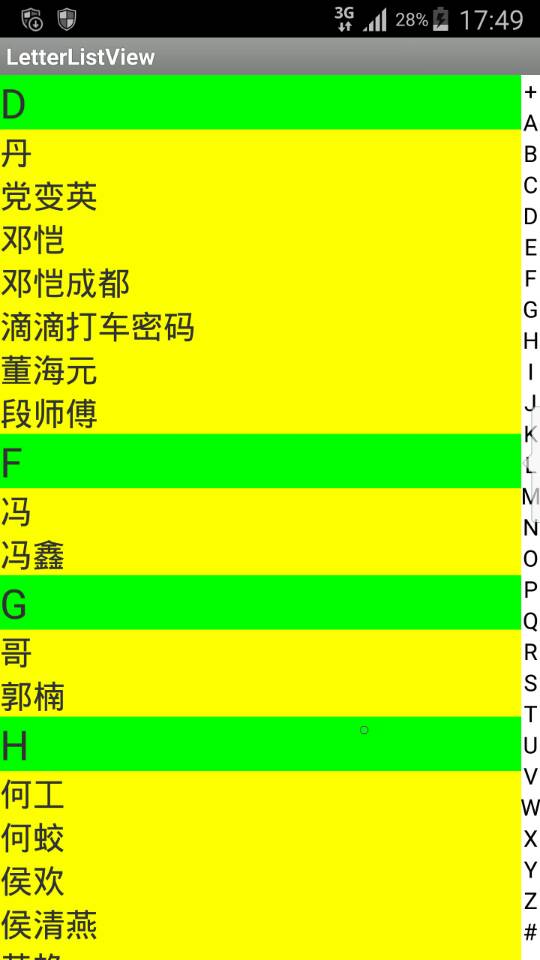
 基於HTML5的WebGL設計漢諾塔3D游戲
基於HTML5的WebGL設計漢諾塔3D游戲在這裡我們將構造一個基於HT for Web的HTML5+JavaScript來實現漢諾塔游戲。http://hightopo
 獲取data下目錄文件和查看android數據庫文件,dataandroid
獲取data下目錄文件和查看android數據庫文件,dataandroid首先要是在真機上查看android數據庫文件必須要取得root權限,這裡怎麼獲取就不在多說。可
 Android 手機衛士--階段小結1,android小結
Android 手機衛士--階段小結1,android小結本文地址:http://www.cnblogs.com/wuyudong/p/5904528.html,轉載請注
 Android特效專輯(八)——實現心型起泡飛舞的特效,讓你的APP瞬間暖心
Android特效專輯(八)——實現心型起泡飛舞的特效,讓你的APP瞬間暖心 Android特效專輯(八)——實現心型起泡飛舞的特效,讓你的A