編輯:關於android開發
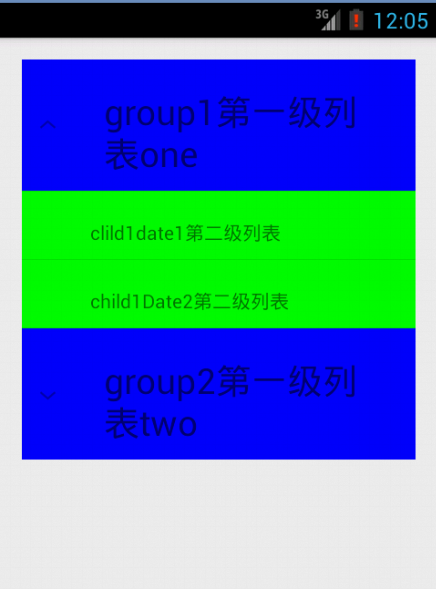
有時候,我們需要設計這樣一個界面,外面有一個列表,當我們點擊其中列表中的某個條目時,就會展開這個條目,出現一個新的列表。比如下圖:(程序運行的效果圖,在這裡貼出來)
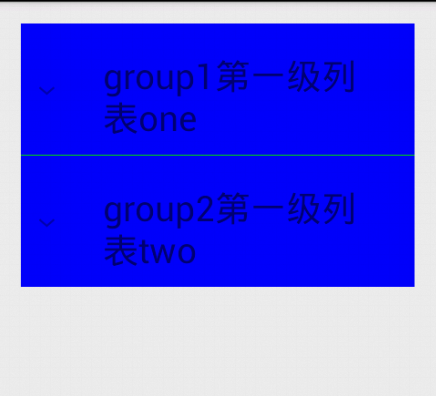
當我們點擊第一項時,視圖變為:
------------------------------------------------------------------------------------------------------------------------------
為了實現這樣的效果,需要定義三個布局,包括顯示的main_activity(主布局),group(第一級列表布局),child(第二級列表布局),下面貼代碼,解釋都在注釋裡面:
main_activity:
<LinearLayout xmlns:android="http://schemas.android.com/apk/res/android"
    xmlns:tools="http://schemas.android.com/tools"
    android:layout_width="match_parent"
    android:layout_height="match_parent"
    android:orientation="vertical"
    android:paddingBottom="@dimen/activity_vertical_margin"
    android:paddingLeft="@dimen/activity_horizontal_margin"
    android:paddingRight="@dimen/activity_horizontal_margin"
    android:paddingTop="@dimen/activity_vertical_margin"
    tools:context="com.example.expandlistaacitvity.MainActivity" >

    <!-- android文檔中要求ExpandableListView的id必須為list,否則會拋出錯誤,有興趣的可以試試
           #ff0000 為紅色
        drawSelectorOntop=false是設置當你選中某一項時,任能清楚顯示當前項(我試了試好像沒有什麼改變。。。。)-->
    <ExpandableListView
        android:id="@android:id/list"
        android:layout_width="match_parent"
        android:layout_height="wrap_content"
        android:layout_weight="1"
        android:drawSelectorOnTop="false"/>

    <!-- 當上面沒有數據可以顯示時,就會顯示這個TextView。這個id也規定必須用empty,否者前面的話就沒作用了 -->
    <TextView
        android:id="@android:id/empty"
        android:layout_width="match_parent"
        android:layout_height="match_parent"
        android:background="#ff0000"
        android:text="no data" />

</LinearLayout>
group.xml:
<?xml version="1.0" encoding="utf-8"?>
<LinearLayout xmlns:android="http://schemas.android.com/apk/res/android"
    android:layout_width="match_parent"
    android:layout_height="match_parent"
    android:orientation="vertical" >

    <!-- 這個是定義的第一級列表的布局
    #0000ff是深青色 -->
    <TextView
        android:id="@+id/groupTo"
        android:layout_height="match_parent"
        android:layout_width="match_parent"
        android:background="#0000ff"
        android:paddingTop="20dp"
        android:paddingLeft="60dp"
        android:paddingBottom="10dp"
        android:textSize="26sp"
        android:text="no data"/>
</LinearLayout>
child.xml:
<?xml version="1.0" encoding="utf-8"?>
<LinearLayout xmlns:android="http://schemas.android.com/apk/res/android"
    android:layout_width="match_parent"
    android:layout_height="match_parent"
    android:layout_margin="5dp"
    android:orientation="vertical" >

    <!-- 這裡定義的是列表中的第二級列表 ,當沒有數據時,顯示no data-->
    <TextView
        android:id="@+id/childTo"
        android:layout_height="match_parent"
        android:layout_width="match_parent"
        android:paddingTop="20dp"
        android:paddingLeft="50dp"
        android:paddingBottom="10dp"
        android:background="#00ff00"
        android:text="no data"/>
</LinearLayout>
接下來是主活動了,同樣解釋在代碼裡:
package com.example.expandlistaacitvity;

import java.util.ArrayList;
import java.util.HashMap;
import java.util.List;
import java.util.Map;

import android.app.ExpandableListActivity;
import android.os.Bundle;
import android.widget.SimpleExpandableListAdapter;

public class MainActivity extends ExpandableListActivity {

    @Override
    protected void onCreate(Bundle savedInstanceState) {
        super.onCreate(savedInstanceState);
        setContentView(R.layout.activity_main);

        //定義兩個一級條目
        List<Map<String, String>> groups = new ArrayList<Map<String,String>>();
        Map<String, String> group1 = new HashMap<String, String>();
        group1.put("group", "group1第一級列表one");
        groups.add(group1);
        Map<String,String> group2 = new HashMap<String, String>();
        group2.put("group", "group2第一級列表two");
        groups.add(group2);

        //定義一個list,裡面存放的是第一個一級條目中的二級條目
        List<Map<String, String>> child1 = new ArrayList<Map<String,String>>();
        Map<String, String> child1Date1 = new HashMap<String, String>();
        child1Date1.put("child", "clild1date1第二級列表");
        child1.add(child1Date1);
        Map<String, String> child1Date2 = new HashMap<String, String>();
        child1Date2.put("child", "child1Date2第二級列表");
        child1.add(child1Date2);

        //定義一個List,為第二個一級條目的二級條目
        List<Map<String, String>> child2 = new ArrayList<Map<String,String>>();
        Map<String, String> child2Date1 = new HashMap<String, String>();
        child2Date1.put("child", "child222Date1第二級列表");
        child2.add(child2Date1);

        //將兩個二級條目放入到list中
        List<List<Map<String, String>>> childs = new ArrayList<List<Map<String,String>>>();
        childs.add(child1);
        childs.add(child2);

        /*
         * 1.上下文
         * 2.一級列表的數據,包含各個group
         * 3.指定一級列表的布局
         * 4.指定一級列表的key
         * 5.指定一級條目的控件顯示的id
         * 下面同上
         */
        SimpleExpandableListAdapter simpleExpandableListAdapter = new SimpleExpandableListAdapter
                (this, groups, R.layout.group,new String[]{"group"}, new int[]{R.id.groupTo},
                        childs,R.layout.child,new String[]{"child"},new int[]{R.id.childTo}
                        );
        setListAdapter(simpleExpandableListAdapter);
    }
}
 谷歌電子市場2--首頁,谷歌電子市場2--
谷歌電子市場2--首頁,谷歌電子市場2--1.ListView的封裝 ①getView的封裝 ②加載更多 &nbs
 計算器Pro應用項目源碼,計算器pro源碼
計算器Pro應用項目源碼,計算器pro源碼 本計算器實現了一些簡單的功能,可能本身還存在一些缺陷,希望大家提建議,能夠改進一下。 源碼項目我已經上傳到源碼天堂那
 Android新手入門2016(10)--GridView
Android新手入門2016(10)--GridView GridView跟ListView一樣是多控件布局。實現九宮圖是最方便的。 還是先看看圖,沒圖說個雞雞是不是
 27個漂亮的移動端注冊/登錄界面設計作品,27登錄界面設計作品
27個漂亮的移動端注冊/登錄界面設計作品,27登錄界面設計作品英文:medium 作者:Muzli 譯者:設計達人 鏈接:http://www.s