編輯:關於android開發
此開源框架官網地址:https://github.com/astuetz/PagerSlidingTabStrip
可以理解為配合ViewPager使用的交互式頁面指示器控件。
話不多說,先上效果圖:

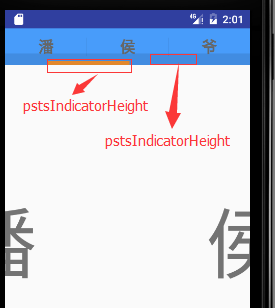
為了演示其中的pstsIndicatorHeight與pstsUnderlineHeight 的區別,進行了不同的設置已區分效果(做了去除actionbar處理)。大家可以很直觀的看出相比之前單獨使用ViewPager以及ViewPager與Fragement嵌套,本次演示PagerSlidingTabStrip的使用,為頁面導航提供了相對更加絢麗的切換效果,下面我們就介紹下PagerSlidingTabStrip的使用。
前期相關博文推薦:
· apstsIndicatorColor //Color of the sliding indicator 滑動條的顏色
· pstsUnderlineColor //Color of the full-width line onthe bottom of the view 滑動條所在的那個全寬線的顏色
· pstsDividerColor //Color of the dividers betweentabs 每個標簽的分割線的顏色
· pstsIndicatorHeight //Height of the sliding indicator 滑動條的高度
· pstsUnderlineHeight //Height of the full-width line onthe bottom of the view 滑動條所在的那個全寬線的高度
· pstsDividerPadding //Top and bottom padding of thedividers 分割線底部和頂部的填充寬度
· pstsTabPaddingLeftRight //Left and right padding of eachtab 每個標簽左右填充寬度
· pstsScrollOffset //Scroll offset of the selectedtab
· pstsTabBackground //Background drawable of each tab,should be a StateListDrawable 每個標簽的背景,應該是一個StateListDrawable
· pstsShouldExpand //If set to true, each tab isgiven the same weight, default false 如果設置為true,每個標簽是相同的控件,均勻平分整個屏幕,默認是false
· pstsTextAllCaps //If true, all tab titles will beupper case, default true 如果為true,所有標簽都是大寫字母,默認為true
所有的屬性都有他們自己的getter和setter方法來隨時改變他們
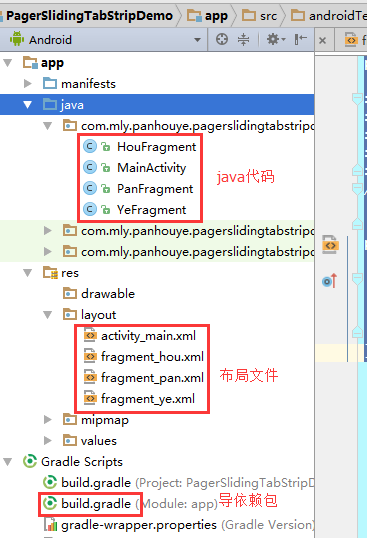
在res/values/styles.xml中設置
<style name="AppTheme" parent="Theme.AppCompat.Light.NoActionBar">
整體xml文件如下:
1 <resources>
2     <!-- Base application theme. -->
3     <style name="AppTheme" parent="Theme.AppCompat.Light.NoActionBar">
4         <!-- Customize your theme here. -->
5         <item name="colorPrimary">@color/colorPrimary</item>
6         <item name="colorPrimaryDark">@color/colorPrimaryDark</item>
7         <item name="colorAccent">@color/colorAccent</item>
8     </style>
9 </resources>
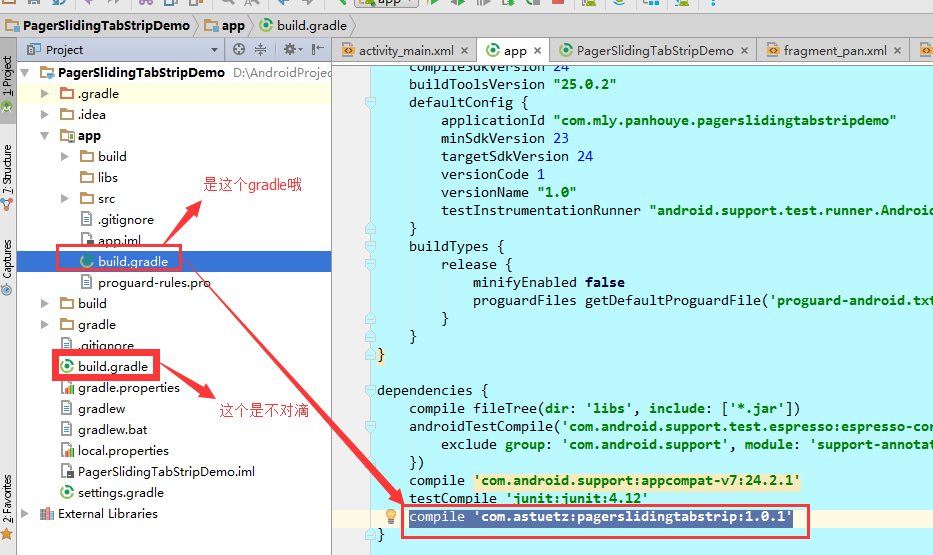
使用AndroidStudio2.2。仍然采用在build.gradle下中dependencies下直接添加如下代碼:
1 compile 'com.astuetz:pagerslidingtabstrip:1.0.1'
布局前對顏色做了一些引用設置,res/values/colors.xml文件如下:
 1 <?xml version="1.0" encoding="utf-8"?>
 2 <resources>
 3     <color name="colorPrimary">#3F51B5</color>
 4     <color name="colorPrimaryDark">#303F9F</color>
 5     <color name="colorAccent">#FF4081</color>
 6
 7     <color name="color_theme">#489cfa</color>
 8     <color name="transparent">#00000000</color>
 9     <color name="yellow">#fc9630</color>
10 </resources>
(1)主布局文件activity_main.xml
PagerSlidingTabStrip配合ViewPager一起使用,本次將ViewPager放置在PagerSlidingTabStrip下面,具體布局文件如下(大家根據前文中的屬性解釋來對照不理解的屬性,注意添加app命名空間):
 1 <?xml version="1.0" encoding="utf-8"?>
 2 <RelativeLayout xmlns:android="http://schemas.android.com/apk/res/android"
 3     xmlns:tools="http://schemas.android.com/tools"
 4     xmlns:app="http://schemas.android.com/apk/res-auto"
 5     android:id="@+id/activity_main"
 6     android:layout_width="match_parent"
 7     android:layout_height="match_parent"
 8     tools:context="com.mly.panhouye.pagerslidingtabstripdemo.MainActivity">
 9     <com.astuetz.PagerSlidingTabStrip
10         android:id="@+id/pst"
11         android:layout_width="match_parent"
12         android:layout_height="48dip"
13         android:background="@color/color_theme"
14         app:pstsShouldExpand="true"
15         app:pstsTabBackground="@color/transparent"
16         app:pstsIndicatorHeight="5dp"
17         app:pstsIndicatorColor="@color/yellow"
18         app:pstsTextAllCaps="false"
19         app:pstsUnderlineHeight="15dp"
20     />
21     <android.support.v4.view.ViewPager
22         android:id="@+id/pager"
23         android:layout_width="match_parent"
24         android:layout_height="match_parent"
25         android:layout_below="@+id/pst"/>
26 </RelativeLayout>
(2)對應的Fragment布局文件
本次僅演示簡單效果,fragment_pan, fragment_hou, fragment_ye每個布局文件僅僅文字不同,這裡僅演示其中一個fragment_pan.xml:
 1 <?xml version="1.0" encoding="utf-8"?>
 2 <LinearLayout xmlns:android="http://schemas.android.com/apk/res/android"
 3     android:orientation="vertical" android:layout_width="match_parent"
 4     android:layout_height="match_parent">
 5     <TextView
 6         android:layout_width="match_parent"
 7         android:layout_height="match_parent"
 8         android:gravity="center"
 9         android:text="潘"
10         android:textSize="100sp"
11         />
12 </LinearLayout>
(3)每個fragment要用來填充對應的fragment類,演示ragment_pan.xml布局對應的fragmen類HouFragment.java:
 1 package com.mly.panhouye.pagerslidingtabstripdemo;
 2
 3 import android.os.Bundle;
 4 import android.support.v4.app.Fragment;
 5 import android.view.LayoutInflater;
 6 import android.view.View;
 7 import android.view.ViewGroup;
 8 /**
 9  * Created by panchengjia on 2017/1/15 0015.
10  */
11 public class HouFragment extends Fragment {
12     @Override
13     public View onCreateView(LayoutInflater inflater, ViewGroup container,  Bundle savedInstanceState) {
14         View view =inflater.inflate(R.layout.fragment_hou,null);
15         return view;
16     }
17 }
 1 package com.mly.panhouye.pagerslidingtabstripdemo;
 2
 3 import android.os.Bundle;
 4 import android.support.v4.app.Fragment;
 5 import android.support.v4.app.FragmentManager;
 6 import android.support.v4.app.FragmentPagerAdapter;
 7 import android.support.v4.view.ViewPager;
 8 import android.support.v7.app.AppCompatActivity;
 9 import com.astuetz.PagerSlidingTabStrip;
10 import java.util.ArrayList;
11
12 public class MainActivity extends AppCompatActivity {
13     PagerSlidingTabStrip pst;
14     ViewPager viewPager;
15     ArrayList<Fragment> fragments;
16     //聲明pst的標題
17     String[] titles  = {"潘","侯","爺"};
18     @Override
19     protected void onCreate(Bundle savedInstanceState) {
20         super.onCreate(savedInstanceState);
21         setContentView(R.layout.activity_main);
22         pst= (PagerSlidingTabStrip) findViewById(R.id.pst);
23         viewPager= (ViewPager) findViewById(R.id.pager);
24
25         fragments = new ArrayList<>();
26         HouFragment houFragment = new HouFragment();
27         PanFragment panFragment = new PanFragment();
28         YeFragment yeFragment = new YeFragment();
29         //添加fragment到集合中時注意順序
30         fragments.add(panFragment);
31         fragments.add(houFragment);
32         fragments.add(yeFragment);
33         FragmentManager fragmentManager = getSupportFragmentManager();
34         viewPager.setAdapter(new MyPagerAdapter(fragmentManager,titles,fragments));
35         viewPager.setCurrentItem(0);
36         //當ViewPager的onPagerChangeListener回調時,PagerSlidingTabStrip也一起隨之變動
37         //具體做法都已封裝到了PagerSlidingTabStrip.setViewPager()方法裡,使用時調用實例如下
38         pst.setViewPager(viewPager);
39         pst.setTextSize(30);
40     }
41
42     /**
43      * 自定義適配器
44      */
45     class MyPagerAdapter extends FragmentPagerAdapter {
46         private String[] titles;
47         ArrayList<Fragment> fragments;
48         //根據需求定義構造方法,方便外部調用
49         public MyPagerAdapter(FragmentManager fm, String[] titles, ArrayList<Fragment> fragments) {
50             super(fm);
51             this.titles = titles;
52             this.fragments = fragments;
53         }
54         //設置每頁的標題
55         @Override
56         public CharSequence getPageTitle(int position) {
57             return titles[position];
58         }
59         //設置每一頁對應的fragment
60         @Override
61         public Fragment getItem(int position) {
62             return fragments.get(position);
63         }
64         //fragment的數量
65         @Override
66         public int getCount() {
67             return fragments.size();
68         }
69     }
70 }
本次僅僅演示的是PagerSlidingTabStrip最最基本的使用方法,大家可以嘗試使用它搞出更加絢麗的切換效果,干吧。
 Android學習指南之二十一:Broadcast Receiver 的使用
如果說Activity和服務都是實干派,那麼將Broadcast Receiv
 Android React-Native系列之(一)零基礎搭建React-Native開發環境
Android React-Native系列之(一)零基礎搭建React-Native開發環境 很早就聽說過大名鼎鼎的React-Native了(不大清楚的童靴們可以自行
 Android的Kotlin秘方(I):OnGlobalLayoutListener,
Android的Kotlin秘方(I):OnGlobalLayoutListener,春節後,又重新“開張”。各位高手請繼續支持。謝謝! &nbs
 算法—符號表,算法符號
算法—符號表,算法符號定義:符號表是一種存儲鍵值對的數據結構,支持兩種操作:插入(put),即將一組新的鍵值對存入表中;查找(get),即根據給定的鍵得到相應的值。 1
 ViewPager與android.support.design.widget.TabLayout雙向交互聯動切換,tablayoutviewpager
ViewPager與android.support.design.wid