編輯:關於android開發
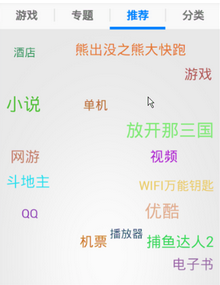
RecommendFragment public class RecommendFragment extends BaseFragment {
private ArrayList<String> mList;
@Override
public View onCreateSuccessView() {
// 初始化飛入飛出自定義控件
StellarMap stellar = new StellarMap(UIUtils.getContext());
// 設置內部文字距邊緣邊距為10dip
int padding = UIUtils.dip2px(10);
stellar.setInnerPadding(padding, padding, padding, padding);
// 設置數據源
stellar.setAdapter(new RecommendAdapter());
// 設定展示規則,9行6列(具體以隨機結果為准)
stellar.setRegularity(6, 9);
// 設置默認組為第0組
stellar.setGroup(0, true);
return stellar;
}
@Override
public ResultState onLoad() {
RecommendProtocol protocol = new RecommendProtocol();
mList = protocol.getData(0);// 33條數據
return check(mList);
}
class RecommendAdapter implements StellarMap.Adapter {
// 返回組的數量
@Override
public int getGroupCount() {
return 2;
}
// 每組某個組下返回孩子的個數
@Override
public int getCount(int group) {
int count = mList.size() / getGroupCount();// 用總數除以組個數就是每組應該展示的孩子的個數
if (group == getGroupCount() - 1) {// 由於上一行代碼不一定整除, 最後一組,將余數補上
count += mList.size() % getGroupCount();
}
return count;
}
@Override
public View getView(int group, int position, View convertView) {
if (group > 0) {// 如果發現不是第一組,需要更新position, 要加上之前幾頁的總數,才是當前組的准確位置
position = position + getCount(group - 1) * group;
}
TextView view = new TextView(UIUtils.getContext());
view.setText(mList.get(position));
// 設置隨機文字大小
Random random = new Random();
int size = 16 + random.nextInt(10);// 產生16-25的隨機數
view.setTextSize(TypedValue.COMPLEX_UNIT_SP, size);// 以sp為單位設置文字大小
// 設置隨機文字顏色
int r = 30 + random.nextInt(210);// 產生30-239的隨機顏色, 繞過0-29,
// 240-255的值,避免顏色過暗或者過亮
int g = 30 + random.nextInt(210);
int b = 30 + random.nextInt(210);
view.setTextColor(Color.rgb(r, g, b));
return view;
}
@Override
public int getNextGroupOnZoom(int group, boolean isZoomIn) {
if (!isZoomIn) {
// 下一組
if (group < getGroupCount() - 1) {
return ++group;
} else {
return 0;// 如果沒有下一頁了,就跳到第一組
}
} else {
// 上一組
if (group > 0) {
return --group;
} else {
return getGroupCount() - 1;// 如果沒有上一頁了,就跳到最後一組
}
}
}
}
}
public class StellarMap extends FrameLayout implements AnimationListener, OnTouchListener, OnGestureListener {

	private RandomLayout mHidenGroup;

	private RandomLayout mShownGroup;

	private Adapter mAdapter;
	private RandomLayout.Adapter mShownGroupAdapter;
	private RandomLayout.Adapter mHidenGroupAdapter;

	private int mShownGroupIndex;// 顯示的組
	private int mHidenGroupIndex;// 隱藏的組
	private int mGroupCount;// 組數

	/** 動畫 */
	private Animation mZoomInNearAnim;
	private Animation mZoomInAwayAnim;
	private Animation mZoomOutNearAnim;
	private Animation mZoomOutAwayAnim;

	private Animation mPanInAnim;
	private Animation mPanOutAnim;
	/** 手勢識別器 */
	private GestureDetector mGestureDetector;

	/** 構造方法 */
	public StellarMap(Context context, AttributeSet attrs, int defStyle) {
		super(context, attrs, defStyle);
		init();
	}

	public StellarMap(Context context, AttributeSet attrs) {
		super(context, attrs);
		init();
	}

	public StellarMap(Context context) {
		super(context);
		init();
	}

	/** 初始化方法 */
	private void init() {
		mGroupCount = 0;
		mHidenGroupIndex = -1;
		mShownGroupIndex = -1;
		mHidenGroup = new RandomLayout(getContext());
		mShownGroup = new RandomLayout(getContext());

		addView(mHidenGroup, new LayoutParams(LayoutParams.FILL_PARENT, LayoutParams.FILL_PARENT));
		mHidenGroup.setVisibility(View.GONE);
		addView(mShownGroup, new LayoutParams(LayoutParams.FILL_PARENT, LayoutParams.FILL_PARENT));

		mGestureDetector = new GestureDetector(this);
		setOnTouchListener(this);
		//設置動畫
		mZoomInNearAnim = AnimationUtil.createZoomInNearAnim();
		mZoomInNearAnim.setAnimationListener(this);
		mZoomInAwayAnim = AnimationUtil.createZoomInAwayAnim();
		mZoomInAwayAnim.setAnimationListener(this);
		mZoomOutNearAnim = AnimationUtil.createZoomOutNearAnim();
		mZoomOutNearAnim.setAnimationListener(this);
		mZoomOutAwayAnim = AnimationUtil.createZoomOutAwayAnim();
		mZoomOutAwayAnim.setAnimationListener(this);
	}

	/** 設置隱藏組和顯示組的x和y的規則 */
	public void setRegularity(int xRegularity, int yRegularity) {
		mHidenGroup.setRegularity(xRegularity, yRegularity);
		mShownGroup.setRegularity(xRegularity, yRegularity);
	}

	private void setChildAdapter() {
		if (null == mAdapter) {
			return;
		}
		mHidenGroupAdapter = new RandomLayout.Adapter() {
			//取出本Adapter的View對象給HidenGroup的Adapter
			@Override
			public View getView(int position, View convertView) {
				return mAdapter.getView(mHidenGroupIndex, position, convertView);
			}

			@Override
			public int getCount() {
				return mAdapter.getCount(mHidenGroupIndex);
			}
		};
		mHidenGroup.setAdapter(mHidenGroupAdapter);

		mShownGroupAdapter = new RandomLayout.Adapter() {
			//取出本Adapter的View對象給ShownGroup的Adapter
			@Override
			public View getView(int position, View convertView) {
				return mAdapter.getView(mShownGroupIndex, position, convertView);
			}

			@Override
			public int getCount() {
				return mAdapter.getCount(mShownGroupIndex);
			}
		};
		mShownGroup.setAdapter(mShownGroupAdapter);
	}

	/** 設置本Adapter */
	public void setAdapter(Adapter adapter) {
		mAdapter = adapter;
		mGroupCount = mAdapter.getGroupCount();
		if (mGroupCount > 0) {
			mShownGroupIndex = 0;
		}
		setChildAdapter();
	}

	/** 設置顯示區域 */
	public void setInnerPadding(int paddingLeft, int paddingTop, int paddingRight, int paddingBottom) {
		mHidenGroup.setPadding(paddingLeft, paddingTop, paddingRight, paddingBottom);
		mShownGroup.setPadding(paddingLeft, paddingTop, paddingRight, paddingBottom);
	}

	/** 給指定的Group設置動畫 */
	public void setGroup(int groupIndex, boolean playAnimation) {
		switchGroup(groupIndex, playAnimation, mZoomInNearAnim, mZoomInAwayAnim);
	}

	/** 獲取當前顯示的group角標 */
	public int getCurrentGroup() {
		return mShownGroupIndex;
	}

	/** 給Group設置動畫入 */
	public void zoomIn() {
		final int nextGroupIndex = mAdapter.getNextGroupOnZoom(mShownGroupIndex, true);
		switchGroup(nextGroupIndex, true, mZoomInNearAnim, mZoomInAwayAnim);
	}

	/** 給Group設置出動畫 */
	public void zoomOut() {
		final int nextGroupIndex = mAdapter.getNextGroupOnZoom(mShownGroupIndex, false);
		switchGroup(nextGroupIndex, true, mZoomOutNearAnim, mZoomOutAwayAnim);
	}

	/** 給下一個Group設置進出動畫 */
	private void switchGroup(int newGroupIndex, boolean playAnimation, Animation inAnim, Animation outAnim) {
		if (newGroupIndex < 0 || newGroupIndex >= mGroupCount) {
			return;
		}
		//把當前顯示Group角標設置為隱藏的
		mHidenGroupIndex = mShownGroupIndex;
		//把下一個Group角標設置為顯示的
		mShownGroupIndex = newGroupIndex;
		// 交換兩個Group
		RandomLayout temp = mShownGroup;
		mShownGroup = mHidenGroup;
		mShownGroup.setAdapter(mShownGroupAdapter);
		mHidenGroup = temp;
		mHidenGroup.setAdapter(mHidenGroupAdapter);
		//刷新顯示的Group
		mShownGroup.refresh();
		//顯示Group
		mShownGroup.setVisibility(View.VISIBLE);

		//啟動動畫
		if (playAnimation) {
			if (mShownGroup.hasLayouted()) {
				mShownGroup.startAnimation(inAnim);
			}
			mHidenGroup.startAnimation(outAnim);
		} else {
			mHidenGroup.setVisibility(View.GONE);
		}
	}

	// 重新分配顯示區域
	public void redistribute() {
		mShownGroup.redistribute();
	}

	/** 動畫監聽 */
	@Override
	public void onAnimationStart(Animation animation) {
		// 當動畫啟動
	}

	@Override
	public void onAnimationEnd(Animation animation) {
		// 當動畫結束
		if (animation == mZoomInAwayAnim || animation == mZoomOutAwayAnim || animation == mPanOutAnim) {
			mHidenGroup.setVisibility(View.GONE);
		}
	}

	@Override
	public void onAnimationRepeat(Animation animation) {
		// 當動畫重復
	}

	/** 定位 */
	@Override
	public void onLayout(boolean changed, int l, int t, int r, int b) {
		//用以判斷ShownGroup是否onLayout的變量
		boolean hasLayoutedBefore = mShownGroup.hasLayouted();
		super.onLayout(changed, l, t, r, b);
		if (!hasLayoutedBefore && mShownGroup.hasLayouted()) {
			mShownGroup.startAnimation(mZoomInNearAnim);//第一次layout的時候啟動動畫
		} else {
			mShownGroup.setVisibility(View.VISIBLE);
		}
	}

	/** 重寫onTouch事件,把onTouch事件分配給手勢識別 */
	@Override
	public boolean onTouch(View v, MotionEvent event) {
		return mGestureDetector.onTouchEvent(event);
	}

	/** 消費掉onDown事件 */
	@Override
	public boolean onDown(MotionEvent e) {
		return true;
	}

	/** 空實現 */
	@Override
	public void onShowPress(MotionEvent e) {
	}

	@Override
	public boolean onSingleTapUp(MotionEvent e) {
		return false;
	}

	@Override
	public boolean onScroll(MotionEvent e1, MotionEvent e2, float distanceX, float distanceY) {
		return false;
	}

	@Override
	public void onLongPress(MotionEvent e) {

	}

	@Override
	public boolean onFling(MotionEvent e1, MotionEvent e2, float velocityX, float velocityY) {
		int centerX = getMeasuredWidth() / 2;
		int centerY = getMeasuredWidth() / 2;

		int x1 = (int) e1.getX() - centerX;
		int y1 = (int) e1.getY() - centerY;
		int x2 = (int) e2.getX() - centerX;
		int y2 = (int) e2.getY() - centerY;

		if ((x1 * x1 + y1 * y1) > (x2 * x2 + y2 * y2)) {
			zoomOut();
		} else {
			zoomIn();
		}
		return true;
	}

	/** 內部類、接口 */
	public static interface Adapter {
		public abstract int getGroupCount();

		public abstract int getCount(int group);

		public abstract View getView(int group, int position, View convertView);

		public abstract int getNextGroupOnZoom(int group, boolean isZoomIn);
	}
}
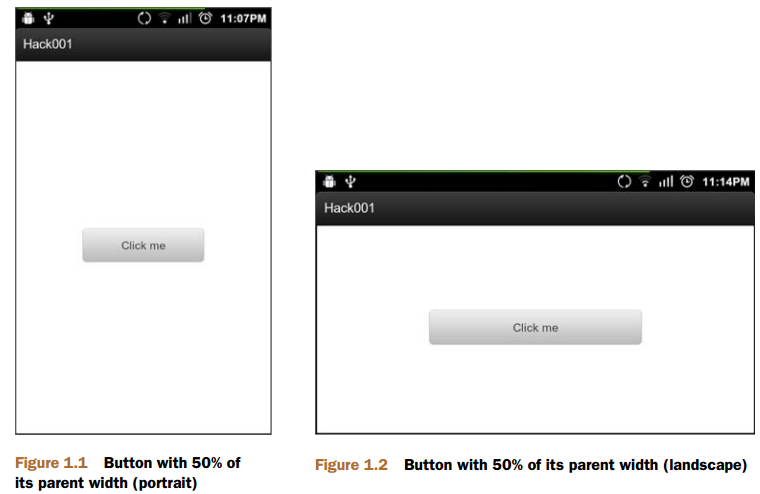 Android Hack1 使用weight屬性實現視圖的居中顯示,androidhack1
Android Hack1 使用weight屬性實現視圖的居中顯示,androidhack1本文地址:http://www.cnblogs.com/wuyudong/p/
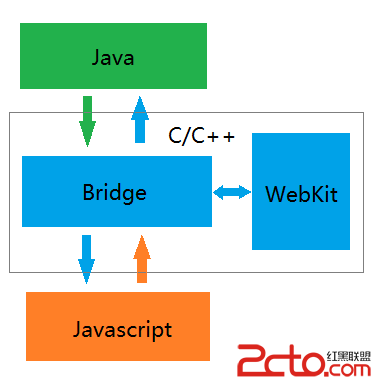 React-Native系列Android——Native與Javascript通信原理(二)
React-Native系列Android——Native與Javascript通信原理(二) 前一篇博客分析了Native端向Javascript端通信的全流程,這
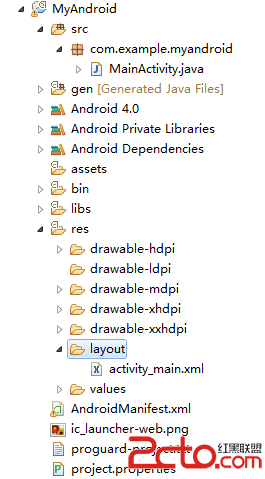 Android項目從Eclipse增加支持Android Studio
Android項目從Eclipse增加支持Android Studio 使用Eclipse開發Android已經有些年頭了,然而Android Studio(後面簡稱
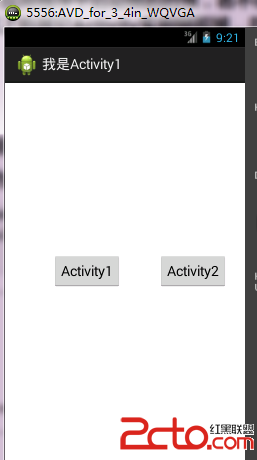 android:Activity啟動模式之singleTop
android:Activity啟動模式之singleTop 先看一下singleTop啟動模式的說明: 可以有多個實例,但是不允許此Activity的多個實例疊加。