編輯:關於android開發
本文調用android的媒體播放器實現一些音樂播放操作
項目布局:
<LinearLayout xmlns:android="http://schemas.android.com/apk/res/android"
    xmlns:tools="http://schemas.android.com/tools"
    android:layout_width="match_parent"
    android:layout_height="match_parent"
    android:orientation="vertical"
    tools:context=".MainActivity" >

    <EditText
        android:id="@+id/et_path"
        android:layout_width="fill_parent"
        android:layout_height="wrap_content"
        android:hint="請輸入音樂文件的路徑" />

    <LinearLayout
        android:layout_width="fill_parent"
        android:layout_height="wrap_content"
        android:orientation="horizontal" >

        <Button
            android:id="@+id/bt_play"
            android:layout_width="0dip"
            android:layout_height="wrap_content"
            android:layout_weight="1"
            android:text="播放" />

        <Button
            android:id="@+id/bt_pause"
            android:layout_width="0dip"
            android:layout_height="wrap_content"
            android:layout_weight="1"
            android:text="暫停" />

        <Button
            android:id="@+id/bt_replay"
            android:layout_width="0dip"
            android:layout_height="wrap_content"
            android:layout_weight="1"
            android:text="重播" />

        <Button
            android:id="@+id/bt_stop"
            android:layout_width="0dip"
            android:layout_height="wrap_content"
            android:layout_weight="1"
            android:text="停止" />
    </LinearLayout>

</LinearLayout>
可以查看本地sdk中的文件查看相關api
file:///……/sdk/docs/guide/topics/media/mediaplayer.html
本文地址:http://www.cnblogs.com/wuyudong/p/5679191.html,轉載請注明源地址。
相關邏輯部分代碼如下:
package com.wuyudong.mp3player;

import java.io.File;
import java.io.IOException;

import android.media.AudioManager;
import android.media.MediaPlayer;
import android.media.MediaPlayer.OnCompletionListener;
import android.net.Uri;
import android.os.Bundle;
import android.app.Activity;
import android.view.Menu;
import android.view.View;
import android.view.View.OnClickListener;
import android.widget.Button;
import android.widget.EditText;
import android.widget.Toast;

public class MainActivity extends Activity implements OnClickListener {

    private EditText et_path;
    private Button bt_play, bt_replay, bt_pause, bt_stop;

    private MediaPlayer mediaPlayer;

    @Override
    protected void onCreate(Bundle savedInstanceState) {
        super.onCreate(savedInstanceState);
        setContentView(R.layout.activity_main);

        et_path = (EditText) findViewById(R.id.et_path);
        bt_play = (Button) findViewById(R.id.bt_play);
        bt_replay = (Button) findViewById(R.id.bt_replay);
        bt_pause = (Button) findViewById(R.id.bt_pause);
        bt_stop = (Button) findViewById(R.id.bt_stop);

        bt_pause.setOnClickListener(this);
        bt_play.setOnClickListener(this);
        bt_replay.setOnClickListener(this);
        bt_stop.setOnClickListener(this);

    }

    @Override
    public void onClick(View v) {
        switch (v.getId()) {
        case R.id.bt_play:
            play();
            break;
        case R.id.bt_replay:
            replay();
            break;
        case R.id.bt_stop:
            stop();
            break;
        case R.id.bt_pause:
            pause();
            break;
        default:
            break;
        }
    }

    /**
     * 暫停音樂
     */
    private void pause() {
        if ("繼續".equals(bt_pause.getText().toString().trim())) {
            mediaPlayer.start();
            bt_pause.setText("暫停");
            return;
        }
        if (mediaPlayer != null && mediaPlayer.isPlaying()) {
            mediaPlayer.pause();
            bt_pause.setText("繼續");
            return;
        }
    }

    /**
     * 重新播放
     */
    private void replay() {
        if (mediaPlayer != null && mediaPlayer.isPlaying()) {
            mediaPlayer.seekTo(0);
            return;
        }
        play();
    }

    /**
     * 停止播放音樂
     */
    private void stop() {
        if (mediaPlayer != null && mediaPlayer.isPlaying()) {
            mediaPlayer.stop();
            mediaPlayer.release(); // 記得釋放資源
            mediaPlayer = null;
            bt_play.setEnabled(true);
        }
    }

    /**
     * 播放音樂
     */
    private void play() {
        String path = et_path.getText().toString().trim();
        File file = new File(path);
        if (file.exists() && file.length() > 0) {
            try {
                mediaPlayer = new MediaPlayer();
                mediaPlayer.setAudioStreamType(AudioManager.STREAM_MUSIC);
                mediaPlayer.setDataSource(path);
                mediaPlayer.prepare(); // might take long! (for buffering, etc)
                mediaPlayer.start();
                mediaPlayer.setOnCompletionListener(new OnCompletionListener() {
                    @Override
                    public void onCompletion(MediaPlayer mp) {
                        bt_play.setEnabled(true);
                    }
                } );

                bt_play.setEnabled(false);
            } catch (Exception e) {
                Toast.makeText(this, "播放失敗", 0).show();
                e.printStackTrace();
            }
        } else {
            Toast.makeText(this, "文件不存在", 0).show();
        }

    }

}
在執行代碼之前先上傳一份音頻文件到sdcard
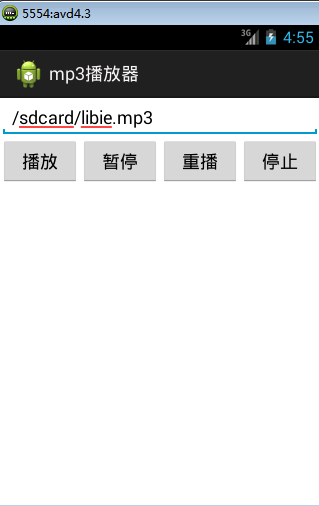
最後運行項目實現的效果如下:
 我的Android進階之旅------)關於使用CSDN-markdown編輯器來編寫博客
我的Android進階之旅------)關於使用CSDN-markdown編輯器來編寫博客 關於使用MarkDown編輯器的原因 其實前段時間就支持使用MarkDown
 Android6.0權限管理
Android6.0權限管理 Android 6.0 Marshmallow首次加入了運行時權限管理,這對用戶來說,可以更好的了解、控 制 app 涉及到的權限。然而對開
 Visual Studio Emulator for Android 初體驗,emulatorandroid
Visual Studio Emulator for Android 初體驗,emulatorandroidVisual Studio Emulator for Andr
 Android 手機衛士--設置界面&功能列表界面跳轉邏輯處理,android衛士--界面
Android 手機衛士--設置界面&功能列表界面跳轉邏輯處理,android衛士--界面在《Android 手機衛士--md5加密過程》中已經實現了加密類,這裡