編輯:關於android開發
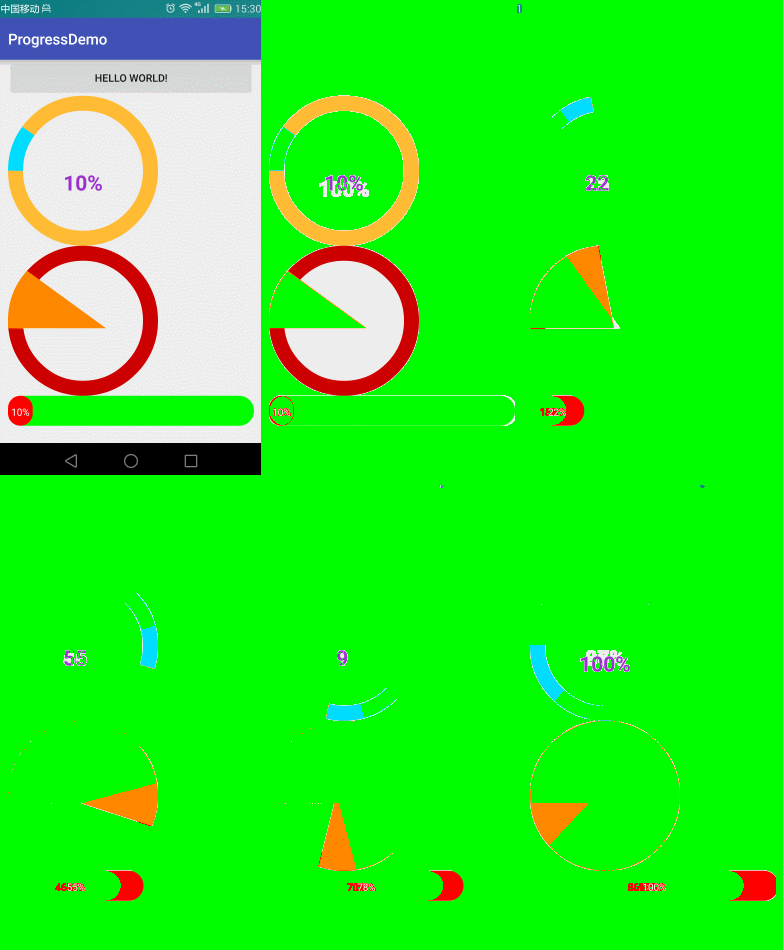
自定義屬性
    <!--
    roundColor 圓環的顏色

    roundProgressColor 進度的顏色

    roundWidth 圓環的寬度

    textColor 文字顏色

    textSize  文字大小

    max 最大值

    textIsDisplayable  是否顯示進度文本


    style 樣式
    STROKE 空心
    FILL 實心
    -->

    <declare-styleable name="RoundProgressBar">
        <attr name="roundColor" format="color"/>
        <attr name="roundProgressColor" format="color"/>
        <attr name="roundWidth" format="dimension"></attr>
        <attr name="textColor" format="color" />
        <attr name="textSize" format="dimension" />
        <attr name="max" format="integer"></attr>
        <attr name="textIsDisplayable" format="boolean"></attr>
        <attr name="style">
            <enum name="STROKE" value="0"></enum>
            <enum name="FILL" value="1"></enum>
        </attr>
    </declare-styleable>
public RoundProgressBar(Context context, AttributeSet attrs, int defStyleAttr) {
        super(context, attrs, defStyleAttr);
        mPaint = new Paint();

        /**
         * 獲取自定義的屬性
         */
        TypedArray typedArray = context.obtainStyledAttributes(attrs, R.styleable.RoundProgressBar);

        //底色
        mRoundColor = typedArray.getColor(R.styleable.RoundProgressBar_roundColor, Color.RED);
        //進度的顏色
        mRoundProgressColor = typedArray.getColor(R.styleable.RoundProgressBar_roundProgressColor, Color.BLUE);
        //圓形的寬
        mRoundWidth = typedArray.getDimension(R.styleable.RoundProgressBar_roundWidth, 20);

        //字體顏色 中間
        mTextColor = typedArray.getColor(R.styleable.RoundProgressBar_textColor, Color.BLUE);

        //中間進度顯示的字體大小
        mTextSize = typedArray.getDimension(R.styleable.RoundProgressBar_textSize, 15);

        //最大值
        mMax = typedArray.getInteger(R.styleable.RoundProgressBar_max, 100);

        //文字是否顯示
        mTextIsDisplayable = typedArray.getBoolean(R.styleable.RoundProgressBar_textIsDisplayable, true);

        //實心或者 空心
        mStyle = typedArray.getInt(R.styleable.RoundProgressBar_style, 0);


        typedArray.recycle();

    }
繪制
        //圓心
        int centerOfCircle = getWidth() / 2;
        //radius 半徑
        int radius = (int) (centerOfCircle - mRoundWidth / 2);


        //設置畫筆
        mPaint.setAntiAlias(true);
        //圓環的顏色
        mPaint.setColor(mRoundColor);

        //設置空心
        mPaint.setStyle(Paint.Style.STROKE);

        //畫筆寬度
        mPaint.setStrokeWidth(mRoundWidth);

        //畫圓
        canvas.drawCircle(centerOfCircle, centerOfCircle, radius, mPaint);


        /**
         * 畫百分比
         */
        mPaint.setStrokeWidth(0);
        //字體大小
        mPaint.setTextSize(mTextSize);
        //畫筆顏色
        mPaint.setColor(mTextColor);
        //字體
        mPaint.setTypeface(Typeface.DEFAULT_BOLD);

        //計算百分比
        int percent = (int) (((float) mProgress / (float) mMax) * 100);

        //測量字體的寬度
        float textWidth = mPaint.measureText(percent + "%");
        //判斷是否顯示進度文字 不是0,風格是空心的
        if (mTextIsDisplayable && percent != 0 && mStyle == STROKE) {

            canvas.drawText(percent + "%", centerOfCircle - textWidth / 2, centerOfCircle + textWidth / 2, mPaint);
        }


        /**
         * 設置進度
         */
        mPaint.setColor(mRoundProgressColor);
        //畫筆寬度
        mPaint.setStrokeWidth(mRoundWidth);
        mPaint.setAntiAlias(true);


        RectF oval = new RectF(centerOfCircle - radius, centerOfCircle - radius, centerOfCircle + radius, centerOfCircle + radius);


        switch (mStyle) {

            case STROKE:
                //空心
                mPaint.setStyle(Paint.Style.STROKE);
                //畫圓弧

                /**
                 *
                 *開始的角度
                 */
                canvas.drawArc(oval, 180, 360 * mProgress / mMax, false, mPaint);
                break;
            case FILL:
                //實心
                mPaint.setStyle(Paint.Style.FILL_AND_STROKE);
                //畫圓弧
                if(mProgress!=0) {
                    canvas.drawArc(oval, 180, 360 * mProgress / mMax, true, mPaint);
                }
                break;
        }
源碼:
https://github.com/ln0491/ProgressDemo
 我的Android進階之旅------)android中一些特殊字符(如:←↑→↓等箭頭符號)的Unicode碼值
我的Android進階之旅------)android中一些特殊字符(如:←↑→↓等箭頭符號)的Unicode碼值 在項目中,有時候在一些控件(如Button、Text
 ReactNative官方中文文檔0.21,reactnative0.21
ReactNative官方中文文檔0.21,reactnative0.21 整理了一份ReactNative0.21中文文檔,提供給需要的reactnative愛好者
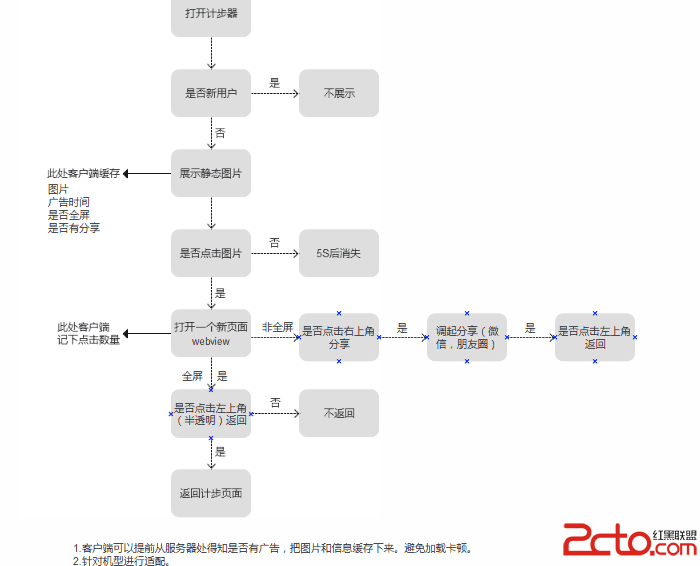 開發首屏廣告(Android)簡述
開發首屏廣告(Android)簡述 作為一個成熟的應用, 必須要有廣告. 那麼, 如何優雅地開發廣告呢? 需要注意一些細節. 本文提供一個簡單的示例, 代碼僅供參考.
 Ubuntu android 開發配置,ubuntuandroid
Ubuntu android 開發配置,ubuntuandroid1. 安裝 Java SDK 1.1下載 jav