編輯:關於android開發
總覺得不用框架直接開發比較繁瑣,java下有很多,我使用ssh,php下有很多,我使用ThinkPHP,Delphi下還沒有找到一個比較合適的,Android下呢?今天在網上搜索了一下,發現也是有很多不錯的框架的,比較了一下,發現兩個比較好用的:Afinal和xUtils。
Afinal:
http://github.com/yangfuhai/afinal
xUtils:
https://github.com/wyouflf/xUtils
xUtils是在Afinal上fork了一個分支。
這兩個框架都使用了注解方式,使用起來真的很方便:
完全注解方式就可以進行UI綁定和事件綁定
無需findViewById和setClickListener等
簡單的入門介紹:
Afinal:
http://www.oschina.net/p/afinal/
xUtils源起:
http://my.oschina.net/u/1171837/blog/147544
對框架感興趣的朋友可以試一下。
也感謝作者提供的好工具!
附上簡單的控件和事件注入示例:
xml:

<RelativeLayout xmlns:android="http://schemas.android.com/apk/res/android"
    xmlns:tools="http://schemas.android.com/tools"
    android:layout_width="match_parent"
    android:layout_height="match_parent"
    android:paddingBottom="@dimen/activity_vertical_margin"
    android:paddingLeft="@dimen/activity_horizontal_margin"
    android:paddingRight="@dimen/activity_horizontal_margin"
    android:paddingTop="@dimen/activity_vertical_margin"
    tools:context=".MainActivity" >

    <TextView
        android:id="@+id/tvHello"
        android:layout_width="wrap_content"
        android:layout_height="wrap_content"
        android:text="@string/hello_world" />

    <Button
        android:id="@+id/btnHello"
        android:layout_width="wrap_content"
        android:layout_height="wrap_content"
        android:layout_marginLeft="68dp"
        android:layout_toRightOf="@+id/tvHello"
        android:text="Button" />

</RelativeLayout>
java:
package com.example.myxutils;

import android.app.Activity;
import android.os.Bundle;
import android.view.Menu;
import android.view.View;
import android.widget.TextView;

import com.lidroid.xutils.ViewUtils;
import com.lidroid.xutils.view.annotation.ViewInject;
import com.lidroid.xutils.view.annotation.event.OnClick;

public class MainActivity extends Activity {

    // xUtils的view注解要求必須提供id,以使代碼混淆不受影響。
    @ViewInject(R.id.tvHello)TextView tvHello;

    @Override
    protected void onCreate(Bundle savedInstanceState) {
        super.onCreate(savedInstanceState);
        setContentView(R.layout.activity_main);

      //在Activity中注入:
        ViewUtils.inject(this); //注入view和事件
        tvHello.setText("Hello,Garfield !");
    }


    @OnClick(R.id.btnHello)
    public void testButtonClick(View v) { // 方法簽名必須和接口中的要求一致
        tvHello.setText("這是按鈕事件 !");
    }


    @Override
    public boolean onCreateOptionsMenu(Menu menu) {
        // Inflate the menu; this adds items to the action bar if it is present.
        getMenuInflater().inflate(R.menu.main, menu);
        return true;
    }

}
代碼簡潔了好多!
 Android平台Camera實時濾鏡實現方法探討(十)--代碼地址以及簡介
Android平台Camera實時濾鏡實現方法探討(十)--代碼地址以及簡介 簡單做了個相機和圖片編輯模塊,時間原因很多功能還沒有做,尚有BUG,見諒,將在以後抽時間修改
 Android開發的初學者快速創建一個項目,android開發初學者
Android開發的初學者快速創建一個項目,android開發初學者因為gwf的原因,大陸連不上google所以AndroidSDK是無法更新的 而且設置代
 Android Material Design的FloatingActionButton,Snackbar和CoordinatorLayout,androidsnackbar
Android Material Design的FloatingActionButton,Snackbar和CoordinatorLayout,androidsnackb
 Android中使用GridView和ImageViewSwitcher實現電子相冊簡單功能,gridviewimageview
Android中使用GridView和ImageViewSwitcher實現電子相冊簡單功能,gridviewimageview我們在手機上查看相冊時,首先看到的是網格狀
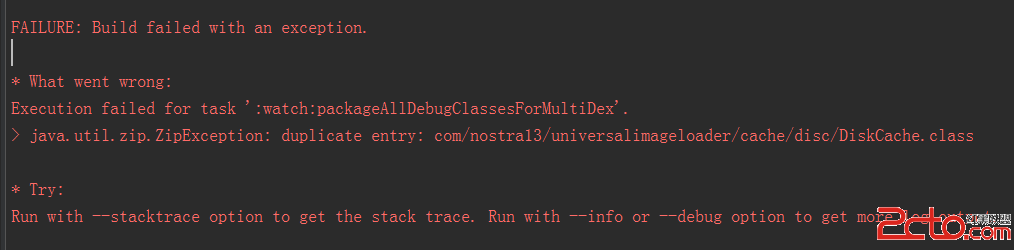 我的Android進階之旅------)Android編譯錯誤java.util.zip.ZipException: duplicate entry的解決方法
我的Android進階之旅------)Android編譯錯誤java.