編輯:關於android開發
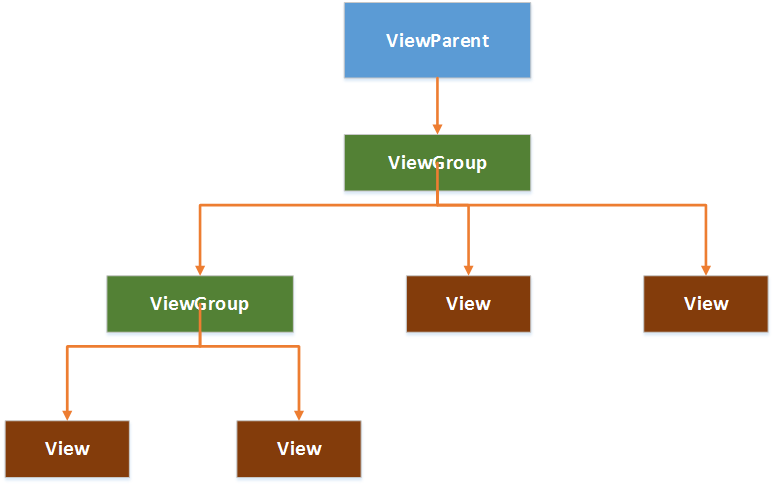
在Android中,視圖控件大致被分為兩類,即ViewGroup和View,ViewGroup控件作為父控件,包含並管理著子View,通過ViewGroup和View便形成了控件樹,各個ViewGoup對象和View對象就是控件樹中的節點。在控件樹中,以樹的深度來遍歷查找對應的控件元素,同時,上層控件負責子控件的測量與繪制,並傳遞交互事件。
Android控件樹:
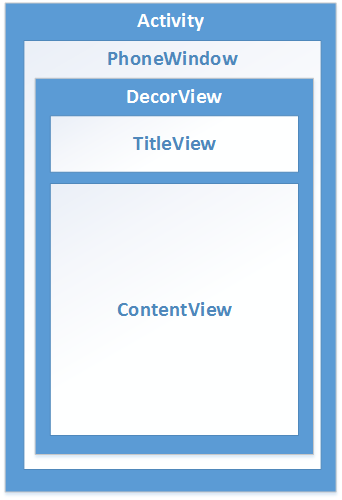
AndroidUI界面架構圖:
一.測量View的工具類:MeasureSpec
1.MeasureSpec包含了測量的模式和測量的大小,通過MeasureSpec.getMode()獲取測量模式,通過MeasureSpec.getSize()獲取測量大小;
2.MeasureSpec是一個32位的int值,高2位為測量的模式,低30位為測量的大小,使用位運算的目的在於提高優化效率。
二.測量的模式
1.EXACTLY,精確值模式:將layout_width或layout_height屬性指定為具體數值或者match_parent。
2.AT_MOST,最大值模式:將layout_width或layout_height指定為wrap_content。
3.UNSPECIFIED: View想多大就多大
三.View類默認的onMeasure()方法只支持EXACTLY模式,如果要支持其它模式,就必須重寫onMeasure(),重寫onMeasure()的模板代碼:
 1 package com.example.demoapp.views;
 2
 3 import android.content.Context;
 4 import android.view.View;
 5
 6 public class MeasuredView extends View {
 7     public MeasuredView(Context context) {
 8         super(context);
 9     }
10
11     @Override
12     protected void onMeasure(int widthMeasureSpec, int heightMeasureSpec) {
13         // 調用父類的onMeasure()
14         super.onMeasure(measureWidth(widthMeasureSpec), measureHeight(heightMeasureSpec));
15         // 或者直接調用父類的setMeasuredDimension(),因為父類的onMeasure()最終調用了setMeasuredDimension()
16         // setMeasuredDimension(measureWidth(widthMeasureSpec), measureHeight(heightMeasureSpec));
17     }
18
19     /**
20      * 測量View的width
21      * @param measureSpec MeasureSpec對象
22      * @return View的width
23      */
24     private int measureWidth(int measureSpec) {
25         int result = 0;
26         int specMode = MeasureSpec.getMode(measureSpec);
27         int specSize = MeasureSpec.getSize(measureSpec);
28
29         if (specMode == MeasureSpec.EXACTLY) {
30             result = specSize;
31         } else {
32             result = 200;
33             if (specMode == MeasureSpec.AT_MOST) {
34                 result = Math.min(result, specSize);
35             }
36         }
37         return result;
38     }
39
40     /**
41      * 測量View的height
42      * @param measureSpec MeasureSpec對象
43      * @return View的height
44      */
45     private int measureHeight(int measureSpec) {
46         int result = 0;
47         int specMode = MeasureSpec.getMode(measureSpec);
48         int specSize = MeasureSpec.getSize(measureSpec);
49
50         if (specMode == MeasureSpec.EXACTLY) {
51             result = specSize;
52         } else {
53             result = 200;
54             if (specMode == MeasureSpec.AT_MOST) {
55                 result = Math.min(result, specSize);
56             }
57         }
58         return result;
59     }
60 }
四.View的繪制
1.2D繪圖必備利器——Canvas
1)獲取Canvas對象的方式:
a.由方法中的參數傳入,例如,View的onDraw()中有一個參數就是Canvas對象
b.通過構造方法構造,即:Canvas canvas = new Canvas(bitmap),在Canvas的構造方法傳入一個Bitmap對象,即可獲取一個Canvas對象。通過傳入Bitmap對象構造Canvas對象的過程稱為“畫布的裝載”,傳入的Bitmap對象承載了多有繪制在Canvas上的像素信息,調用Canvas.drawXXX方法(如:Canvas.drawBitmap(bitmap, 0, 0, null))都將發生在該Bitmap對象上。
2)利用Canvas繪圖
a.通過Canvas.drwaXXX進行繪制操作將直接作用於Bitmap對象,當再次刷新View的時候,我們將會被繪制的Bitmap對象發生了改變;
b.利用Canvas和Paint進行繪圖;
c.不管多麼復雜、精美的空間,都可以被拆分為一個個小的圖形單元,我們只要找到這些圖形單元,就可以將控件繪制出來。
五.ViewGroup的測量
1.ViewGroup的作用:管理子View,如子View的大小、位置;
2.ViewGroup通過遍歷子View,調用子View的Measure()來獲得每一個子View的測量結果;
3.ViewGroup測量完子View,調用子View的Layout()將子View放到合適的位置;
4.在自定義ViewGroup的時候,通常會重寫onLayout()控制子View的顯示;
5.如果需要支持wrap_content屬性,必須重寫onMeasure()。
六、ViewGroup的繪制
通常情況下,ViewGoup不需要繪制,但是ViewGroup會使用dispatchDraw()來繪制其子View。
七.自定義View
1.自定義View的時候,通常需要重寫onDraw()來繪制View要顯示的內容,如果還需要支持wrap_content屬性,必須重寫onMeasure();
2.通過自定義attrs屬性,可以設置新的View屬性;
3.View中一些重要的回調方法:
1)onFinishInflate():從XML中加載組建後回調;
2)onSizeChanged():組件大小改變時回調;
3)onMeasure():進行測量;
4)onLayout():設置顯示的位置;
5)onTouchEvent():觸摸事件。
4.實現自定義View的三種常用方法:
1)通過重寫onDraw()對原生控件進行擴展;
2)通過組合實現新的控件,通常集成一個合適的額ViewGoup,再通過addView()給它添加指定功能的控件,從而組合成新的復合控件。
3)重寫View實現全新的控件,通過重寫onDraw(),onMeasure()實現繪制邏輯,重寫onTouchEvent()實現交互邏輯。
5.自定義屬性
1)自定義屬性的方法:在res資源目錄的values目錄下創建一個attrs.xml的屬性定義文件,文件模板:
 1 <?xml version="1.0" encoding="utf-8"?>
 2 <resources>
 3     <declare-styleable name="customAttr">
 4         <attr name="title" format="string" />
 5         <attr name="fontSize" format="dimension" />
 6         <attr name="fontColor" format="color" />
 7         <attr name="background" format="reference|color" />
 8         <attr name="fontStyle" format="enum" />
 9         <attr name="shadeSupport" format="boolean" />
10     </declare-styleable>
11 </resources>
2)通過TypedArray獲取自定義屬性集,通過TypedArray.getString()、TypedArray.getColor()等方法獲取屬性值,模板代碼:
 1 package com.jy.myrecyclerview.test;
 2
 3 import android.content.Context;
 4 import android.content.res.TypedArray;
 5 import android.util.AttributeSet;
 6 import android.view.View;
 7
 8 import com.jy.myrecyclerview.R;
 9
10 /**
11  * Created by 123 on 2016/5/6.
12  */
13 public class TestCustomAttrs extends View {
14     private Context mContext;
15     private AttributeSet mAttrs;
16     private String mTitle;
17     private float mFontSize;
18     private int mFontColor;
19     private int mBackground;
20     private int mFontStyle;
21     private boolean mShadeSupport;
22
23     public TestCustomAttrs(Context context) {
24         super(context);
25         this.mContext = context;
26     }
27
28     public TestCustomAttrs(Context context, AttributeSet attrs) {
29         super(context, attrs);
30         this.mContext = context;
31         this.mAttrs = attrs;
32     }
33
34     public TestCustomAttrs(Context context, AttributeSet attrs, int defStyleAttr) {
35         super(context, attrs, defStyleAttr);
36         this.mContext = context;
37         this.mAttrs = attrs;
38     }
39
40     private void getCustomAttrs() {
41         TypedArray ta = mContext.obtainStyledAttributes(mAttrs, R.styleable.customAttr);
42         mTitle = ta.getString(R.styleable.customAttr_title);
43         mFontSize = ta.getDimension(R.styleable.customAttr_fontSize, 10);
44         mFontColor = ta.getColor(R.styleable.customAttr_fontColor, 0);
45         mBackground = ta.getColor(R.styleable.customAttr_background, 0);
46         mFontStyle = ta.getInt(R.styleable.customAttr_fontStyle, 0);
47         mShadeSupport = ta.getBoolean(R.styleable.customAttr_shadeSupport, false);
48         ta.recycle();
49     }
50 }
6.定義回調接口,實現自定義控件的靈活控制;
7.引用UI模板
1)自定義控件需要使用命名空間進行引入:xmlns:custom="http://schemas.android.com/apk/res-auto",即將自定義控件的命名空間取名為custom
2)在XML文件中使用自定義屬性的時候,就可以通過這個命名空間來引用,代碼模板如下:
<?xml version="1.0" encoding="utf-8"?>
<RelativeLayout xmlns:android="http://schemas.android.com/apk/res/android"
    xmlns:custom="http://schemas.android.com/apk/res-auto"
    android:layout_width="match_parent"
    android:layout_height="match_parent" >

    <com.jy.myrecyclerview.test.TestCustomAttrs
        android:id="@+id/id_recyclerview"
        android:divider="#ffff0000"
        android:dividerHeight="10dp"
        android:layout_width="match_parent"
        android:layout_height="match_parent"
        custom:title="title"
        custom:fontSize="12sp"
        custom:fontColor="@color/colorPrimary"
        custom:background="@color/colorPrimary"
        custom:shadeSupport="false" />

</RelativeLayout>
九.自定義ViewGroup
1.需要重寫的方法:
1)onMeasure():對子View進行測量;
2)onLayout():設置子View的位置;
3)onTouchEvent():設置觸摸交互事件。
注:本文參閱了徐宜生的《Android群英傳》一書。
 Android開發環境搭建,android開發搭建
Android開發環境搭建,android開發搭建1.下載JDK,Eclipse、Android SDK、ADT插件 2.安裝JDK 通過配置JDK的變量環境,
 Android項目實戰(二十五):Android studio 混淆+打包+驗證是否成功,androidstudio
Android項目實戰(二十五):Android studio 混淆+打包+驗證是否成功,androidstudio前言: 單挑Android項目,最近即時通訊用到環信,
 Android數據存儲之GreenDao 3.0 詳解(一),androidgreendao
Android數據存儲之GreenDao 3.0 詳解(一),androidgreendao前言: 今天一大早收到GreenDao 3.0 正式發布的消息,自
 BLE-NRF51822教程3-sdk程序框架剖析
BLE-NRF51822教程3-sdk程序框架剖析nordicBLE 技術交流群498676838本講為框架介紹,不會牽涉到太多代碼細節。 51822的官方SDK其實是