編輯:關於android開發
手機防盜頁面部分
點擊手機防盜,進行判斷,如果沒有設置密碼,顯示一個設置密碼的對話框,如果已經設置密碼了,彈出輸入密碼對話框
密碼保存在SharedPreferences中,數據取出進行判斷
自定義一個布局文件,dialog_setup_password.xml
根布局寬度不要充滿屏幕
內部控件,寬度要小一點留出空間,居中對齊,android:gravity=”center”
兩個並排的按鈕,確定和取消,線性布局水平朝向
獲取AlertDialog.Builder對象,通過new Builder(),參數:上下文對象
調用Builder對象的setView(view)方法,參數:View對象,通過布局填充器填充
調用View.inflate(context,resource,root)方法,把布局文件轉換成View對象,上下文,資源,根
調用Builder對象的show()方法
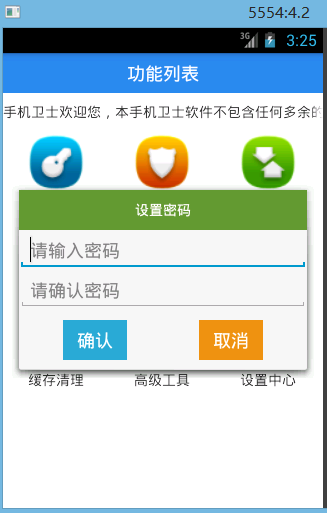
HomeActivity.java
    /**
     * 打開手機防盜的對話框
     */
    protected void startMobileSec() {
        String password=sp.getString("password", "");
        //設置密碼
        if(TextUtils.isEmpty(password)){
            AlertDialog.Builder builder=new Builder(this);
            View view=View.inflate(this, R.layout.dialog_setup_password, null);
            builder.setView(view);
            builder.show();
        }else{
            //輸入密碼

        }
    }
dialog_setup_password.xml
<?xml version="1.0" encoding="utf-8"?>
<LinearLayout xmlns:android="http://schemas.android.com/apk/res/android"
    android:layout_width="300dp"
    android:layout_height="wrap_content"
    android:gravity="center_horizontal"
    android:orientation="vertical" >

    <TextView
        android:background="#669933"
        android:textColor="#fff"
        android:layout_width="match_parent"
        android:layout_height="40dp"
        android:gravity="center"
        android:text="設置密碼" />
    <EditText
        android:layout_width="290dp"
        android:layout_height="wrap_content"
        android:hint="請輸入密碼"/>
    <EditText
        android:layout_width="290dp"
        android:layout_height="wrap_content"
        android:hint="請確認密碼"/>
    <RelativeLayout
        android:layout_marginTop="10dp"
        android:layout_marginBottom="10dp"
        android:gravity="center_horizontal"
        android:layout_width="200dp"
        android:layout_height="wrap_content">
        <Button
            android:layout_alignParentLeft="true"
            android:background="#2aabd2"
            android:textColor="#fff"
            android:layout_width="wrap_content"
            android:layout_height="40dp"
            android:text="確認"/>
        <Button
            android:layout_alignParentRight="true"
            android:background="#eb9316"
            android:textColor="#fff"
            android:layout_width="wrap_content"
            android:layout_height="40dp"
            android:text="取消"/>
    </RelativeLayout>

</LinearLayout>
 Android 網絡圖片查看器,
Android 網絡圖片查看器,今天來實現一下android下的一款簡單的網絡圖片查看器 界面如下: 代碼如下: <LinearLayout xmlns:and
 Andriod React Native 樣式表中可用樣式屬性
Andriod React Native 樣式表中可用樣式屬性 寫了這麼多篇Android React Native的博文,基本上把復雜的東西都搞定了,接下來來看看一
 49.Android 各種Span
49.Android 各種Span 49.Android 各種Span Android 各種Span 前言 SpannableStringBuilder URLSpan
 Android JNI簡介,androidjni簡介
Android JNI簡介,androidjni簡介JNI簡介 JNI (Java Native Interface),Java的本地接口 &nb