編輯:關於android開發
TabHost是Android中自帶的選項卡控件,效果圖如下:
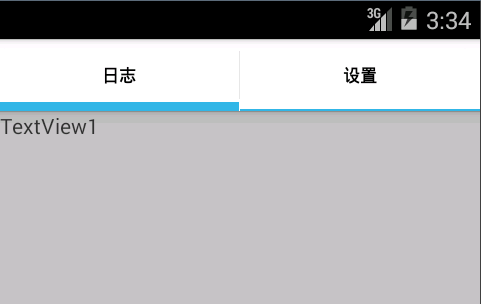
主布局文件
<RelativeLayout xmlns:android="http://schemas.android.com/apk/res/android"
    xmlns:tools="http://schemas.android.com/tools"
    android:layout_width="match_parent"
    android:layout_height="match_parent"
    tools:context=".MainActivity" >

    <TabHost
        android:id="@+id/tabhost"
        android:layout_width="match_parent"
        android:layout_height="match_parent"
        android:layout_alignParentLeft="true"
        android:layout_alignParentTop="true" >

        <LinearLayout
            android:layout_width="match_parent"
            android:layout_height="match_parent"
            android:orientation="vertical" >

            <TabWidget
                android:id="@android:id/tabs"
                android:layout_width="match_parent"
                android:layout_height="wrap_content" >
            </TabWidget>

            <FrameLayout
                android:id="@android:id/tabcontent"
                android:layout_width="match_parent"
                android:layout_height="match_parent"
                android:orientation="vertical" >

                <LinearLayout
                    android:id="@+id/tab1"
                    android:layout_width="match_parent"
                    android:layout_height="match_parent"
                    android:orientation="vertical" >
                </LinearLayout>

                <LinearLayout
                    android:id="@+id/tab2"
                    android:layout_width="match_parent"
                    android:layout_height="match_parent"
                    android:orientation="vertical">
                </LinearLayout>

                <LinearLayout
                    android:id="@+id/tab3"
                    android:layout_width="match_parent"
                    android:layout_height="match_parent"
                    android:orientation="vertical" >
                </LinearLayout>
            </FrameLayout>
        </LinearLayout>
    </TabHost>

</RelativeLayout>
核心代碼:
package com.tabhost;

import android.os.Bundle;
import android.app.Activity;
import android.app.ActivityGroup;
import android.content.Intent;
import android.view.Menu;
import android.view.Window;
import android.widget.TabHost;

public class MainActivity extends ActivityGroup {


    private TabHost mTabHost;

      protected void onCreate(Bundle savedInstanceState) {
        super.onCreate(savedInstanceState);
        this.requestWindowFeature(Window.FEATURE_NO_TITLE);
        setContentView(R.layout.activity_main);
        // 設置TabHost
        initTabs();
      }

      private void initTabs() {
        mTabHost = (TabHost) findViewById(R.id.tabhost);
        mTabHost.setup(this.getLocalActivityManager());
        // 添加日志列表的tab,注意下面的setContent中的代碼.是這個需求實現的關鍵
        mTabHost.addTab(mTabHost.newTabSpec("tab_log")
          .setIndicator("日志",getResources().getDrawable(R.drawable.login_bg))
          .setContent(new Intent(this, LogActivity.class)));

        // 添加應用設置的tab,注意下面的setContent中的代碼.是這個需求實現的關鍵
        mTabHost.addTab(mTabHost.newTabSpec("tab_setting")
          .setIndicator("設置",getResources().getDrawable(R.drawable.ic_launcher))
          .setContent(new Intent(this, SettingActivity.class)));
        mTabHost.setCurrentTab(1);
      }

}
兩個子頁面很簡單,兩個Activity以及對應布局。
 Android-ViewPager的使用
Android-ViewPager的使用 Android-ViewPager的使用 ViewPager是安卓App很常用的工具類,通常是用來設置界面導航,比如微信,QQ
 我的Android第二課,Android
我的Android第二課,Android 嗨!各位,小編又和大家分享知識啦,在昨天的博客筆記中小編給大家講解了如何去配置Android工具以及
 百度地圖開發的學習(一),百度地圖開發學習
百度地圖開發的學習(一),百度地圖開發學習由於項目需求緣故,最近在學習Android地圖的開發,所以就記錄一下學習過程。最近都會陸續更新啦。目前使用百度地圖API的挺多的
 Genymotion 下載安裝常見錯誤一條龍,genymotion常見錯誤
Genymotion 下載安裝常見錯誤一條龍,genymotion常見錯誤Genymotion 安卓模擬器確實比安卓原生的模擬器快,但是除了快就找不到其他優點了... 曾