編輯:開發入門
在 android 中呈現 RSS 數據
現在,RSS 提要中的 XML 數據安全地保存在內存中 RSSFeed 的實例中,該實例使用一個方便的 List 結構包含了許多 RSSItem。RSS 閱讀器的目的就是管理數據並以一種整潔的方式呈現給用戶。在這裡,Android 用戶界面代碼和各種資源將進行交互。本節將介紹 android 用戶界面的實現以及顯示 RSS 數據的方式。
主用戶界面
RSSReader 應用程序的啟動 Activity 是 RSSReader 類。Activity 的入口點是 onCreate 方法。該方法負責啟動用戶界面,在某些情形下,例如在本例中,除創建用戶界面外,它還將發起後續操作。查看 RSSReader.Java 中的 onCreate 方法,如清單 8 所示,可以看到應用程序的結構非常簡單。
清單 8. The RSSReader 的 onCreate 方法
    private RSSFeed feed = null;

    public void onCreate(Bundle icicle) {
        super.onCreate(icicle);
        setContentVIEw(R.layout.main);

        // go get our feed!
        feed = getFeed(RSSFEEDOFCHOICE);

        // display UI
        UpdateDisplay();

    }
onCreate 方法執行以下三個功能:
R.layout.main 確定的用戶界面並呈現 main.XML 中包含的布局。getFeed() 方法創建一個 RSSFeed 類的實例。UpdateDisplay() 方法更新用戶界面以反映 RSS 提要內容。用戶界面布局
RSSReader Activity 的用戶界面包括兩個 TextView 和一個 ListView。TextView 顯示通道標題和發布日期,而 ListVIEw 顯示 RSSFeed 中的 RSSItems 列表。
清單 9 包含了 Activity 主用戶界面的布局。
清單 9. main.XML 包含 RSSReader Activity 的用戶界面定義
<?xml version="1.0" encoding="utf-8"?>
<LinearLayout XMLns:android="http://schemas.android.com/apk/res/android"
    android:orientation="vertical"
    android:layout_width="fill_parent"
    android:layout_height="fill_parent"
    >
<TextView
    android:layout_width="fill_parent"
    android:layout_height="wrap_content"
    android:text="Android RSSReader"
    android:id="@+id/feedtitle"
    />
<TextView
    android:layout_width="fill_parent"
    android:layout_height="wrap_content"
    android:text=""
    android:id="@+id/feedpubdate"
    />
<ListVIEw
    android:layout_width="fill_parent"
    android:layout_height="fill_parent"
    android:id="@+id/itemlist"

    />
</LinearLayout>
main.XML 中的布局具有非常簡單的用戶界面視圖。注意每個視圖中出現的 android:id 屬性。這樣做是有其意義的,因為應用程序將動態更新每個視圖的內容。
呈現
查看清單 10 中的 UpdateDisplay 方法,了解 RSSFeed 數據如何連接到用戶界面。RSSFeed 類的實例現在包含 RSS 數據。執行UpdateDisplay 方法,獲取 RSS 數據並通過 android 用戶界面呈現。
清單 10. UpdateDisplay 方法將數據連接到用戶界面
    private void UpdateDisplay()
    {
        TextView feedtitle = (TextView) findViewById(R.id.feedtitle);
        TextView feedpubdate = (TextView) findViewById(R.id.feedpubdate);
        ListView itemlist = (ListView) findVIEwById(R.id.itemlist);


        if (feed == null)
        {
            feedtitle.setText("No RSS Feed Available");
            return;
        }

        feedtitle.setText(feed.getTitle());
        feedpubdate.setText(feed.getPubDate());


ArrayAdapter<RSSItem> adapter = new
    ArrayAdapter<RSSItem>(this,android.R.layout.
    simple_list_item_1,feed.getAllItems());

        itemlist.setAdapter(adapter);

        itemlist.setSelection(0);

        itemlist.setOnItemClickListener(this);


    }
查看清單 10,UpdateDisplay 方法通過 findVIEwById() 方法將兩個 TextView 對象和一個 ListVIEw 對象連接到布局,並分別傳入標識符。
如果 RSSFeed 為 null,該方法將顯示一條消息表示 RSS 提要可用。
通道標題和發布日期分別使用 TextVIEw 對象顯示。
RSSItems 列表
要將 RSSItems 列表連接到 ListVIEw,需要創建一個 ArrayAdapter類的實例。構建這個參數化的類是為了管理 RSSItem 類型的項。列表布局由內置的資源 simple_list_item_1 管理,該內置資源實質上是一個列表,其中每個條目支持一行文本。還需通過 RSSFeed 類的getAllItems() 方法傳遞 RSSFeed 中的所有 RSSItem 條目的列表。上文提到過,RSSItem 類覆蓋了默認的 toString() 方法,允許ArrayAdapter 獲得有意義的表示以便在 ListView 中顯示。清單 11 顯示這個方法如何實現相同的格式化以確保文本恰當地嵌入到 ListVIEw 中。
清單 11. 覆蓋 RSSItem 類的默認的 toString() 方法
    public String toString()
    {
        // limit how much text you display
        if (_title.length() > 42)
        {
            return _title.substring(0, 42) + "...";
        }
        return _title;
    }
ArrayAdapter 被分配給 ListVIEw,並且通過使用參數 0 調用 setSelection 選擇了第一個條目。
最後,您需要使用 setOnItemClickListener 方法創建一個偵聽器來響應項選擇事件。RSSReader 類實現 OnItemClickListener 界面:public class RSSReader extends Activity implements OnItemClickListener。
偵聽器功能由 onItemClick 方法實現,如清單 12 所示。
清單 12. onItemClick 實現
public void onItemClick(AdapterView parent, VIEw v, int position, long id)
     {
         Log.i(tag,"item clicked! [" + feed.getItem(position).getTitle() + "]");

         Intent itemintent = new Intent(this,ShowDescription.class);

         Bundle b = new Bundle();
         b.putString("title", feed.getItem(position).getTitle());
         b.putString("description", feed.getItem(position).getDescription());
         b.putString("link", feed.getItem(position).getLink());
         b.putString("pubdate", feed.getItem(position).getPubDate());

         itemintent.putExtra("android.intent.extra.INTENT", b);

         startSubActivity(itemintent,0);
     }
當選擇 ListVIEw 的某個項後,應用程序將顯示所選的 RSSItem 的 Description 元素。查看 onItemClick 中的代碼並注意以下三點:
ShowDescriptionActivity 在 ShowDescription.Java 中定義ShowDescription 行為,它可幫助應用程序實現同步功能ShowDescription
ShowDescription Activity 提供了所選 RSSItem 的下一層細節,如圖 2 所示。
圖 2. 所選 RSSItem 的下一層細節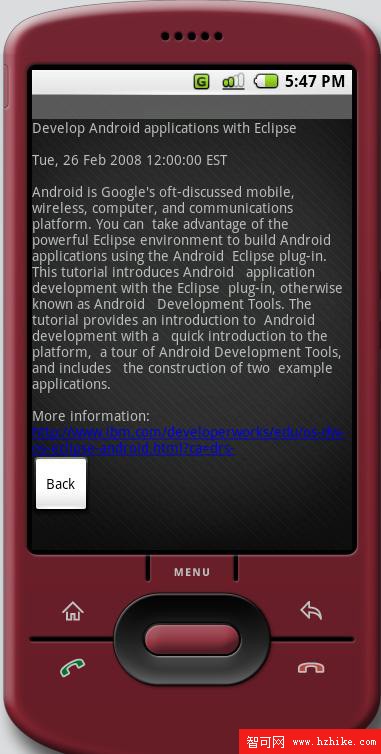
清單 13 列出了 ShowDescription 類。注意解除綁定 RSSItem 數據以及格式化用於用戶界面的字符串的過程。
清單 13. ShowDescription 行為
package com.msi.androidrss;

import android.app.Activity;
import android.os.Bundle;
import android.widget.Button;
import android.widget.TextView;
import android.content.Intent;
import android.view.*;

public class ShowDescription extends Activity
{
    public void onCreate(Bundle icicle)
    {
        super.onCreate(icicle);
        setContentVIEw(R.layout.showdescription);

        String theStory = null;


        Intent startingIntent = getIntent();

        if (startingIntent != null)
        {
            Bundle b = startingIntent.getBundleExtra("android.intent.extra.INTENT");
            if (b == null)
            {
                theStory = "bad bundle?";
            }
            else
            {
                theStory = b.getString("title") + "\n\n" + b.getString("pubdate")
				+ "\n\n" + b.getString("description").replace('\n',' ')
				+ "\n\nMore information:\n" + b.getString("link");
            }
        }
        else
        {
            theStory = "Information Not Found.";

        }

        TextView db= (TextView) findViewById(R.id.storybox);
        db.setText(theStory);

        Button backbutton = (Button) findViewById(R.id.back);

        backbutton.setOnClickListener(new Button.OnClickListener()
        {
            public void onClick(VIEw v)
            {
                finish();
            }
        });
    }
}
需要確保 Activity 沒有嘗試處理一個 null Bundle 或顯示錯誤的數據。確保變量 theStory 始終具有一個有效的值。
back 按鈕
代碼使用一個簡單的 Button OnClickListener 終止這個 Activity。由於這個 Activity 使用 startSubActivity() 方法啟動,因此調用 finish() 將導致控制權返回給調用的 Activity,即RSSReader。
注意,描述的文本表示包含一個超鏈接。android 通過屬性android:autoLink="all" 自動處理這一點,如清單 14 所示。
清單 14. ShowDescription.XML 定義 ShowDescription Activity 的用戶界面
<?xml version="1.0" encoding="utf-8"?>
<LinearLayout XMLns:android="http://schemas.android.com/apk/res/android"
    android:orientation="vertical"
    android:layout_width="fill_parent"
    android:layout_height="fill_parent"
    >
<TextVIEw
    android:layout_width="fill_parent"
    android:layout_height="wrap_content"
    android:autoLink="all"
    android:text="story goes here ...."
    android:id="@+id/storybox"
    />
<Button
    android:layout_width="wrap_content"
    android:layout_height="wrap_content"
    android:text="Back"
    android:id="@+id/back"
    />

</LinearLayout>
通過鏈接文本,使用 RSSItem 鏈接啟動 Web 站點是一個零代碼操作,如圖 3 和圖 4 所示。
圖 3. 文本中的 Web 站點引用將自動使用超鏈接
圖 4 展示了從 RSSItem 鏈接元素啟動的 Web 頁面。它演示了 RSS 的強大和高效性。在選擇提要項時,將顯示感興趣的主題。您將看到一些簡潔的摘要,如果這些內容提供了足夠的信息量,那麼就可以滿足您的需求。如果您希望查看更多的內容,那麼可以單擊鏈接,從而獲得更詳細的信息。
圖 4. 啟動 RSSItem 鏈接元素中的 Web 頁面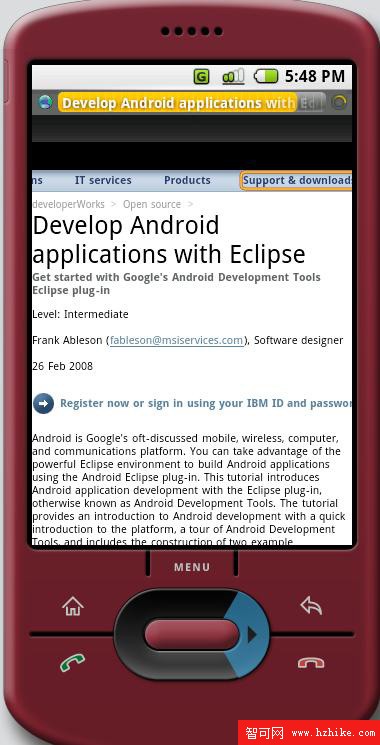
大功告成!您現在擁有了一個可以工作的 RSS 閱讀器!
擴展鉤子
在源代碼中,最後要查看的是用於設置菜單的 RSSReader.Java 文件。本教程沒有解決選擇和刷新 RSS 提要的問題,但是,您將看到提供了一些鉤子,用於在未來的教程中實現這些功能。清單 15 包含了兩個實現菜單行為的方法。
清單 15. 菜單處理方法
   public boolean onCreateOptionsMenu(Menu menu)
    {
        super.onCreateOptionsMenu(menu);

        menu.add(0,0,"Choose RSS Feed");
        menu.add(0,1,"Refresh");
        Log.i(tag,"onCreateOptionsMenu");
        return true;
    }

    public boolean onOptionsItemSelected(Menu.Item item){
        switch (item.getId()) {
        case 0:

            Log.i(tag,"Set RSS Feed");
            return true;
        case 1:
            Log.i(tag,"Refreshing RSS Feed");
            return true;
        }
        return false;
    }
在 Activity 生命周期中將調用一次 onCreateOptionsMenu(),它允許創建菜單項。該方法的第二個參數是菜單的惟一標識符。
當用戶選擇某個項時將調用 onOptionsItemSelected 方法。通過getId() 方法使用菜單項的標識符,可以簡單地響應特定的菜單選擇。
對功能進行擴展超出了本教程的討論范圍;這些方法可以作為增強 android RSS 閱讀器的起點!
結束語
本教程演示了如何為 android 構建一個 RSS 閱讀器應用程序。通過對 RSS 數據提要結構的討論,我們發現 SAX 解析方法非常適合 RSS version 2.0 的簡單 XML 結構。使用 SAX 處理 XML 數據時,由回調處理程序使用的五種方法保證了解析 RSS 數據的效率。在解析和組織 RSS 數據時,可通過一個定制的視圖呈現數據。對於感興趣的讀者,本教程還提供了一些鉤子,以便將這個示例應用程序進一步擴展為一個功能更豐富的 RSS 閱讀器。
 Android 開發簡介之一:Android 簡史
簡介黑莓和 iPhone 都提供了受歡迎的、高容量的移動平台,但是卻分別針對兩個不同的消費群體。黑莓是企業業務用戶的不二選擇。但是,作為一種消費設備,它在易用性和 “新
 智能交通之路(一)
公共交通減少了交通擁擠和由此產生的污染。同時還降低了用戶的壓力水平和需要支付的費用。現在許多 Web 站點和移動應用程序幫助全球各個城市的乘客,購物者和游客成為合乎道德
 使用 Android 實現聯網(二)
環境監控系統在這個場景中,我們假設您是企業所在的若干辦公場所的資產管理員。管理資產與管理數據中心沒有太大的差別 — 一般情況下都很枯燥,只有出現緊急的情況下工作才會比較
 Android 開發簡介之三:編寫一個基本的應用程序
編寫一個基本的應用程序本節展示如何構建一個 Android 應用程序。示例應用程序非常簡單:一個修改後的 “Hello android” 應用程序。您將進行一個微小的修