編輯:Android編程入門
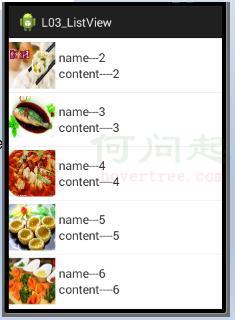
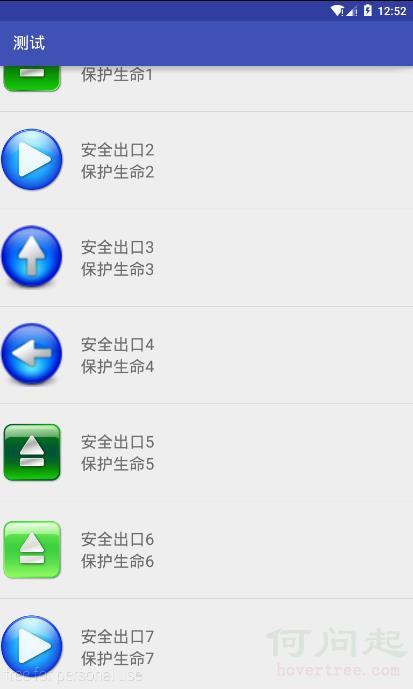
SimpleAdapter:可顯示文字加圖片
activity_activitysimple.xml
<?xml version="1.0" encoding="utf-8"?>
<LinearLayout xmlns:android="http://schemas.android.com/apk/res/android"
    android:layout_width="match_parent"
    android:layout_height="120dp"
    >

    <ImageView
        android:layout_width="80dp"
        android:layout_height="80dp"
        android:src="@drawable/anniu5"
        android:layout_gravity="center_vertical"
        android:id="@+id/iv_1"/>
    <LinearLayout
        android:layout_width="match_parent"
        android:layout_height="wrap_content"
        android:orientation="vertical"
        android:layout_gravity="center_vertical"
        android:layout_marginLeft="20dp"
        >
        <TextView
            android:layout_width="wrap_content"
            android:layout_height="wrap_content"
            android:text="生命可貴"
            android:textSize="20dp"
            android:id="@+id/tv_1"/>
        <TextView
            android:layout_width="wrap_content"
            android:layout_height="wrap_content"
            android:text="安全出口"
            android:textSize="20dp"
            android:id="@+id/tv_2"/>


    </LinearLayout>


</LinearLayout>
Activitysimple.java
package com.example.chenshuai.test321;

import android.os.Bundle;
import android.support.v7.app.AppCompatActivity;
import android.widget.ListView;
import android.widget.SimpleAdapter;

import java.util.ArrayList;
import java.util.HashMap;
import java.util.List;
import java.util.Map;

public class Activitysimple extends AppCompatActivity {

    @Override
    protected void onCreate(Bundle savedInstanceState) {
        super.onCreate(savedInstanceState);
        setContentView(R.layout.activity_activitysimple);

        ListView simple_1 = (ListView)findViewById(R.id.simple_1);

        //准備數據源
        List<Map<String,Object>> im = new ArrayList<Map<String,Object>>();

        Map<String,Object> map = new HashMap<String,Object>();

        map.put("image",R.drawable.anniu3);
        map.put("name","安全出口1");
        map.put("content","保護生命1");
        im.add(map);

        map = new HashMap<String,Object>();
        map.put("image",R.drawable.anniu4);
        map.put("name","安全出口2");
        map.put("content", "保護生命2");
        im.add(map);

        map = new HashMap<String,Object>();
        map.put("image",R.drawable.anniu5);
        map.put("name","安全出口3");
        map.put("content", "保護生命3");
        im.add(map);

        map = new HashMap<String,Object>();
        map.put("image",R.drawable.anniu6);
        map.put("name","安全出口4");
        map.put("content", "保護生命4");
        im.add(map);

        map = new HashMap<String,Object>();
        map.put("image",R.drawable.anniu7);
        map.put("name","安全出口5");
        map.put("content", "保護生命5");
        im.add(map);

        map = new HashMap<String,Object>();
        map.put("image",R.drawable.anniu8);
        map.put("name","安全出口6");
        map.put("content", "保護生命6");
        im.add(map);

        map = new HashMap<String,Object>();
        map.put("image",R.drawable.anniu9);
        map.put("name","安全出口7");
        map.put("content", "保護生命7");
        im.add(map);

        map = new HashMap<String,Object>();
        map.put("image",R.drawable.anniu10);
        map.put("name","安全出口8");
        map.put("content", "保護生命8");
        im.add(map);


        //1.數據源裡key的數組
        String str[] = {"image","name","content"};

        //2.layout文件裡面子視圖的id  key與value相對應
        int[] viewid = {R.id.iv_1,R.id.tv_1,R.id.tv_2};

        SimpleAdapter simpleAdapter = new SimpleAdapter(this,im,R.layout.simple_layout,str,viewid);

        simple_1.setAdapter(simpleAdapter);
    }
}
 Android 意圖(Intent)和過濾器(Filter)
Android 意圖(Intent)和過濾器(Filter)Android意圖是一個要執行的操作的抽象描述。它可以通過 startActivity 來啟動
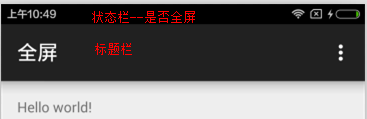 全屏 標題欄 狀態欄
requestWindowFeature(Window.FEATURE_NO_TITLE);getWindow().addFlags(WindowManager.Layo
 Android開發學習之路-Android Studio真神器!
放假之後電腦配置升級就開始用Android Studio(下面簡稱AS)了,那個酸爽真的不是一般的啊,這裡開一篇博客來記錄下AS裡面各種酷炫的功能,有更好玩的,大家不要吝
 Android自定義SurfaceView實現雪花效果
實現雪花的效果其實也可以通過自定義View的方式來實現的(SurfaceView也是繼承自View的),而且操作上也相對簡單一些,當然也有一些