編輯:Android開發實例
今天看到一個ios寫的圖靈機器人,直接去官網(http://www.tuling123.com/openapi/)看了下API接入,太簡單了,就一個get請求~於是乎,寫了一個Android版本的機器人,沒什麼技術含量,但是挺好玩的~剛好昨晚看了自己喜歡的秦時明月,嘿嘿,小貔貅,就是我的機器人寵物啦~
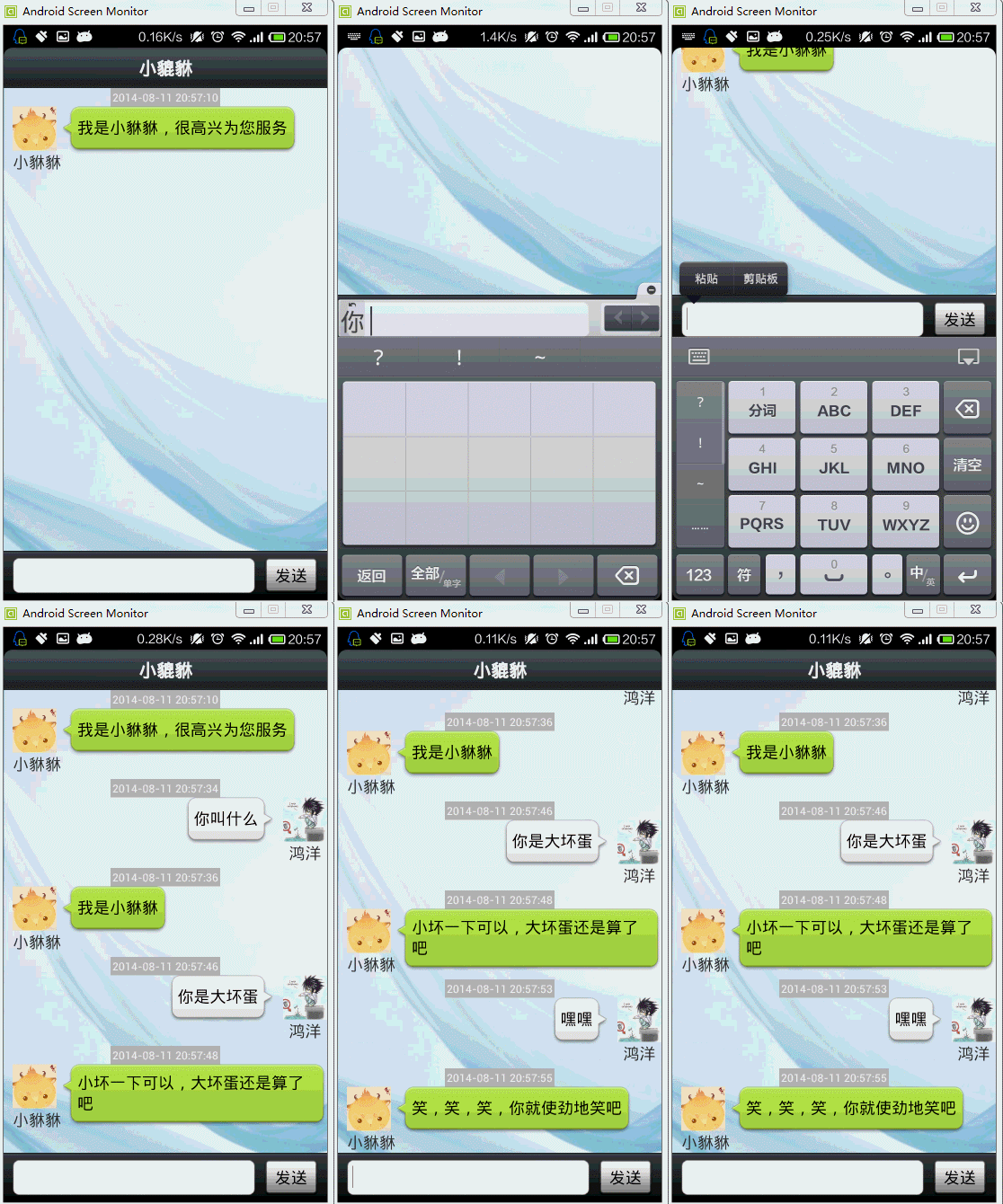
這是一個安卓智能聊天機器人的源碼,采用了仿微信的風格設計,調用的是圖靈機器人的API,能夠實現智能聊天、講故事、講笑話、查天氣、查公交等豐富的功能。
先給大家展示效果圖:
下面是代碼片段,想要源碼的小伙伴可在下面留言留下你的郵箱地址
package com.example.android_robot_;
import java.util.ArrayList;
import java.util.Date;
import java.util.List;
import android.app.Activity;
import android.content.Context;
import android.os.Bundle;
import android.os.Handler;
import android.os.Message;
import android.text.TextUtils;
import android.view.View;
import android.view.Window;
import android.view.inputmethod.InputMethodManager;
import android.widget.EditText;
import android.widget.ListView;
import android.widget.Toast;
import com.example.android_robot_.bean.ChatMessage;
import com.example.android_robot_.bean.ChatMessage.Type;
import com.zhy.utils.HttpUtils;
public class MainActivity extends Activity
{
    /**
     * 展示消息的listview
     */
    private ListView mChatView;
    /**
     * 文本域
     */
    private EditText mMsg;
    /**
     * 存儲聊天消息
     */
    private List mDatas = new ArrayList();
    /**
     * 適配器
     */
    private ChatMessageAdapter mAdapter;
    private Handler mHandler = new Handler()
    {
        public void handleMessage(android.os.Message msg)
        {
            ChatMessage from = (ChatMessage) msg.obj;
            mDatas.add(from);
            mAdapter.notifyDataSetChanged();
            mChatView.setSelection(mDatas.size() - );
        };
    };
    <a href="http://home.cto.com/index.php?s=/space/" target="_blank">@Override</a>
    protected void onCreate(Bundle savedInstanceState)
    {
        super.onCreate(savedInstanceState);
        requestWindowFeature(Window.FEATURE_NO_TITLE);
        setContentView(R.layout.main_chatting);
        initView();
        mAdapter = new ChatMessageAdapter(this, mDatas);
        mChatView.setAdapter(mAdapter);
    }
    private void initView()
    {
        mChatView = (ListView) findViewById(R.id.id_chat_listView);
        mMsg = (EditText) findViewById(R.id.id_chat_msg);
        mDatas.add(new ChatMessage(Type.INPUT, "我是小貅貅,很高興為您服務"));
    }
    public void sendMessage(View view)
    {
        final String msg = mMsg.getText().toString();
        if (TextUtils.isEmpty(msg))
        {
            Toast.makeText(this, "您還沒有填寫信息呢...", Toast.LENGTH_SHORT).show();
            return;
        }
        ChatMessage to = new ChatMessage(Type.OUTPUT, msg);
        to.setDate(new Date());
        mDatas.add(to);
        mAdapter.notifyDataSetChanged();
        mChatView.setSelection(mDatas.size() - );
        mMsg.setText("");
        // 關閉軟鍵盤
        InputMethodManager imm = (InputMethodManager) getSystemService(Context.INPUT_METHOD_SERVICE);
        // 得到InputMethodManager的實例
        if (imm.isActive())
        {
            // 如果開啟
            imm.toggleSoftInput(InputMethodManager.SHOW_IMPLICIT,
                    InputMethodManager.HIDE_NOT_ALWAYS);
            // 關閉軟鍵盤,開啟方法相同,這個方法是切換開啟與關閉狀態的
        }
        new Thread()
        {
            public void run()
            {
                ChatMessage from = null;
                try
                {
                    from = HttpUtils.sendMsg(msg);
                } catch (Exception e)
                {
                    from = new ChatMessage(Type.INPUT, "服務器掛了呢...");
                }
                Message message = Message.obtain();
                message.obj = from;
                mHandler.sendMessage(message);
            };
        }.start();
    }
}
以上代碼就是實現安卓聊天機器人的全部代碼,喜歡的朋友直接拿去用,在使用過程中發現有問題請隨時和我聯系。
 android底部菜單欄實現原理與代碼
上一個項目已經做完了,這周基本上沒事,所以整理了下以前的項目,想把一些通用的部分封裝起來,這樣以後遇到相似的項目就不用重復發明輪子了,也節省了開發效率。今天把de
 Android提高之Android手機與BLE終端通信
最近穿戴設備發展得很火,把相關技術也帶旺了,其中一項是BLE(Bluetooth Low Energy)。BLE是藍牙4.0的核心Profile,主打功能是快速搜
 Android MediaPlayer(多媒體播放)
Android提供了許多方法來控制播放的音頻/視頻文件和流。其中該方法是通過一類稱為MediaPlayer。Android是提供MediaPlayer類訪問內置的媒體播放
 Android手機衛士(一):實現splash
從今天開始根據之前學習的android的基礎知識,實戰一下,實現一個簡單功能的android手機衛士。 手機衛士的主要功能如下: 什麼是Spla