編輯:Android開發實例
本文實例講述了Android編程之SMS讀取短信並保存到SQLite的方法。分享給大家供大家參考,具體如下:
Android 之 SMS 短信在Android系統中是保存在SQLite數據庫中的,但不讓其它程序訪問(Android系統的安全機制)
現在我們在讀取手機內的SMS短信,先保存在我們自己定義的SQLite數據庫中,然後讀取SQLite數據庫提取短信,並顯示
SMS短信SQLite存取代碼:
package com.homer.sms;
import java.sql.Date;
import java.text.SimpleDateFormat;
import org.loon.wsi.R;
import android.app.Activity;
import android.content.Context;
import android.database.Cursor;
import android.database.sqlite.SQLiteDatabase;
import android.graphics.Color;
import android.net.Uri;
import android.os.Bundle;
import android.util.Log;
import android.widget.TableLayout;
import android.widget.TableRow;
import android.widget.TableRow.LayoutParams;
import android.widget.TextView;
/**
 * 讀取手機短信, 先保存到SQLite數據,然後再讀取數據庫顯示
 *
 * @author sunboy_2050
 * @since http://blog.csdn.net/sunboy_2050
 * @date 2012.03.06
 */
public class smsRead4 extends Activity {
 TableLayout tableLayout;
 int index = 0;
 @Override
 public void onCreate(Bundle savedInstanceState) {
  super.onCreate(savedInstanceState);
  setContentView(R.layout.main);
  tableLayout = (TableLayout) findViewById(R.id.tableLayout);
  showSMS();
 }
 private void showSMS() {
  SmsHander smsHander = new SmsHander(this);
  smsHander.createSMSDatabase(); // 創建SQLite數據庫
  smsHander.insertSMSToDatabase(); // 讀取手機短信,插入SQLite數據庫
  Cursor cursor = smsHander.querySMSInDatabase(100); // 獲取前100條短信(日期排序)
  cursor.moveToPosition(-1);
  while (cursor.moveToNext()) {
   String strAddress = cursor.getString(cursor.getColumnIndex("address"));
   String strDate = cursor.getString(cursor.getColumnIndex("date"));
   String strBody = cursor.getString(cursor.getColumnIndex("body"));
   SimpleDateFormat dateFormat = new SimpleDateFormat("yyyy-MM-dd HH:mm:ss");
   Date date = new Date(Long.parseLong(strDate));
   strDate = dateFormat.format(date);
   String smsTitle = strAddress + "\t\t" + strDate;
   String smsBody = strBody + "\n";
   Log.i("tableRow", smsTitle + smsBody);
   // title Row
   TableRow trTitle = new TableRow(this);
   trTitle.setLayoutParams(new LayoutParams(LayoutParams.WRAP_CONTENT, LayoutParams.WRAP_CONTENT));
   TextView tvTitle = new TextView(this);
   tvTitle.setText(smsTitle);
   tvTitle.getPaint().setFakeBoldText(true); // 加粗字體
   tvTitle.setTextColor(Color.RED);
   tvTitle.setLayoutParams(new LayoutParams(LayoutParams.WRAP_CONTENT, LayoutParams.WRAP_CONTENT));
   trTitle.addView(tvTitle);
   tableLayout.addView(trTitle, new TableLayout.LayoutParams(LayoutParams.FILL_PARENT, LayoutParams.WRAP_CONTENT));
   // body Row
   TableRow trBody = new TableRow(this);
   trBody.setLayoutParams(new LayoutParams(LayoutParams.WRAP_CONTENT, LayoutParams.WRAP_CONTENT));
   TextView tvBody = new TextView(this);
   tvBody.setText(smsBody);
   tvBody.setLayoutParams(new LayoutParams(LayoutParams.WRAP_CONTENT, LayoutParams.WRAP_CONTENT));
   trBody.addView(tvBody);
   tableLayout.addView(trBody, new TableLayout.LayoutParams(LayoutParams.FILL_PARENT, LayoutParams.WRAP_CONTENT));
  }
  if (!cursor.isClosed()) {
   cursor.close();
   cursor = null;
  }
  smsHander.closeSMSDatabase();
  index = 0;
 }
 public class SmsHander {
  SQLiteDatabase db;
  Context context;
  public SmsHander(Context context) {
   this.context = context;
  }
  public void createSMSDatabase() {
   String sql = "create table if not exists sms("
     + "_id integer primary key autoincrement,"
     + "address varchar(255)," + "person varchar(255),"
     + "body varchar(1024)," + "date varchar(255),"
     + "type integer)";
   db = SQLiteDatabase.openOrCreateDatabase(context.getFilesDir().toString() + "/data.db3", null); // 創建數據庫
   db.execSQL(sql);
  }
  // 獲取手機短信
  private Cursor getSMSInPhone() {
   Uri SMS_CONTENT = Uri.parse("content://sms/");
   String[] projection = new String[] { "_id", "address", "person", "body", "date", "type" };
   Cursor cursor = context.getContentResolver().query(SMS_CONTENT, projection, null, null, "date desc"); // 獲取手機短信
   while (cursor.moveToNext()) {
    System.out.println("--sms-- : " + cursor.getString(cursor.getColumnIndex("body")));
   }
   return cursor;
  }
  // 保存手機短信到 SQLite 數據庫
  public void insertSMSToDatabase() {
   Long lastTime;
   Cursor dbCount = db.rawQuery("select count(*) from sms", null);
   dbCount.moveToFirst();
   if (dbCount.getInt(0) > 0) {
    Cursor dbcur = db.rawQuery("select * from sms order by date desc limit 1", null);
    dbcur.moveToFirst();
    lastTime = Long.parseLong(dbcur.getString(dbcur.getColumnIndex("date")));
   } else {
    lastTime = new Long(0);
   }
   dbCount.close();
   dbCount = null;
   Cursor cur = getSMSInPhone(); // 獲取短信(游標)
   db.beginTransaction(); // 開始事務處理
   if (cur.moveToFirst()) {
    String address;
    String person;
    String body;
    String date;
    int type;
    int iAddress = cur.getColumnIndex("address");
    int iPerson = cur.getColumnIndex("person");
    int iBody = cur.getColumnIndex("body");
    int iDate = cur.getColumnIndex("date");
    int iType = cur.getColumnIndex("type");
    do {
     address = cur.getString(iAddress);
     person = cur.getString(iPerson);
     body = cur.getString(iBody);
     date = cur.getString(iDate);
     type = cur.getInt(iType);
     if (Long.parseLong(date) > lastTime) {
      String sql = "insert into sms values(null, ?, ?, ?, ?, ?)";
      Object[] bindArgs = new Object[] { address, person, body, date, type };
      db.execSQL(sql, bindArgs);
     } else {
      break;
     }
    } while (cur.moveToNext());
    cur.close();
    cur = null;
    db.setTransactionSuccessful(); // 設置事務處理成功,不設置會自動回滾不提交
    db.endTransaction(); // 結束事務處理
   }
  }
  // 獲取 SQLite 數據庫中的全部短信
  public Cursor querySMSFromDatabase() {
   String sql = "select * from sms order by date desc";
   return db.rawQuery(sql, null);
  }
  // 獲取 SQLite 數據庫中的最新 size 條短信
  public Cursor querySMSInDatabase(int size) {
   String sql;
   Cursor dbCount = db.rawQuery("select count(*) from sms", null);
   dbCount.moveToFirst();
   if (size < dbCount.getInt(0)) { // 不足 size 條短信,則取前 size 條
    sql = "select * from sms order by date desc limit " + size;
   } else {
    sql = "select * from sms order by date desc";
   }
   dbCount.close();
   dbCount = null;
   return db.rawQuery(sql, null);
  }
  // 獲取 SQLite數據庫的前 second秒短信
  public Cursor getSMSInDatabaseFrom(long second) {
   long time = System.currentTimeMillis() / 1000 - second;
   String sql = "select * from sms order by date desc where date > " + time;
   return db.rawQuery(sql, null);
  }
  // 關閉數據庫
  public void closeSMSDatabase() {
   if (db != null && db.isOpen()) {
    db.close();
    db = null;
   }
  }
 }
}
運行結果:
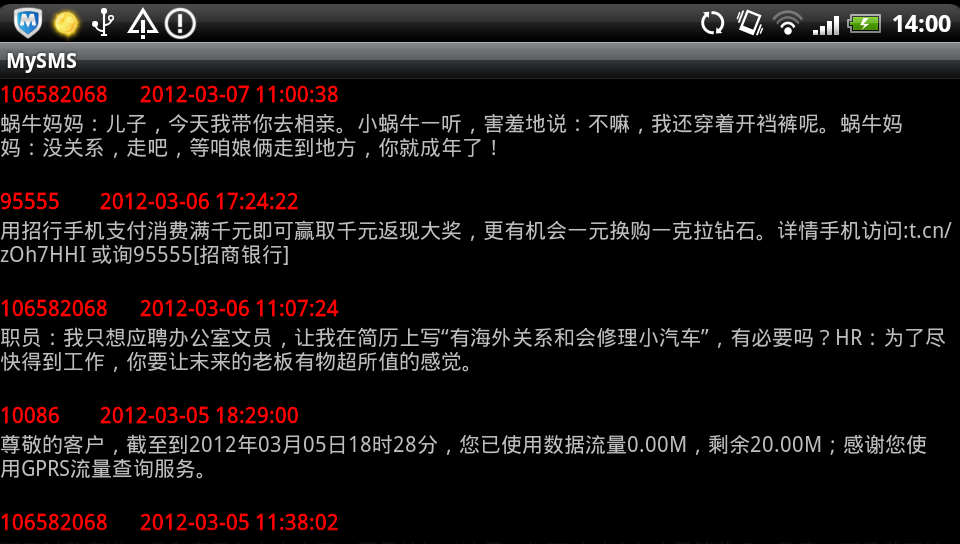
完整實例代碼代碼點擊此處本站下載。
希望本文所述對大家Android程序設計有所幫助。
 使用ViewPager實現左右循環滑動及滑動跳轉
前面一篇文章實現了使用ViewPager實現高仿launcher拖動效果 ,後來很多朋友問能不能實現左右循環滑動效果和引導頁面。今天實現了左右滑動,至於在最後一頁
 Android APK文件在電腦(PC虛擬機)上面運行方法
APK是Android系統的發布的工程包,很多時候我們想在電腦上而非Android手機上面運行它。下面就提供下Android APK文件在電腦上面運行方法。 首先
 Android中實現Webview頂部帶進度條的方法
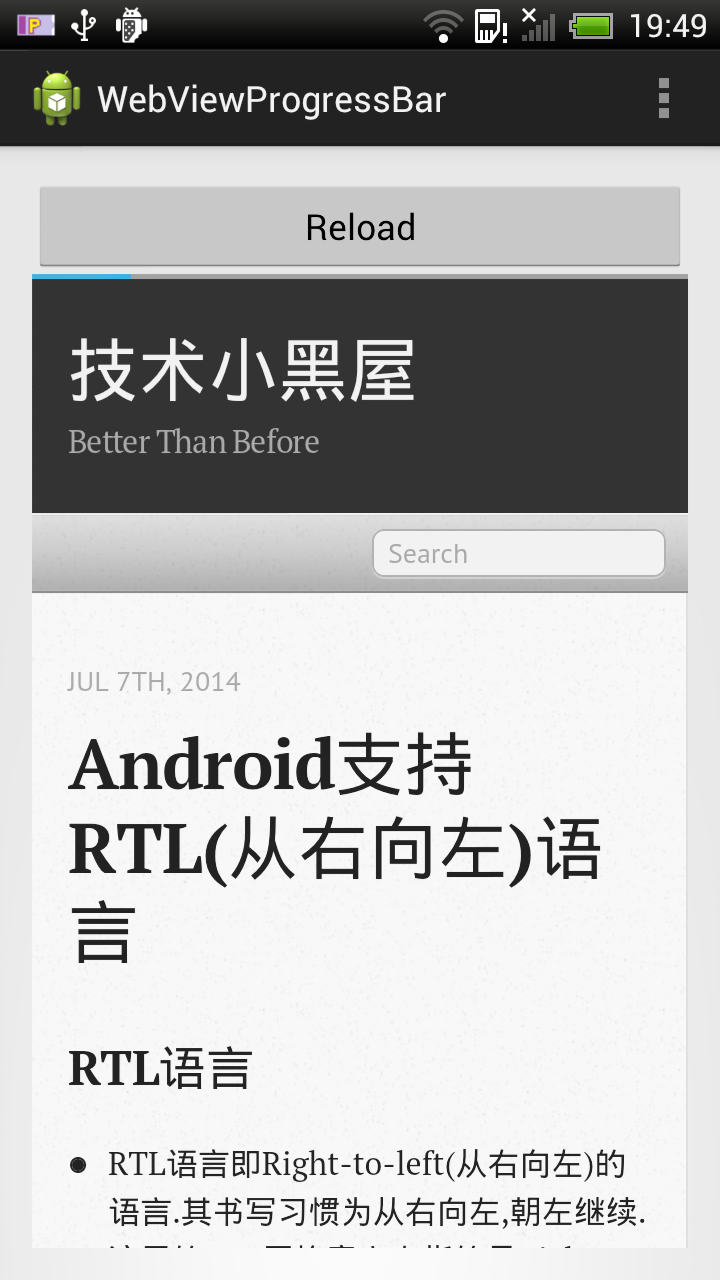
寫這篇文章,做份備忘,簡單滴展示一個帶進度條的Webview示例,進度條位於Webview上面. 示例圖如下: 主Activity代碼: 代碼如下: packa
 Android本地化
Android應用程序可以在許多不同地區的許多設備上運行。為了使應用程序更具交互性,應用程序應該處理以適合應用程序將要使用的語言環境方面的文字,數字,文件等。在本章中,我