編輯:Android開發實例
Android對這種方法進行了封裝,我們沒有權限去調用這個方法,所以我們只能通過AIDL,然後利用Java的反射機制去調用系統級的方法。
下面上代碼:(注釋比較詳細)
/**
  * 作用:-----獲取包的大小-----
  * @param context 上下文
  * @param pkgName app的包名
  * @param appInfo 實體類,用於存放App的某些信息
  */
 public static void getPkgSize(final Context context, String pkgName, final PhoneAppInfo appInfo) {
  // getPackageSizeInfo是PackageManager中的一個private方法,所以需要通過反射的機制來調用
  Method method;
  try {
   method = PackageManager.class.getMethod("getPackageSizeInfo",
     new Class[]{String.class, IPackageStatsObserver.class});
   // 調用 getPackageSizeInfo 方法,需要兩個參數:1、需要檢測的應用包名;2、回調
   method.invoke(context.getPackageManager(), pkgName,
     new IPackageStatsObserver.Stub() {
      @Override
      public void onGetStatsCompleted(PackageStats pStats, boolean succeeded) throws RemoteException {
       if (succeeded && pStats != null) {
        synchronized (PhoneAppInfo.class) {
         appInfo.setCatchSize(pStats.cacheSize);//緩存大小
         appInfo.setDataSize(pStats.dataSize); //數據大小
         appInfo.setCodeSize(pStats.codeSize); //應用大小
         appInfo.setAppSize(pStats.cacheSize + pStats.codeSize + pStats.dataSize);//應用的總大小
         Log.d("asdasdxx",appInfo.getAppSize()+"");
        }
       }
      }
     });
  } catch (NoSuchMethodException | InvocationTargetException | IllegalAccessException e) {
   e.printStackTrace();
  }
 }
下面是兩個AIDL文件的代碼。。。
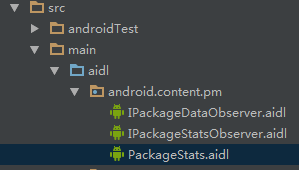
步驟(Android Studio):
1、在main文件夾下,建立一個aidl文件夾的文件夾
2、建立一個包,包名為android.content.pm
3、結構圖
*******PackageStats.aidl文件***************
/* //device/java/android/android/view/WindowManager.aidl
**
** Copyright 2007, The Android Open Source Project
**
** Licensed under the Apache License, Version 2.0 (the "License");
** you may not use this file except in compliance with the License.
** You may obtain a copy of the License at
**
**  http://www.apache.org/licenses/LICENSE-2.0
**
** Unless required by applicable law or agreed to in writing, software
** distributed under the License is distributed on an "AS IS" BASIS,
** WITHOUT WARRANTIES OR CONDITIONS OF ANY KIND, either express or implied.
** See the License for the specific language governing permissions and
** limitations under the License.
*/
package android.content.pm;
parcelable PackageStats;
****************IPackageStatusObserver.aidl******************
/*
**
** Copyright 2007, The Android Open Source Project
**
** Licensed under the Apache License, Version 2.0 (the "License");
** you may not use this file except in compliance with the License.
** You may obtain a copy of the License at
**
**  http://www.apache.org/licenses/LICENSE-2.0
**
** Unless required by applicable law or agreed to in writing, software
** distributed under the License is distributed on an "AS IS" BASIS,
** WITHOUT WARRANTIES OR CONDITIONS OF ANY KIND, either express or implied.
** See the License for the specific language governing permissions and
** limitations under the License.
*/
package android.content.pm;
import android.content.pm.PackageStats;
/**
 * API for package data change related callbacks from the Package Manager.
 * Some usage scenarios include deletion of cache directory, generate
 * statistics related to code, data, cache usage(TODO)
 * {@hide}
 */
oneway interface IPackageStatsObserver {
 void onGetStatsCompleted(in PackageStats pStats, boolean succeeded);
}
 Android輸入框控件ClearEditText實現清除功能
這篇文章主要為大家詳細介紹了Android輸入框控件ClearEditText實現清除功能,感興趣的小伙伴們可以參考一下 本文給大家帶來
 Android加載Spinner
可以顯示在的Android任務,通過加載進度條的進展。進度條有兩種形狀。加載欄和加載微調(spinner)。在本章中,我們將討論微調(spinner)。Spinner 用
 Android JSON解析器
JSON代表JavaScript對象符號。它是一個獨立的數據交換格式,是XML的最佳替代品。本章介紹了如何解析JSON文件,並從中提取所需的信息。Android提供了四個
 Android仿QQ登陸窗口實現原理
今天根據騰訊qq,我們做一個練習,來學習如何制作一個漂亮的布局。首先看一下官方圖片 還是一個啟動畫面,之後進入登錄頁面,導航頁面就不介紹了,大家可以參考微信的導