編輯:Android開發實例
一般而言在Android上使用JAVA實現彩圖轉換為灰度圖,與J2ME上的實現方法類似,不過遇到頻繁地轉換或者是大圖轉換時,就必須使用NDK來提高速度了。本文主要通過JAVA和NDK這兩種方式來分別實現彩圖轉換為灰度圖,並給出速度的對比,供大家參考。
先來簡單地介紹一下Android的NDK使用步驟:
以NDK r4為例,或許以後新版的NDK的使用方法略有不同。
1、下載支持C++的android-ndk-r4-crystax,支持C++的話可玩性更強。
2、下載cygwin,選擇ftp://mirrors.kernel.org這個鏡像,搜索 Devel Install 安裝 gcc 和 make 等工具;
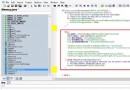
如圖所示:
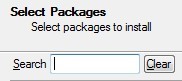
在搜索框裡分別搜索gcc和make,必須是 Devel Install 欄的。
3、Cygwin安裝目錄下,找到home/username的目錄下的.bash_profile文件,打開文件在最後加上:
NDK=/cygdrive/d:cygwin/android-ndk-r4-crystax
export NDK
PS:假設安裝在D:/cygwin/android-ndk-r4-crystax。
4、運行cygwin,通過cd命令去到NDK/samples/例子目錄/,運行$NDK/ndk-build來編譯該目錄下的Android.mk
以下是個人習慣
5、安裝Eclipse的CDT,官方下載cdt安裝包,解壓縮後把plugins和feagures 復制覆蓋到eclipse文件夾下即可
6、去到系統屬性->環境變量->Path添加"D:/cygwin/bin"(假設cygwin安裝在D:下)和"D:/cygwin/android-ndk-r4-crystax",重啟計算機,然後就可以在Eclipse裡面建立基於cygwin的C/C++工程了,先通過這一步來驗證NDK的程序能夠編譯成功,然後再通過第4步來生成SO文件。
接下來看看本文程序運行的效果:
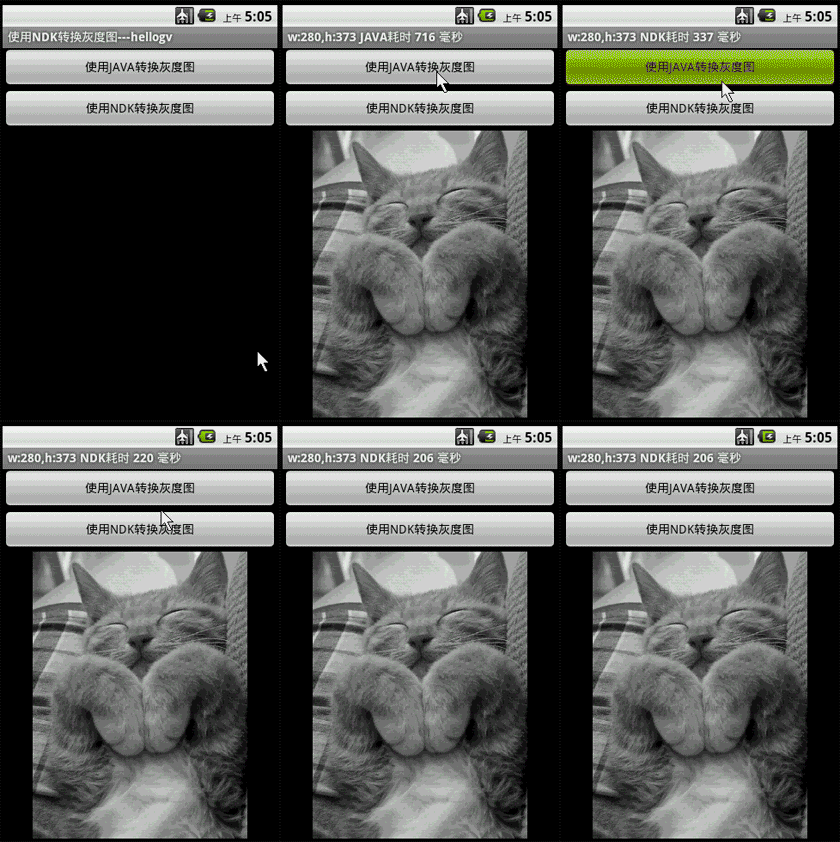
從轉換灰度圖的耗時來說,NDK的確比JAVA所用的時間短不少。
main.xml源碼如下:
<?xml version="1.0" encoding="utf-8" ?>
- <LinearLayout xmlns:android="http://schemas.android.com/apk/res/android" android:orientation="vertical" android:layout_width="fill_parent" android:layout_height="fill_parent">
<Button android:layout_height="wrap_content" android:layout_width="fill_parent" android:id="@+id/btnJAVA" android:text="使用JAVA轉換灰度圖" />
<Button android:layout_height="wrap_content" android:layout_width="fill_parent" android:id="@+id/btnNDK" android:text="使用NDK轉換灰度圖" />
<ImageView android:id="@+id/ImageView01" android:layout_width="fill_parent" android:layout_height="fill_parent" />
</LinearLayout>
主程序testToGray.java的源碼如下:
package com.testToGray;
import android.app.Activity;
import android.graphics.Bitmap;
import android.graphics.Bitmap.Config;
import android.graphics.drawable.BitmapDrawable;
import android.os.Bundle;
import android.view.View;
import android.widget.Button;
import android.widget.ImageView;
public class testToGray extends Activity {
  /** Called when the activity is first created. */
  Button btnJAVA,btnNDK;
  ImageView imgView;
  @Override
  public void onCreate(Bundle savedInstanceState) {
    super.onCreate(savedInstanceState);
    setContentView(R.layout.main);
    this.setTitle("使用NDK轉換灰度圖---hellogv");
    btnJAVA=(Button)this.findViewById(R.id.btnJAVA);
    btnJAVA.setOnClickListener(new ClickEvent());

    btnNDK=(Button)this.findViewById(R.id.btnNDK);
    btnNDK.setOnClickListener(new ClickEvent());
    imgView=(ImageView)this.findViewById(R.id.ImageView01);
  }
  class ClickEvent implements View.OnClickListener{
    @Override
    public void onClick(View v) {
      if(v==btnJAVA)
      {
        long current=System.currentTimeMillis();
        Bitmap img=ConvertGrayImg(R.drawable.cat);
        long performance=System.currentTimeMillis()-current;
        //顯示灰度圖
        imgView.setImageBitmap(img);
        testToGray.this.setTitle("w:"+String.valueOf(img.getWidth())+",h:"+String.valueOf(img.getHeight())
            +" JAVA耗時 "+String.valueOf(performance)+" 毫秒");
      }
      else if(v==btnNDK)
      {
        long current=System.currentTimeMillis();
        //先打開圖像並讀取像素
        Bitmap img1=((BitmapDrawable) getResources().getDrawable(R.drawable.cat)).getBitmap();
        int w=img1.getWidth(),h=img1.getHeight();
        int[] pix = new int[w * h];
        img1.getPixels(pix, 0, w, 0, 0, w, h);
        //通過ImgToGray.so把彩色像素轉為灰度像素
        int[] resultInt=LibFuns.ImgToGray(pix, w, h);
        Bitmap resultImg=Bitmap.createBitmap(w, h, Config.RGB_565);
        resultImg.setPixels(resultInt, 0, w, 0, 0,w, h);
        long performance=System.currentTimeMillis()-current;
        //顯示灰度圖
        imgView.setImageBitmap(resultImg);
        testToGray.this.setTitle("w:"+String.valueOf(img1.getWidth())+",h:"+String.valueOf(img1.getHeight())
            +" NDK耗時 "+String.valueOf(performance)+" 毫秒");
      }
    }
  }

  /**
   * 把資源圖片轉為灰度圖
   * @param resID 資源ID
   * @return
   */
  public Bitmap ConvertGrayImg(int resID)
  {
    Bitmap img1=((BitmapDrawable) getResources().getDrawable(resID)).getBitmap();

    int w=img1.getWidth(),h=img1.getHeight();
    int[] pix = new int[w * h];
    img1.getPixels(pix, 0, w, 0, 0, w, h);
    int alpha=0xFF<<24;
    for (int i = 0; i < h; i++) {
      for (int j = 0; j < w; j++) {
        // 獲得像素的顏色
        int color = pix[w * i + j];
        int red = ((color & 0x00FF0000) >> 16);
        int green = ((color & 0x0000FF00) >> 8);
        int blue = color & 0x000000FF;
        color = (red + green + blue)/3;
        color = alpha | (color << 16) | (color << 8) | color;
        pix[w * i + j] = color;
      }
    }
    Bitmap result=Bitmap.createBitmap(w, h, Config.RGB_565);
    result.setPixels(pix, 0, w, 0, 0,w, h);
    return result;
  }
}
封裝NDK函數的JAVA類LibFuns.java的源碼如下:
package com.testToGray;
public class LibFuns {
  static {
    System.loadLibrary("ImgToGray");
  }
  /**
  * @param width the current view width
  * @param height the current view height
  */
  public static native int[] ImgToGray(int[] buf, int w, int h);
}
彩圖轉換為灰度圖的ImgToGray.cpp源碼:
#include <jni.h>
#include <stdio.h>
#include <stdlib.h>
extern "C" {
JNIEXPORT jintArray JNICALL Java_com_testToGray_LibFuns_ImgToGray(
    JNIEnv* env, jobject obj, jintArray buf, int w, int h);
}
;
JNIEXPORT jintArray JNICALL Java_com_testToGray_LibFuns_ImgToGray(
    JNIEnv* env, jobject obj, jintArray buf, int w, int h) {
  jint *cbuf;
  cbuf = env->GetIntArrayElements(buf, false);
  if (cbuf == NULL) {
    return 0; /* exception occurred */
  }
  int alpha = 0xFF << 24;
  for (int i = 0; i < h; i++) {
    for (int j = 0; j < w; j++) {
      // 獲得像素的顏色
      int color = cbuf[w * i + j];
      int red = ((color & 0x00FF0000) >> 16);
      int green = ((color & 0x0000FF00) >> 8);
      int blue = color & 0x000000FF;
      color = (red + green + blue) / 3;
      color = alpha | (color << 16) | (color << 8) | color;
      cbuf[w * i + j] = color;
    }
  }
  int size=w * h;
  jintArray result = env->NewIntArray(size);
  env->SetIntArrayRegion(result, 0, size, cbuf);
  env->ReleaseIntArrayElements(buf, cbuf, 0);
  return result;
}
Android.mk的源碼:
LOCAL_PATH:= $(call my-dir)
include $(CLEAR_VARS)
LOCAL_MODULE  := ImgToGray
LOCAL_SRC_FILES := ImgToGray.cpp
include $(BUILD_SHARED_LIBRARY)
感興趣的讀者可以動手調試一下本文所述代碼,相信會對大家進行Android項目開發有一定的幫助。
 基於Android實現ListView圓角效果
本文演示如何在Android中實現ListView圓角效果。 無論是網站,還是APP,人們都愛看一些新穎的視圖效果。直角看多了,就想看看圓角,這幾年刮起了一陣陣的圓角設
 Android實現獲取SD卡總容量,可用大小,機身內存總容量及可用大小的方法
本文實例講述了Android實現獲取SD卡總容量,可用大小,機身內存總容量及可用大小的方法。分享給大家供大家參考,具體如下: 可能有的同學不知道系統已經提供了獲取
 Android編程之單元測試實例分析
本文實例講述了Android編程之單元測試用法。分享給大家供大家參考,具體如下: 在實際開發中,開發android軟件的過程需要不斷地進行測試。使用Junint測
 Android登錄實例
登錄應用程序的屏幕,詢問憑據登錄到一些特定的應用。可能需要登錄到Facebook,微博等本章介紹了,如何創建一個登錄界面,以及如何管理安全問題和錯誤嘗試。首先,必須定義兩