編輯:Android開發實例
前文簡單介紹了Android中SurfaceView的基本使用,本文就來介紹一下SurfaceView與多線程的混搭。SurfaceView與多線程混搭,是為了防止動畫閃爍而實現的一種多線程應用。android的多線程用法與JAVA的多線程用法完全一樣,本文不做多線程方面的介紹了。直接講解SurfaceView與多線程的混合使用,即開一條線程專門讀取圖片,另外一條線程專門繪圖。
本文程序運行截圖如下,左邊是開單個線程讀取並繪圖,右邊是開兩個線程,一個專門讀取圖片,一個專門繪圖:
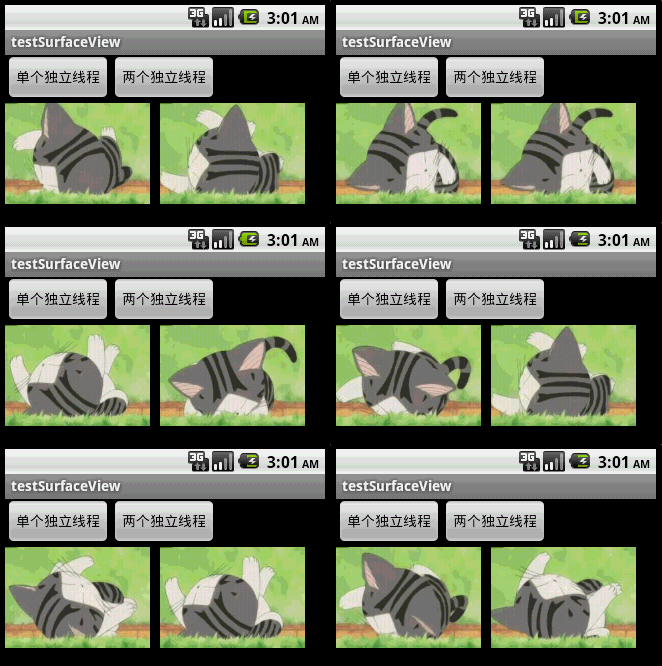
對比一下可以看出,右邊動畫的幀速明顯比左邊的快,左右兩者都沒使用Thread.sleep()。為什麼要開兩個線程一個讀一個畫,而不去開兩個線程像左邊那樣都“邊讀邊畫”呢?因為SurfaceView每次繪圖都會鎖定Canvas,也就是說同一片區域這次沒畫完下次就不能畫,因此要提高動畫播放的效率,就得開一條線程專門畫圖,開另外一條線程做預處理的工作。
main.xml的源碼如下:
<?xml version="1.0" encoding="utf-8"?>
<LinearLayout xmlns:android="http://schemas.android.com/apk/res/android"
 android:layout_width="fill_parent" android:layout_height="fill_parent"
 android:orientation="vertical">

 <LinearLayout android:id="@+id/LinearLayout01"
 android:layout_width="wrap_content" android:layout_height="wrap_content">
 <Button android:id="@+id/Button01" android:layout_width="wrap_content"
  android:layout_height="wrap_content" android:text="單個獨立線程"></Button>
 <Button android:id="@+id/Button02" android:layout_width="wrap_content"
  android:layout_height="wrap_content" android:text="兩個獨立線程"></Button>
 </LinearLayout>
 <SurfaceView android:id="@+id/SurfaceView01"
 android:layout_width="fill_parent" android:layout_height="fill_parent"></SurfaceView>
</LinearLayout>
Java程序的源碼如下:
package com.testSurfaceView;
import java.lang.reflect.Field;
import java.util.ArrayList;
import android.app.Activity;
import android.graphics.Bitmap;
import android.graphics.BitmapFactory;
import android.graphics.Canvas;
import android.graphics.Paint;
import android.graphics.Rect;
import android.os.Bundle;
import android.util.Log;
import android.view.SurfaceHolder;
import android.view.SurfaceView;
import android.view.View;
import android.widget.Button;

public class testSurfaceView extends Activity {
 /** Called when the activity is first created. */
 Button btnSingleThread, btnDoubleThread;
 SurfaceView sfv;
 SurfaceHolder sfh;
 ArrayList<Integer> imgList = new ArrayList<Integer>();
 int imgWidth, imgHeight;
 Bitmap bitmap;//獨立線程讀取,獨立線程繪圖

 @Override
 public void onCreate(Bundle savedInstanceState) {
 super.onCreate(savedInstanceState);
 setContentView(R.layout.main);

 btnSingleThread = (Button) this.findViewById(R.id.Button01);
 btnDoubleThread = (Button) this.findViewById(R.id.Button02);
 btnSingleThread.setOnClickListener(new ClickEvent());
 btnDoubleThread.setOnClickListener(new ClickEvent());
 sfv = (SurfaceView) this.findViewById(R.id.SurfaceView01);
 sfh = sfv.getHolder();
 sfh.addCallback(new MyCallBack());// 自動運行surfaceCreated以及surfaceChanged
 }

 class ClickEvent implements View.OnClickListener {

 @Override
 public void onClick(View v) {

  if (v == btnSingleThread) {
  new Load_DrawImage(0, 0).start();//開一條線程讀取並繪圖
  } else if (v == btnDoubleThread) {
  new LoadImage().start();//開一條線程讀取
  new DrawImage(imgWidth + 10, 0).start();//開一條線程繪圖
  }
 }
 }
 class MyCallBack implements SurfaceHolder.Callback {
 @Override
 public void surfaceChanged(SurfaceHolder holder, int format, int width,
  int height) {
  Log.i("Surface:", "Change");
 }
 @Override
 public void surfaceCreated(SurfaceHolder holder) {
  Log.i("Surface:", "Create");
  // 用反射機制來獲取資源中的圖片ID和尺寸
  Field[] fields = R.drawable.class.getDeclaredFields();
  for (Field field : fields) {
  if (!"icon".equals(field.getName()))// 除了icon之外的圖片
  {
   int index = 0;
   try {
   index = field.getInt(R.drawable.class);
   } catch (IllegalArgumentException e) {
   // TODO Auto-generated catch block
   e.printStackTrace();
   } catch (IllegalAccessException e) {
   // TODO Auto-generated catch block
   e.printStackTrace();
   }
   // 保存圖片ID
   imgList.add(index);
  }
  }
  // 取得圖像大小
  Bitmap bmImg = BitmapFactory.decodeResource(getResources(),
   imgList.get(0));
  imgWidth = bmImg.getWidth();
  imgHeight = bmImg.getHeight();
 }
 @Override
 public void surfaceDestroyed(SurfaceHolder holder) {
  Log.i("Surface:", "Destroy");
 }
 }
 /*
 * 讀取並顯示圖片的線程
 */
 class Load_DrawImage extends Thread {
 int x, y;
 int imgIndex = 0;

 public Load_DrawImage(int x, int y) {
  this.x = x;
  this.y = y;
 }
 public void run() {
  while (true) {
  Canvas c = sfh.lockCanvas(new Rect(this.x, this.y, this.x
   + imgWidth, this.y + imgHeight));
  Bitmap bmImg = BitmapFactory.decodeResource(getResources(),
   imgList.get(imgIndex));
  c.drawBitmap(bmImg, this.x, this.y, new Paint());
  imgIndex++;
  if (imgIndex == imgList.size())
   imgIndex = 0;
  sfh.unlockCanvasAndPost(c);// 更新屏幕顯示內容
  }
 }
 };
 /*
 * 只負責繪圖的線程
 */
 class DrawImage extends Thread {
 int x, y;
 public DrawImage(int x, int y) {
  this.x = x;
  this.y = y;
 }
 public void run() {
  while (true) {
  if (bitmap != null) {//如果圖像有效
   Canvas c = sfh.lockCanvas(new Rect(this.x, this.y, this.x
    + imgWidth, this.y + imgHeight));

   c.drawBitmap(bitmap, this.x, this.y, new Paint());

   sfh.unlockCanvasAndPost(c);// 更新屏幕顯示內容
  }
  }
 }
 };
 /*
 * 只負責讀取圖片的線程
 */
 class LoadImage extends Thread {
 int imgIndex = 0;
 public void run() {
  while (true) {
  bitmap = BitmapFactory.decodeResource(getResources(),
   imgList.get(imgIndex));
  imgIndex++;
  if (imgIndex == imgList.size())//如果到盡頭則重新讀取
   imgIndex = 0;
  }
 }
 };
}
希望本文所述示例能對大家進行Android的SurfaceView與多線程的混搭編程有所幫助。
 Android加載Spinner
可以顯示在的Android任務,通過加載進度條的進展。進度條有兩種形狀。加載欄和加載微調(spinner)。在本章中,我們將討論微調(spinner)。Spinner 用
 Android中的Handler與多線程應用實例
本文首先解釋一下handler是用來干嘛的,然後通過例子介紹其在多線程中的應用。 什麼是Handler handler通俗一點講就是用來在各個進程之間發送數據的處
 Android提高之模擬信號示波器的實現
前面簡單地介紹了Android程序開發中AudioRecord和AudioTrack的使用,這次再結合SurfaceView實現一個Android版的手機模擬信號
 Android JSON解析器
JSON代表JavaScript對象符號。它是一個獨立的數據交換格式,是XML的最佳替代品。本章介紹了如何解析JSON文件,並從中提取所需的信息。Android提供了四個