編輯:Android資訊
Android Notification在每一個Android應用開發中基本都會遇到,它可以按指定的規則向用戶推送一些消息,是一項非常實用的功能。本文主要介紹了Android Notification 用法的4種形式,希望可以對各位Android開發者有所幫助。
實現通知一般有以下幾個步驟:
Notification一般有幾種用途:,如下圖
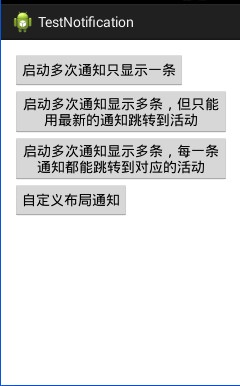
如果有很多通知的內容一樣,為了不影響系統通知顯示的列表過多,可以進行計數堆積,只顯示一條,代碼如下:
btn1.setOnClickListener(new View.OnClickListener() {
            @Override
            public void onClick(View v) {
                count++;
                //從系統服務中獲得通知管理器
                NotificationManager nm=(NotificationManager)MainActivity.this.getSystemService(Context.NOTIFICATION_SERVICE);
                //定義notification
                Notification n=new Notification(R.drawable.ic_launcher,"我是通知提示",System.currentTimeMillis());
                n.flags=Notification.FLAG_AUTO_CANCEL;
                n.number=count;
                //通知消息與Intent關聯
                Intent it=new Intent(MainActivity.this,Second.class);
                it.putExtra("name", "name:"+count);
                PendingIntent pi=PendingIntent.getActivity(MainActivity.this, 100, it, PendingIntent.FLAG_CANCEL_CURRENT);
                //具體的通知內容
                n.setLatestEventInfo(MainActivity.this, "標題", "啟動多次通知只顯示一條",pi);
                //執行通知
                nm.notify(1, n);

            }
        });
點擊4次後,效果如下:
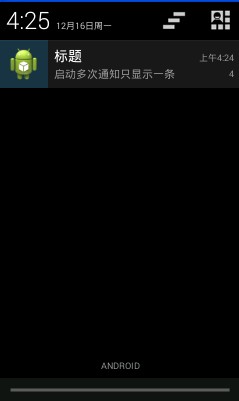
這是由於nm.notify(1,n)的requestCode全相同導致的。
btn2.setOnClickListener(new View.OnClickListener() {
            @Override
            public void onClick(View v) {
                count++;
                //從系統服務中獲得通知管理器
                NotificationManager nm=(NotificationManager)MainActivity.this.getSystemService(Context.NOTIFICATION_SERVICE);
                //定義notification
                Notification n=new Notification(R.drawable.ic_launcher,"我是通知提示",System.currentTimeMillis());
                n.flags=Notification.FLAG_AUTO_CANCEL;
                n.number=count;
                //通知消息與Intent關聯
                Intent it=new Intent(MainActivity.this,Second.class);
                it.putExtra("name", "name:"+count);
                PendingIntent pi=PendingIntent.getActivity(MainActivity.this, 100, it, PendingIntent.FLAG_CANCEL_CURRENT);
                //具體的通知內容
                n.setLatestEventInfo(MainActivity.this, "標題", "啟動多次通知顯示多條,但只能用最新的通知跳轉到活動",pi);
                //執行通知
                nm.notify(count, n);

            }
        });
結果如下:
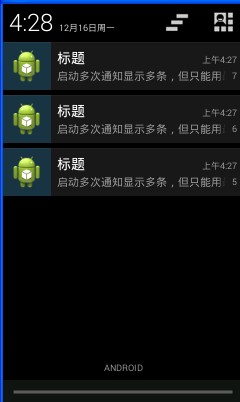
點擊第5,6條通知均不會跳轉,只有點擊第7條才可跳轉。
而這是由於PendingIntent的RequestCode相同而導致的。
btn3.setOnClickListener(new View.OnClickListener() {
            @Override
            public void onClick(View v) {
                count++;
                //從系統服務中獲得通知管理器
                NotificationManager nm=(NotificationManager)MainActivity.this.getSystemService(Context.NOTIFICATION_SERVICE);
                //定義notification
                Notification n=new Notification(R.drawable.ic_launcher,"我是通知提示",System.currentTimeMillis());
                n.flags=Notification.FLAG_AUTO_CANCEL;
                n.number=count;
                //通知消息與Intent關聯
                Intent it=new Intent(MainActivity.this,Second.class);
                it.putExtra("name", "name:"+count);
                PendingIntent pi=PendingIntent.getActivity(MainActivity.this, count, it, PendingIntent.FLAG_CANCEL_CURRENT);
                //具體的通知內容
                n.setLatestEventInfo(MainActivity.this, "標題", "啟動多次通知顯示多條,每一條通知都能跳轉到對應的活動",pi);
                //執行通知
                nm.notify(count, n);

            }
        });
由於nm.notify(count,n)的code每次都不一樣,相當於為每一個通知關聯了一個屬於自己的intent,結果和上圖一致,只是每一個通知都可跳轉至對應活動。
下圖中的第一條通知就是自定義的:
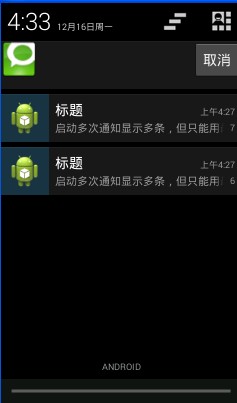
自定義布局方式的通知和普通的方式唯一的區別就是加載了一個RemoteView,片段如下:
RemoteViews rv=new RemoteViews(MainActivity.this.getPackageName(),R.layout.notify);
                n.contentView=rv;
                //通知消息與Intent關聯
                Intent it=new Intent(MainActivity.this,Second.class);
                it.putExtra("name", "name:"+count);
                PendingIntent pi=PendingIntent.getActivity(MainActivity.this, count, it, 0);
                n.contentIntent=pi;
這個自定義通知我本來想實現定義一個按鈕,點擊按鈕後取消通知。我的思路如下:
由於RemoteView並沒沒有類似findViewById的方法,所以我沒辦法找到新加載的布局文件上的控件,更沒辦法為其添加按鈕事件。
但是在關聯intent的時候,PendingIntent提供了較多的方法,其中主要有:
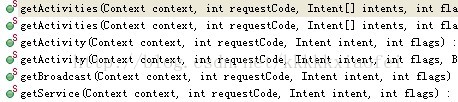
可以看到,可以關聯三大組件。
再者,RemoteView雖然沒有findViewById,但是他有setOnClickFillInIntent和setOnClickPendingIntent兩個方法
我先建立了一個廣播
//注冊廣播
        BroadcastReceiver b=new BroadcastReceiver(){
            @Override
            public void onReceive(Context context, Intent intent) {

                Toast.makeText(context, "button被點擊了", 3000).show();
            }

        };
        IntentFilter filter=new IntentFilter();
        filter.addAction("ONCLICK");
        this.registerReceiver(b, filter);
然後在nm.notify後繼續設置控件的事件
//執行通知
                nm.notify(count, n);
                //設置控件
                rv.setTextViewText(R.id.tv2, "我是自定義布局");

                Intent clickIntent=new Intent("ONCLICK");

                PendingIntent clickPending=PendingIntent.getBroadcast(MainActivity.this, count, clickIntent, 0);
                rv.setOnClickPendingIntent(R.id.cancel, clickPending);
結果並沒有執行,廣播根本沒接收到,我感覺代碼是沒有問題的,查看了下setOnClickPendingIntent,竟然說對LisetView等控件的事件不起作用,又查看了setOnClickFillInIntent,這個貌似有用,系統還推薦了另外一個與之類似的方法,由於level級別不夠,不能使用,我也就沒有驗證,應該是可以的,不然那麼多應用好看的通知都是咋做的啊,先記下來,以後有需求的時候好好研究下。
參考代碼:http://download.csdn.net/detail/kkkkkxiaofei/6723903
 再次探究Android ListView緩存機制
概述 雖然現在5.0後Google推出了RecycleView,但在5.0 Lollipop普及前Listview仍會被廣泛使用,所以打算再次探究一下Listvi
 很少有人會告訴你的 Android 開發基本常識
本文介紹Android開發過程中的一些基本常識,大多是一些流程、專業術語和解決問題的方法等。 軟件開發流程 一個完整的軟件開發流程離不開策劃、交互、視覺、軟件、測
 我是如何自學Android的 學習資料分享
自己學了兩三個月的Android,最近花了一周左右的時間寫了個App——Diigoer(已開源),又花了一兩周時間找工作,收到了兩個Offer,也算是對自己學習的
 Android UI控件系列:Dialog(對話框)
對話框是Android中不可或缺的,在使用對話框的時候,需要使用AlertDialog.Builder類。當然處理系統默認的對話框外,還可以自定義對話框,如果對話