編輯:關於Android編程
在眾多的社交類軟件中,朋友圈是必不可少的,可以與好友、同學等分享自己的日常和有意思的事情,在開發社交類App時,朋友圈發表的內容你不可能讓他全部顯示,全部顯示的話用戶體驗度會非常不好,這時就要用到全文、收縮的功能,朋友如果想要看你發的動態,只要點一下全文就可以查看所有的全部的內容了,如果不想看,也沒有必要把這一篇文章全部都滑到底部,才能看下一條內容。
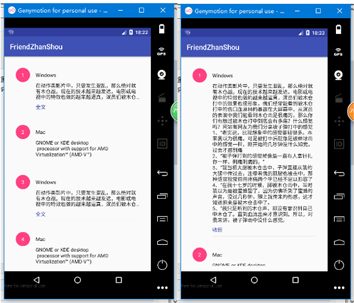
下邊將源碼貼出來供大家參考:(代碼不是最簡便的,但是功能是可以的)
首先寫一個布局,這個布局是每個子項的布局 item_text_list.xml
<?xml version="1.0" encoding="utf-8"?>
<LinearLayout xmlns:android="http://schemas.android.com/apk/res/android"
  android:layout_width="match_parent"
  android:layout_height="wrap_content"
  android:orientation="vertical"
  android:paddingBottom="@dimen/activity_vertical_margin"
  android:paddingLeft="@dimen/activity_horizontal_margin"
  android:paddingRight="@dimen/activity_horizontal_margin"
  android:paddingTop="@dimen/activity_vertical_margin">

  <LinearLayout
    android:layout_width="match_parent"
    android:layout_height="wrap_content"
    android:layout_gravity="center_vertical"
    android:orientation="horizontal">

    <TextView
      android:id="@+id/tv_hend"
      android:layout_width="40dp"
      android:layout_height="40dp"
      android:layout_marginRight="16dp"
      android:background="@drawable/circle"
      android:gravity="center"
      android:text="1"
      android:textColor="@android:color/white"
      android:textSize="14sp" />

    <TextView
      android:id="@+id/tv_name"
      android:layout_width="wrap_content"
      android:layout_height="wrap_content"
      android:alpha="0.87"
      android:text="丁先森"
      android:textColor="@android:color/black"
      android:textSize="14sp" />
  </LinearLayout>

  <LinearLayout
    android:layout_width="match_parent"
    android:layout_height="wrap_content"
    android:layout_marginLeft="56dp"
    android:orientation="vertical"
    android:paddingBottom="8dp">

    <TextView
      android:id="@+id/tv_content"
      android:layout_width="wrap_content"
      android:layout_height="wrap_content"
      android:layout_marginBottom="8dp"
      android:alpha="0.85"
      android:ellipsize="end"
      android:text=""
      android:textColor="@android:color/black"
      android:textSize="14sp" />

    <TextView
      android:id="@+id/tv_expand_or_collapse"
      android:layout_width="wrap_content"
      android:layout_height="wrap_content"
      android:text="全文"
      android:textColor="@color/colorPrimaryDark"
      android:textSize="14sp" />
  </LinearLayout>

  <View
    android:layout_width="match_parent"
    android:layout_height="0.5dp"
    android:layout_marginLeft="56dp"
    android:alpha="0.12"
    android:background="@android:color/black" />
</LinearLayout>
寫一個Util類,其實是存放的數據,也可以讀取數據庫,獲取JSON字符串,這裡為了實現功能就是用固定的數據
Util.class
package com.example.friendzhanshou;

/**
 * @author DingChao
 *     2017/2/10
 */

public class Util {
  private static String[] nameArray = new String[]{
      "Windows", "Mac", "Linux"
  };
  private static String[] contentArray = new String[]{
      "在動作類影片中,只要發生混亂,那麼絕對就有木倉戰。現在的技術越來越發達,電影或電視中的特效也做的越來越逼真,演員們被木倉打中的效果也很形象,我們經常能看到被木倉打中的傷口血淋林的暴露在大屏幕中,從演員的表演中我們能看到木倉擊是很痛的,那麼你們有想過被木倉打中到底會有多痛?什麼感覺嗎?網站有網友為我們分享被子彈打中的感覺\n" +
          "1、“老實說,比我想象中的感覺要輕很多。本來我以為很痛,可是被打中後就像是被棒球擊中的感覺一樣,剛開始的幾秒鐘沒什麼知覺,過會才感到痛\n" +
          "2、“被子彈打到的感覺就像是一直有人拿針扎你一樣,刺痛刺痛的。”\n" +
          "3、“我當初大腿被木倉擊中,子彈直接從我的大腿中傳過去,連帶著我的肌腱也被擊中,那種感覺我覺得用疼痛兩個字已經不足以形容了\n" +
          "4、“在我十七歲的時候,腳被木倉擊中,當時我以為是被蜜蜂蟄了,因為仿佛聽到了蜜蜂的聲音,沒過幾秒鐘,腳上就傳來灼熱感,這才知道原來是被木倉擊中了。\n" +
          "5、“我只是聽到的木倉聲,卻沒有意識到自己中木倉了。直到血流出來才意識到。所以,對我來講,被子彈擊中沒什麼感覺。"
     ,
      "GNOME or KDE desktop\n" +
          " processor with support for AMD Virtualization™ (AMD-V™)"


  };

  /**
   * 獲取文本內容根據下標
   *
   * @param position
   * @return
   */

  public static String getContent(int position) {
    return contentArray[position % contentArray.length];
  }

  /**
   * 獲取名稱根據下標
   *
   * @param position
   * @return
   */
  public static String getName(int position) {
    return nameArray[position % contentArray.length];
  }
}
設置適配器
TextListAdapter.class
package com.example.friendzhanshou;

import android.app.Activity;
import android.support.v7.widget.RecyclerView;
import android.util.SparseArray;
import android.view.View;
import android.view.ViewGroup;
import android.view.ViewTreeObserver;
import android.widget.Adapter;
import android.widget.TextView;

/**
 * @author DingChao
 *     2017/2/10
 */

  public class TextListAdapter extends RecyclerView.Adapter<TextListAdapter.TextHolder> {
  private Activity mContent;

  private final int MAX_LINE_COUNT = 3;

  private final int STATE_UNKNOW = -1;

  private final int STATE_NOT_OVERFLOW = 1;//文本行數不能超過限定行數

  private final int STATE_COLLAPSED = 2;//文本行數超過限定行數,進行折疊

  private final int STATE_EXPANDED = 3;//文本超過限定行數,被點擊全文展開

  private SparseArray<Integer> mTextStateList;

  public TextListAdapter(Activity context) {
    mContent = context;
    mTextStateList = new SparseArray<>();
  }

  @Override
  public TextHolder onCreateViewHolder(ViewGroup parent, int viewType) {
    return new TextHolder(mContent.getLayoutInflater().inflate(R.layout.item_test_list, parent, false));
  }

  @Override
  public void onBindViewHolder(final TextHolder holder,final int position) {
    holder.hend.setText(position+1+"");//設置頭部的文字
    holder.name.setText(Util.getName(position));//設置名稱
    int state=mTextStateList.get(position,STATE_UNKNOW);
//    如果該itme是第一次初始化,則取獲取文本的行數
    if (state==STATE_UNKNOW){
      holder.content.getViewTreeObserver().addOnPreDrawListener(new ViewTreeObserver.OnPreDrawListener() {
        @Override
        public boolean onPreDraw() {
//          這個回掉會調用多次,獲取玩行數後記得注銷監聽
          holder.content.getViewTreeObserver().removeOnPreDrawListener(this);
//          holder.content.getViewTreeObserver().addOnPreDrawListener(null);
//          如果內容顯示的行數大於限定顯示行數
          if (holder.content.getLineCount()>MAX_LINE_COUNT) {
            holder.content.setMaxLines(MAX_LINE_COUNT);//設置最大顯示行數
            holder.expandOrCollapse.setVisibility(View.VISIBLE);//讓其顯示全文的文本框狀態為顯示
            holder.expandOrCollapse.setText("全文");//設置其文字為全文
            mTextStateList.put(position, STATE_COLLAPSED);
          }else{
            holder.expandOrCollapse.setVisibility(View.GONE);//顯示全文隱藏
            mTextStateList.put(position,STATE_NOT_OVERFLOW);//讓其不能超過限定的行數
          }
          return true;
        }
      });

      holder.content.setMaxLines(Integer.MAX_VALUE);//設置文本的最大行數,為整數的最大數值
      holder.content.setText(Util.getContent(position));//用Util中的getContent方法獲取內容
    }else{
//      如果之前已經初始化過了,則使用保存的狀態,無需在獲取一次
      switch (state){
        case STATE_NOT_OVERFLOW:
          holder.expandOrCollapse.setVisibility(View.GONE);
          break;
        case STATE_COLLAPSED:
          holder.content.setMaxLines(MAX_LINE_COUNT);
          holder.expandOrCollapse.setVisibility(View.VISIBLE);
          holder.expandOrCollapse.setText("全文");
          break;
        case STATE_EXPANDED:
          holder.content.setMaxLines(Integer.MAX_VALUE);
          holder.expandOrCollapse.setVisibility(View.VISIBLE);
          holder.expandOrCollapse.setText("收起");
          break;
      }
      holder.content.setText(Util.getContent(position));
    }


//    設置顯示和收起的點擊事件
    holder.expandOrCollapse.setOnClickListener(new View.OnClickListener() {
      @Override
      public void onClick(View v) {
        int state=mTextStateList.get(position,STATE_UNKNOW);
        if (state==STATE_COLLAPSED){
          holder.content.setMaxLines(Integer.MAX_VALUE);
          holder.expandOrCollapse.setText("收起");
          mTextStateList.put(position,STATE_EXPANDED);
        }else if (state==STATE_EXPANDED){
          holder.content.setMaxLines(MAX_LINE_COUNT);
          holder.expandOrCollapse.setText("全文");
          mTextStateList.put(position,STATE_COLLAPSED);
        }
      }
    });

  }

  @Override
  public int getItemCount() {
    return 15;
  }


  public class TextHolder extends RecyclerView.ViewHolder {
    public TextView hend;
    public TextView name;
    public TextView content;
    public TextView expandOrCollapse;

    public TextHolder(View itemView) {
      super(itemView);
//      綁定xml布局中的控件
      hend = (TextView) itemView.findViewById(R.id.tv_hend);
      name = (TextView) itemView.findViewById(R.id.tv_name);
      content = (TextView) itemView.findViewById(R.id.tv_content);
      expandOrCollapse = (TextView) itemView.findViewById(R.id.tv_expand_or_collapse);
    }
  }
}
主布局的內容:
<?xml version="1.0" encoding="utf-8"?>
<RelativeLayout xmlns:android="http://schemas.android.com/apk/res/android"
  xmlns:tools="http://schemas.android.com/tools"
  android:id="@+id/activity_main"
  android:layout_width="match_parent"
  android:layout_height="match_parent"
  android:paddingBottom="@dimen/activity_vertical_margin"
  android:paddingLeft="@dimen/activity_horizontal_margin"
  android:paddingRight="@dimen/activity_horizontal_margin"
  android:paddingTop="@dimen/activity_vertical_margin"
  tools:context="com.example.friendzhanshou.MainActivity">

  <android.support.v7.widget.RecyclerView
    android:id="@+id/rv_text_list"
    android:layout_width="match_parent"
    android:layout_height="match_parent"></android.support.v7.widget.RecyclerView>
</RelativeLayout>
MainActivity中的代碼也很簡單,獲取空間,綁定數據源:
package com.example.friendzhanshou;

import android.support.v7.app.AppCompatActivity;
import android.os.Bundle;
import android.support.v7.widget.LinearLayoutManager;
import android.support.v7.widget.RecyclerView;

public class MainActivity extends AppCompatActivity {
  private RecyclerView mRvTextList;

  @Override
  protected void onCreate(Bundle savedInstanceState) {
    super.onCreate(savedInstanceState);
    setContentView(R.layout.activity_main);
    mRvTextList= (RecyclerView) findViewById(R.id.rv_text_list);
    mRvTextList.setLayoutManager(new LinearLayoutManager(this,LinearLayoutManager.VERTICAL,false));
    mRvTextList.setAdapter(new TextListAdapter(this));
  }
}
demo下載地址:friendzhanshou_jb51.rar
以上就是本文的全部內容,希望對大家的學習有所幫助,也希望大家多多支持本站。
 一個不是那麼優美的圓形進度條續(基本還原原應用裡面的效果)
之前幫別人寫了一個不是那麼優美的圓形進度條,效果圖大家也看過了。但是後某人不滿意,說原應用是倒計時時間最後5s,才開始顯示數字的,同時轉完一圈需要的時間只能是30s左右。
 CoordinatorLayout的使用
CoordinatorLayout簡介可以看到該控件是Support Design包中的一個非常重要的控件,Google官方將CoordinatorLayout稱為是一個
 最全面的AndroidStudio配置指南總結-包括護眼模式
使用AndroidStudio開發APP已有半年多的時間了,從剛開始的不習慣到慢慢適應再到逐漸喜歡上AndroidStudio,中間的過程頗有一番曲折,現在把自己對And
 Android開發中使用sqlite實現新聞收藏和取消收藏的功能
之前學習oracle,簡單的認為數據庫只存在服務器端,學習安卓之後才發現原來android和Ios本身是“攜帶”數據庫的——SQLite,是輕量級的、嵌入式的