編輯:關於Android編程
本文實例講述了Android編程基於自定義View實現絢麗的圓形進度條功能。分享給大家供大家參考,具體如下:
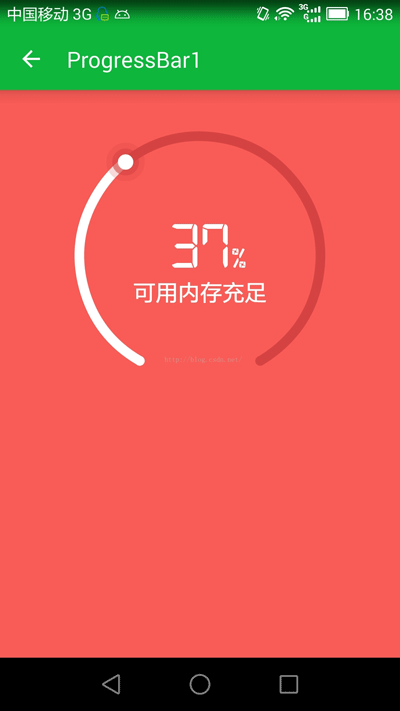
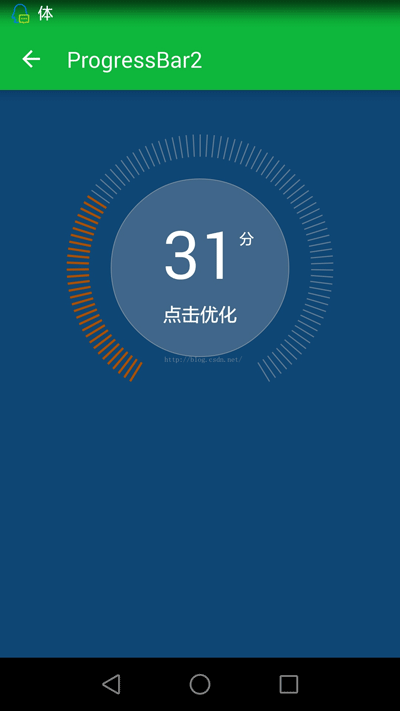
本文包含兩個組件,首先上效果圖:
1.ProgressBarView1(支持拖動):
2.ProgressBarView2(不同進度值顯示不同顏色,不支持拖拽):
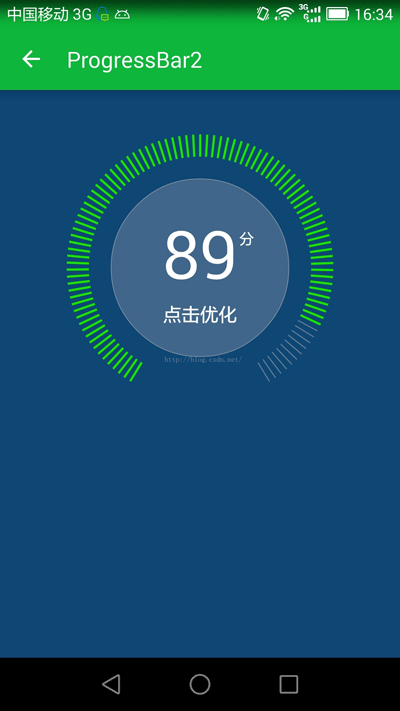
代碼不多,注釋也比較詳細,全部貼上了:
(一)ProgressBarView1:
/**
 * 自定義絢麗的ProgressBar.
 */
public class ProgressBarView1 extends View {
  /**
   * 進度條所占用的角度
   */
  private static final int ARC_FULL_DEGREE = 300;
  /**
   * 弧線的寬度
   */
  private int STROKE_WIDTH;
  /**
   * 組件的寬,高
   */
  private int width, height;
  /**
   * 進度條最大值和當前進度值
   */
  private float max, progress;
  /**
   * 是否允許拖動進度條
   */
  private boolean draggingEnabled = false;
  /**
   * 繪制弧線的矩形區域
   */
  private RectF circleRectF;
  /**
   * 繪制弧線的畫筆
   */
  private Paint progressPaint;
  /**
   * 繪制文字的畫筆
   */
  private Paint textPaint;
  /**
   * 繪制當前進度值的畫筆
   */
  private Paint thumbPaint;
  /**
   * 圓弧的半徑
   */
  private int circleRadius;
  /**
   * 圓弧圓心位置
   */
  private int centerX, centerY;
  public ProgressBarView1(Context context) {
    super(context);
    init();
  }
  public ProgressBarView1(Context context, AttributeSet attrs) {
    super(context, attrs);
    init();
  }
  public ProgressBarView1(Context context, AttributeSet attrs, int defStyleAttr) {
    super(context, attrs, defStyleAttr);
    init();
  }
  private void init() {
    progressPaint = new Paint();
    progressPaint.setAntiAlias(true);
    textPaint = new Paint();
    textPaint.setColor(Color.WHITE);
    textPaint.setAntiAlias(true);
    thumbPaint = new Paint();
    thumbPaint.setAntiAlias(true);
    //使用自定義字體
    textPaint.setTypeface(Typeface.createFromAsset(getContext().getAssets(), "fangz.ttf"));
  }
  @Override
  protected void onMeasure(int widthMeasureSpec, int heightMeasureSpec) {
    super.onMeasure(widthMeasureSpec, heightMeasureSpec);
    if (width == 0 || height == 0) {
      width = getWidth();
      height = getHeight();
      //計算圓弧半徑和圓心點
      circleRadius = Math.min(width, height) / 2;
      STROKE_WIDTH = circleRadius / 12;
      circleRadius -= STROKE_WIDTH;
      centerX = width / 2;
      centerY = height / 2;
      //圓弧所在矩形區域
      circleRectF = new RectF();
      circleRectF.left = centerX - circleRadius;
      circleRectF.top = centerY - circleRadius;
      circleRectF.right = centerX + circleRadius;
      circleRectF.bottom = centerY + circleRadius;
    }
  }
  private Rect textBounds = new Rect();
  @Override
  protected void onDraw(Canvas canvas) {
    super.onDraw(canvas);
    float start = 90 + ((360 - ARC_FULL_DEGREE) >> 1); //進度條起始點
    float sweep1 = ARC_FULL_DEGREE * (progress / max); //進度劃過的角度
    float sweep2 = ARC_FULL_DEGREE - sweep1; //剩余的角度
    //繪制起始位置小圓形
    progressPaint.setColor(Color.WHITE);
    progressPaint.setStrokeWidth(0);
    progressPaint.setStyle(Paint.Style.FILL);
    float radians = (float) (((360.0f - ARC_FULL_DEGREE) / 2) / 180 * Math.PI);
    float startX = centerX - circleRadius * (float) Math.sin(radians);
    float startY = centerY + circleRadius * (float) Math.cos(radians);
    canvas.drawCircle(startX, startY, STROKE_WIDTH / 2, progressPaint);
    //繪制進度條
    progressPaint.setStrokeWidth(STROKE_WIDTH);
    progressPaint.setStyle(Paint.Style.STROKE);//設置空心
    canvas.drawArc(circleRectF, start, sweep1, false, progressPaint);
    //繪制進度條背景
    progressPaint.setColor(Color.parseColor("#d64444"));
    canvas.drawArc(circleRectF, start + sweep1, sweep2, false, progressPaint);
    //繪制結束位置小圓形
    progressPaint.setStrokeWidth(0);
    progressPaint.setStyle(Paint.Style.FILL);
    float endX = centerX + circleRadius * (float) Math.sin(radians);
    float endY = centerY + circleRadius * (float) Math.cos(radians);
    canvas.drawCircle(endX, endY, STROKE_WIDTH / 2, progressPaint);
    //上一行文字
    textPaint.setTextSize(circleRadius >> 1);
    String text = (int) (100 * progress / max) + "";
    float textLen = textPaint.measureText(text);
    //計算文字高度
    textPaint.getTextBounds("8", 0, 1, textBounds);
    float h1 = textBounds.height();
    //% 前面的數字水平居中,適當調整
    float extra = text.startsWith("1") ? -textPaint.measureText("1") / 2 : 0;
    canvas.drawText(text, centerX - textLen / 2 + extra, centerY - 30 + h1 / 2, textPaint);
    //百分號
    textPaint.setTextSize(circleRadius >> 2);
    canvas.drawText("%", centerX + textLen / 2 + extra + 5, centerY - 30 + h1 / 2, textPaint);
    //下一行文字
    textPaint.setTextSize(circleRadius / 5);
    text = "可用內存充足";
    textLen = textPaint.measureText(text);
    textPaint.getTextBounds(text, 0, text.length(), textBounds);
    float h2 = textBounds.height();
    canvas.drawText(text, centerX - textLen / 2, centerY + h1 / 2 + h2, textPaint);
    //繪制進度位置,也可以直接替換成一張圖片
    float progressRadians = (float) (((360.0f - ARC_FULL_DEGREE) / 2 + sweep1) / 180 * Math.PI);
    float thumbX = centerX - circleRadius * (float) Math.sin(progressRadians);
    float thumbY = centerY + circleRadius * (float) Math.cos(progressRadians);
    thumbPaint.setColor(Color.parseColor("#33d64444"));
    canvas.drawCircle(thumbX, thumbY, STROKE_WIDTH * 2.0f, thumbPaint);
    thumbPaint.setColor(Color.parseColor("#99d64444"));
    canvas.drawCircle(thumbX, thumbY, STROKE_WIDTH * 1.4f, thumbPaint);
    thumbPaint.setColor(Color.WHITE);
    canvas.drawCircle(thumbX, thumbY, STROKE_WIDTH * 0.8f, thumbPaint);
  }
  private boolean isDragging = false;
  @Override
  public boolean onTouchEvent(@NonNull MotionEvent event) {
    if (!draggingEnabled) {
      return super.onTouchEvent(event);
    }
    //處理拖動事件
    float currentX = event.getX();
    float currentY = event.getY();
    int action = event.getAction();
    switch (action) {
      case MotionEvent.ACTION_DOWN:
        //判斷是否在進度條thumb位置
        if (checkOnArc(currentX, currentY)) {
          float newProgress = calDegreeByPosition(currentX, currentY) / ARC_FULL_DEGREE * max;
          setProgressSync(newProgress);
          isDragging = true;
        }
        break;
      case MotionEvent.ACTION_MOVE:
        if (isDragging) {
          //判斷拖動時是否移出去了
          if (checkOnArc(currentX, currentY)) {
            setProgressSync(calDegreeByPosition(currentX, currentY) / ARC_FULL_DEGREE * max);
          } else {
            isDragging = false;
          }
        }
        break;
      case MotionEvent.ACTION_UP:
        isDragging = false;
        break;
    }
    return true;
  }
  private float calDistance(float x1, float y1, float x2, float y2) {
    return (float) Math.sqrt((x1 - x2) * (x1 - x2) + (y1 - y2) * (y1 - y2));
  }
  /**
   * 判斷該點是否在弧線上(附近)
   */
  private boolean checkOnArc(float currentX, float currentY) {
    float distance = calDistance(currentX, currentY, centerX, centerY);
    float degree = calDegreeByPosition(currentX, currentY);
    return distance > circleRadius - STROKE_WIDTH * 5 && distance < circleRadius + STROKE_WIDTH * 5
        && (degree >= -8 && degree <= ARC_FULL_DEGREE + 8);
  }
  /**
   * 根據當前位置,計算出進度條已經轉過的角度。
   */
  private float calDegreeByPosition(float currentX, float currentY) {
    float a1 = (float) (Math.atan(1.0f * (centerX - currentX) / (currentY - centerY)) / Math.PI * 180);
    if (currentY < centerY) {
      a1 += 180;
    } else if (currentY > centerY && currentX > centerX) {
      a1 += 360;
    }
    return a1 - (360 - ARC_FULL_DEGREE) / 2;
  }
  public void setMax(int max) {
    this.max = max;
    invalidate();
  }
  public void setProgress(float progress) {
    final float validProgress = checkProgress(progress);
    //動畫切換進度值
    new Thread(new Runnable() {
      @Override
      public void run() {
        float oldProgress = ProgressBarView1.this.progress;
        for (int i = 1; i <= 100; i++) {
          ProgressBarView1.this.progress = oldProgress + (validProgress - oldProgress) * (1.0f * i / 100);
          postInvalidate();
          SystemClock.sleep(20);
        }
      }
    }).start();
  }
  public void setProgressSync(float progress) {
    this.progress = checkProgress(progress);
    invalidate();
  }
  //保證progress的值位於[0,max]
  private float checkProgress(float progress) {
    if (progress < 0) {
      return 0;
    }
    return progress > max ? max : progress;
  }
  public void setDraggingEnabled(boolean draggingEnabled) {
    this.draggingEnabled = draggingEnabled;
  }
}
(二)ProgressBarView2:
/**
 * 自定義絢麗的ProgressBar.
 */
public class ProgressBarView2 extends View {
  /**
   * 進度條所占用的角度
   */
  private static final int ARC_FULL_DEGREE = 300;
  //進度條個數
  private static final int COUNT = 100;
  //每個進度條所占用角度
  private static final float ARC_EACH_PROGRESS = ARC_FULL_DEGREE * 1.0f / (COUNT - 1);
  /**
   * 弧線細線條的長度
   */
  private int ARC_LINE_LENGTH;
  /**
   * 弧線細線條的寬度
   */
  private int ARC_LINE_WIDTH;
  /**
   * 組件的寬,高
   */
  private int width, height;
  /**
   * 進度條最大值和當前進度值
   */
  private float max, progress;
  /**
   * 繪制弧線的畫筆
   */
  private Paint progressPaint;
  /**
   * 繪制文字的畫筆
   */
  private Paint textPaint;
  /**
   * 繪制文字背景圓形的畫筆
   */
  private Paint textBgPaint;
  /**
   * 圓弧的半徑
   */
  private int circleRadius;
  /**
   * 圓弧圓心位置
   */
  private int centerX, centerY;
  public ProgressBarView2(Context context) {
    super(context);
    init();
  }
  public ProgressBarView2(Context context, AttributeSet attrs) {
    super(context, attrs);
    init();
  }
  public ProgressBarView2(Context context, AttributeSet attrs, int defStyleAttr) {
    super(context, attrs, defStyleAttr);
    init();
  }
  private void init() {
    progressPaint = new Paint();
    progressPaint.setAntiAlias(true);
    textPaint = new Paint();
    textPaint.setColor(Color.WHITE);
    textPaint.setAntiAlias(true);
    textBgPaint = new Paint();
    textBgPaint.setAntiAlias(true);
  }
  @Override
  protected void onMeasure(int widthMeasureSpec, int heightMeasureSpec) {
    super.onMeasure(widthMeasureSpec, heightMeasureSpec);
    if (width == 0 || height == 0) {
      width = getWidth();
      height = getHeight();
      //計算圓弧半徑和圓心點
      circleRadius = Math.min(width, height) / 2;
      ARC_LINE_LENGTH = circleRadius / 6;
      ARC_LINE_WIDTH = ARC_LINE_LENGTH / 8;
      centerX = width / 2;
      centerY = height / 2;
    }
  }
  private Rect textBounds = new Rect();
  @Override
  protected void onDraw(Canvas canvas) {
    super.onDraw(canvas);
    float start = (360 - ARC_FULL_DEGREE) >> 1; //進度條起始角度
    float sweep1 = ARC_FULL_DEGREE * (progress / max); //進度劃過的角度
    //繪制進度條
    progressPaint.setColor(Color.parseColor(calColor(progress / max, "#ffff0000", "#ff00ff00")));
    progressPaint.setStrokeWidth(ARC_LINE_WIDTH);
    float drawDegree = 1.6f;
    while (drawDegree <= ARC_FULL_DEGREE) {
      double a = (start + drawDegree) / 180 * Math.PI;
      float lineStartX = centerX - circleRadius * (float) Math.sin(a);
      float lineStartY = centerY + circleRadius * (float) Math.cos(a);
      float lineStopX = lineStartX + ARC_LINE_LENGTH * (float) Math.sin(a);
      float lineStopY = lineStartY - ARC_LINE_LENGTH * (float) Math.cos(a);
      if (drawDegree > sweep1) {
        //繪制進度條背景
        progressPaint.setColor(Color.parseColor("#88aaaaaa"));
        progressPaint.setStrokeWidth(ARC_LINE_WIDTH >> 1);
      }
      canvas.drawLine(lineStartX, lineStartY, lineStopX, lineStopY, progressPaint);
      drawDegree += ARC_EACH_PROGRESS;
    }
    //繪制文字背景圓形
    textBgPaint.setStyle(Paint.Style.FILL);//設置填充
    textBgPaint.setColor(Color.parseColor("#41668b"));
    canvas.drawCircle(centerX, centerY, (circleRadius - ARC_LINE_LENGTH) * 0.8f, textBgPaint);
    textBgPaint.setStyle(Paint.Style.STROKE);//設置空心
    textBgPaint.setStrokeWidth(2);
    textBgPaint.setColor(Color.parseColor("#aaaaaaaa"));
    canvas.drawCircle(centerX, centerY, (circleRadius - ARC_LINE_LENGTH) * 0.8f, textBgPaint);
    //上一行文字
    textPaint.setTextSize(circleRadius >> 1);
    String text = (int) (100 * progress / max) + "";
    float textLen = textPaint.measureText(text);
    //計算文字高度
    textPaint.getTextBounds("8", 0, 1, textBounds);
    float h1 = textBounds.height();
    canvas.drawText(text, centerX - textLen / 2, centerY - circleRadius / 10 + h1 / 2, textPaint);
    //分
    textPaint.setTextSize(circleRadius >> 3);
    textPaint.getTextBounds("分", 0, 1, textBounds);
    float h11 = textBounds.height();
    canvas.drawText("分", centerX + textLen / 2 + 5, centerY - circleRadius / 10 + h1 / 2 - (h1 - h11), textPaint);
    //下一行文字
    textPaint.setTextSize(circleRadius / 6);
    text = "點擊優化";
    textLen = textPaint.measureText(text);
    canvas.drawText(text, centerX - textLen / 2, centerY + circleRadius / 2.5f, textPaint);
  }
  public void setMax(int max) {
    this.max = max;
    invalidate();
  }
  //動畫切換進度值(異步)
  public void setProgress(final float progress) {
    new Thread(new Runnable() {
      @Override
      public void run() {
        float oldProgress = ProgressBarView2.this.progress;
        for (int i = 1; i <= 100; i++) {
          ProgressBarView2.this.progress = oldProgress + (progress - oldProgress) * (1.0f * i / 100);
          postInvalidate();
          SystemClock.sleep(20);
        }
      }
    }).start();
  }
  //直接設置進度值(同步)
  public void setProgressSync(float progress) {
    this.progress = progress;
    invalidate();
  }
  /**
   * 計算漸變效果中間的某個顏色值。
   * 僅支持 #aarrggbb 模式,例如 #ccc9c9b2
   */
  public String calColor(float fraction, String startValue, String endValue) {
    int start_a, start_r, start_g, start_b;
    int end_a, end_r, end_g, end_b;
    //start
    start_a = getIntValue(startValue, 1, 3);
    start_r = getIntValue(startValue, 3, 5);
    start_g = getIntValue(startValue, 5, 7);
    start_b = getIntValue(startValue, 7, 9);
    //end
    end_a = getIntValue(endValue, 1, 3);
    end_r = getIntValue(endValue, 3, 5);
    end_g = getIntValue(endValue, 5, 7);
    end_b = getIntValue(endValue, 7, 9);
    return "#" + getHexString((int) (start_a + fraction * (end_a - start_a)))
        + getHexString((int) (start_r + fraction * (end_r - start_r)))
        + getHexString((int) (start_g + fraction * (end_g - start_g)))
        + getHexString((int) (start_b + fraction * (end_b - start_b)));
  }
  //從原始#AARRGGBB顏色值中指定位置截取,並轉為int.
  private int getIntValue(String hexValue, int start, int end) {
    return Integer.parseInt(hexValue.substring(start, end), 16);
  }
  private String getHexString(int value) {
    String a = Integer.toHexString(value);
    if (a.length() == 1) {
      a = "0" + a;
    }
    return a;
  }
}
更多關於Android相關內容感興趣的讀者可查看本站專題:《Android視圖View技巧總結》、《Android開發動畫技巧匯總》、《Android編程之activity操作技巧總結》、《Android布局layout技巧總結》、《Android開發入門與進階教程》、《Android資源操作技巧匯總》及《Android控件用法總結》
希望本文所述對大家Android程序設計有所幫助。
 Android開源項目QuickReturnHeader分析
最近項目開發,碰到一個ListView的需求。 向上滑動,隱藏Header。向下滑動,迅速顯示Header。 在GitHub中,找到了QuickReturn
 android 從零開始搭建框架系列(1)
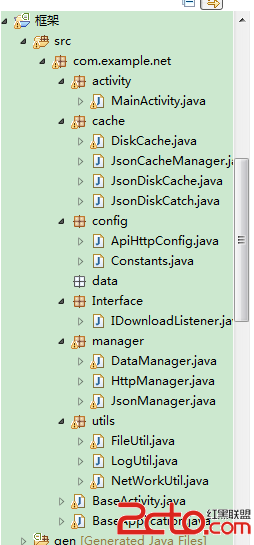
工作幾年發現自己沒留下啥東西,天天開發開發,沒總結過。 這次想總結下。故而寫這個系列的博客。希望對廣大的開發者有所幫助。OK 首先先分析下 框架的作用,以及框架所應擁有的
 Android應用中設置alpha值來制作透明與漸變效果的實例
Android系統支持的顏色是由4個值組成的,前3個為RGB,也就是我們常說的三原色(紅、綠、藍),最後一個值是A,也就是Alpha。這4個值都在0~255之間。顏色值越
 我眼中的Window創建/添加/刪除/更新過程
在Android中和我們打交道最多的就是Activity,因為我們會頻繁的與界面進行交互,而Activity內部關於界面方面的操作都是由Window來實現的,因此我們有必