編輯:關於Android編程
先放個gif。。最終效果如果:
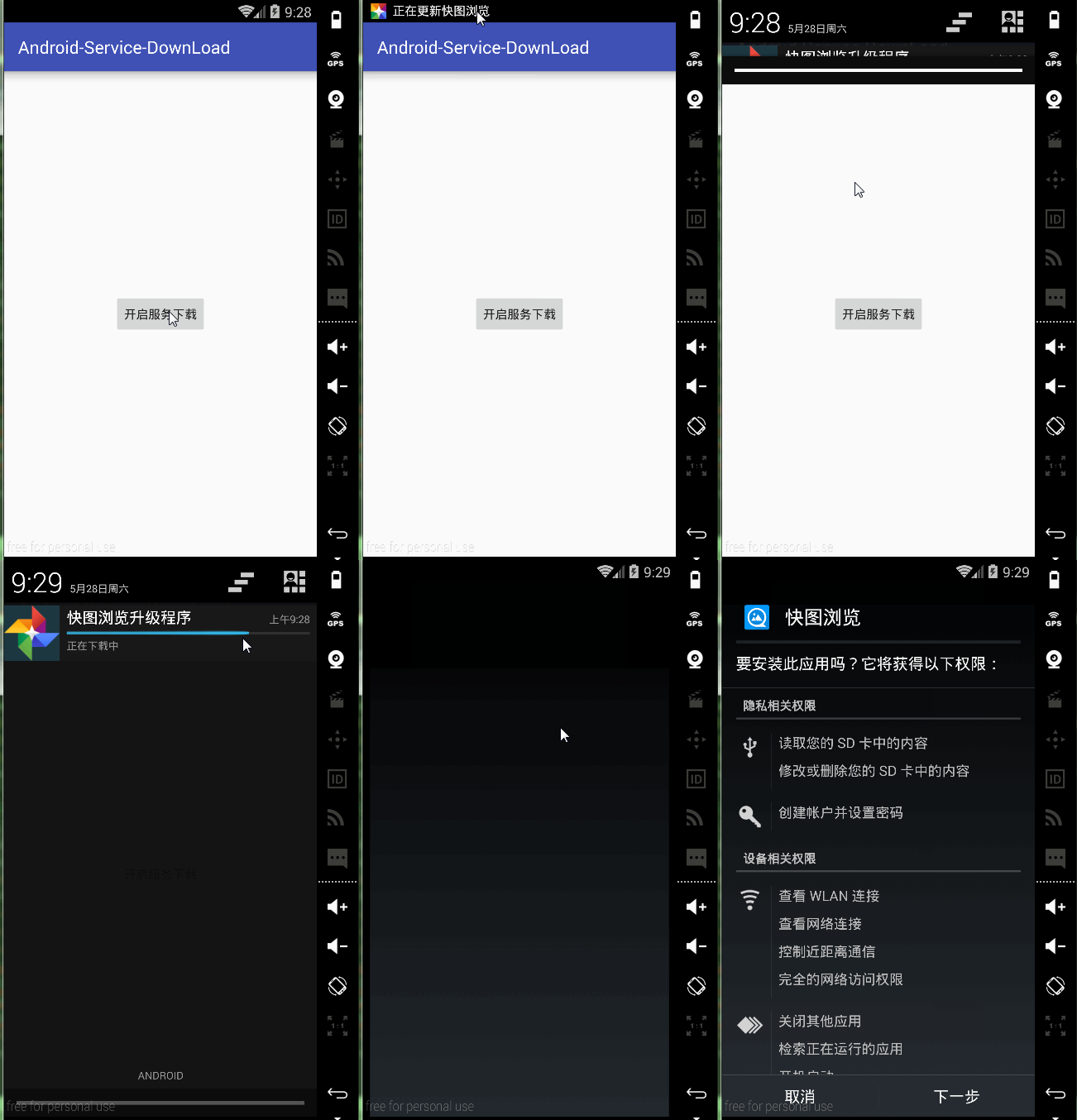
主要演示了Android從服務器下載文件,調用Notification顯示下載進度,並且在下載完畢以後點擊通知會跳轉到安裝APK的界面,演示是在真實的網絡環境中使用真實的URL進行演示,來看看代碼:
MainActivity代碼非常簡單,就是啟動一個Service:
public class MainActivity extends AppCompatActivity {
 String download_url="http://shouji.360tpcdn.com/160329/a9037075b8d3aa98fbf6115c54a5b895/com.alensw.PicFolder_4722404.apk";

 @Override
 protected void onCreate(Bundle savedInstanceState) {
  super.onCreate(savedInstanceState);
  setContentView(R.layout.activity_main);

 }
 public void bt_start_service(View view){
  Intent intent=new Intent(this,DownLoadService.class);
  intent.putExtra("download_url",download_url);
  startService(intent);
 }
}
DownLoadService裡面,在onStartCommand方法裡面是關鍵代碼,調用NotifyUtil這個工具類的“notify_progress”方法去顯示一個通知,與此同時開始下載APK文件,DownLoadService代碼如下:
public class DownLoadService extends Service {
 String download_url;
 String savePath= Environment.getExternalStorageDirectory()+"/liulan.apk";
 private int requestCode = (int) SystemClock.uptimeMillis();
 private NotifyUtil currentNotify;
 File mFile;
 @Nullable
 @Override
 public IBinder onBind(Intent intent) {
  return null;
 }

 @Override
 public void onCreate() {
  super.onCreate();


 }

 @Override
 public int onStartCommand(Intent intent, int flags, int startId) {
  mFile=new File(savePath);
  download_url=intent.getStringExtra("download_url");
  Log.e("test","執行onStartCommand");
  //設置想要展示的數據內容
  Intent intent_noti = new Intent();
  intent_noti.setAction(Intent.ACTION_VIEW);
  //文件的類型,從tomcat裡面找
  intent_noti.setDataAndType(Uri.fromFile(mFile), "application/vnd.android.package-archive");
  PendingIntent rightPendIntent = PendingIntent.getActivity(this,
    requestCode, intent_noti, PendingIntent.FLAG_UPDATE_CURRENT);
  int smallIcon = R.drawable.xc_smaillicon;
  String ticker = "正在更新快圖浏覽";
  //實例化工具類,並且調用接口
  NotifyUtil notify7 = new NotifyUtil(this, 7);
  notify7.notify_progress(rightPendIntent, smallIcon, ticker, "快圖浏覽升級程序", "正在下載中",
    false, false, false, download_url, savePath, new NotifyUtil.DownLoadListener() {
     @Override
     public void OnSuccess(File file) {
      mFile=file;
      DownLoadService.this.stopSelf();
     }

     @Override
     public void onFailure(Throwable t, int errorNo, String strMsg) {

     }
    });
  currentNotify = notify7;
  return super.onStartCommand(intent, flags, startId);

 }
}
在調用“notify_progress”方法的時候,已經開始下載文件了,那麼下載的代碼是什麼呢?如下:
public void notify_progress(PendingIntent pendingIntent, int smallIcon,
        String ticker, String title, String content,
        boolean sound, boolean vibrate, boolean lights,
        String download_url, String savePath, final DownLoadListener listener) {

  setCompatBuilder(pendingIntent, smallIcon, ticker, title, content, sound, vibrate, lights);
  /*
   * 因為進度條要實時更新通知欄也就說要不斷的發送新的提示,所以這裡不建議開啟通知聲音。
   * 這裡是作為范例,給大家講解下原理。所以發送通知後會聽到多次的通知聲音。
   */
  FinalHttp fh = new FinalHttp();
  HttpHandler<File> httpHandler=fh.download(download_url, savePath, new AjaxCallBack<File>() {
   @Override
   public void onLoading(long count, long current) {
    super.onLoading(count, current);
    double a=count;
    double b=current;
    double currentPro=(double)((b/a)*100);
    cBuilder.setProgress(100, (int)currentPro, false);
    sent();
   }

   @Override
   public void onSuccess(File file) {
    super.onSuccess(file);
    cBuilder.setContentText("下載完成").setProgress(0, 0, false);
    sent();
    listener.OnSuccess(file);
   }

   @Override
   public void onFailure(Throwable t, int errorNo, String strMsg) {
    super.onFailure(t, errorNo, strMsg);
    listener.onFailure(t,errorNo,strMsg);
   }

  });


 }
這裡用到了afinal.jar
這個jar已經封裝好下載的工具類,我們直接拿來用就行。下載成功之後會通過DownLoadListener這個接口回調到DownLoadService裡面,最終運行效果就如最上面那個gif動態圖運行效果一樣。
項目下載地址:點擊下載
以上就是本文的全部內容,希望對大家的學習有所幫助,也希望大家多多支持本站。
 手機百度地圖買汽車票圖文教程
手機都可以買火車票、飛機票了,唯獨買汽車票還是有困難。百度地圖作為出行必備的手機應用,不僅可以查公交,現在還能查詢跨市的長途汽車了,更可以直接在線買票,免去
 我的Android進階之旅------)關於android:layout_weight屬性的詳細解析
關於android:layout_weight屬性的詳細解析效果一圖1 上面的效果圖中三個文本框的寬度比為 1:2:3圖2代碼如下所示:<code class=&q
 Android中為TextView添加多個可點擊的文本
我們使用社交軟件的過程中多多少少會為別人的帖子點贊,如圖 : 可以看到用戶頁面顯示出來的只是點了贊的用戶的名稱,點擊這些名稱可以進入到該用戶的主頁。我們就
 從零開始學android(Toast土司提示組件.二十.)
在系統之中,通過對話框可以對用戶的某些操作進行提示,但是在Android平台之中也提供了另外一套更加友好的提示界面效果,而且這種界面在提示用戶的時候不會打斷用戶的正常操作