編輯:關於Android編程
由於項目上的需要側滑條目展示收藏按鈕,記得之前代碼家有寫過一個厲害的開源控件 AndroidSwipeLayout 本來准備直接拿來使用,但是看過 issue 發現現在有不少使用者反應有不少的 bug ,而且代碼家現在貌似也不進行維護了.故自己實現了一個所要效果的一個控件.因為只是實現我需要的效果,所以大家也能看到,代碼裡有不少地方我是寫死的.希望對大家有些幫助.而且暫時也不需要 AndroidSwipeLayout 大而全的功能,算是變相給自己做的項目精簡代碼了.
完整示例代碼請看:GitHub 地址
主要源碼:
public class SwipeLayout extends FrameLayout {
public static final int CLOSE = 0;
public static final int OPEN = 1;
private int mState = CLOSE;
private int mWidth;
private int mHeight;
private float mDownX;
private float mDownY;
private SwipeListener mSwipeListener;
private View mTopView;
private View mBottomView;
private ViewDragHelper mViewDragHelper;
public SwipeLayout(Context context) {
this(context, null);
}
public SwipeLayout(Context context, AttributeSet attrs) {
this(context, attrs, 0);
}
public SwipeLayout(Context context, AttributeSet attrs, int defStyleAttr) {
super(context, attrs, defStyleAttr);
mViewDragHelper = ViewDragHelper.create(this, new ViewDragHelper.Callback() {
@Override
public boolean tryCaptureView(View child, int pointerId) {//只對mTopView進行處理
return child == mTopView;
}
@Override
public int clampViewPositionHorizontal(View child, int left, int dx) {//設置橫向滑動的邊界(left的值是mTopView左上角點的x坐標值)
int newLeft;
if (left <= -mBottomView.getMeasuredWidth()) {
newLeft = -mBottomView.getMeasuredWidth();
} else if (left >= 0) {
newLeft = 0;
} else {
newLeft = left;
}
return newLeft;
}
@Override
public int clampViewPositionVertical(View child, int top, int dy) {//因為不需要上下的滑動直接設置為0(top的值是mTopView左上角點的y坐標值)
return 0;
}
@Override
public void onViewReleased(View releasedChild, float xvel, float yvel) {//手指松開時會回調該函數
int right = mWidth - releasedChild.getRight();//mTopView右邊界距離屏幕右邊的距離
int bottomWidth = mBottomView.getMeasuredWidth();
if (right > bottomWidth * 9 / 10) {
scrollToLeftEdge();
return;
}
if (right <= bottomWidth / 10 && right > 0) {
scrollToRightEdge();
return;
}
if (xvel == 0) {//速度為0時單獨處理
if (right >= bottomWidth / 2) {
scrollToLeftEdge();
} else if (right < bottomWidth / 2) {
scrollToRightEdge();
}
return;
}
if (xvel > 0) {//向右滑動後松手
scrollToRightEdge();
} else {//向左滑動後松手
scrollToLeftEdge();
}
}
});
}
@Override
public void computeScroll() {
if (mViewDragHelper.continueSettling(true)) {
invalidate();
}
}
@Override
public boolean onInterceptTouchEvent(MotionEvent ev) {
switch (ev.getAction()) {
case MotionEvent.ACTION_DOWN:
mDownX = ev.getRawX();
mDownY = ev.getRawY();
if (mState == CLOSE) {
return true;
}
break;
case MotionEvent.ACTION_MOVE:
float distanceX = ev.getRawX() - mDownX;
float distanceY = ev.getRawY() - mDownY;
float angle;
if (distanceX == 0) {
angle = 90;
} else {
angle = (float) Math.toDegrees(Math.atan(Math.abs(distanceY / distanceX)));
}
if (angle < 45) {
return true;//攔截事件交給自己處理滑動
}
break;
}
return mViewDragHelper.shouldInterceptTouchEvent(ev);
}
@Override
public boolean onTouchEvent(MotionEvent ev) {
ViewParent viewParent = getParent();
switch (ev.getAction()) {
case MotionEvent.ACTION_DOWN:
mDownX = ev.getRawX();
mDownY = ev.getRawY();
break;
case MotionEvent.ACTION_MOVE:
float distanceX = ev.getRawX() - mDownX;
float distanceY = ev.getRawY() - mDownY;
float angle;
if (distanceX == 0) {
angle = 90;
} else {
angle = (float) Math.toDegrees(Math.atan(Math.abs(distanceY / distanceX)));
}
if (angle < 45 && viewParent != null) {
viewParent.requestDisallowInterceptTouchEvent(true);//讓父控件不要處理事件,交給子控件
}
break;
case MotionEvent.ACTION_CANCEL:
case MotionEvent.ACTION_UP:
if (viewParent != null) {
viewParent.requestDisallowInterceptTouchEvent(false);
}
break;
}
mViewDragHelper.processTouchEvent(ev);
return true;
}
@Override
protected void onLayout(boolean changed, int l, int t, int r, int b) {
super.onLayout(changed, l, t, r, b);
int measureHeight = mBottomView.getMeasuredHeight();
int measureWidth = mBottomView.getMeasuredWidth();
mBottomView.layout(mWidth - measureWidth, (mHeight - measureHeight) / 2, mWidth, mHeight + measureHeight / 2);//靠右邊界垂直居中
if (mState == OPEN) {
mTopView.layout(-measureWidth, 0, mTopView.getMeasuredWidth() - measureWidth, mTopView.getMeasuredHeight());
}
}
@Override
protected void onSizeChanged(int w, int h, int oldw, int oldh) {
super.onSizeChanged(w, h, oldw, oldh);
mWidth = w;
mHeight = h;
}
@Override
protected void onFinishInflate() {
super.onFinishInflate();
if (getChildCount() != 2) {
throw new IllegalStateException("only and should contain two child view");
}
View bottomView = getChildAt(0);
if (!(bottomView instanceof ViewGroup)) {
throw new IllegalStateException("sideslip menu should be contained by a viewgroup");
}
mBottomView = bottomView;
mTopView = getChildAt(1);
}
//回滾到左邊(只能在onViewReleased裡使用該方法)
private void scrollToLeftEdge() {
mViewDragHelper.settleCapturedViewAt(-mBottomView.getMeasuredWidth(), 0);
invalidate();
mState = OPEN;
if (mSwipeListener != null) {
mSwipeListener.onOpenListener(this);
}
}
//回滾到右邊(只能在onViewReleased裡使用該方法)
private void scrollToRightEdge() {
mViewDragHelper.settleCapturedViewAt(0, 0);
invalidate();
mState = CLOSE;
}
public void smoothClose() {
mViewDragHelper.smoothSlideViewTo(mTopView, 0, 0);
invalidate();
mState = CLOSE;
}
public int getState() {
return mState;
}
public void setState(int state) {
mState = state;
invalidate();
}
public interface SwipeListener {
void onOpenListener(SwipeLayout swipeLayout);
}
public void setSwipeListener(SwipeListener mSwipeListener) {
this.mSwipeListener = mSwipeListener;
}
}
效果圖
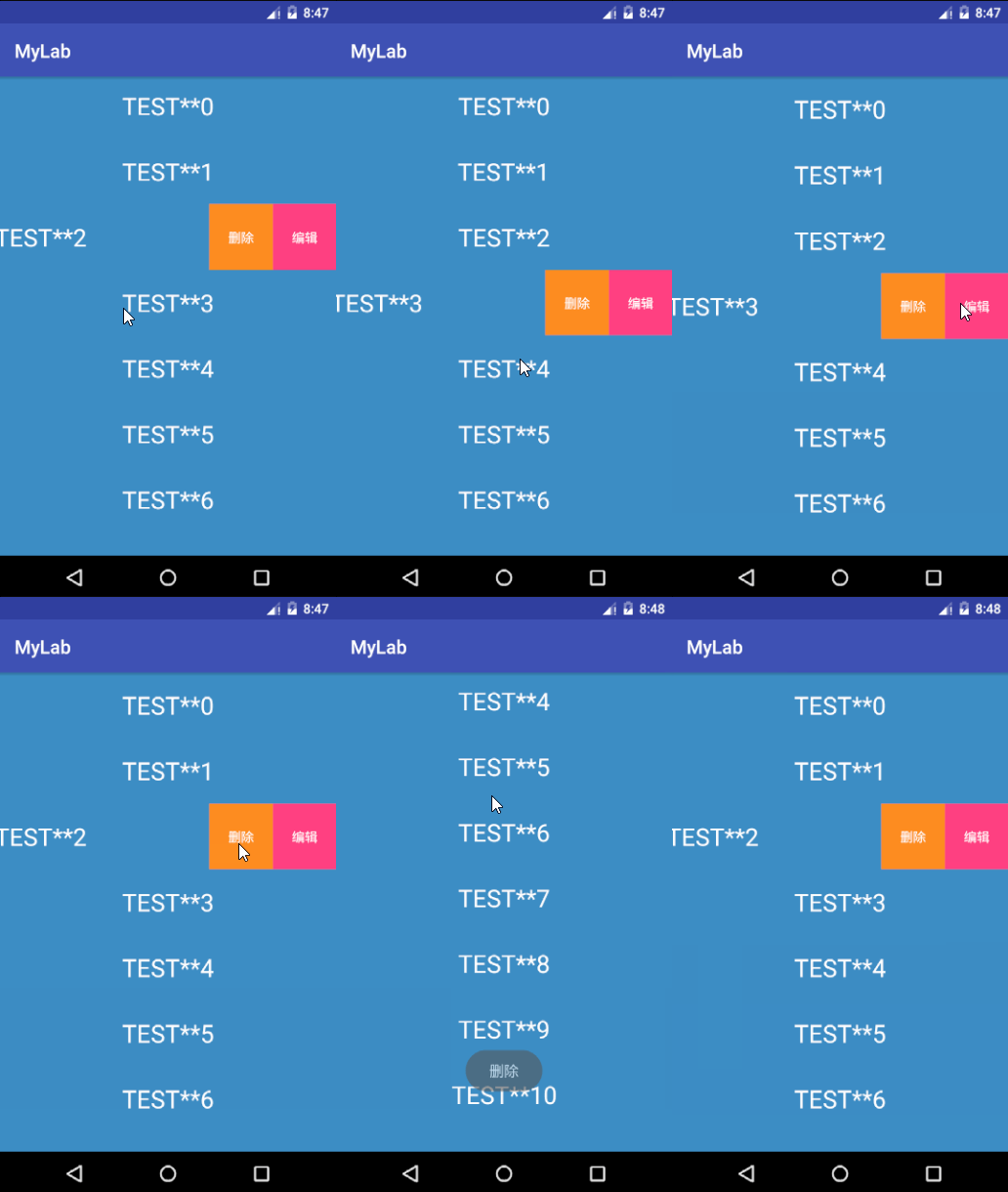
以上所述是小編給大家介紹的Android 中 SwipeLayout一個展示條目底層菜單的側滑控件源碼解析,希望對大家有所幫助,如果大家有任何疑問請給我留言,小編會及時回復大家的。在此也非常感謝大家對本站網站的支持!
 在Android Studio中為jar添加source源碼
下面的步驟將介紹如何在Android Studio中為jar庫綁定源碼!!! 1. 在build.gradle中添加jar依賴: dependencies {
 Android BLE藍牙通訊學習
在app應用的開發過程中,一般和藍牙接觸的不多,但是隨著智能穿戴設備的發展,穿戴設備和手機關聯的app越來越多,之前也是沒怎麼接觸過這一塊的東西,正好最近需要做一個和藍牙
 Android實現左右擺動的球體動畫效果
首先,看一下效果 可能各位在別處看到過類似的東西,我在微信的文章末尾看到有個玩意,感覺有意思,就用代碼實現一下。這篇文章主要把握寫代碼的思路展示一下。 看到上
 仿愛奇藝視頻,騰訊視頻,搜狐視頻首頁推薦位輪播圖介紹(一)
前言:本篇只是一個介紹這個一個類庫,具體實現思路代碼會下篇中進行分析出來,仿愛奇藝視頻,騰訊視頻,搜狐視頻首頁推薦位輪播圖github地址: https://github