編輯:關於Android編程
本文為大家分享了Android模仿新浪微博啟動界面&登陸界面的具體實現代碼,供大家參考,具體內容如下
啟動界面
主要有兩個功能:
1.加載啟動動畫
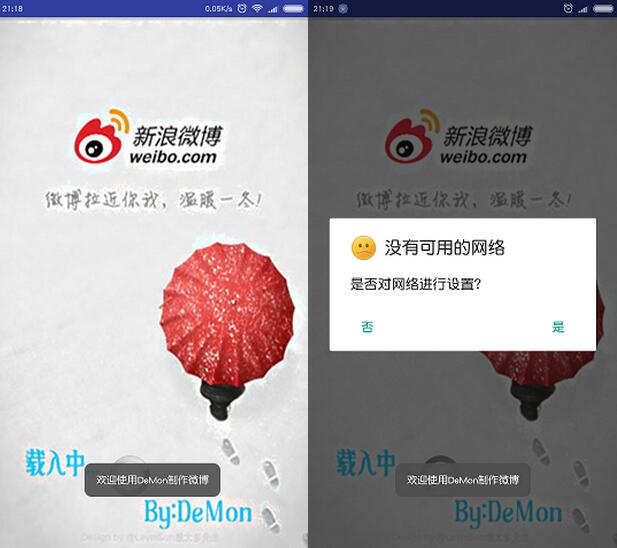
2.判斷網絡,有者直接進入登陸界面,否則去設置網絡
代碼較簡單,主要采用AlphaAnimation()方法和動畫監聽器,使一張圖片產生漸變動畫。在動畫啟動的時候判斷網絡,動畫結束時完成判斷並進入登陸界面。
/**
 * Created by D&LL on 2016/5/25.
 * 初始頁面加載界面
 */
public class SplashActivity extends Activity {

 @Override
 protected void onCreate(Bundle savedInstanceState) {
 super.onCreate(savedInstanceState);
 setContentView(R.layout.splash);
 ImageView splashimage = (ImageView) findViewById(R.id.splashimage);
 //透明度漸變動畫
 AlphaAnimation animation = new AlphaAnimation(0.1f, 1.0f);
 //設置動畫時長
 animation.setDuration(3000);
 //將組件和動畫進行關聯
 splashimage.setAnimation(animation);
 animation.setAnimationListener(new Animation.AnimationListener() {
  //動畫啟動執行
  @Override
  public void onAnimationStart(Animation animation) {
  Toast.makeText(SplashActivity.this, "歡迎使用DeMon制作微博", Toast.LENGTH_LONG).show();
  //檢查並網絡的方法
  Tools.checkNetWork(SplashActivity.this);
  }

  //動畫結束執行
  @Override
  public void onAnimationEnd(Animation animation) {
  Intent intent = new Intent(SplashActivity.this, LoginActivity.class);
  startActivity(intent);
  finish();
  }

  //動畫重復執行
  @Override
  public void onAnimationRepeat(Animation animation) {

  }
 });

 }
使用ConnectivityManager獲取系統的連接服務,然後獲取代表聯網狀態的NetWorkInfo對象,獲取網絡的連接情況,如果沒有網絡則生成一個AlertDialog引導進行網絡設置。該方法位於Tools.java中。
 /**
 * 設置網絡
 *
 * @param context
 */
 public static void checkNetWork(final SplashActivity context) {
 if (!NetWorkStatus(context)) {
  TextView msg = new TextView(context);
  msg.setText("請設置網絡!");
  AlertDialog.Builder b = new AlertDialog.Builder(context).
   setIcon(R.drawable.notnet)
   .setTitle("沒有可用的網絡")
   .setMessage("是否對網絡進行設置?");
  b.setPositiveButton("是", new DialogInterface.OnClickListener() {
  public void onClick(DialogInterface dialog, int whichButton) {
   //跳轉到設置網絡界面
   context.startActivity(new Intent(Settings.ACTION_SETTINGS));
  }
  }).setNeutralButton("否", new DialogInterface.OnClickListener() {
  public void onClick(DialogInterface dialog, int whichButton) {
   dialog.cancel();
   context.finish();
  }
  }).create().show();
 }
 }

 /**
 * 判斷網絡狀態
 */
 public static boolean NetWorkStatus(Context context) {
 //獲取系統的連接服務
 ConnectivityManager connect = (ConnectivityManager) context.getSystemService(Context
  .CONNECTIVITY_SERVICE);
 if (connect == null) {
  return false;
 } else {
  // 獲取代表聯網狀態的NetWorkInfo對象,獲取網絡的連接情況
  NetworkInfo[] infos = connect.getAllNetworkInfo();
  if (infos != null) {
  for (NetworkInfo network : infos) {
   if (network.getState() == NetworkInfo.State.CONNECTED) {
   return true;
   }
  }
  }
 }
 return false;
 }
SplashActivity的布局文件splash.xml
<?xml version="1.0" encoding="utf-8"?>
<RelativeLayout xmlns:android="http://schemas.android.com/apk/res/android"
  android:layout_width="match_parent"
  android:layout_height="match_parent">

 <ImageView
 android:id="@+id/splashimage"
 android:layout_width="match_parent"
 android:layout_height="match_parent"
 android:scaleType="fitXY"
 android:src="@drawable/splashimage"/>

 <ProgressBar

 android:layout_width="wrap_content"
 android:layout_height="wrap_content"
 android:layout_alignParentBottom="true"
 android:layout_alignParentStart="true"
 android:layout_gravity="center"
 android:layout_marginBottom="64dp"
 android:layout_marginStart="130dp">
 </ProgressBar>
</RelativeLayout>
登陸界面
此界面只有幾個按鈕,故合在一條博客裡。
微博按鈕觸發進入到到授權界面
public class LoginActivity extends Activity {
 private Button sinalogin;

 @Override
 protected void onCreate(Bundle savedInstanceState) {
 super.onCreate(savedInstanceState);
 setContentView(R.layout.login);

 sinalogin = (Button) findViewById(R.id.sinalogin);
 sinalogin.setOnClickListener(new View.OnClickListener() {
  @Override
  public void onClick(View v) {
  Intent intent = new Intent(LoginActivity.this, OAuthActivity.class);
  startActivity(intent);
  LoginActivity.this.finish();
  }
 });
 }

}
布局文件login.xml兩個自定義樣式的EditText,一個普通按鈕(此處純粹擺設)。只有微博登陸按鈕有用。
<?xml version="1.0" encoding="utf-8"?>
<LinearLayout xmlns:android="http://schemas.android.com/apk/res/android"
  android:layout_width="match_parent"
  android:layout_height="match_parent"
  android:background="@drawable/background"
  android:gravity="center_vertical"
  android:orientation="vertical"
  android:paddingBottom="@dimen/activity_vertical_margin"
  android:paddingLeft="@dimen/activity_horizontal_margin"
  android:paddingRight="@dimen/activity_horizontal_margin"
  android:paddingTop="@dimen/activity_vertical_margin">

 <EditText
 android:id="@+id/username"
 android:layout_width="match_parent"
 android:layout_height="40dip"
 android:background="@drawable/bg_edittext"
 android:ems="10"
 android:inputType="textPersonName">

 </EditText>

 <EditText
 android:id="@+id/passworld"
 android:layout_width="match_parent"
 android:layout_height="40dip"
 android:layout_marginTop="20dip"
 android:background="@drawable/bg_edittext"
 android:ems="10"
 android:inputType="textPassword"/>

 <LinearLayout
 android:layout_width="fill_parent"
 android:layout_height="wrap_content"
 android:orientation="horizontal">

 <Button
  android:id="@+id/login"
  android:layout_width="200dp"
  android:layout_height="wrap_content"
  android:layout_marginTop="20dip"
  android:layout_weight="1"
  android:text="登錄"/>

 <Button
  android:id="@+id/sinalogin"
  android:layout_width="200dp"
  android:layout_height="38dp"
  android:layout_marginTop="20dip"
  android:layout_weight="1"
  android:background="@drawable/weibologin"/>
 </LinearLayout>
</LinearLayout>

以上就是本文的全部內容,希望對大家的學習有所幫助,也希望大家多多支持本站。
 Android開發----------- 手電筒改進版本
在之前的基礎上 在 res 文件夾下面: 添加一個 drawable/local_me.xml localme_cml 主程序: p
 Android項目-智慧北京:02(三種技術設計主頁面及源碼分析點擊事件傳遞的機制及Json數據傳遞的使用)
演示ViewPager的預加載功能Android ViewPager 的預加載android新引入的Fragment加入了Viewpager這樣的一個組件。至於該控件的
 Android學習筆記032之數據存儲—文件存儲讀取
我們知道,在AndroidOS中,提供了五中數據存儲方式,分別是:ContentProvider存儲、文件存儲、SharedPreference存儲、SQLite數據庫存
 Android Training學習筆記之適配不同的設備
Android是一個開源的開放的操作系統,世界上的任何人都可以基於這個系統進行適合自己的定制活動。Android的這樣一個特點使得android世界的碎片化很嚴重,形形色