編輯:關於Android編程
今天在android項目中使用AES對數據進行加解密,遇到了很多問題,網上也找了很多資料,也不行。不過最後還是讓我給搞出來了,這裡把這個記錄下來,不要讓別人走我的彎路,因為網上絕大多數的例子都是行不通的。好了,接下來開始講解
1、Aes工具類
package com.example.cheng.aesencrypt;

import android.text.TextUtils;

import java.security.NoSuchAlgorithmException;
import java.security.SecureRandom;

import javax.crypto.Cipher;
import javax.crypto.KeyGenerator;
import javax.crypto.SecretKey;
import javax.crypto.spec.IvParameterSpec;
import javax.crypto.spec.SecretKeySpec;


/**
 * class description here
 *
 * @author cheng
 * @version 1.0.0
 * @since 2016-11-02
 */
public class Aes {

 private static final String SHA1PRNG = "SHA1PRNG"; // SHA1PRNG 強隨機種子算法, 要區別4.2以上版本的調用方法
 private static final String IV = "qws871bz73msl9x8";
 private static final String AES = "AES"; //AES 加密
 private static final String CIPHERMODE = "AES/CBC/PKCS5Padding"; //algorithm/mode/padding

 /**
 * 加密
 */
 public static String encrypt(String key, String cleartext) {
 if (TextUtils.isEmpty(cleartext)) {
  return cleartext;
 }
 try {
  byte[] result = encrypt(key, cleartext.getBytes());
  return parseByte2HexStr(result);
 } catch (Exception e) {
  e.printStackTrace();
 }
 return null;
 }

 /**
 * 加密
 */
 public static byte[] encrypt(String key, byte[] clear) throws Exception {
 byte[] raw = getRawKey(key.getBytes());
 SecretKeySpec skeySpec = new SecretKeySpec(raw, AES);
 Cipher cipher = Cipher.getInstance(CIPHERMODE);
 cipher.init(Cipher.ENCRYPT_MODE, skeySpec, new IvParameterSpec(new byte[cipher.getBlockSize()]));
 byte[] encrypted = cipher.doFinal(clear);
 return encrypted;
 }

 /**
 * 解密
 */
 public static String decrypt(String key, String encrypted) {
 if (TextUtils.isEmpty(encrypted)) {
  return encrypted;
 }
 try {
  byte[] enc = parseHexStr2Byte(encrypted);
  byte[] result = decrypt(key, enc);
  return new String(result);
 } catch (Exception e) {
  e.printStackTrace();
 }
 return null;
 }

 /**
 * 解密
 */
 public static byte[] decrypt(String key, byte[] encrypted) throws Exception {
 byte[] raw = getRawKey(key.getBytes());
 SecretKeySpec skeySpec = new SecretKeySpec(raw, AES);
 Cipher cipher = Cipher.getInstance(CIPHERMODE);
 cipher.init(Cipher.DECRYPT_MODE, skeySpec, new IvParameterSpec(new byte[cipher.getBlockSize()]));
 byte[] decrypted = cipher.doFinal(encrypted);
 return decrypted;
 }

 /**
 * 生成隨機數,可以當做動態的密鑰
 * 加密和解密的密鑰必須一致,不然將不能解密
 */
 public static String generateKey() {
 try {
  SecureRandom secureRandom = SecureRandom.getInstance(SHA1PRNG);
  byte[] key = new byte[20];
  secureRandom.nextBytes(key);
  return toHex(key);
 } catch (NoSuchAlgorithmException e) {
  e.printStackTrace();
 }
 return null;
 }

 /**
 * 對密鑰進行處理
 */
 public static byte[] getRawKey(byte[] seed) throws Exception {
 KeyGenerator kgen = KeyGenerator.getInstance(AES);
 //for android
 SecureRandom sr = null;
 // 在4.2以上版本中,SecureRandom獲取方式發生了改變
 if (android.os.Build.VERSION.SDK_INT >= 17) {
  sr = SecureRandom.getInstance(SHA1PRNG, "Crypto");
 } else {
  sr = SecureRandom.getInstance(SHA1PRNG);
 }
 // for Java
 // secureRandom = SecureRandom.getInstance(SHA1PRNG);
 sr.setSeed(seed);
 kgen.init(128, sr); //256 bits or 128 bits,192bits
 //AES中128位密鑰版本有10個加密循環,192比特密鑰版本有12個加密循環,256比特密鑰版本則有14個加密循環。
 SecretKey skey = kgen.generateKey();
 byte[] raw = skey.getEncoded();
 return raw;
 }

 /**
 * 二進制轉字符
 */
 public static String toHex(byte[] buf) {
 if (buf == null)
  return "";
 StringBuffer result = new StringBuffer(2 * buf.length);
 for (int i = 0; i < buf.length; i++) {
  appendHex(result, buf[i]);
 }
 return result.toString();
 }

 private static void appendHex(StringBuffer sb, byte b) {
 sb.append(IV.charAt((b >> 4) & 0x0f)).append(IV.charAt(b & 0x0f));
 }

 /**
 * 將二進制轉換成16進制
 *
 * @param buf
 * @return
 */
 public static String parseByte2HexStr(byte buf[]) {
 StringBuilder sb = new StringBuilder();
 for (int i = 0; i < buf.length; i++) {
  String hex = Integer.toHexString(buf[i] & 0xFF);
  if (hex.length() == 1) {
  hex = '0' + hex;
  }
  sb.append(hex.toUpperCase());
 }
 return sb.toString();
 }

 /**
 * 將16進制轉換為二進制
 *
 * @param hexStr
 * @return
 */
 public static byte[] parseHexStr2Byte(String hexStr) {
 if (hexStr.length() < 1)
  return null;
 byte[] result = new byte[hexStr.length() / 2];
 for (int i = 0; i < hexStr.length() / 2; i++) {
  int high = Integer.parseInt(hexStr.substring(i * 2, i * 2 + 1), 16);
  int low = Integer.parseInt(hexStr.substring(i * 2 + 1, i * 2 + 2),
   16);
  result[i] = (byte) (high * 16 + low);
 }
 return result;
 }
}
2、mainActivity和layout文件如下:
package com.example.cheng.aesencrypt;

import android.os.Bundle;
import android.support.v7.app.AppCompatActivity;
import android.view.View;
import android.widget.EditText;
import android.widget.TextView;
import android.widget.Toast;


public class MainActivity extends AppCompatActivity {
 private EditText mInputET;
 private TextView mShowEncryputTV;
 private TextView mShowInputTV;
 private static final String PASSWORD_STRING = "12345678";

 @Override
 protected void onCreate(Bundle savedInstanceState) {
 super.onCreate(savedInstanceState);
 setContentView(R.layout.activity_main);
 mInputET = (EditText) findViewById(R.id.ase_input);
 mShowEncryputTV = (TextView) findViewById(R.id.show_oringe_encrypt);
 mShowInputTV = (TextView) findViewById(R.id.show_ase_encrypt);
 }

 /**
 * 加密
 *
 * @param view
 */
 public void encrypt(View view) {
 String inputString = mInputET.getText().toString().trim();
 if (inputString.length() == 0) {
  Toast.makeText(this, "請輸入要加密的內容", Toast.LENGTH_SHORT).show();
  return;
 }
 String encryStr = Aes.encrypt(PASSWORD_STRING, inputString);
 mShowInputTV.setText(encryStr);
 }

 /**
 * 解密
 *
 * @param view
 */
 public void decrypt(View view) {
 String encryptString = mShowInputTV.getText().toString().trim();
 if (encryptString.length() == 0) {
  Toast.makeText(this, "解密字符串不能為空", Toast.LENGTH_SHORT).show();
  return;
 }
 String decryStr = Aes.decrypt(PASSWORD_STRING, encryptString);
 mShowEncryputTV.setText(decryStr);
 }
}
layout文件
<?xml version="1.0" encoding="utf-8"?>
<LinearLayout xmlns:android="http://schemas.android.com/apk/res/android"
 xmlns:tools="http://schemas.android.com/tools"
 android:id="@+id/activity_main"
 android:layout_width="match_parent"
 android:layout_height="match_parent"
 android:gravity="center_vertical"
 android:orientation="vertical"
 android:paddingBottom="@dimen/activity_vertical_margin"
 android:paddingLeft="@dimen/activity_horizontal_margin"
 android:paddingRight="@dimen/activity_horizontal_margin"
 android:paddingTop="@dimen/activity_vertical_margin"
 tools:context="com.example.cheng.aesencrypt.MainActivity">


 <EditText
 android:id="@+id/ase_input"
 android:layout_width="match_parent"
 android:layout_height="wrap_content"
 android:hint="輸入要加密的內容" />

 <Button
 android:layout_width="wrap_content"
 android:layout_height="wrap_content"
 android:onClick="encrypt"
 android:text="點擊進行ASE加密" />

 <TextView
 android:id="@+id/show_ase_encrypt"
 android:layout_width="match_parent"
 android:layout_height="wrap_content"
 android:layout_marginTop="10dp"
 android:text="顯示加密後的內容" />

 <Button
 android:layout_width="wrap_content"
 android:layout_height="wrap_content"
 android:onClick="decrypt"
 android:text="點擊進行ASE解密" />

 <TextView
 android:id="@+id/show_oringe_encrypt"
 android:layout_width="wrap_content"
 android:layout_height="wrap_content"
 android:layout_marginTop="10dp"
 android:text="顯示加密後的內容" />

</LinearLayout>
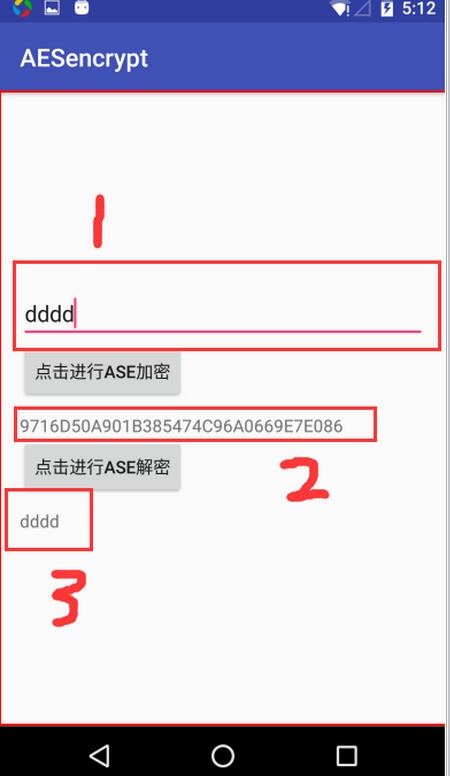
3、最後的效果如下:
1)、是一個輸入框,輸入鑰加密的字符串;
2)、點擊“AES加密”按鈕後生產的加密字符串;
3)、點擊“AES解密”按鈕後,對加密字符串進行解密,然後在3處看到解密後的字符串,可以看到加密字符串和解密字符串相同,所以AES加解密成功了
4、總結
要用真機測試,模擬器是不行的,具體原因沒去研究;
點擊獲取本例的github地址:
也可以通過android studio直接git下來,git地址為https://github.com/chenguo4930/AndroidAES.git
其中也還有DES、RSA的加解密demo的github地址為https://github.com/chenguo4930/EncodeDemo
git地址為: https://github.com/chenguo4930/EncodeDemo.git
以上就是本文的全部內容,希望對大家的學習有所幫助,也希望大家多多支持本站。
 Android中的android:layout_weight使用詳解
在使用LinearLayout的時候,子控件可以設置layout_weight。layout_weight的作用是設置子空間在LinearLayout的重要度(控件的大小
 解決Android Studio加載第三方jar包,出現包重復加載的問題:
通過Maven中央庫添加第三方jar包的時候,出現了重復加載jar包的問題,解決辦法很簡單去掉一個不讓它去加載就OK了 一、錯誤 com.android.ide.co
 Android自定義漂亮的圓形進度條
這幾天對Android中實現畫圓弧及圓弧效果中所實現的效果進行了修改,改為進度圓心進度條,效果如圖所示TasksCompletedView.java 代碼如下import
 Android ListView構建支持單選和多選的投票項目
引言我們在android的APP開發中有時候會碰到提供一個選項列表供用戶選擇的需求,如在投票類型的項目中,我們提供一些主題給用戶選擇,每個主題有若干選項,用戶對這些主題的