編輯:關於Android編程
本實例實現每隔5秒上傳一次,通過服務器端獲取手機上傳過來的文件信息並做相應處理;采用Android+Struts2技術。
一、Android端實現文件上傳
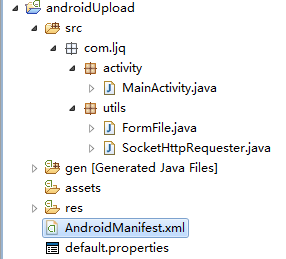
1)、新建一個Android項目命名為androidUpload,目錄結構如下:
2)、新建FormFile類,用來封裝文件信息
package com.ljq.utils;

import java.io.File;
import java.io.FileInputStream;
import java.io.FileNotFoundException;
import java.io.InputStream;

/**
 * 上傳文件
 */
public class FormFile {
  /* 上傳文件的數據 */
  private byte[] data;
  private InputStream inStream;
  private File file;
  /* 文件名稱 */
  private String filname;
  /* 請求參數名稱*/
  private String parameterName;
  /* 內容類型 */
  private String contentType = "application/octet-stream";

  public FormFile(String filname, byte[] data, String parameterName, String contentType) {
    this.data = data;
    this.filname = filname;
    this.parameterName = parameterName;
    if(contentType!=null) this.contentType = contentType;
  }

  public FormFile(String filname, File file, String parameterName, String contentType) {
    this.filname = filname;
    this.parameterName = parameterName;
    this.file = file;
    try {
      this.inStream = new FileInputStream(file);
    } catch (FileNotFoundException e) {
      e.printStackTrace();
    }
    if(contentType!=null) this.contentType = contentType;
  }

  public File getFile() {
    return file;
  }

  public InputStream getInStream() {
    return inStream;
  }

  public byte[] getData() {
    return data;
  }

  public String getFilname() {
    return filname;
  }

  public void setFilname(String filname) {
    this.filname = filname;
  }

  public String getParameterName() {
    return parameterName;
  }

  public void setParameterName(String parameterName) {
    this.parameterName = parameterName;
  }

  public String getContentType() {
    return contentType;
  }

  public void setContentType(String contentType) {
    this.contentType = contentType;
  }

}
3)、新建SocketHttpRequester類,封裝上傳文件到服務器代碼
package com.ljq.utils;

import java.io.BufferedReader;
import java.io.InputStreamReader;
import java.io.OutputStream;
import java.net.InetAddress;
import java.net.Socket;
import java.net.URL;
import java.util.Map;

/**
 * 上傳文件到服務器
 *
 * @author Administrator
 *
 */
public class SocketHttpRequester {
  /**
   * 直接通過HTTP協議提交數據到服務器,實現如下面表單提交功能:
   *  <FORM METHOD=POST ACTION="http://192.168.1.101:8083/upload/servlet/UploadServlet" enctype="multipart/form-data">
      <INPUT TYPE="text" NAME="name">
      <INPUT TYPE="text" NAME="id">
      <input type="file" name="imagefile"/>
      <input type="file" name="zip"/>
     </FORM>
   * @param path 上傳路徑(注:避免使用localhost或127.0.0.1這樣的路徑測試,因為它會指向手機模擬器,你可以使用http://www.iteye.cn或http://192.168.1.101:8083這樣的路徑測試)
   * @param params 請求參數 key為參數名,value為參數值
   * @param file 上傳文件
   */
  public static boolean post(String path, Map<String, String> params, FormFile[] files) throws Exception{
    final String BOUNDARY = "---------------------------7da2137580612"; //數據分隔線
    final String endline = "--" + BOUNDARY + "--\r\n";//數據結束標志

    int fileDataLength = 0;
    for(FormFile uploadFile : files){//得到文件類型數據的總長度
      StringBuilder fileExplain = new StringBuilder();
       fileExplain.append("--");
       fileExplain.append(BOUNDARY);
       fileExplain.append("\r\n");
       fileExplain.append("Content-Disposition: form-data;name=\""+ uploadFile.getParameterName()+"\";filename=\""+ uploadFile.getFilname() + "\"\r\n");
       fileExplain.append("Content-Type: "+ uploadFile.getContentType()+"\r\n\r\n");
       fileExplain.append("\r\n");
       fileDataLength += fileExplain.length();
      if(uploadFile.getInStream()!=null){
        fileDataLength += uploadFile.getFile().length();
       }else{
         fileDataLength += uploadFile.getData().length;
       }
    }
    StringBuilder textEntity = new StringBuilder();
    for (Map.Entry<String, String> entry : params.entrySet()) {//構造文本類型參數的實體數據
      textEntity.append("--");
      textEntity.append(BOUNDARY);
      textEntity.append("\r\n");
      textEntity.append("Content-Disposition: form-data; name=\""+ entry.getKey() + "\"\r\n\r\n");
      textEntity.append(entry.getValue());
      textEntity.append("\r\n");
    }
    //計算傳輸給服務器的實體數據總長度
    int dataLength = textEntity.toString().getBytes().length + fileDataLength + endline.getBytes().length;

    URL url = new URL(path);
    int port = url.getPort()==-1 ? 80 : url.getPort();
    Socket socket = new Socket(InetAddress.getByName(url.getHost()), port);
    OutputStream outStream = socket.getOutputStream();
    //下面完成HTTP請求頭的發送
    String requestmethod = "POST "+ url.getPath()+" HTTP/1.1\r\n";
    outStream.write(requestmethod.getBytes());
    String accept = "Accept: image/gif, image/jpeg, image/pjpeg, image/pjpeg, application/x-shockwave-flash, application/xaml+xml, application/vnd.ms-xpsdocument, application/x-ms-xbap, application/x-ms-application, application/vnd.ms-excel, application/vnd.ms-powerpoint, application/msword, */*\r\n";
    outStream.write(accept.getBytes());
    String language = "Accept-Language: zh-CN\r\n";
    outStream.write(language.getBytes());
    String contenttype = "Content-Type: multipart/form-data; boundary="+ BOUNDARY+ "\r\n";
    outStream.write(contenttype.getBytes());
    String contentlength = "Content-Length: "+ dataLength + "\r\n";
    outStream.write(contentlength.getBytes());
    String alive = "Connection: Keep-Alive\r\n";
    outStream.write(alive.getBytes());
    String host = "Host: "+ url.getHost() +":"+ port +"\r\n";
    outStream.write(host.getBytes());
    //寫完HTTP請求頭後根據HTTP協議再寫一個回車換行
    outStream.write("\r\n".getBytes());
    //把所有文本類型的實體數據發送出來
    outStream.write(textEntity.toString().getBytes());
    //把所有文件類型的實體數據發送出來
    for(FormFile uploadFile : files){
      StringBuilder fileEntity = new StringBuilder();
       fileEntity.append("--");
       fileEntity.append(BOUNDARY);
       fileEntity.append("\r\n");
       fileEntity.append("Content-Disposition: form-data;name=\""+ uploadFile.getParameterName()+"\";filename=\""+ uploadFile.getFilname() + "\"\r\n");
       fileEntity.append("Content-Type: "+ uploadFile.getContentType()+"\r\n\r\n");
       outStream.write(fileEntity.toString().getBytes());
       if(uploadFile.getInStream()!=null){
         byte[] buffer = new byte[1024];
         int len = 0;
         while((len = uploadFile.getInStream().read(buffer, 0, 1024))!=-1){
           outStream.write(buffer, 0, len);
         }
         uploadFile.getInStream().close();
       }else{
         outStream.write(uploadFile.getData(), 0, uploadFile.getData().length);
       }
       outStream.write("\r\n".getBytes());
    }
    //下面發送數據結束標志,表示數據已經結束
    outStream.write(endline.getBytes());

    BufferedReader reader = new BufferedReader(new InputStreamReader(socket.getInputStream()));
    if(reader.readLine().indexOf("200")==-1){//讀取web服務器返回的數據,判斷請求碼是否為200,如果不是200,代表請求失敗
      return false;
    }
    outStream.flush();
    outStream.close();
    reader.close();
    socket.close();
    return true;
  }

  /**
   * 提交數據到服務器
   * @param path 上傳路徑(注:避免使用localhost或127.0.0.1這樣的路徑測試,因為它會指向手機模擬器,你可以使用http://www.itcast.cn或http://192.168.1.10:8080這樣的路徑測試)
   * @param params 請求參數 key為參數名,value為參數值
   * @param file 上傳文件
   */
  public static boolean post(String path, Map<String, String> params, FormFile file) throws Exception{
    return post(path, params, new FormFile[]{file});
  }
}
4)、新建MainActivity類,實現每隔5秒上傳一次
package com.ljq.activity;

import java.io.File;
import java.util.HashMap;
import java.util.Map;

import android.app.Activity;
import android.os.Bundle;
import android.os.Environment;
import android.os.Handler;
import android.util.Log;

import com.ljq.utils.FormFile;
import com.ljq.utils.SocketHttpRequester;

public class MainActivity extends Activity {
  private File file;
  private Handler handler;
  private static final String TAG="MainActivity";

  @Override
  public void onCreate(Bundle savedInstanceState) {
    super.onCreate(savedInstanceState);
    setContentView(R.layout.main);
    Log.i(TAG, "onCreate");

    file = new File(Environment.getExternalStorageDirectory(), "123.rmvb");
    Log.i(TAG, "照片文件是否存在:"+file);
    handler=new Handler();
    handler.post(runnable);
  }

  Runnable runnable=new Runnable() {

    public void run() {
      Log.i(TAG, "runnable run");
      uploadFile(file);
      handler.postDelayed(runnable, 5000);
    }

  };

  /**
   * 上傳圖片到服務器
   *
   * @param imageFile 包含路徑
   */
  public void uploadFile(File imageFile) {
    Log.i(TAG, "upload start");
    try {
      String requestUrl = "http://192.168.1.101:8083/upload/upload/execute.do";
      //請求普通信息
      Map<String, String> params = new HashMap<String, String>();
      params.put("username", "張三");
      params.put("pwd", "zhangsan");
      params.put("age", "21");
      params.put("fileName", imageFile.getName());
      //上傳文件
      FormFile formfile = new FormFile(imageFile.getName(), imageFile, "image", "application/octet-stream");

      SocketHttpRequester.post(requestUrl, params, formfile);
      Log.i(TAG, "upload success");
    } catch (Exception e) {
      Log.i(TAG, "upload error");
      e.printStackTrace();
    }
    Log.i(TAG, "upload end");
  }
}
5)、修改清單文件
<?xml version="1.0" encoding="utf-8"?>
<manifest xmlns:android="http://schemas.android.com/apk/res/android"
   package="com.ljq.activity"
   android:versionCode="1"
   android:versionName="1.0">
  <application android:icon="@drawable/icon" android:label="@string/app_name">
    <activity android:name=".MainActivity"
         android:label="@string/app_name">
      <intent-filter>
        <action android:name="android.intent.action.MAIN" />
        <category android:name="android.intent.category.LAUNCHER" />
      </intent-filter>
    </activity>

  </application>
  <uses-sdk android:minSdkVersion="4" />
  <uses-permission android:name="android.permission.INTERNET" />

</manifest>
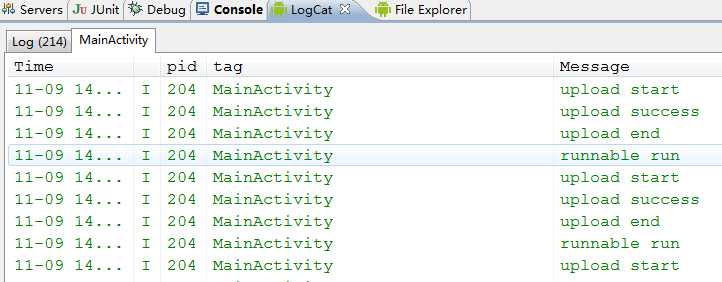
啟動模擬器,運行如下:
二、服務器端用來獲取Android端上傳過來的文件信息
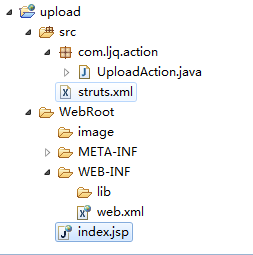
1)、新建一個web項目命名為upload,目錄結構如下
注意:記得加入struts2 jar包,需加入的jar如下
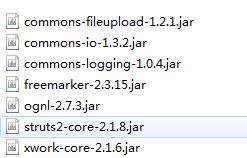
2)、新建action類,命名為UploadAction,內容如下
package com.ljq.action;

import java.io.File;
import java.io.FileInputStream;
import java.io.FileOutputStream;
import java.io.IOException;

import javax.servlet.http.HttpServletRequest;

import org.apache.struts2.ServletActionContext;

import com.opensymphony.xwork2.ActionSupport;

/**
 * 獲取Android端上傳過來的信息
 *
 * @author Administrator
 *
 */
@SuppressWarnings("serial")
public class UploadAction extends ActionSupport {
  // 上傳文件域
  private File image;
  // 上傳文件類型
  private String imageContentType;
  // 封裝上傳文件名
  private String imageFileName;
  // 接受依賴注入的屬性
  private String savePath;

  @Override
  public String execute() {
    HttpServletRequest request=ServletActionContext.getRequest();
    FileOutputStream fos = null;
    FileInputStream fis = null;
    try {
      System.out.println("獲取Android端傳過來的普通信息:");
      System.out.println("用戶名:"+request.getParameter("username"));
      System.out.println("密碼:"+request.getParameter("pwd"));
      System.out.println("年齡:"+request.getParameter("age"));
      System.out.println("文件名:"+request.getParameter("fileName"));
      System.out.println("獲取Android端傳過來的文件信息:");
      System.out.println("文件存放目錄: "+getSavePath());
      System.out.println("文件名稱: "+imageFileName);
      System.out.println("文件大小: "+image.length());
      System.out.println("文件類型: "+imageContentType);

      fos = new FileOutputStream(getSavePath() + "/" + getImageFileName());
      fis = new FileInputStream(getImage());
      byte[] buffer = new byte[1024];
      int len = 0;
      while ((len = fis.read(buffer)) != -1) {
        fos.write(buffer, 0, len);
      }
      System.out.println("文件上傳成功");
    } catch (Exception e) {
      System.out.println("文件上傳失敗");
      e.printStackTrace();
    } finally {
      close(fos, fis);
    }
    return SUCCESS;
  }

  /**
   * 文件存放目錄
   *
   * @return
   */
  public String getSavePath() throws Exception{
    return ServletActionContext.getServletContext().getRealPath(savePath);
  }

  public void setSavePath(String savePath) {
    this.savePath = savePath;
  }

  public File getImage() {
    return image;
  }

  public void setImage(File image) {
    this.image = image;
  }

  public String getImageContentType() {
    return imageContentType;
  }

  public void setImageContentType(String imageContentType) {
    this.imageContentType = imageContentType;
  }

  public String getImageFileName() {
    return imageFileName;
  }

  public void setImageFileName(String imageFileName) {
    this.imageFileName = imageFileName;
  }

  private void close(FileOutputStream fos, FileInputStream fis) {
    if (fis != null) {
      try {
        fis.close();
        fis=null;
      } catch (IOException e) {
        System.out.println("FileInputStream關閉失敗");
        e.printStackTrace();
      }
    }
    if (fos != null) {
      try {
        fos.close();
        fis=null;
      } catch (IOException e) {
        System.out.println("FileOutputStream關閉失敗");
        e.printStackTrace();
      }
    }
  }

}
3)、配置struts.xml
<?xml version="1.0" encoding="UTF-8" ?>
<!DOCTYPE struts PUBLIC
  "-//Apache Software Foundation//DTD Struts Configuration 2.0//EN"
  "http://struts.apache.org/dtds/struts-2.0.dtd">

<struts>
  <!-- 該屬性指定需要Struts2處理的請求後綴,該屬性的默認值是action,即所有匹配*.action的請求都由Struts2處理。
    如果用戶需要指定多個請求後綴,則多個後綴之間以英文逗號(,)隔開。 -->
  <constant name="struts.action.extension" value="do"/>
  <!-- 設置浏覽器是否緩存靜態內容,默認值為true(生產環境下使用),開發階段最好關閉 -->
  <constant name="struts.serve.static.browserCache" value="false"/>
  <!-- 當struts的配置文件修改後,系統是否自動重新加載該文件,默認值為false(生產環境下使用),開發階段最好打開 -->
  <constant name="struts.configuration.xml.reload" value="true"/>
  <!-- 開發模式下使用,這樣可以打印出更詳細的錯誤信息 -->
  <constant name="struts.devMode" value="true"/>
  <!-- 默認的視圖主題 -->
  <constant name="struts.ui.theme" value="simple"/>
  <!--<constant name="struts.objectFactory" value="spring" />-->
  <!--解決亂碼  -->
  <constant name="struts.i18n.encoding" value="UTF-8"/>
  <!-- 指定允許上傳的文件最大字節數。默認值是2097152(2M) -->
  <constant name="struts.multipart.maxSize" value="22097152"/>
  <!-- 設置上傳文件的臨時文件夾,默認使用javax.servlet.context.tempdir -->
  <constant name="struts.multipart.saveDir " value="d:/tmp"/>

  <package name="upload" namespace="/upload" extends="struts-default">
    <action name="execute" class="com.ljq.action.UploadAction">
      <!-- 動態設置savePath的屬性值 -->
      <param name="savePath">/image</param>
      <result name="success">/WEB-INF/page/message.jsp</result>
    </action>
  </package>
</struts>
4)、配置web.xml
<?xml version="1.0" encoding="UTF-8"?>
<web-app version="2.4" xmlns="http://java.sun.com/xml/ns/j2ee"
  xmlns:xsi="http://www.w3.org/2001/XMLSchema-instance"
  xsi:schemaLocation="http://java.sun.com/xml/ns/j2ee
  http://java.sun.com/xml/ns/j2ee/web-app_2_4.xsd">

  <filter>
    <filter-name>struts2</filter-name>
    <filter-class>
      org.apache.struts2.dispatcher.ng.filter.StrutsPrepareAndExecuteFilter
    </filter-class>
  </filter>
  <filter-mapping>
    <filter-name>struts2</filter-name>
    <url-pattern>/*</url-pattern>
  </filter-mapping>

  <filter>
    <filter-name>strutsCleanup</filter-name>
    <filter-class>
      org.apache.struts2.dispatcher.ActionContextCleanUp
    </filter-class>
  </filter>
  <filter-mapping>
    <filter-name>strutsCleanup</filter-name>
    <url-pattern>/*</url-pattern>
  </filter-mapping>

  <welcome-file-list>
    <welcome-file>index.jsp</welcome-file>
  </welcome-file-list>
</web-app>
運行結構如下:
獲取Android端傳過來的普通信息:
用戶名:張三
密碼:zhangsan
年齡:21
文件名:123.rmvb
獲取Android端傳過來的文件信息:
文件存放目錄: D:\apache-tomcat-6.0.18\webapps\upload\image
文件名稱: 123.rmvb
文件大小: 3962649
文件類型: application/octet-stream
文件上傳成功
以上就是本文的全部內容,希望對大家的學習有所幫助,也希望大家多多支持本站。
 仿約會吧應用詳情頁,評論欄隨Recyclerview滑動左右移動
背景最近在玩一個叫“約會吧”的應用,也是在看直播app,默認下載安裝的,安裝點進去看這個應用做的不錯,就留下來了。然後看他們動態詳情頁底部有一個效
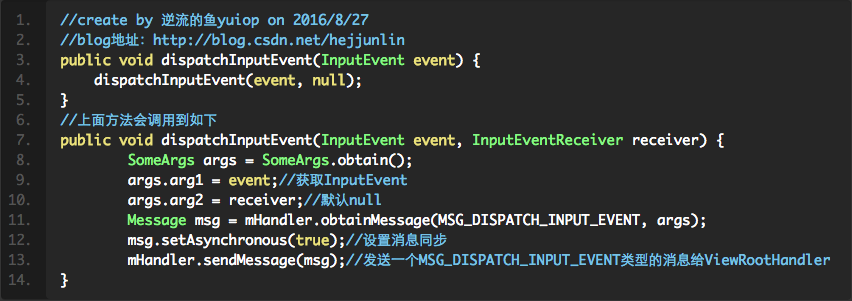 Android View框架總結(九)KeyEvent事件分發機制
本篇開始分析按鍵消息事件分發(PS:本篇文章中源碼均是android 6.0,請知曉)先看下Agenda:ViewRootImpl中的dispatchInputEvent
 Ionic2創建App啟動頁左右滑動歡迎界面
摘要:每個有逼格的App在第一次啟動時都有一個歡迎界面,通常是幾個單頁面或者帶動畫的單頁面滑動到最後一頁有個啟動的按鈕,本文將使用Ionic2來創建,So easy!效果
 Android圓形旋轉菜單開發實例
最近幫朋友做了一個動畫菜單,感覺有一定的實用價值,就在此給大家分享一下,先看看效果:實現思路:從圖中可以看出,這三個(或更多,需要自己再實現)菜單是圍繞著中心點旋轉的,旋