編輯:關於Android編程
使用PopupWindow來實現彈出框,並且帶有動畫效果
首先自定義PopupWindow
public class LostPopupWindow extends PopupWindow {
public Lost lost;
public void onLost(Lost lost){
this.lost = lost;
}
private View conentView;
public View getConentView() {
return conentView;
}
public LostPopupWindow(final Activity context) {
LayoutInflater inflater = (LayoutInflater) context
.getSystemService(Context.LAYOUT_INFLATER_SERVICE);
conentView = inflater.inflate(R.layout.lost_pop_menu, null);
int h = context.getWindowManager().getDefaultDisplay().getHeight();
int w = context.getWindowManager().getDefaultDisplay().getWidth();
// 設置SelectPicPopupWindow的View
this.setContentView(conentView);
// 設置SelectPicPopupWindow彈出窗體的寬
this.setWidth(w / 2 + 50);
// 設置SelectPicPopupWindow彈出窗體的高
this.setHeight(LayoutParams.WRAP_CONTENT);
// 設置SelectPicPopupWindow彈出窗體可點擊
this.setFocusable(true);
this.setOutsideTouchable(true);
// 刷新狀態
this.update();
// 實例化一個ColorDrawable顏色為半透明
ColorDrawable dw = new ColorDrawable(0000000000);
// 點back鍵和其他地方使其消失,設置了這個才能觸發OnDismisslistener ,設置其他控件變化等操作
this.setBackgroundDrawable(dw);
// mPopupWindow.setAnimationStyle(android.R.style.Animation_Dialog);
// 設置SelectPicPopupWindow彈出窗體動畫效果
this.setAnimationStyle(R.style.AnimationPreview);
LinearLayout send = (LinearLayout) conentView
.findViewById(R.id.send);
LinearLayout mySend = (LinearLayout) conentView
.findViewById(R.id.my_send);
LinearLayout all = (LinearLayout) conentView.findViewById(R.id.all);
send.setOnClickListener(new View.OnClickListener() {
@Override
public void onClick(View arg0) {
LostPopupWindow.this.dismiss();
lost.onLost(2);
}
});
mySend.setOnClickListener(new View.OnClickListener() {
@Override
public void onClick(View v) {
LostPopupWindow.this.dismiss();
lost.onLost(1);
}
});
all.setOnClickListener(new View.OnClickListener() {
@Override
public void onClick(View v) {
LostPopupWindow.this.dismiss();
lost.onLost(0);
}
});
}
/**
* 顯示popupWindow
*
* @param parent
*/
public void showPopupWindow(View parent) {
if (!this.isShowing()) {
// 以下拉方式顯示popupwindow
this.showAsDropDown(parent, parent.getLayoutParams().width / 2, 18);
} else {
this.dismiss();
}
}
}
R.layout.lost_pop_menu文件
<?xml version="1.0" encoding="utf-8"?>
<LinearLayout xmlns:android="http://schemas.android.com/apk/res/android"
android:layout_width="200dp"
android:layout_height="wrap_content"
android:layout_alignParentRight="true"
android:background="@drawable/black_menu_pop_bg"
android:orientation="vertical"
android:paddingLeft="@dimen/activity_horizontal_margin">
<LinearLayout
android:id="@+id/send"
android:layout_width="match_parent"
android:layout_height="40dp"
android:gravity="center_vertical"
android:orientation="horizontal"
android:scaleType="fitXY">
<ImageView
android:id="@+id/img5"
android:layout_width="20dp"
android:layout_height="20dp"
android:src="@drawable/icon_lost_add" />
<TextView
android:id="@+id/item_content"
android:layout_width="wrap_content"
android:layout_height="wrap_content"
android:layout_marginLeft="10dp"
android:text="發布信息"
android:textColor="#e5e5e6"
android:textSize="18sp" />
</LinearLayout>
<View
android:layout_width="match_parent"
android:layout_height="1px"
android:background="#616467" />
<LinearLayout
android:id="@+id/my_send"
android:layout_width="match_parent"
android:layout_height="40dp"
android:gravity="center_vertical"
android:orientation="horizontal">
<ImageView
android:id="@+id/img6"
android:layout_width="20dp"
android:layout_height="20dp"
android:scaleType="fitXY"
android:src="@drawable/icon_lost_my" />
<TextView
android:id="@+id/item_content1"
android:layout_width="wrap_content"
android:layout_height="wrap_content"
android:layout_marginLeft="10dp"
android:text="我發布的信息"
android:textColor="#e5e5e6"
android:textSize="18sp" />
</LinearLayout>
<View
android:layout_width="match_parent"
android:layout_height="1px"
android:background="#616467" />
<LinearLayout
android:id="@+id/all"
android:layout_width="match_parent"
android:layout_height="40dp"
android:gravity="center_vertical"
android:orientation="horizontal">
<ImageView
android:id="@+id/img7"
android:layout_width="20dp"
android:layout_height="20dp"
android:scaleType="fitXY"
android:src="@drawable/icon_all" />
<TextView
android:id="@+id/item_content2"
android:layout_width="wrap_content"
android:layout_height="wrap_content"
android:layout_marginLeft="10dp"
android:text="全部信息"
android:textColor="#e5e5e6"
android:textSize="18sp" />
</LinearLayout>
</LinearLayout>
動畫R.style.AnimationPreview
<style name="AnimationPreview">
<item name="android:windowEnterAnimation">@anim/fade_in</item>
<item name="android:windowExitAnimation">@anim/fade_out</item>
</style>
@anim/fade_in
<?xml version="1.0" encoding="utf-8"?>
<!-- 左上角擴大-->
<scale xmlns:android="http://schemas.android.com/apk/res/android"
android:interpolator="@android:anim/accelerate_decelerate_interpolator"
android:fromXScale="0.001"
android:toXScale="1.0"
android:fromYScale="0.001"
android:toYScale="1.0"
android:pivotX="100%"
android:pivotY="10%"
android:duration="200" />
@anim/fade_out
<!-- 左上角縮小 -->
<scale xmlns:android="http://schemas.android.com/apk/res/android"
android:interpolator="@android:anim/accelerate_decelerate_interpolator"
android:fromXScale="1.0"
android:toXScale="0.001"
android:fromYScale="1.0"
android:toYScale="0.001"
android:pivotX="100%"
android:pivotY="10%"
android:duration="200" />
接下來就是使用了
LostPopupWindow popWindow = new LostPopupWindow(ZiXunDetailActivity.this);
((ImageView)(popWindow.getConentView().findViewById(R.id.img5))).setImageResource(R.drawable.ckplico);
((ImageView)(popWindow.getConentView().findViewById(R.id.img6))).setImageResource(R.drawable.fbplico);
((ImageView)(popWindow.getConentView().findViewById(R.id.img7))).setImageResource(R.drawable.zfplico);
((TextView)(popWindow.getConentView().findViewById(R.id.item_content))).setText("查看評論");
((TextView)(popWindow.getConentView().findViewById(R.id.item_content1))).setText("發表評論");
((TextView)(popWindow.getConentView().findViewById(R.id.item_content2))).setText("轉發文章");
popWindow.showPopupWindow(linMain);
popWindow.onLost(new Lost() {
@Override
public void onLost(int index) {
switch (index){
case 0: //轉發文章
break;
case 1: //發表評論
lineFooter.setVisibility(View.VISIBLE);
break;
case 2://查看評論
Bundle bundle=new Bundle();
bundle.putString("id",mID);
startActivity(PingLunActivity.class, "熱門評論", bundle);
break;
}
}
});
效果圖
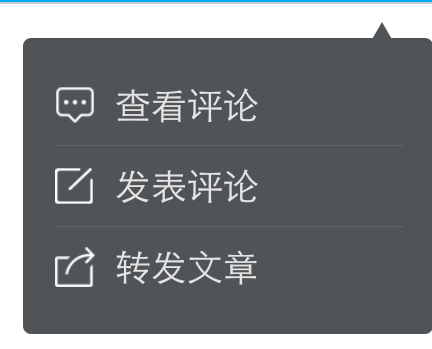
以上所述是小編給大家介紹的Android中自定義PopupWindow實現彈出框並帶有動畫效果,希望對大家有所幫助,如果大家有任何疑問請給我留言,小編會及時回復大家的。在此也非常感謝大家對本站網站的支持!
 android自定義View之(四)------一鍵清除動畫
1.前言: 自己也是參考別人的一些自定義view例子,學習了一些基本的自定義view的方法。今天,我參考了一些資料,再結合自已的一些理解,做了一個一鍵清除的動畫。當年,我
 Android ActionBar完全解析,使用官方推薦的最佳導航欄(下)
限於篇幅的原因,在上篇文章中我們只學習了ActionBar基礎部分的知識,那麼本篇文章我們將接著上一章的內容繼續學習,探究一下ActionBar更加高級的知
 輕松實現RecycleView的下拉刷新、加載更多
那如同這個題目,這裡面涉及的東西其實還是比較多的,RecycleView SwipeRefreshLayout,下拉刷新(這個就是SwipeRefreshLayout的)
 Android編程之繪制文本(FontMetrics)實現方法
本文實例講述了Android編程之繪制文本(FontMetrics)實現方法。分享給大家供大家參考,具體如下:Canvas 作為繪制文本時,使用FontMetrics對象