編輯:關於Android編程
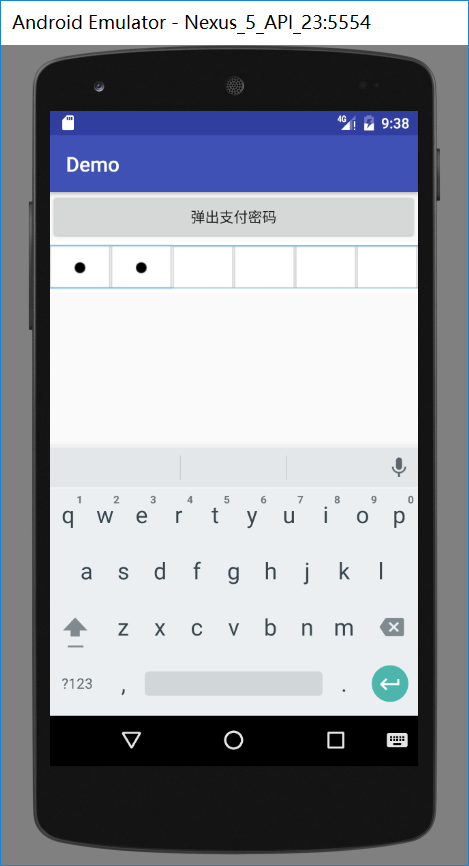
先看一下效果圖
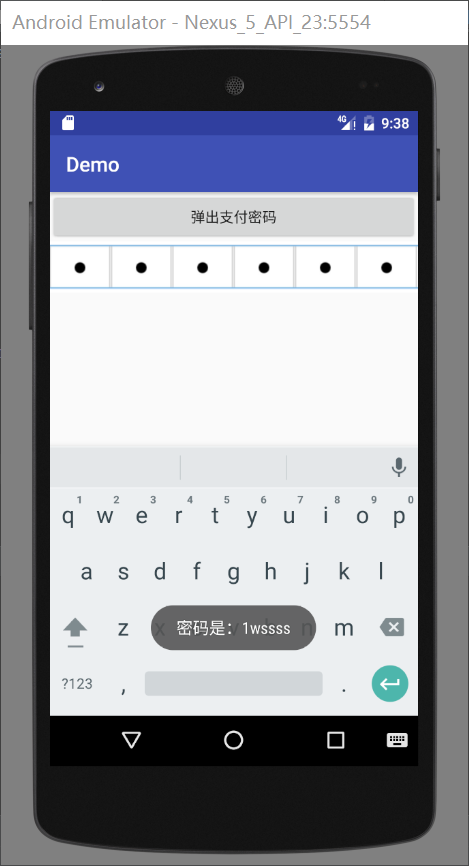
實現思路:
變成點的控件不是TextView和EditText而是Imageview。首先寫一個RelativeLayout裡邊包含6個ImageView和一個EditText(EditText要覆蓋ImageView)將EditText的背景設置成透明。
<?xml version="1.0" encoding="utf-8"?>
<RelativeLayout xmlns:android="http://schemas.android.com/apk/res/android"
 android:layout_width="match_parent"
 android:layout_height="wrap_content">
 <LinearLayout
  android:layout_width="match_parent"
  android:layout_height="50dp"
  android:orientation="horizontal"
  android:background="@android:color/white">
  <ImageView
   android:id="@+id/item_password_iv1"
   android:layout_width="0dp"
   android:layout_height="match_parent"
   android:layout_weight="1"
   android:src="@mipmap/nopassword"/>
  <ImageView
   android:id="@+id/item_password_iv2"
   android:layout_width="0dp"
   android:layout_height="match_parent"
   android:layout_weight="1"
   android:src="@mipmap/nopassword"/>
  <ImageView
   android:id="@+id/item_password_iv3"
   android:layout_width="0dp"
   android:layout_height="match_parent"
   android:layout_weight="1"
   android:src="@mipmap/nopassword"/>
  <ImageView
   android:id="@+id/item_password_iv4"
   android:layout_width="0dp"
   android:layout_height="match_parent"
   android:layout_weight="1"
   android:src="@mipmap/nopassword"/>
  <ImageView
   android:id="@+id/item_password_iv5"
   android:layout_width="0dp"
   android:layout_height="match_parent"
   android:layout_weight="1"
   android:src="@mipmap/nopassword"/>
  <ImageView
   android:id="@+id/item_password_iv6"
   android:layout_width="0dp"
   android:layout_height="match_parent"
   android:layout_weight="1"
   android:src="@mipmap/nopassword"/>
 </LinearLayout>
 <EditText
  android:id="@+id/item_edittext"
  android:layout_width="match_parent"
  android:layout_height="50dp"
  android:background="@android:color/transparent"/>
</RelativeLayout>
自定義一個控件ItemPasswordLayout,用來給布局做一些處理,重點是將EditText的光標去掉,並監聽輸入文字的事件在文字變化後將文字放在一個StringBuffer中,並將edittext設置為"";再監聽按下鍵盤刪除鍵的事件,當按下刪除鍵後會將StringBuffer中刪除相應位置的字符。
/**
 * 密碼輸入框的控件布局
 * Created by Went_Gone on 2016/9/14.
 */
public class ItemPasswordLayout extends RelativeLayout{
 private EditText editText;
 private ImageView[] imageViews;//使用一個數組存儲密碼框
 private StringBuffer stringBuffer = new StringBuffer();//存儲密碼字符
 private int count = 6;
 private String strPassword;//密碼字符串

 public ItemPasswordLayout(Context context) {
  this(context,null);
 }

 public ItemPasswordLayout(Context context, AttributeSet attrs) {
  this(context, attrs,0);
 }

 public ItemPasswordLayout(Context context, AttributeSet attrs, int defStyleAttr) {
  super(context, attrs, defStyleAttr);
  imageViews = new ImageView[6];
  View view = View.inflate(context, R.layout.item_password,this);

  editText = (EditText) findViewById(R.id.item_edittext);
  imageViews[0] = (ImageView) findViewById(R.id.item_password_iv1);
  imageViews[1] = (ImageView) findViewById(R.id.item_password_iv2);
  imageViews[2] = (ImageView) findViewById(R.id.item_password_iv3);
  imageViews[3] = (ImageView) findViewById(R.id.item_password_iv4);
  imageViews[4] = (ImageView) findViewById(R.id.item_password_iv5);
  imageViews[5] = (ImageView) findViewById(R.id.item_password_iv6);

  editText.setCursorVisible(false);//將光標隱藏
  setListener();
 }

 private void setListener() {
  editText.addTextChangedListener(new TextWatcher() {
   @Override
   public void beforeTextChanged(CharSequence charSequence, int i, int i1, int i2) {

   }

   @Override
   public void onTextChanged(CharSequence charSequence, int i, int i1, int i2) {

   }

   @Override
   public void afterTextChanged(Editable editable) {
    //重點 如果字符不為""時才進行操作
    if (!editable.toString().equals("")) {
     if (stringBuffer.length()>5){
      //當密碼長度大於5位時edittext置空
      editText.setText("");
      return;
     }else {
      //將文字添加到StringBuffer中
      stringBuffer.append(editable);
      editText.setText("");//添加後將EditText置空 造成沒有文字輸入的錯局
      Log.e("TAG", "afterTextChanged: stringBuffer is "+stringBuffer);
      count = stringBuffer.length();//記錄stringbuffer的長度
      strPassword = stringBuffer.toString();
      if (stringBuffer.length()==6){
       //文字長度位6 則調用完成輸入的監聽
       if (inputCompleteListener!=null){
        inputCompleteListener.inputComplete();
       }
      }
     }

     for (int i =0;i<stringBuffer.length();i++){
      imageViews[i].setImageResource(R.mipmap.ispassword);
     }
    }
   }
  });
  editText.setOnKeyListener(new OnKeyListener() {
   @Override
   public boolean onKey(View v, int keyCode, KeyEvent event) {
    if (keyCode == KeyEvent.KEYCODE_DEL
      && event.getAction() == KeyEvent.ACTION_DOWN) {
//     Log.e("TAG", "afterTextChanged: stringBuffer is "+stringBuffer);
     if (onKeyDelete()) return true;
     return true;
    }
    return false;
   }
  });
 }

 public boolean onKeyDelete() {
  if (count==0){
   count = 6;
   return true;
  }
  if (stringBuffer.length()>0){
   //刪除相應位置的字符
   stringBuffer.delete((count-1),count);
   count--;
   Log.e("TAG", "afterTextChanged: stringBuffer is "+stringBuffer);
   strPassword = stringBuffer.toString();
   imageViews[stringBuffer.length()].setImageResource(R.mipmap.nopassword);

  }
  return false;
 }

 @Override
 public boolean onKeyDown(int keyCode, KeyEvent event) {
  return super.onKeyDown(keyCode, event);
 }

 private InputCompleteListener inputCompleteListener;

 public void setInputCompleteListener(InputCompleteListener inputCompleteListener) {
  this.inputCompleteListener = inputCompleteListener;
 }

 public interface InputCompleteListener{
  void inputComplete();
 }

 public EditText getEditText() {
  return editText;
 }

 /**
  * 獲取密碼
  * @return
  */
 public String getStrPassword() {
  return strPassword;
 }

 public void setContent(String content){
  editText.setText(content);
 }
}
接下來只需要在Activity調用就可以了。
在xml中聲明
 <com.example.went_gone.demo.view.ItemPasswordLayout
  android:id="@+id/act_zhifubao_IPLayout"
  android:layout_width="match_parent"
  android:layout_height="wrap_content">
 </com.example.went_gone.demo.view.ItemPasswordLayout>
在Activity中調用
 itemPasswordLayout = (ItemPasswordLayout) findViewById(R.id.act_zhifubao_IPLayout);
  itemPasswordLayout.setInputCompleteListener(new ItemPasswordLayout.InputCompleteListener() {
   @Override
   public void inputComplete() {
    Toast.makeText(ZhifubaoActivity.this, "密碼是:"+itemPasswordLayout.getStrPassword(), Toast.LENGTH_SHORT).show();
   }
  });
總結
好了,本文的內容到這就結束了,如此就可以了,是不是很簡單。希望這篇文章能對大家的學習或者工作帶來一定的幫助,如果有疑問大家可以留言交流。
 Saving Android View state correctly
Saving Android View state correctlyToday we will talk about saving and restoring View
 android 學習-Android Fragment 深度解析
有過一些面試經驗的人基本都深有體會,每次面試一般都會問到Fragment的知識,所以,今天我就單獨把Fragment拿出來與大家分享一下. 會涉及到Fragment如
 Android Studio使用心得 - 簡介與環境配置
關於Android Studio 在2013 Google IO大會上發布的全新IDE Android Studio相信各位猿們並不陌生,截止2014的Goog
 Android性能優化之Performance Tips
如果你真的願意去努力,你人生最壞的結果,也不過是大器晚成。 原文鏈接:http://developer.android.com/training/articles/per