編輯:關於Android編程
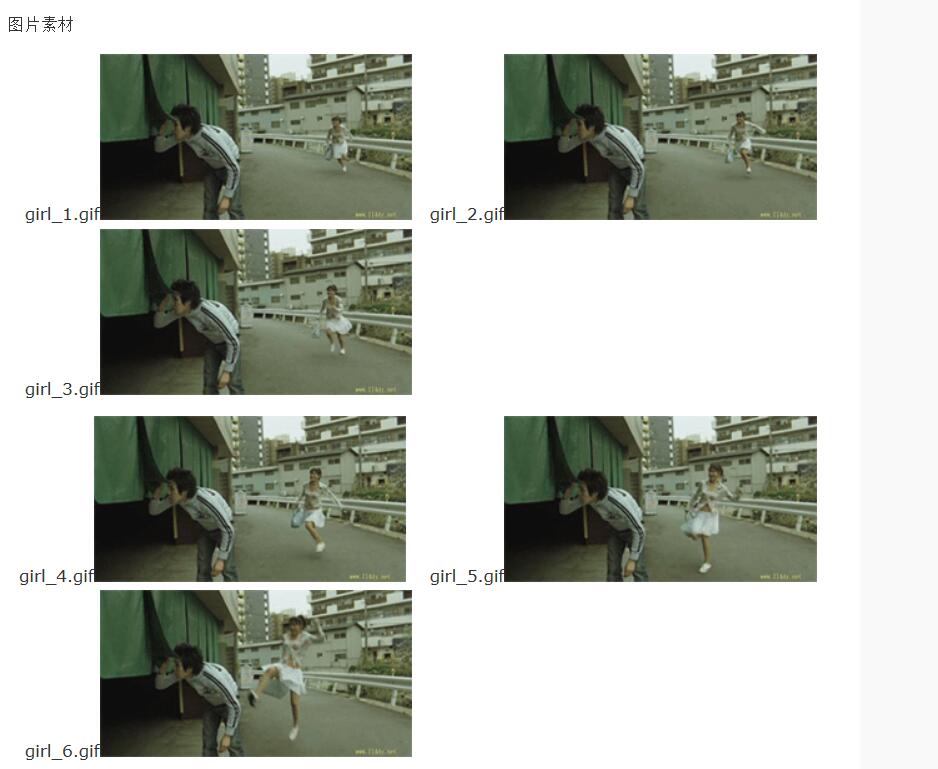
Drawable animation可以加載Drawable資源實現幀動畫。AnimationDrawable是實現Drawable animations的基本類。
這裡用AnimationDrawable 簡單模擬動態圖的實現。
fragment_main 布局文件 ---- 只需要放一個 ImageView即可
<RelativeLayout xmlns:android="http://schemas.android.com/apk/res/android"
  xmlns:tools="http://schemas.android.com/tools"
  android:layout_width="match_parent"
  android:layout_height="match_parent"
  tools:context="com.yztc.frameanimation.MainActivity" >

  <ImageView
    android:id="@+id/iv_frame"
    android:layout_width="match_parent"
    android:layout_height="200dp"
    android:background="@drawable/girl_and_boy" />

</RelativeLayout>
girl_and_boy 布局文件 ---- 實現動畫
推薦用XML文件的方法實現Drawable動畫,不推薦在代碼中實現。這種XML文件存放在工程中res/drawable/目錄下。XML文件的指令(即屬性)為動畫播放的順序和時間間隔。
<?xml version="1.0" encoding="utf-8"?>
<animation-list xmlns:android="http://schemas.android.com/apk/res/android" >
  <!-- onshot 屬性表示動畫只執行一次 -->

  <!-- duration 表示持續時間 -->
  <item
    android:drawable="@drawable/girl_1"
    android:duration="200">
  </item>
  <item
    android:drawable="@drawable/girl_2"
    android:duration="200">
  </item>
  <item
    android:drawable="@drawable/girl_3"
    android:duration="200">
  </item>
  <item
    android:drawable="@drawable/girl_4"
    android:duration="200">
  </item>
  <item
    android:drawable="@drawable/girl_5"
    android:duration="300">
  </item>
  <item
    android:drawable="@drawable/girl_6"
    android:duration="400">
  </item>
  <item
    android:drawable="@drawable/girl_7"
    android:duration="500">
  </item>
  <item
    android:drawable="@drawable/girl_8"
    android:duration="400">
  </item>
  <item
    android:drawable="@drawable/girl_9"
    android:duration="300">
  </item>
  <item
    android:drawable="@drawable/girl_10"
    android:duration="200">
  </item>
  <item
    android:drawable="@drawable/girl_11"
    android:duration="200">
  </item>

</animation-list>
MainActivity
package com.dragon.android.initgif;

import android.app.Activity;
import android.graphics.drawable.AnimationDrawable;
import android.os.Bundle;
import android.widget.ImageView;

public class MainActivity extends Activity {

  @Override
  protected void onCreate(Bundle savedInstanceState) {
    super.onCreate(savedInstanceState);
    setContentView(R.layout.fragment_main);

    ImageView ivFrame = (ImageView) findViewById(R.id.iv_frame);
    // 得到一個動畫圖片
    AnimationDrawable background = (AnimationDrawable) ivFrame
        .getBackground();
    // 開始播放
    background.start();
    // 停止方法.
    // background.stop();
  }

}
以上就是本文的全部內容,希望對大家的學習有所幫助,也希望大家多多支持本站。
 自己實現android側滑菜單
當今的android應用設計中,一種主流的設計方式就是會擁有一個側滑菜單,以圖為證: 實現這樣的側滑效果,在5.0以前我們用的最多的就是SlidingMenu這
 Android編程解析XML方法詳解(SAX,DOM與PULL)
本文實例講述了Android編程解析XML方法。分享給大家供大家參考,具體如下:XML在各種開發中都廣泛應用,Android也不例外。作為承載數據的一個重要角色,如何讀寫
 Android 有效的解決內存洩漏的問題實例詳解
Android 有效的解決內存洩漏的問題Android內存洩漏,我想做Android 應用的時候遇到的話很是頭疼,這裡是我在網上找的不錯的資料,實例詳解這個問題的解決方案
 android產品研發(十四)--)App升級與更新
上一篇文章中我們講解了android app中的輪訓操作,講解的內容主要包括:我們在App中使用輪訓操作的情景,作用以及實現方式等。一般而言我們使用輪訓操作都是通過定時任