編輯:關於Android編程
新版本的微信和QQ上引入的滑動刪除功能是現在比較流行的一個功能。其實這個滑動刪除的控件,github上已經有了,是一個熱門的開源框架SwipeListView。不過,這個SwipeListView是一個framelayout,即是一個兩層的布局,上面的布局front覆蓋了下面的布局back,滑動的時候則會滑開front,這樣下面的back就顯示出來了。但是看了一下微信的滑動刪除好像不是這樣的,感覺更像是一個超出了屏幕的單層布局,滑動的時候是右邊超出屏幕的button進入屏幕,猜測應該不是使用SwipeListView控件。QQ的滑動刪除則是在ListView的item右邊隱藏一個button,但檢測到滑動事件的時候,給button一個出現的動畫,使其可見,這個方案應該是最好實現的了。
本篇主要是學習SwipeListView這個開源框架。
使用這個框架有兩種方式,一種是導入SwipeListViewLibrary這個工程,將其作為一個android工程的依賴庫。由於SwipeListViewLibrary庫工程自身也依賴另外一個熱門的開源框架NineOldAndroids,這個也很容易就能網上或者github上搜到。
導入這兩個庫工程,對於NineOldAndroids,做如下設置,其實主要就是勾選Is Library這個選項,這樣就能是NineOldAndroids工程作為別的工程的依賴庫使用:
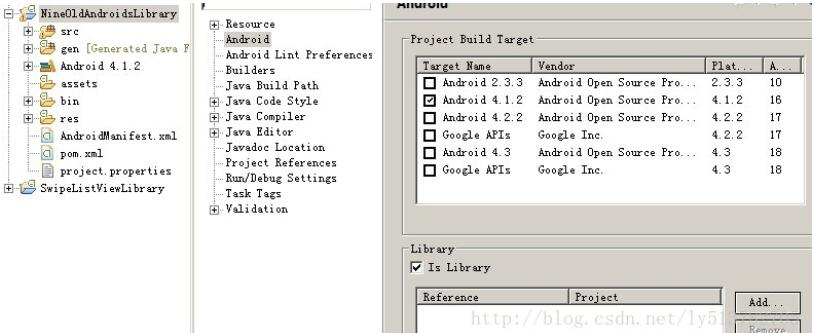
對於SwipeListViewLibrary,除了要勾選Is Library選項,記得在旁邊的Add裡面,加上上面的NineOldAndroids作為本庫的依賴庫:
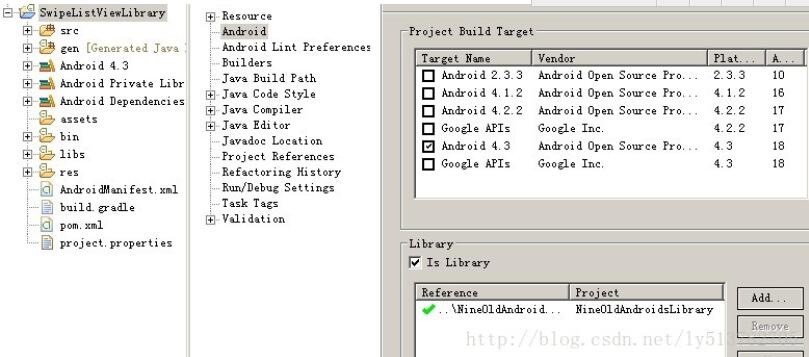
下面就是使用這個庫了,先clean一下上面兩個庫工程,很多時候工程的錯誤,clean一下就好了。然後新建自己的工程,在Add選項裡面添加SwipeListViewLibrary工程就行。這樣就能直接使用SwipeListView這個控件了,很簡單,代碼如下:
 <com.fortysevendeg.swipelistview.SwipeListView
  android:id="@+id/swipe_lv"
  android:layout_width="match_parent"
  android:layout_height="match_parent"
  app:swipeMode="left"
  app:swipeAnimationTime="300"
  app:swipeOffsetLeft="200dp"
  app:swipeFrontView="@+id/front"
  app:swipeBackView="@+id/back"
  app:swipeActionLeft="reveal"/>
其中app:swipeFrontView屬性就是指定前面說的framelayout裡面上面一層的view的id,app:swipeBackView則是指定下面一層的view的id,在下面自定義BaseAdatpter要使用的item的布局裡面可以看到:
 <?xml version="1.0" encoding="utf-8"?>
<FrameLayout xmlns:android="http://schemas.android.com/apk/res/android"
  android:layout_width="match_parent"
  android:layout_height="match_parent" >
  <RelativeLayout
    android:id="@+id/back"
    android:layout_width="match_parent"
    android:layout_height="match_parent">
    <Button
      android:id="@+id/close_btn"
      android:layout_width="wrap_content"
      android:layout_height="wrap_content"
      android:layout_centerVertical="true"
      android:layout_toLeftOf="@+id/delete_btn"
      android:text="Close"
      android:textAppearance="?android:attr/textAppearanceMedium"
      android:focusable="false"
      android:focusableInTouchMode="false"/>
    <Button
      android:id="@+id/delete_btn"
      android:layout_width="wrap_content"
      android:layout_height="wrap_content"
      android:layout_centerVertical="true"
      android:layout_alignParentRight="true"
      android:text="Delete"
      android:textAppearance="?android:attr/textAppearanceMedium"
      android:focusable="false"
      android:focusableInTouchMode="false"/>
  </RelativeLayout>
  <RelativeLayout
    android:id="@+id/front"
    android:layout_width="match_parent"
    android:layout_height="match_parent"
    android:background="@android:color/white">
    <TextView
      android:id="@+id/content_tv"
      android:layout_width="match_parent"
      android:layout_height="match_parent"
      android:gravity="center"
      android:text="hello world"
      android:textAppearance="?android:attr/textAppearanceMedium"
      android:textColor="@android:color/black"/>
  </RelativeLayout>
</FrameLayout>
在Activity裡面初始化的代碼:
arrays = new ArrayList<String>(Arrays.asList(Util.arrays));

    mSwipeLv = (SwipeListView)findViewById(R.id.swipe_lv);
    mAdapter = new MyAdapter(this, arrays);
    mSwipeLv.setAdapter(mAdapter);
    mSwipeLv.setSwipeListViewListener(new BaseSwipeListViewListener() {

      @Override
      public void onClosed(int position, boolean fromRight) {
      }
    });
以及自定義BaseAdapter中的getView():
    @Override
    public View getView(final int position, View convertView, final ViewGroup parent) {
      ViewHolder holder;

      if(convertView == null) {
        holder = new ViewHolder();
        convertView = LayoutInflater.from(mContext).inflate(
            R.layout.layout_swipe_list_item, null);
        holder.mContentTv = (TextView)convertView.findViewById(R.id.content_tv);
        holder.mCloseBtn = (Button)convertView.findViewById(R.id.close_btn);
        holder.mDeleteBtn = (Button)convertView.findViewById(R.id.delete_btn);

        convertView.setTag(holder);
      } else {
        holder = (ViewHolder)convertView.getTag();
      }

      holder.mContentTv.setText(arrays.get(position));
      holder.mCloseBtn.setOnClickListener(new View.OnClickListener() {

        @Override
        public void onClick(View v) {
          ((SwipeListView)parent).closeAnimate(position);
        }
      });
      holder.mDeleteBtn.setOnClickListener(new View.OnClickListener() {

        @Override
        public void onClick(View v) {
          ((SwipeListView)parent).closeOpenedItems();
          mHandler.postDelayed(new Runnable() {

            @Override
            public void run() {
              mArrays.remove(position);
              mAdapter.notifyDataSetChanged();
            }
          }, 350);
        }
      });

      return convertView;
    }
然後就ok了,運行工程的效果如下圖:

另外一種是用SwipeListView控件的方法就是直接導入官方給出的兩個jar包,上面開篇的地址裡可以看到,但是直接導入這兩個jar包,不代表可以立即使用了!首先先把這個包添加到新建工程的build path裡面,如果你的工程沒有添加android的支持包android-support-v4.jar記得也添加以下,然後記得從前面已經導入過的SwipeListViewLibrary庫工程中的res\values\swipelistview__attrs.xml文件復制到新建工程的res/values/目錄下,這個文件主要是申明SwipeListView控件裡面的各項屬性的,直接導入的jar包是沒有包含申明這些屬性的文件的。然後就是向上面一樣在代碼裡面引用了,不過需要注意兩點:一,jar包裡面SwipeListView的包名和庫工程裡面的包名是不一樣的,引用的時候需要注意以下;二,准備妥當,確認前面步驟無誤後,有時在編譯工程時回報錯,說沒有申明swipeFrontView和swipeBackView兩個屬性,這個問題好像是SwipeListView框架的一個bug,stackoverflow上有人指出過,,大意就是在布局文件裡面申明swipeFrontView和swipeBackView這兩個屬性的值得時候,最好不要自定義id的名稱,而是使用swipelistview_backview和swipelistview_frontview。
以上就是本文的全部內容,希望對大家的學習有所幫助,也希望大家多多支持本站。
 Android清理緩存功能實現
應用程序中可以查看應用程序的相關信息,其中有一個功能是清除緩存。如圖: 怎麼實現這些功能呢,從Android的setting源碼中可以得到相關信息。 實現如下:
 ART世界探險(17) - 中層中間代碼MIR
Dalvik字節碼的指令格式指令格式分類Dalvik指令,根據需要的寄存器數目的不同,長度也有所不同。如下面的結構所示,有下面的這些情況: enum Format {
 Android高仿京東垂直循環滾動新聞欄
實現思路其實很簡單,就是一個自定義的LinearLayout,並且textView能夠循環垂直滾動,而且條目可以點擊,顯示區域最多顯示2個條目,並且還有交替的屬性垂直移動
 Android自定義View之Path解析
馬上要到五一了,提前祝賀大家五一快樂。今天的主角是路勁,這個詞給我的第一印象就是那種彎彎的小路,屆時讓我想起了小時候的曲徑通幽處,反正我是忘記了下一句是什麼。言歸正傳,A