編輯:關於Android編程
先來看看要實現的效果圖:
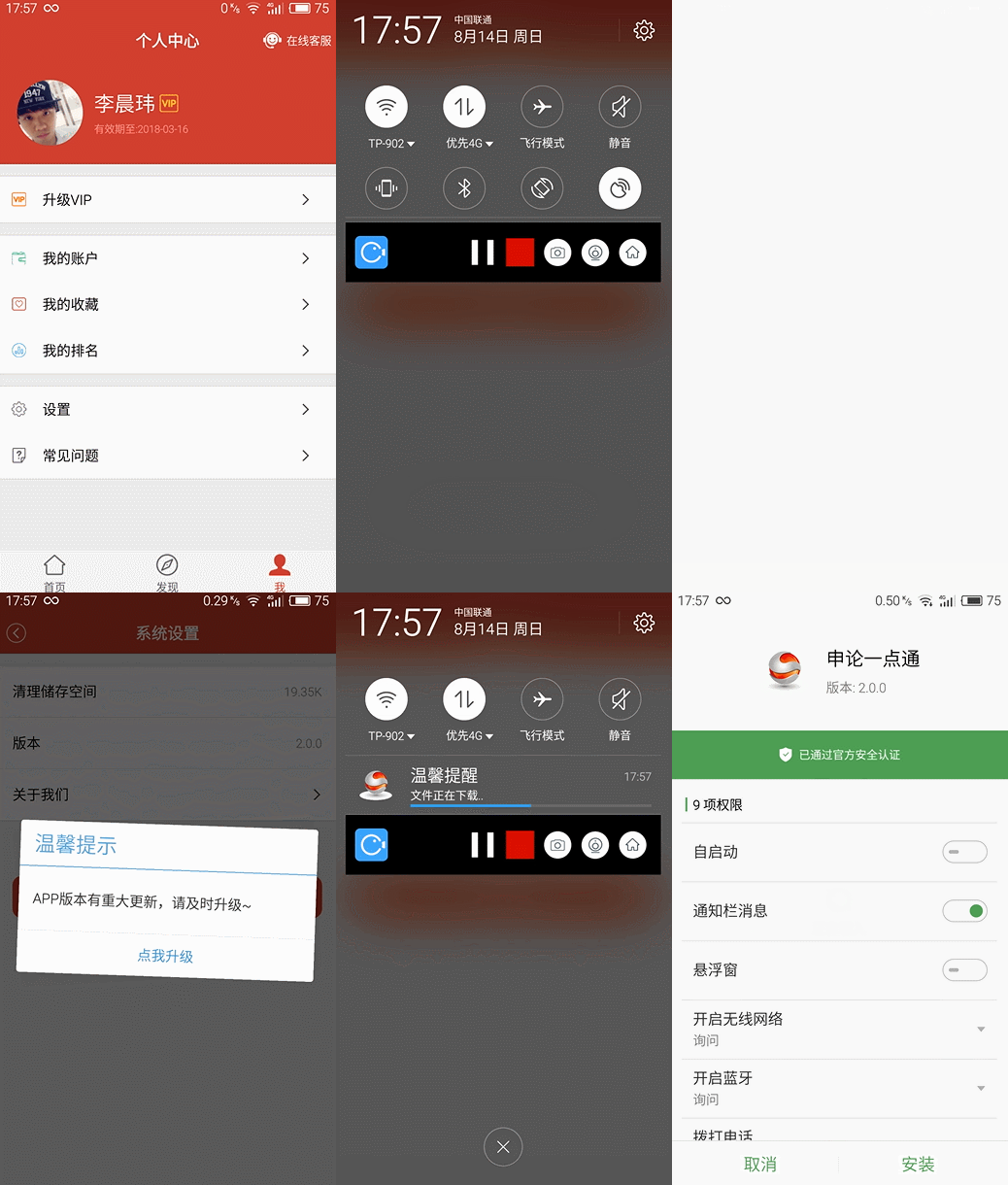
對於安卓用戶來說,手機應用市場說滿天飛可是一點都不誇張,比如小米,魅族,百度,360,機鋒,應用寶等等,當我們想上線一款新版本APP時,先不說渠道打包的麻煩,單純指上傳APP到各大應用市場的工作量就已經很大了,好不容易我們把APP都上傳完了,突然發現一個會導致應用閃退的小Bug,這時那個崩潰啊,明明不是很大的改動,難道我們還要再去重新去把各大應用市場的版本再上傳更新一次?相信我,運營人員肯定會弄死你的!!
有問題,自然就會有解決問題的方案,因此我們就會想到如果在APP裡內嵌自動更新的功能,那麼我們將可以省去很多麻煩,當然關於這方面功能的第三方SDK有很多。
好了,言歸正傳,今天我們自己來實現下關於APP自動更新。
流程其實並不復雜:當用戶打開APP的時候,我們讓APP去發送一個檢查版本的網絡請求,或者利用服務端向APP推送一個透傳消息來檢查APP的版本,如果當前APP版本比服務器上的舊,那麼我們就提醒用戶進行下載更新APP,當然在特定的情況下,我們也可以強制的讓用戶去升級,當然這是很不友好的,盡可能的減少這樣的做法。
好了,來梳理下流程,首先既然是一個APP的更新,那麼我們就需要去下載新的APP,然後我們需要一個通知來告訴用戶當前的下載進度,再來當APP安裝包下載完成後,我們需要去系統的安裝程序來對APP進行安裝更新。
知識點:
下載:異步HTTP請求文件下載,並監聽當前下載進度(這裡我采用了okhttp)
通知:Notification(具體用法請自行翻閱API文檔)
安裝:Intent (具體用法請自行翻閱API文檔)
來看下具體實現代碼:
我們需要一個後台服務來支撐App的下載
import android.app.Notification;
import android.app.NotificationManager;
import android.app.PendingIntent;
import android.app.Service;
import android.content.Intent;
import android.graphics.BitmapFactory;
import android.net.Uri;
import android.os.IBinder;
import android.support.annotation.Nullable;
import android.support.v7.app.NotificationCompat;

import com.fangku.commonlibrary.utils.StorageUtil;
import com.zhy.http.okhttp.OkHttpUtils;
import com.zhy.http.okhttp.callback.FileCallBack;

import java.io.File;

import okhttp3.Call;

/**
 * 自動下載更新apk服務
 * Create by: chenwei.li
 * Date: 2016-08-14
 * time: 09:50
 * Email: lichenwei.me@foxmail.com
 */
public class DownloadService extends Service {

 private String mDownloadUrl;//APK的下載路徑
 private NotificationManager mNotificationManager;
 private Notification mNotification;


 @Override
 public void onCreate() {
 super.onCreate();
 mNotificationManager = (NotificationManager) getSystemService(Service.NOTIFICATION_SERVICE);

 }

 @Override
 public int onStartCommand(Intent intent, int flags, int startId) {
 if (intent == null) {
  notifyMsg("溫馨提醒", "文件下載失敗", 0);
  stopSelf();
 }
 mDownloadUrl = intent.getStringExtra("apkUrl");//獲取下載APK的鏈接
 downloadFile(mDownloadUrl);//下載APK
 return super.onStartCommand(intent, flags, startId);
 }

 @Nullable
 @Override
 public IBinder onBind(Intent intent) {
 return null;
 }

 private void notifyMsg(String title, String content, int progress) {

 NotificationCompat.Builder builder = new NotificationCompat.Builder(this);//為了向下兼容,這裡采用了v7包下的NotificationCompat來構造
 builder.setSmallIcon(R.mipmap.icon_login_logo).setLargeIcon(BitmapFactory.decodeResource(getResources(), R.mipmap.icon_login_logo)).setContentTitle(title);
 if (progress > 0 && progress < 100) {
  //下載進行中
  builder.setProgress(100, progress, false);
 } else {
  builder.setProgress(0, 0, false);
 }
 builder.setAutoCancel(true);
 builder.setWhen(System.currentTimeMillis());
 builder.setContentText(content);
 if (progress >= 100) {
  //下載完成
  builder.setContentIntent(getInstallIntent());
 }
 mNotification = builder.build();
 mNotificationManager.notify(0, mNotification);


 }

 /**
 * 安裝apk文件
 *
 * @return
 */
 private PendingIntent getInstallIntent() {
 File file = new File(StorageUtil.DOWNLOAD_DIR + "APP文件名");
 Intent intent = new Intent(Intent.ACTION_VIEW);
 intent.setFlags(Intent.FLAG_ACTIVITY_NEW_TASK);
 intent.setDataAndType(Uri.parse("file://" + file.getAbsolutePath()), "application/vnd.android.package-archive");
 PendingIntent pendingIntent = PendingIntent.getActivity(this, 0, intent, PendingIntent.FLAG_UPDATE_CURRENT);
 return pendingIntent;
 }


 /**
 * 下載apk文件
 *
 * @param url
 */
 private void downloadFile(String url) {

 OkHttpUtils.get().url(url).build().execute(new FileCallBack(StorageUtil.DOWNLOAD_DIR, "APP文件名") {
  @Override
  public void onError(Call call, Exception e, int id) {
  notifyMsg("溫馨提醒", "文件下載失敗", 0);
  stopSelf();
  }

  @Override
  public void onResponse(File response, int id) {
  //當文件下載完成後回調
  notifyMsg("溫馨提醒", "文件下載已完成", 100);
  stopSelf();


  }

  @Override
  public void inProgress(float progress, long total, int id) {
  //progress*100為當前文件下載進度,total為文件大小
  if ((int) (progress * 100) % 10 == 0) {
   //避免頻繁刷新View,這裡設置每下載10%提醒更新一次進度
   notifyMsg("溫馨提醒", "文件正在下載..", (int) (progress * 100));
  }
  }
 });


 }
}
然後我們只需要在我們想要的更新APP的時候去調起這個服務即可,比如在系統設置裡的"版本檢查"等
Intent intent = new Intent(mContext, DownloadService.class);
intent.putExtra("apkUrl", "APK下載地址");
startService(intent);
總結
這裡我只是粗略演示本地自動更新APP的功能,在實際應用中,我們應該配合服務端來做,比如在用戶啟動APP的時候去比對版本號,如果版本號低於服務器的版本號,那麼此時服務端應該給客戶端一個透傳推送,這裡的推送內容應該為新版本APP的下載地址,此時就可以根據該地址來下載新版APP了,當遇到重大更新,不再對老版本進行兼容的時候,可以強制用戶升級,這裡的方案有很多,比如調用系統級對話框,讓用戶沒辦法取消等操作,這裡就不做更多描述。以上就是這篇文章的全部內容,希望對有需要的人能有所幫助。
 Android反編譯-逆天的反編譯
Jar包的反編譯: Java的世界是透明的,當編譯java程序的時候,是將java源文件轉成.class文件,java虛擬機去執行這些字節碼從而得到運行java程序的目的
 Android TV開發
前言這裡主要記錄幾個TV問題的解決方案,如果對這個不感興趣的其實就不用往下看了。這幾天有一個需求就是要求出一個TV版本的app,之前沒有具體的了解Tv版的app有手機端的
 MUI組價五:開關、底部選項卡、9宮格和分頁
1、switch(開關)mui提供了開關控件,點擊滑動兩種手勢都可以對開關控件進行操作,UI如下:默認開關控件,帶on/off文字提示,打開時為綠色背景,基本class類
 Android 新浪博客分享問題總結
微博開發遇到很多bug 總結一下 我遇到BUG (1) :sso package or singn error 出現這個問題 是我沒有在 博客中填寫正確的包