編輯:關於Android編程
本文介紹微信自動搶紅包的實現方法,主要實現以下幾個功能:
1.自動拆開屏幕上出現的紅包
2.處於桌面或聊天列表時接收到紅包信息時自動進入聊天界面並拆紅包
3.日志功能,記錄搶紅包的詳細日志
實現原理
1.利用AccessibilityService輔助服務,監測屏幕內容,實現自動拆紅包的目的。
2.利用ActiveAndroid數據庫簡單記錄紅包日志
3.利用preference實現監控選項紀錄
最終界面
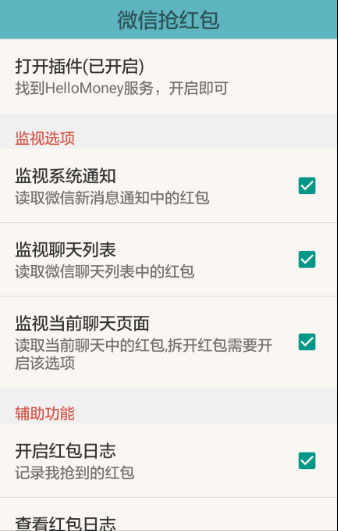
搶紅包核心代碼
AccessibilityService配置
android:accessibilityEventTypes 設置觸發監聽回調的事件類型;
android:packageNames 設置監聽的應用,這裡監聽的是微信,因此填上微信的包名com.tencent.mm
<accessibility-service xmlns:android="http://schemas.android.com/apk/res/android"
android:accessibilityEventTypes="typeNotificationStateChanged|typeWindowStateChanged|typeWindowContentChanged"
 android:accessibilityFeedbackType="feedbackGeneric"
 android:accessibilityFlags="flagDefault"
 android:canRetrieveWindowContent="true"
 android:description="@string/accessibility_description"
 android:notificationTimeout="100"
 android:packageNames="com.tencent.mm"
 android:settingsActivity="com.oden.annotations.app.activity.ManActivity" />
在AndroidManifest.xml中聲明:
 <service
   android:name=".app.service.HongbaoService_"
   android:enabled="true"
   android:exported="true"
   android:label="@string/app_name"
   android:permission="android.permission.BIND_ACCESSIBILITY_SERVICE" >
   <intent-filter>
    <action android:name="android.accessibilityservice.AccessibilityService" />
   </intent-filter>
   <meta-data
    android:name="android.accessibilityservice"
    android:resource="@xml/accessibility_service_config" />
  </service>
搶紅包實現代碼
接收系統發送來的AccessibilityEvent
 private static final String GET_RED_PACKET = "領取紅包";
 private static final String CHECK_RED_PACKET = "查看紅包";
 private static final String RED_PACKET_PICKED = "手慢了,紅包派完了";
 private static final String RED_PACKET_PICKED2 = "手氣";
 private static final String RED_PACKET_PICKED_DETAIL = "紅包詳情";
 private static final String RED_PACKET_SAVE = "已存入零錢";
 private static final String RED_PACKET_NOTIFICATION = "[微信紅包]";

 @Override
 public void onAccessibilityEvent(AccessibilityEvent event) {
  L.d("RECEIVE EVENT!");
  if (watchedFlags == null) return;
   /* 檢測通知消息 */
  if (!mMutex) {
   if (watchedFlags.get("pref_watch_notification") && watchNotifications(event)) return;
   if (watchedFlags.get("pref_watch_list") && watchList(event)) return;
  }
  if (!watchedFlags.get("pref_watch_chat")) return;

  this.rootNodeInfo = event.getSource();
  if (rootNodeInfo == null) return;

  mReceiveNode = null;
  mUnpackNode = null;

  checkNodeInfo();

   /* 如果已經接收到紅包並且還沒有戳開 */
  if (mLuckyMoneyReceived && !mLuckyMoneyPicked && (mReceiveNode != null)) {
   mMutex = true;
   AccessibilityNodeInfo cellNode = mReceiveNode;
   cellNode.getParent().performAction(AccessibilityNodeInfo.ACTION_CLICK);
   mLuckyMoneyReceived = false;
   mLuckyMoneyPicked = true;
   L.d("正在打開!");
  }

   /* 如果戳開但還未領取 */
  if (mNeedUnpack && (mUnpackNode != null)) {
   AccessibilityNodeInfo cellNode = mUnpackNode;
   cellNode.performAction(AccessibilityNodeInfo.ACTION_CLICK);
   mNeedUnpack = false;
   L.d("正在領取!");
  }

  if (mNeedBack) {
   performGlobalAction(GLOBAL_ACTION_BACK);
   mMutex = false;
   mNeedBack = false;
   L.d("正在返回!");
   //總次數和金額統計
   if (isGetMoney) {
    T.showShort(this, "搶到一個紅包: " + gotMoney + "元!");
    totalMoney = totalMoney + gotMoney;
    totalSuccessNum++;
    myPrefs.totalMoney().put(totalMoney);
    myPrefs.successNum().put(totalSuccessNum);
    L.d("totalMoney: " + totalMoney);
    L.d("totalSuccessNum: " + totalSuccessNum);
    saveToLog(hongbaoInfo);
    isGetMoney = false;
   }
  }
 }
檢測監聽事件的節點信息
private void checkNodeInfo() {
  L.d("checkNodeInfo!");
  if (this.rootNodeInfo == null) return;
   /* 聊天會話窗口,遍歷節點匹配“領取紅包”和"查看紅包" */
  List<AccessibilityNodeInfo> nodes1 = this.findAccessibilityNodeInfosByTexts(this.rootNodeInfo, new String[]{
    GET_RED_PACKET, CHECK_RED_PACKET});
  if (!nodes1.isEmpty()) {
  L.d("!nodes1.isEmpty()");
   AccessibilityNodeInfo targetNode = nodes1.get(nodes1.size() - 1);
   if ("android.widget.LinearLayout".equals(targetNode.getParent().getClassName()))//避免被文字干擾導致外掛失效
   {
    if (this.signature.generateSignature(targetNode)) {
     mLuckyMoneyReceived = true;
     mReceiveNode = targetNode;
     L.d("signature:" + this.signature.toString());
    }
   } else {
    L.d("this is text");
   }
   return;
  }

  List<AccessibilityNodeInfo> nodes2 = this.findAccessibilityNodeInfosByTexts(this.rootNodeInfo, new String[]{
    "拆紅包"});
  if (!nodes2.isEmpty()) {
   L.d("node2 != null");
   for (AccessibilityNodeInfo nodeInfo : nodes2) {
     if (nodeInfo.getClassName().equals("android.widget.Button"))
      nodeInfo.performAction(AccessibilityNodeInfo.ACTION_CLICK);
   }
  } else {
    /* 戳開紅包,紅包還沒搶完,遍歷節點匹配“拆紅包” */
   AccessibilityNodeInfo node2 = (this.rootNodeInfo.getChildCount() > 3) ? this.rootNodeInfo.getChild(3) : null;
   if (node2 != null && node2.getClassName().equals("android.widget.Button")) {
    mUnpackNode = node2;
    mNeedUnpack = true;
    isToGetMoney = true;
    L.d("find red packet!");
    return;
   }
  }
   /* 戳開紅包,紅包已被搶完,遍歷節點匹配“已存入零錢”和“手慢了” */
  if (mLuckyMoneyPicked) {
   List<AccessibilityNodeInfo> nodes3 = this.findAccessibilityNodeInfosByTexts(this.rootNodeInfo, new String[]{
     RED_PACKET_PICKED, RED_PACKET_SAVE, RED_PACKET_PICKED2, RED_PACKET_PICKED_DETAIL});
   if (!nodes3.isEmpty()) {
    L.d("!nodes3.isEmpty()");
    if (rootNodeInfo.getChildCount() > 1) {
     L.d("RED_PACKET_PICKED!");
    } else {
     L.d("nodes3.get(0).toString(): " + nodes3.get(0).getText().toString());
     if (!nodes3.get(0).getText().toString().equals(RED_PACKET_PICKED_DETAIL)) {
      AccessibilityNodeInfo targetNode = nodes3.get(nodes3.size() - 1);
      hongbaoInfo.getInfo(targetNode);
      if (isToGetMoney) {
       isGetMoney = true;
       isToGetMoney = false;
       gotMoney = hongbaoInfo.getMoney();
       L.d("gotMoney: " + gotMoney);
      }
      L.d("RED_PACKET_SAVE!");
      L.d("hongbaoInfo: " + hongbaoInfo.toString());
     } else {
      L.d("this packet is myself!");
     }

    }
    mNeedBack = true;
    mLuckyMoneyPicked = false;
   }
  }
 }
主要通過檢測“領取紅包”等關鍵文字信息來判斷是否有新紅包
檢測收到紅包時判斷是否"android.widget.LinearLayout",屏蔽聊天信息中的文字干擾
拆紅包時,由於微信版本可能不同,同時進行兩種判斷,以兼容部分版本
拆完紅包需自動返回,有以下幾種情況:搶到了,手慢了,以及該紅包是自己發出的紅包
下面是監聽聊天列表的代碼:
private boolean watchList(AccessibilityEvent event) {
  // Not a message
  if (event.getEventType() != AccessibilityEvent.TYPE_WINDOW_CONTENT_CHANGED || event.getSource() == null)
   return false;

  List<AccessibilityNodeInfo> nodes = event.getSource().findAccessibilityNodeInfosByText(RED_PACKET_NOTIFICATION);
  if (!nodes.isEmpty()) {
   AccessibilityNodeInfo nodeToClick = nodes.get(0);
   CharSequence contentDescription = nodeToClick.getContentDescription();
   if (contentDescription != null && !lastContentDescription.equals(contentDescription)) {
    nodeToClick.performAction(AccessibilityNodeInfo.ACTION_CLICK);
    lastContentDescription = contentDescription.toString();
    return true;
   }
  }
  return false;
 }
下面是監聽通知信息的代碼:
 private boolean watchNotifications(AccessibilityEvent event) {
  // Not a notification
  if (event.getEventType() != AccessibilityEvent.TYPE_NOTIFICATION_STATE_CHANGED)
   return false;

  // Not a hongbao
  String tip = event.getText().toString();
  if (!tip.contains(RED_PACKET_NOTIFICATION)) return true;

  Parcelable parcelable = event.getParcelableData();
  if (parcelable instanceof Notification) {
   Notification notification = (Notification) parcelable;
   try {
    notification.contentIntent.send();
   } catch (PendingIntent.CanceledException e) {
    e.printStackTrace();
   }
  }
  return true;
 }
紅包信息的獲取,及日志的存儲
通過獲取節點的子信息,分別獲得紅包發送者及搶到的金額、搶紅包時間等信息,建立簡單的表單分別記錄該信息。
@Table(name = "HongbaoInfos")
public class HongbaoInfo extends Model {

 private int month;
 private int day;
 private int hour;
 private int min;
 private int sec;

 @Column(name = "sender")
 public String sender;

 @Column(name = "money")
 public String money;

 @Column(name = "time")
 public String time;

 public void getInfo(AccessibilityNodeInfo node) {

  AccessibilityNodeInfo hongbaoNode = node.getParent();
  sender = hongbaoNode.getChild(0).getText().toString();
  money = hongbaoNode.getChild(2).getText().toString();
  time = getStringTime();
 }

 private String getStringTime() {
  Calendar c = Calendar.getInstance();
  month = c.get(Calendar.MONTH) + 1;
  day = c.get(Calendar.DAY_OF_MONTH);
  hour = c.get(Calendar.HOUR_OF_DAY);
  min = c.get(Calendar.MINUTE);
  sec = c.get(Calendar.SECOND);
  return month+"月"+day+"日 "+hour+":"+min+":"+sec;
 }

 @Override
 public String toString() {
  return "HongbaoInfo [sender=" + sender + ", money=" + money + ", time=" + time + "]";
 }

 public static List<HongbaoInfo> getAll() {
  return new Select()
    .from(HongbaoInfo.class)
    .orderBy("Id ASC")
    .execute();
 }

 public static void deleteALL() {
  new Delete().from(HongbaoInfo.class).execute();
 }

 public float getMoney() {
  return Float.parseFloat(money);
 }

 public String getSender() {
  return sender;
 }

 public String getTime() {
  return time;
 }
}
存儲操作:
 private void saveToLog(HongbaoInfo hongbaoInfo) {
  if (watchedFlags.get("pref_etc_log")) {
   HongbaoInfo hongbaoInfo1 = new HongbaoInfo();
   hongbaoInfo1 = hongbaoInfo;
   hongbaoInfo1.save();
  } else {
   L.d("log closed!");
  }
 }
總結
主要的代碼到這裡基本結束,目前在微信最新版上測試ok,尚還存在以下幾個問題:
1.同一個人連續發的不能自動搶,因為為了防止重復點擊做了過濾,同一個人的紅包搶了後不會再次點擊
2.AccessibilityService開啟時間長後有時會被系統關掉
結束語
以上就是本文的全部內容了,希望對大家的學習和工作能有所幫助。
 android adb使用
#####################################################################################
 詳解android shape的使用總結
shape用於設定形狀,可以在selector,layout等裡面使用,有6個子標簽,各屬性如下: <?xml version=1.0 enco
 Android studio創建第一個app
本文實例為大家介紹了Android studio創建第一個app的詳細步驟,供大家參考,具體內容如下1.創建HelloWorld項目任何編程語言寫出的第一個程序毫無疑問都
 2 微信開發者中心
微信公眾號開發者中心提供了使用代碼開發微信微應用的功能,使用代碼開發微應用需要用到服務器,以存放編寫的代碼,因此我們需要一個服務器。那麼在微信那裡設置服務器呢?在微信公眾