編輯:關於Android編程
本文實例講述了android實現Splash閃屏效果的方法。分享給大家供大家參考,具體如下:
Java代碼:
public class Splash extends Activity{
  private final int SPLASH_DISPLAY_LENGHT = 1000;
  @Override
  protected void onCreate(Bundle savedInstanceState) {
    // TODO Auto-generated method stub
    super.onCreate(savedInstanceState);
    setContentView(R.layout.splash);
    new Handler().postDelayed(new Runnable(){
      @Override
      public void run() {
        // TODO Auto-generated method stub
        Intent mainIntent = new Intent(Splash.this, Application.class);
        Splash.this.startActivity(mainIntent);
        Splash.this.finish();
      }
    }, SPLASH_DISPLAY_LENGHT);
  }
}
AndroidManifest.xml
Xml代碼:
<application android:icon="@drawable/icon" android:label="@string/app_name">
    <activity android:name=".Application" android:label="@string/app_name">
      <intent-filter>
        <action android:name="android.intent.action.DEFAULT" />
        <category android:name="ndroid.intent.category.VIEW" />
      </intent-filter>
    </activity>
    <activity android:name="Splash" android:label="@string/app_name">
      <intent-filter>
        <action android:name="android.intent.action.MAIN" />
        <category android:name="android.intent.category.LAUNCHER" />
      </intent-filter>
    </activity>
</application>
PS:這裡再為大家提供一個關於AndroidManifest.xml權限控制的在線查詢工具:
Android Manifest功能與權限描述大全:
http://tools.jb51.net/table/AndroidManifest
更多關於Android相關內容感興趣的讀者可查看本站專題:《Android編程之activity操作技巧總結》、《Android視圖View技巧總結》、《Android操作SQLite數據庫技巧總結》、《Android操作json格式數據技巧總結》、《Android數據庫操作技巧總結》、《Android文件操作技巧匯總》、《Android編程開發之SD卡操作方法匯總》、《Android開發入門與進階教程》、《Android資源操作技巧匯總》及《Android控件用法總結》
希望本文所述對大家Android程序設計有所幫助。
 Android開源--MenuDrawer
開源地址:https://github.com/SimonVT/android-menudrawer 簡介:menudrawer是跟sliderMenu差不多的一種框架,
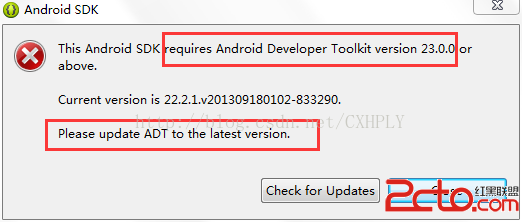 Android初學者Eclispe環境啟動遇This Android SDK requires Android Developer Toolkit version 23.0.0 or above
當我們進行Android開發,配置安裝環境Eclispe&SDK&ADT過程中,在SDK在線安裝後,重新登錄Eclispe,會出現警告框:This And
 Android 4.4 KitKat NotificationManagerService使用詳解與原理分析(一)__使用詳解
概況 Android在4.3的版本中(即API 18)加入了NotificationListenerService,根據SDK的描述(AndroidDev
 Android利用Intent實現讀取圖片操作
本文實例演示如何從圖庫(Gallery)中讀取圖像並用ImageView將它顯示出來,供大家參考,具體內容如下運行本示例前,需要先利用相機模擬拍攝一些圖片到圖庫中。1、運