編輯:關於Android編程
一、什麼是加殼?
加殼是在二進制的程序中植入一段代碼,在運行的時候優先取得程序的控制權,做一些額外的工作。大多數病毒就是基於此原理。
二、加殼作用
加殼的程序可以有效阻止對程序的反匯編分析,以達到它不可告人的目的。這種技術也常用來保護軟件版權,防止被軟件破解。
三、Android Dex文件加殼原理
PC平台現在已存在大量的標准的加殼和解殼工具,但是Android作為新興平台還未出現APK加殼工具。Android Dex文件大量使用引用給加殼帶來了一定的難度,但是從理論上講,Android APK加殼也是可行的。
在這個過程中,牽扯到三個角色:
1、加殼程序:加密源程序為解殼數據、組裝解殼程序和解殼數據
2、解殼程序:解密解殼數據,並運行時通過DexClassLoader動態加載
3、源程序:需要加殼處理的被保護代碼
根據解殼數據在解殼程序DEX文件中的不同分布,本文將提出兩種Android Dex加殼的實現方案。
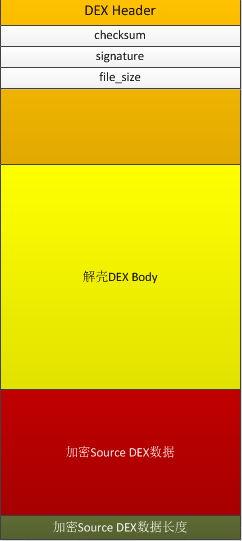
解殼數據位於解殼程序文件尾部:該種方式簡單實用,合並後的DEX文件結構如下。
四、加殼程序工作流程:
1、加密源程序APK文件為解殼數據
2、把解殼數據寫入解殼程序Dex文件末尾,並在文件尾部添加解殼數據的大小。
3、修改解殼程序DEX頭中checksum、signature 和file_size頭信息。
4、修改源程序AndroidMainfest.xml文件並覆蓋解殼程序AndroidMainfest.xml文件。
五、解殼DEX程序工作流程:
1、讀取DEX文件末尾數據獲取借殼數據長度。
2、從DEX文件讀取解殼數據,解密解殼數據。以文件形式保存解密數據到a.APK文件
3、通過DexClassLoader動態加載a.apk。
解殼數據位於解殼程序文件頭
該種方式相對比較復雜, 合並後DEX文件結構如下:
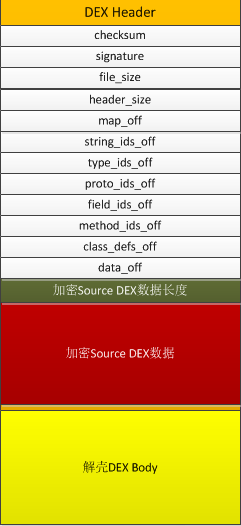
六、加殼程序工作流程:
1、加密源程序APK文件為解殼數據
2、計算解殼數據長度,並添加該長度到解殼DEX文件頭末尾,並繼續解殼數據到文件頭末尾。
(插入數據的位置為0x70處)
3、修改解殼程序DEX頭中checksum、signature、file_size、header_size、string_ids_off、type_ids_off、proto_ids_off、field_ids_off、
method_ids_off、class_defs_off和data_off相關項。 分析map_off 數據,修改相關的數據偏移量。
4、修改源程序AndroidMainfest.xml文件並覆蓋解殼程序AndroidMainfest.xml文件。
七、加殼程序流程及代碼實現
1、加密源程序APK為解殼數據
2、把解殼數據寫入解殼程序DEX文件末尾,並在文件尾部添加解殼數據的大小。
3、修改解殼程序DEX頭中checksum、signature 和file_size頭信息。
代碼實現如下:
package com.android.dexshell;
import java.io.ByteArrayOutputStream;
import java.io.File;
import java.io.FileInputStream;
import java.io.FileOutputStream;
import java.io.IOException;
import java.security.MessageDigest;
import java.security.NoSuchAlgorithmException;
import java.util.zip.Adler32;

public class DexShellTool {
 /**
  * @param args
  */
 public static void main(String[] args) {
  // TODO Auto-generated method stub
  try {
   File payloadSrcFile = new File("g:/payload.apk");
   File unShellDexFile = new File("g:/unshell.dex");
   byte[] payloadArray = encrpt(readFileBytes(payloadSrcFile));
   byte[] unShellDexArray = readFileBytes(unShellDexFile);
   int payloadLen = payloadArray.length;
   int unShellDexLen = unShellDexArray.length;
   int totalLen = payloadLen + unShellDexLen +4;
   byte[] newdex = new byte[totalLen];
   //添加解殼代碼
   System.arraycopy(unShellDexArray, 0, newdex, 0, unShellDexLen);
   //添加加密後的解殼數據
   System.arraycopy(payloadArray, 0, newdex, unShellDexLen,
     payloadLen);
   //添加解殼數據長度
   System.arraycopy(intToByte(payloadLen), 0, newdex, totalLen-4, 4);
      //修改DEX file size文件頭
   fixFileSizeHeader(newdex);
   //修改DEX SHA1 文件頭
   fixSHA1Header(newdex);
   //修改DEX CheckSum文件頭
   fixCheckSumHeader(newdex);


   String str = "g:/classes.dex";
   File file = new File(str);
   if (!file.exists()) {
    file.createNewFile();
   }

   FileOutputStream localFileOutputStream = new FileOutputStream(str);
   localFileOutputStream.write(newdex);
   localFileOutputStream.flush();
   localFileOutputStream.close();


  } catch (Exception e) {
   // TODO Auto-generated catch block
   e.printStackTrace();
  }
 }

 //直接返回數據,讀者可以添加自己加密方法
 private static byte[] encrpt(byte[] srcdata){
  return srcdata;
 }


 private static void fixCheckSumHeader(byte[] dexBytes) {
  Adler32 adler = new Adler32();
  adler.update(dexBytes, 12, dexBytes.length - 12);
  long value = adler.getValue();
  int va = (int) value;
  byte[] newcs = intToByte(va);
  byte[] recs = new byte[4];
  for (int i = 0; i < 4; i++) {
   recs[i] = newcs[newcs.length - 1 - i];
   System.out.println(Integer.toHexString(newcs[i]));
  }
  System.arraycopy(recs, 0, dexBytes, 8, 4);
  System.out.println(Long.toHexString(value));
  System.out.println();
 }


 public static byte[] intToByte(int number) {
  byte[] b = new byte[4];
  for (int i = 3; i >= 0; i--) {
   b[i] = (byte) (number % 256);
   number >>= 8;
  }
  return b;
 }


 private static void fixSHA1Header(byte[] dexBytes)
   throws NoSuchAlgorithmException {
  MessageDigest md = MessageDigest.getInstance("SHA-1");
  md.update(dexBytes, 32, dexBytes.length - 32);
  byte[] newdt = md.digest();
  System.arraycopy(newdt, 0, dexBytes, 12, 20);
  String hexstr = "";
  for (int i = 0; i < newdt.length; i++) {
   hexstr += Integer.toString((newdt[i] & 0xff) + 0x100, 16)
     .substring(1);
  }
  System.out.println(hexstr);
 }


 private static void fixFileSizeHeader(byte[] dexBytes) {


  byte[] newfs = intToByte(dexBytes.length);
  System.out.println(Integer.toHexString(dexBytes.length));
  byte[] refs = new byte[4];
  for (int i = 0; i < 4; i++) {
   refs[i] = newfs[newfs.length - 1 - i];
   System.out.println(Integer.toHexString(newfs[i]));
  }
  System.arraycopy(refs, 0, dexBytes, 32, 4);
 }


 private static byte[] readFileBytes(File file) throws IOException {
  byte[] arrayOfByte = new byte[1024];
  ByteArrayOutputStream localByteArrayOutputStream = new ByteArrayOutputStream();
  FileInputStream fis = new FileInputStream(file);
  while (true) {
   int i = fis.read(arrayOfByte);
   if (i != -1) {
    localByteArrayOutputStream.write(arrayOfByte, 0, i);
   } else {
    return localByteArrayOutputStream.toByteArray();
   }
  }
 }


}
八、解殼程序流程及代碼實現
在解殼程序的開發過程中需要解決如下幾個關鍵的技術問題:
1.解殼代碼如何能夠第一時間執行?
Android程序由不同的組件構成,系統在有需要的時候啟動程序組件。因此解殼程序必須在Android系統啟動組件之前運行,完成對解殼數據的解殼及APK文件的動態加載,否則會使程序出現加載類失敗的異常。
Android開發者都知道Applicaiton做為整個應用的上下文,會被系統第一時間調用,這也是應用開發者程序代碼的第一執行點。因此通過對AndroidMainfest.xml的application的配置可以實現解殼代碼第一時間運行。
<application
 android:icon="@drawable/ic_launcher"
 android:label="@string/app_name"
 android:theme="@style/AppTheme" android:name="

</application>
2.如何替換回源程序原有的Application?
當在AndroidMainfest.xml文件配置為解殼代碼的Application時。源程序原有的Applicaiton將被替換,為了不影響源程序代碼邏輯,我們需要 在解殼代碼運行完成後,替換回源程序原有的Application對象。我們通過在AndroidMainfest.xml文件中配置原有Applicaiton類信息來達到我們 的目的。解殼程序要在運行完畢後通過創建配置的Application對象,並通過反射修改回原Application。
<application
 android:icon="@drawable/ic_launcher"
 android:label="@string/app_name"
 android:theme="@style/AppTheme" android:name="
</application>
3.如何通過DexClassLoader實現對apk代碼的動態加載。
我們知道DexClassLoader加載的類是沒有組件生命周期的,也就是說即使DexClassLoader通過對APK的動態加載完成了對組件類的加載,當系統啟動該組件時,還會出現加載類失敗的異常。為什麼組件類被動態加載入虛擬機,但系統卻出現加載類失敗呢?
通過查看Android源代碼我們知道組件類的加載是由另一個ClassLoader來完成的,DexClassLoader和系統組件ClassLoader並不存在關系,系統組件ClassLoader當然找不到由DexClassLoader加載的類,如果把系統組件ClassLoader的parent修改成DexClassLoader,我們就可以實現對apk代碼的動態加載。
4.如何使解殼後的APK資源文件被代碼動態引用。
代碼默認引用的資源文件在最外層的解殼程序中,因此我們要增加系統的資源加載路徑來實現對借殼後APK文件資源的加載。
解殼實現代碼:
package com.android.dexunshell;

import java.io.BufferedInputStream;
import java.io.ByteArrayInputStream;
import java.io.ByteArrayOutputStream;
import java.io.DataInputStream;
import java.io.File;
import java.io.FileInputStream;
import java.io.FileOutputStream;
import java.io.IOException;
import java.lang.ref.WeakReference;
import java.util.ArrayList;
import java.util.HashMap;
import java.util.Iterator;
import java.util.zip.ZipEntry;
import java.util.zip.ZipInputStream;

import dalvik.system.DexClassLoader;
import android.app.Application;
import android.content.pm.ApplicationInfo;
import android.content.pm.PackageManager;
import android.content.pm.PackageManager.NameNotFoundException;
import android.os.Bundle;

public class ProxyApplication extends Application {

 private static final String appkey = "APPLICATION_CLASS_NAME";
 private String apkFileName;
 private String odexPath;
 private String libPath;
 @Override
 public void onCreate() {
  // TODO Auto-generated method stub
  super.onCreate();
  try {
   File odex = this.getDir("payload_odex", MODE_PRIVATE);
   File libs = this.getDir("payload_lib", MODE_PRIVATE);
   odexPath = odex.getAbsolutePath();
   libPath = libs.getAbsolutePath();
   apkFileName = odex.getAbsolutePath()+"/payload.apk";
   File dexFile = new File(apkFileName);
   if(!dexFile.exists())
    dexFile.createNewFile();
   //讀取程序classes.dex文件
   byte[] dexdata = this.readDexFileFromApk();
   //分離出解殼後的apk文件已用於動態加載
   this.splitPayLoadFromDex(dexdata);
   //配置動態加載環境
   this.configApplicationEnv();

  } catch (Exception e) {
   // TODO Auto-generated catch block
   e.printStackTrace();
  }
 }

 private void configApplicationEnv() throws NameNotFoundException, IllegalAccessException, InstantiationException, ClassNotFoundException, IOException{

  Object currentActivityThread = RefInvoke.invokeStaticMethod("android.app.ActivityThread", "currentActivityThread", new Class[]{}, new Object[]{});
  HashMap mPackages = (HashMap)RefInvoke.getFieldOjbect("android.app.ActivityThread", currentActivityThread, "mPackages");
  //替換組件類加載器為DexClassLoader,已使動態加載代碼具有組件生命周期
  WeakReference wr = (WeakReference) mPackages.get(this.getPackageName());
  DexClassLoader dLoader = new DexClassLoader(apkFileName,
    odexPath, libPath, (ClassLoader) RefInvoke.getFieldOjbect("android.app.LoadedApk", wr.get(), "mClassLoader"));
  RefInvoke.setFieldOjbect("android.app.LoadedApk", "mClassLoader", wr.get(), dLoader);

  //如果源應用配置有Appliction對象,則替換為源應用Applicaiton,以便不影響源程序邏輯。
  ApplicationInfo appInfo = this.getPackageManager().getApplicationInfo(this.getPackageName(),PackageManager.GET_META_DATA);
  Bundle bundle = appInfo.metaData;
  if(bundle != null && bundle.containsKey(appkey)){

   String appClassName = bundle.getString(appkey);
   Application app = (Application)dLoader.loadClass(appClassName).newInstance();
   RefInvoke.setFieldOjbect("android.app.ContextImpl", "mOuterContext", this.getBaseContext(), app);
   RefInvoke.setFieldOjbect("android.content.ContextWrapper", "mBase", app, this.getBaseContext());
   Object mBoundApplication = RefInvoke.getFieldOjbect("android.app.ActivityThread", currentActivityThread, "mBoundApplication");
   Object info = RefInvoke.getFieldOjbect("android.app.ActivityThread$AppBindData", mBoundApplication, "info");
   RefInvoke.setFieldOjbect("android.app.LoadedApk", "mApplication", info, app);
   Object oldApplication = RefInvoke.getFieldOjbect("android.app.ActivityThread", currentActivityThread, "mInitialApplication");
   RefInvoke.setFieldOjbect("android.app.ActivityThread", "mInitialApplication", currentActivityThread, app);
   ArrayList<Application> mAllApplications = (ArrayList<Application>)RefInvoke.getFieldOjbect("android.app.ActivityThread", currentActivityThread, "mAllApplications");
   mAllApplications.remove(oldApplication);
   mAllApplications.add(app);
   HashMap mProviderMap = (HashMap) RefInvoke.getFieldOjbect("android.app.ActivityThread", currentActivityThread, "mProviderMap");
   Iterator it = mProviderMap.values().iterator();
   while(it.hasNext()){
    Object providerClientRecord = it.next();
    Object localProvider = RefInvoke.getFieldOjbect("android.app.ProviderClientRecord", providerClientRecord, "mLocalProvider");
    RefInvoke.setFieldOjbect("android.content.ContentProvider", "mContext", localProvider, app);
   }
   RefInvoke.invokeMethod(appClassName, "onCreate", app, new Class[]{}, new Object[]{});
  }
 }

 private void splitPayLoadFromDex(byte[] data) throws IOException{
  byte[] apkdata = decrypt(data);
  int ablen = apkdata.length;
  byte[] dexlen = new byte[4];
  System.arraycopy(apkdata, ablen - 4, dexlen, 0, 4);
  ByteArrayInputStream bais = new ByteArrayInputStream(dexlen);
  DataInputStream in = new DataInputStream(bais);
  int readInt = in.readInt();
  System.out.println(Integer.toHexString(readInt));
  byte[] newdex = new byte[readInt];
  System.arraycopy(apkdata, ablen - 4 - readInt, newdex, 0, readInt);
  File file = new File(apkFileName);
  try {
   FileOutputStream localFileOutputStream = new FileOutputStream(file);
   localFileOutputStream.write(newdex);
   localFileOutputStream.close();

  } catch (IOException localIOException) {
   throw new RuntimeException(localIOException);
  }

  ZipInputStream localZipInputStream = new ZipInputStream(
    new BufferedInputStream(new FileInputStream(file)));
  while (true) {
   ZipEntry localZipEntry = localZipInputStream.getNextEntry();
   if (localZipEntry == null) {
    localZipInputStream.close();
    break;
   }
   String name = localZipEntry.getName();
   if (name.startsWith("lib/") && name.endsWith(".so")) {
    File storeFile = new File(libPath+"/"+name.substring(name.lastIndexOf('/')));
    storeFile.createNewFile();
    FileOutputStream fos = new FileOutputStream(storeFile);
    byte[] arrayOfByte = new byte[1024];
    while (true) {
     int i = localZipInputStream.read(arrayOfByte);
     if (i == -1)
      break;
     fos.write(arrayOfByte, 0, i);
    }
    fos.flush();
    fos.close();
   }
   localZipInputStream.closeEntry();
  }
  localZipInputStream.close();

 }

 private byte[] readDexFileFromApk() throws IOException {
  ByteArrayOutputStream dexByteArrayOutputStream = new ByteArrayOutputStream();
  ZipInputStream localZipInputStream = new ZipInputStream(
    new BufferedInputStream(new FileInputStream(this.getApplicationInfo().sourceDir)));
  while (true) {
   ZipEntry localZipEntry = localZipInputStream.getNextEntry();
   if (localZipEntry == null) {
    localZipInputStream.close();
    break;
   }
   if (localZipEntry.getName().equals("classes.dex")) {
    byte[] arrayOfByte = new byte[1024];
    while (true) {
     int i = localZipInputStream.read(arrayOfByte);
     if (i == -1)
      break;
     dexByteArrayOutputStream.write(arrayOfByte, 0, i);
    }
   }
   localZipInputStream.closeEntry();
  }
  localZipInputStream.close();
  return dexByteArrayOutputStream.toByteArray();
 }

 ////直接返回數據,讀者可以添加自己解密方法
 private byte[] decrypt(byte[] data){
  return data;
 }
}
RefInvoke為反射調用工具類:
package com.android.dexunshell;

import java.lang.reflect.Field;
import java.lang.reflect.InvocationTargetException;
import java.lang.reflect.Method;

public class RefInvoke {

 public static Object invokeStaticMethod(String class_name, String method_name, Class[] pareTyple, Object[] pareVaules){

  try {
   Class obj_class = Class.forName(class_name);
   Method method = obj_class.getMethod(method_name,pareTyple);
   return method.invoke(null, pareVaules);
  } catch (SecurityException e) {
   // TODO Auto-generated catch block
   e.printStackTrace();
  } catch (IllegalArgumentException e) {
   // TODO Auto-generated catch block
   e.printStackTrace();
  } catch (IllegalAccessException e) {
   // TODO Auto-generated catch block
   e.printStackTrace();
  } catch (NoSuchMethodException e) {
   // TODO Auto-generated catch block
   e.printStackTrace();
  } catch (InvocationTargetException e) {
   // TODO Auto-generated catch block
   e.printStackTrace();
  } catch (ClassNotFoundException e) {
   // TODO Auto-generated catch block
   e.printStackTrace();
  }
  return null;

 }

 public static Object invokeMethod(String class_name, String method_name, Object obj ,Class[] pareTyple, Object[] pareVaules){

  try {
   Class obj_class = Class.forName(class_name);
   Method method = obj_class.getMethod(method_name,pareTyple);
   return method.invoke(obj, pareVaules);
  } catch (SecurityException e) {
   // TODO Auto-generated catch block
   e.printStackTrace();
  } catch (IllegalArgumentException e) {
   // TODO Auto-generated catch block
   e.printStackTrace();
  } catch (IllegalAccessException e) {
   // TODO Auto-generated catch block
   e.printStackTrace();
  } catch (NoSuchMethodException e) {
   // TODO Auto-generated catch block
   e.printStackTrace();
  } catch (InvocationTargetException e) {
   // TODO Auto-generated catch block
   e.printStackTrace();
  } catch (ClassNotFoundException e) {
   // TODO Auto-generated catch block
   e.printStackTrace();
  }
  return null;

 }

 public static Object getFieldOjbect(String class_name,Object obj, String filedName){
  try {
   Class obj_class = Class.forName(class_name);
   Field field = obj_class.getDeclaredField(filedName);
   field.setAccessible(true);
   return field.get(obj);
  } catch (SecurityException e) {
   // TODO Auto-generated catch block
   e.printStackTrace();
  } catch (NoSuchFieldException e) {
   // TODO Auto-generated catch block
   e.printStackTrace();
  } catch (IllegalArgumentException e) {
   // TODO Auto-generated catch block
   e.printStackTrace();
  } catch (IllegalAccessException e) {
   // TODO Auto-generated catch block
   e.printStackTrace();
  } catch (ClassNotFoundException e) {
   // TODO Auto-generated catch block
   e.printStackTrace();
  }
  return null;

 }

 public static Object getStaticFieldOjbect(String class_name, String filedName){

  try {
   Class obj_class = Class.forName(class_name);
   Field field = obj_class.getDeclaredField(filedName);
   field.setAccessible(true);
   return field.get(null);
  } catch (SecurityException e) {
   // TODO Auto-generated catch block
   e.printStackTrace();
  } catch (NoSuchFieldException e) {
   // TODO Auto-generated catch block
   e.printStackTrace();
  } catch (IllegalArgumentException e) {
   // TODO Auto-generated catch block
   e.printStackTrace();
  } catch (IllegalAccessException e) {
   // TODO Auto-generated catch block
   e.printStackTrace();
  } catch (ClassNotFoundException e) {
   // TODO Auto-generated catch block
   e.printStackTrace();
  }
  return null;

 }

 public static void setFieldOjbect(String classname, String filedName, Object obj, Object filedVaule){
  try {
   Class obj_class = Class.forName(classname);
   Field field = obj_class.getDeclaredField(filedName);
   field.setAccessible(true);
   field.set(obj, filedVaule);
  } catch (SecurityException e) {
   // TODO Auto-generated catch block
   e.printStackTrace();
  } catch (NoSuchFieldException e) {
   // TODO Auto-generated catch block
   e.printStackTrace();
  } catch (IllegalArgumentException e) {
   // TODO Auto-generated catch block
   e.printStackTrace();
  } catch (IllegalAccessException e) {
   // TODO Auto-generated catch block
   e.printStackTrace();
  } catch (ClassNotFoundException e) {
   // TODO Auto-generated catch block
   e.printStackTrace();
  }
 }

 public static void setStaticOjbect(String class_name, String filedName, Object filedVaule){
  try {
   Class obj_class = Class.forName(class_name);
   Field field = obj_class.getDeclaredField(filedName);
   field.setAccessible(true);
   field.set(null, filedVaule);
  } catch (SecurityException e) {
   // TODO Auto-generated catch block
   e.printStackTrace();
  } catch (NoSuchFieldException e) {
   // TODO Auto-generated catch block
   e.printStackTrace();
  } catch (IllegalArgumentException e) {
   // TODO Auto-generated catch block
   e.printStackTrace();
  } catch (IllegalAccessException e) {
   // TODO Auto-generated catch block
   e.printStackTrace();
  } catch (ClassNotFoundException e) {
   // TODO Auto-generated catch block
   e.printStackTrace();
  }
 }

}
九、總結
本文代碼基本實現了APK文件的加殼及脫殼原理,該代碼作為實驗代碼還有諸多地方需要改進。比如:
1、加殼數據的加密算法的添加。
2、脫殼代碼由java語言實現,可通過C代碼的實現對脫殼邏輯進行保護,以達到更好的反逆向分析效果。
 Android動態加載Dex機制解析
1.什麼是類加載器?類加載器(class loader)是 Java?中的一個很重要的概念。類加載器負責加載 Java 類的字節代碼到 Java 虛擬機中。Java 虛擬
 Android-滿屏幕拖動的控件
覺得跟之前的模擬小火箭很相似,又有學習的地方,能作為知識補充。所以轉載一起學習。大家也可以關注他的文章哦。也就是,用戶可以隨心所欲的拖動控件,布局文件很簡單就是一個But
 微信群怎麼轉讓給別人 微信群怎麼轉讓
微信群是我們經常聊天聊工作的地方,但是你需要離開的時候想要將這個微信群轉給一個人來管理該怎麼辦呢?那麼微信群怎麼轉讓群主呢?微信群怎麼轉讓給別人?微信群怎麼
 Android Application Fundamentals——Android應用程序基礎知識
Application Fundamentals——應用程序基礎知識Key classes——關鍵類Activ