編輯:關於Android編程
最近在進行android開發過程中,在將 Intent傳遞給調用的組件並完成組件的調用時遇到點困難,並且之前對Intent的學習也是一知半解,最近特意為此拿出一些時間,對Intent部分進行了系統的學習並進行了部分實踐,下面將自己的學習及Intent知識進行了詳細的歸納整理,希望能幫助到同樣遇到相同問題的博友。
下面是Intent介紹、詳解及Intent示例總結:
一.Intent介紹:
Intent的中文意思是“意圖,意向”,在Android中提供了Intent機制來協助應用間的交互與通訊,Intent負責對應用中一次操作的動 作、動作涉及數據、附加數據進行描述,Android則根據此Intent的描述,負責找到對應的組件,將 Intent傳遞給調用的組件,並完成組件的調用。Intent不僅可用於應用程序之間,也可用於應用程序內部的Activity/Service之間的 交互。因此,可以將Intent理解為不同組件之間通信的“媒介”專門提供組件互相調用的相關信息。
二、Intent作用:
Intent 是一個將要執行的動作的抽象的描述,一般來說是作為參數來使用,由Intent來協助完成android各個組件之間的通訊。比如說調用 startActivity()來啟動一個activity,或者由broadcaseIntent()來傳遞給所有感興趣的 BroadcaseReceiver, 再或者由startService()/bindservice()來啟動一個後台的service.所以可以看出來,intent主要是用來啟動其他的 activity 或者service,所以可以將intent理解成activity之間的粘合劑。
三.Inten啟動組件的方法:
Intent可以啟動一個Activity,也可以啟動一個Service,還可以發起一個廣播Broadcasts。具體方法如下:
組件名稱
方法名稱
Activity
startActvity( )
startActivity( )
Service
startService( )
bindService( )
Broadcasts
sendBroadcasts( )
sendOrderedBroadcasts( )
sendStickyBroadcasts( )
四.Intent的幾個重要屬性,下面進行詳解:
動作(Action),數據(Data),分類(Category),類型(Type),組件(Compent)以及擴展信(Extra)。其中最常用的是Action屬性和Data屬性。
1.Action屬性:
對於有如下聲明的Activity:
<activity android:name=".TargetActivity">
<intent-filter>
<action android:name="com.scott.intent.action.TARGET"/>
<category android:name="android.intent.category.DEFAULT"/>
</intent-filter>
</activity>
TargetActivity在其<intent-filter>中聲明了<action>,即目標action,如果我們需要做一個跳轉的動作,就需要在Intent中指定目標的action,如下:
public void gotoTargetActivity(View view) {
Intent intent = new Intent("com.scott.intent.action.TARGET");
startActivity(intent);
}
當我們為Intent指定相應的action,然後調用startActivity方法後,系統會根據action跳轉到對應的Activity。
除了自定義的action之外,Intent也內含了很多默認的action,下面列舉幾個:
public static final String ACTION_MAIN = "android.intent.action.MAIN";
public static final String ACTION_VIEW = "android.intent.action.VIEW";
public static final String ACTION_WEB_SEARCH = "android.intent.action.WEB_SEARCH";
public static final String ACTION_CALL = "android.intent.action.CALL";
每一個action都有其特定的用途。
2.data和extras,即執行動作要操作的數據和傳遞到目標的附加信息:
下面舉一個與浏覽器交互的例子:
/**
* 打開指定網頁
* @param view
*/
public void invokeWebBrowser(View view) {
Intent intent = new Intent(Intent.ACTION_VIEW);
intent.setData(Uri.parse("http://www.google.com.hk"));
startActivity(intent);
}
/**
* 進行關鍵字搜索
* @param view
*/
public void invokeWebSearch(View view) {
Intent intent = new Intent(Intent.ACTION_WEB_SEARCH);
intent.putExtra(SearchManager.QUERY, "android"); //關鍵字
startActivity(intent);
}
上面兩種方法分別是啟動浏覽器並打開指定網頁、進行關鍵字搜索,分別對應的action是Intent.ACTION_VIEW和 Intent.ACTION_WEB_SEARCH,前者需指定相應的網頁地址,後者需指定關鍵字信息,對於關鍵字搜索來說,浏覽器會按照自己設置的默認 的搜索引擎進行搜索。
我們注意到,在打開網頁時,為Intent指定一個data屬性,這其實是指定要操作的數據,是一個URI的形式,我們可以將一個指定前綴的字符串轉換成 特定的URI類型,如:“http:”或“https:”表示網絡地址類型,“tel:”表示電話號碼類型,“mailto:”表示郵件地址類型,等等。
例如,我們要呼叫給定的號碼,可以這樣做:
public void call(View view) {
Intent intent = new Intent(Intent.ACTION_CALL);
intent.setData(Uri.parse("tel:"));
startActivity(intent);
}
那麼我們如何知道目標是否接受這種前綴呢?這就需要看一下目標中<data/>元素的匹配規則了。
在目標<data/>標簽中包含了以下幾種子元素,他們定義了url的匹配規則:
android:scheme 匹配url中的前綴,除了“http”、“https”、“tel”...之外,我們可以定義自己的前綴
android:host 匹配url中的主機名部分,如“google.com”,如果定義為“*”則表示任意主機名
android:port 匹配url中的端口
android:path 匹配url中的路徑
我們改動一下TargetActivity的聲明信息:
<activity android:name=".TargetActivity">
<intent-filter>
<action android:name="com.scott.intent.action.TARGET"/>
<category android:name="android.intent.category.DEFAULT"/>
<data android:scheme="scott" android:host="com.scott.intent.data" android:port="" android:path="/target"/>
</intent-filter>
</activity>
這個時候如果只指定action就不夠了,我們需要為其設置data值,如下:
常量 解釋 CATEGORY_DEFAULT 默認的category CATEGORY_BROWSABLE 指定了此category後,在網頁上點擊圖片或鏈接時,系統會考慮將此目標Activity列入可選列表,供用戶選擇以打開圖片或鏈接。 CATEGORY_GADGET The activity can be embedded inside of another activity that hosts gadgets. CATEGORY_HOME The activity displays the home screen, the first screen the user sees when the device is turned on or when the HOME key is pressed. CATEGORY_LAUNCHER The activity can be the initial activity of a task and is listed in the top-level application launcher. CATEGORY_PREFERENCE 表示該目標Activity是一個首選項界面;
public void gotoTargetActivity(View view) {
Intent intent = new Intent("com.scott.intent.action.TARGET");
intent.setData(Uri.parse("scott://com.scott.intent.data:/target"));
startActivity(intent);
}
此時,url中的每個部分和TargetActivity配置信息中全部一致才能跳轉成功,否則就被系統拒絕。
不過有時候對path限定死了也不太好,比如我們有這樣的url:(scott://com.scott.intent.data:7788/target/hello)(scott://com.scott.intent.data:7788/target/hi) 這個時候該怎麼辦呢? 我們需要使用另外一個元素:android:pathPrefix,表示路徑前綴。 我們把android:path="/target"修改為android:pathPrefix="/target",然後就可以滿足以上的要求了。 而在進行搜索時,我們使用了一個putExtra方法,將關鍵字做為參數放置在Intent中,我們成為extras(附加信息),這裡面涉及到了一個Bundle對象。
Bundle和Intent有著密不可分的關系,主要負責為Intent保存附加參數信息,它實現了android.os.Paracelable接口, 內部維護一個Map類型的屬性,用於以鍵值對的形式存放附加參數信息。在我們使用Intent的putExtra方法放置附加信息時,該方法會檢查默認的 Bundle實例為不為空,如果為空,則新創建一個Bundle實例,然後將具體的參數信息放置到Bundle實例中。我們也可以自己創建Bundle對 象,然後為Intent指定這個Bundle即可,如下:
public void gotoTargetActivity(View view) {
Intent intent = new Intent("com.scott.intent.action.TARGET");
Bundle bundle = new Bundle();
bundle.putInt("id", );
bundle.putString("name", "scott");
intent.putExtras(bundle);
startActivity(intent);
}
需要注意的是,在使用putExtras方法設置Bundle對象之後,系統進行的不是引用操作,而是復制操作,所以如果設置完之後再更改bundle實 例中的數據,將不會影響Intent內部的附加信息。那我們如何獲取設置在Intent中的附加信息呢?與之對應的是,我們要從Intent中獲取到 Bundle實例,然後再從中取出對應的鍵值信息:
Bundle bundle = intent.getExtras();
int id = bundle.getInt("id");
String name = bundle.getString("name");
當然我們也可以使用Intent的getIntExtra和getStringExtra方法獲取,其數據源都是Intent中的Bundle類型的實例對象。
3.category,要執行動作的目標所具有的特質或行為歸類
例如:在我們的應用主界面Activity通常有如下配置:
<category android:name="android.intent.category.LAUNCHER" />
代表該目標Activity是該應用所在task中的初始Activity並且出現在系統launcher的應用列表中。
幾個常見的category如下:
在為Intent設置category時,應使用addCategory(String category)方法向Intent中添加指定的類別信息,來匹配聲明了此類別的目標Activity。
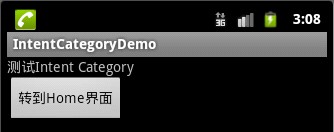
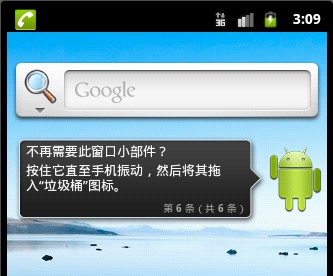
下面舉一個回到Home界面的例子:
main.xml:
 <?xml version="." encoding="utf-"?>
 <LinearLayout xmlns:android="http://schemas.android.com/apk/res/android"
 android:orientation="vertical" android:layout_width="fill_parent"
 android:layout_height="fill_parent"
 >
 <TextView
 android:layout_width="fill_parent"
 android:layout_height="wrap_content"
 android:text="測試Intent Category"
 />
 <Button
 android:id="@+id/Button"
 android:layout_width="wrap_content"
 android:layout_height="wrap_content"
 android:text="轉到Home界面"
 />
 </LinearLayout>
strings.xml:
 <?xml version="." encoding="utf-"?>
 <resources>
 <string name="hello">Hello World, MainActivity!</string>
 <string name="app_name">IntentCategoryDemo</string>
 </resources>
MainActivity.java:
 package com.android.category.activity;
 import android.app.Activity;
 import android.content.Intent;
 import android.os.Bundle;
 import android.view.View;
 import android.view.View.OnClickListener;
 import android.widget.Button;
 public class MainActivity extends Activity {
 private Button btn;
 @Override
 public void onCreate(Bundle savedInstanceState) {
 super.onCreate(savedInstanceState);
 setContentView(R.layout.main);
 btn = (Button)findViewById(R.id.Button);
 btn.setOnClickListener(new OnClickListener() {
  @Override
  public void onClick(View v) {
  Intent intent = new Intent();
  intent.setAction(Intent.ACTION_MAIN);// 添加Action屬性
  intent.addCategory(Intent.CATEGORY_HOME);// 添加Category屬性
  startActivity(intent);// 啟動Activity
  }
 });
 }
 }
效果圖如下:
Home:
4.type:要執行動作的目標Activity所能處理的MIME數據類型
例如:一個可以處理圖片的目標Activity在其聲明中包含這樣的mimeType:
<data android:mimeType="image/*" />
在使用Intent進行匹配時,我們可以使用setType(String type)或者setDataAndType(Uri data, String type)來設置mimeType。
5.component,目標組件的包或類名稱
在使用component進行匹配時,一般采用以下幾種形式:
 intent.setComponent(new ComponentName(getApplicationContext(), TargetActivity.class));
 intent.setComponent(new ComponentName(getApplicationContext(), "com.scott.intent.TargetActivity"));
 intent.setComponent(new ComponentName("com.scott.other", "com.scott.other.TargetActivity"));
其中,前兩種是用於匹配同一包內的目標,第三種是用於匹配其他包內的目標。
【注意】:如果我們在Intent中指定了component屬性,系統將不會再對action、data/type、category進行匹配。
五、Intent用法示例全面總結:
1. 調用撥號程序
 // 給移動客服撥打電話
 Uri uri = Uri.parse("tel:");
 Intent intent = new Intent(Intent.ACTION_DIAL, uri);
 startActivity(intent);
2.發送短信或彩信
// 給發送內容為“Hello”的短信
 Uri uri = Uri.parse("smsto:");
 Intent intent = new Intent(Intent.ACTION_SENDTO, uri);
 intent.putExtra("sms_body", "Hello");
 startActivity(intent);
 // 發送彩信(相當於發送帶附件的短信)
 Intent intent = new Intent(Intent.ACTION_SEND);
 intent.putExtra("sms_body", "Hello");
 Uri uri = Uri.parse("content://media/external/images/media/");
 intent.putExtra(Intent.EXTRA_STREAM, uri);
 intent.setType("image/png");
 startActivity(intent);
3.通過浏覽器打開網頁
// 打開Google主頁
 Uri uri = Uri.parse("http://www.google.com");
 Intent intent = new Intent(Intent.ACTION_VIEW, uri);
 startActivity(intent);
.發送電子郵件
 // 給someone@domain.com發郵件
 Uri uri = Uri.parse("mailto:someone@domain.com");
 Intent intent = new Intent(Intent.ACTION_SENDTO, uri);
 startActivity(intent);
 // 給someone@domain.com發郵件發送內容為“Hello”的郵件
 Intent intent = new Intent(Intent.ACTION_SEND);
 intent.putExtra(Intent.EXTRA_EMAIL, "someone@domain.com");
 intent.putExtra(Intent.EXTRA_SUBJECT, "Subject");
 intent.putExtra(Intent.EXTRA_TEXT, "Hello");
 intent.setType("text/plain");
 startActivity(intent);
 // 給多人發郵件
 Intent intent=new Intent(Intent.ACTION_SEND);
 String[] tos = {"@abc.com", "@abc.com"}; // 收件人
 String[] ccs = {"@abc.com", "@abc.com"}; // 抄送
 String[] bccs = {"@abc.com", "@abc.com"}; // 密送
 intent.putExtra(Intent.EXTRA_EMAIL, tos);
 intent.putExtra(Intent.EXTRA_CC, ccs);
 intent.putExtra(Intent.EXTRA_BCC, bccs);
 intent.putExtra(Intent.EXTRA_SUBJECT, "Subject");
 intent.putExtra(Intent.EXTRA_TEXT, "Hello");
 intent.setType("message/rfc");
 startActivity(intent);
5.顯示地圖與路徑規劃
// 打開Google地圖中國北京位置(北緯.,東經.)
 Uri uri = Uri.parse("geo:.,.");
 Intent intent = new Intent(Intent.ACTION_VIEW, uri);
 startActivity(intent);
 // 路徑規劃:從北京某地(北緯.,東經.)到上海某地(北緯.,東經.)
 Uri uri = Uri.parse("http://maps.google.com/maps?f=d&saddr=. .&daddr=. .");
 Intent intent = new Intent(Intent.ACTION_VIEW, uri);
 startActivity(intent);
6. 播放多媒體
 Intent intent = new Intent(Intent.ACTION_VIEW);
 Uri uri = Uri.parse("file:///sdcard/foo.mp");
 intent.setDataAndType(uri, "audio/mp");
 startActivity(intent);
 Uri uri = Uri.withAppendedPath(MediaStore.Audio.Media.INTERNAL_CONTENT_URI, "");
 Intent intent = new Intent(Intent.ACTION_VIEW, uri);
 startActivity(intent);
7. 拍照
 // 打開拍照程序
 Intent intent = new Intent(MediaStore.ACTION_IMAGE_CAPTURE);
 startActivityForResult(intent, );
 // 取出照片數據
 Bundle extras = intent.getExtras();
 Bitmap bitmap = (Bitmap) extras.get("data");
8.獲取並剪切圖片
 // 獲取並剪切圖片
 Intent intent = new Intent(Intent.ACTION_GET_CONTENT);
 intent.setType("image/*");
 intent.putExtra("crop", "true"); // 開啟剪切
 intent.putExtra("aspectX", ); // 剪切的寬高比為:
 intent.putExtra("aspectY", );
 intent.putExtra("outputX", ); // 保存圖片的寬和高
 intent.putExtra("outputY", );
 intent.putExtra("output", Uri.fromFile(new File("/mnt/sdcard/temp"))); // 保存路徑
 intent.putExtra("outputFormat", "JPEG");// 返回格式
 startActivityForResult(intent, );
 // 剪切特定圖片
 Intent intent = new Intent("com.android.camera.action.CROP");
 intent.setClassName("com.android.camera", "com.android.camera.CropImage");
 intent.setData(Uri.fromFile(new File("/mnt/sdcard/temp")));
 intent.putExtra("outputX", ); // 剪切的寬高比為:
 intent.putExtra("outputY", );
 intent.putExtra("aspectX", ); // 保存圖片的寬和高
 intent.putExtra("aspectY", );
 intent.putExtra("scale", true);
 intent.putExtra("noFaceDetection", true);
 intent.putExtra("output", Uri.parse("file:///mnt/sdcard/temp"));
 startActivityForResult(intent, );
9. 打開Google Market
// 打開Google Market直接進入該程序的詳細頁面
 Uri uri = Uri.parse("market://details?id=" + "com.demo.app");
 Intent intent = new Intent(Intent.ACTION_VIEW, uri);
 startActivity(intent);
10.安裝和卸載程序
 Uri uri = Uri.fromParts("package", "com.demo.app", null);
 Intent intent = new Intent(Intent.ACTION_DELETE, uri);
 startActivity(intent);
11. 進入設置界面
// 進入無線網絡設置界面(其它可以舉一反三)
 Intent intent = new Intent(android.provider.Settings.ACTION_WIRELESS_SETTINGS);
 startActivityForResult(intent, );
 java/android 設計模式學習筆記(7)---裝飾者模式
這篇將會介紹裝飾者模式(Decorator Pattern),裝飾者模式也稱為包裝模式(Wrapper Pattern),結構型模式之一,其使用一種對客戶端透明的方式來動
 Android 實現微信,微博,微信朋友圈,QQ分享的功能
Android 實現微信,微博,微信朋友圈,QQ分享的功能一、去各自所在的開發者平台注冊相應的Key值;引入相關jar包、權限等二、ShareUtil工具類import
 android 藍牙低耗能(LBE)技術介紹
藍牙低能耗(BLE)技術是低成本、短距離、可互操作的魯棒性無線技術,工作在免許可的2.4GHz ISM射頻頻段。它從一開始就設計為超低功耗(ULP)無線技術。它利用許多智
 Android ListView.setEmptyView
概述ListView:一個可以垂直滑動的列表視圖。setEmptyView()接口繼承至ListView的父類AdapterView。可想而知,ListView為空時,才