編輯:關於Android編程
本文實例為大家分享了Android實現蒙板效果的相關代碼,供大家參考,具體內容如下
1、不保留標題欄蒙板的實現
效果:
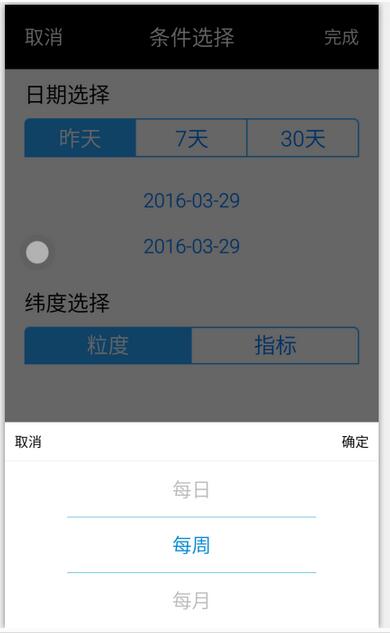
原理:
1、彈窗時,設置背景窗體的透明度
2、取消彈窗時,恢復背景窗體的透明度
關鍵代碼:
private void popupWindows(List<String> list){
  //產生背景變暗效果
  WindowManager.LayoutParams lp=getWindow().getAttributes();
  lp.alpha = 0.4f;
  getWindow().setAttributes(lp);

    ......省略號......

  mPopupWindow.setOnDismissListener(new PopupWindow.OnDismissListener() {
      @Override
      public void onDismiss() {
        WindowManager.LayoutParams lp = getWindow().getAttributes();
        lp.alpha = 1f;
        getWindow().setAttributes(lp);
      }
    });

   ......省略號......

}
2、保留標題欄蒙板的實現
效果:
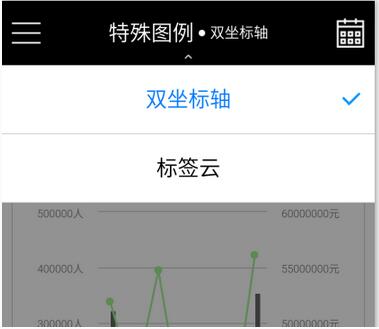
原理:
1、根據需求,設置蒙板布局大小。
2、彈窗時,顯示蒙板布局
2、取消彈窗時,隱藏蒙板布局
關鍵代碼:
1、蒙板布局實現:
<!-- popup蒙板 -->
<LinearLayout
  android:id="@+id/ll_popup_hide"
  android:layout_width="match_parent"
  android:background="@color/hide_bg"
  android:orientation="vertical"
  android:layout_height="match_parent">
</LinearLayout>

<color name="hide_bg">#88323232</color>
2、代碼處理
ll_popup_hide.setVisibility(View.VISIBLE); //顯示蒙板
ll_popup_hide.setVisibility(View.INVISIBLE); //隱藏蒙板
以上就是本文的全部內容,希望對大家的學習有所幫助。
 Line B612 APP怎麼用
Line靜音自拍APP“B612”是一款自拍專用APP,專門用於自拍,且不會發出快門聲。該應用使用簡單,拍照之前無需像傳統拍照軟件那
 android NDK 教程一(初識JNI--hello world)
前言android的知識太過龐雜了,自己如果學過了,但過一段時間不用了又會忘記。寫android NDK系列的博客呢,其一是為了鍛煉自己的寫作水平,其二是為自己所學過所掌
 android搜索框上下滑動變色效果
搜索框上下滑動變透明度是現在APP中很常見的效果,先看看效果:首先來看下布局骨架:<RelativeLayout xmlns:android=http://sche
 Android中logcat的介紹和使用
logcat日志的等級劃分 等級從低到高排列verbose :冗余,最低等級。 黑色debug:調試信息 藍色info: 普通信息 綠色w