編輯:關於Android編程
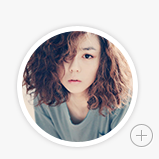
要畫這種圓形帶陰影的頭像,個人分解成三個圖層
1,先畫頭像邊緣的漸變
RadialGradient gradient = new RadialGradient(j/2,k/2,j/2,new int[]{0xff5d5d5d,0xff5d5d5d,0x00ffffff},new float[]{0.f,0.8f,1.0f}, Shader.TileMode.CLAMP);
paint.setShader(gradient);
canvas.drawCircle(j/2,k/2,j/2,paint);
2,截去出圓形頭像Bitmap
/**
 * 轉換圖片成圓形
 * @param bitmap 傳入Bitmap對象
 * @return
 */
 public Bitmap toRoundBitmap(Bitmap bitmap)
 {
  int width = bitmap.getWidth();
  int height = bitmap.getHeight();
  float roundPx;
  float left,top,right,bottom,dst_left,dst_top,dst_right,dst_bottom;
  if (width <= height) {
   roundPx = width / 2 -5;
   top = 0;
   bottom = width;
   left = 0;
   right = width;
   height = width;
   dst_left = 0;
   dst_top = 0;
   dst_right = width;
   dst_bottom = width;
  } else {
   roundPx = height / 2 -5;
   float clip = (width - height) / 2;
   left = clip;
   right = width - clip;
   top = 0;
   bottom = height;
   width = height;
   dst_left = 0;
   dst_top = 0;
   dst_right = height;
   dst_bottom = height;
  }

  Bitmap output = Bitmap.createBitmap(width,
    height, Bitmap.Config.ARGB_8888);
  Canvas canvas = new Canvas(output);

  final int color = 0xff424242;
  final Paint paint = new Paint();
  final Rect src = new Rect((int)left, (int)top, (int)right, (int)bottom);
  final Rect dst = new Rect((int)dst_left, (int)dst_top, (int)dst_right, (int)dst_bottom);
  final RectF rectF = new RectF(dst_left+15, dst_top+15, dst_right-20, dst_bottom-20);

  paint.setAntiAlias(true);

  canvas.drawARGB(0, 0, 0, 0);
  paint.setColor(color);

  canvas.drawRoundRect(rectF, roundPx, roundPx, paint);

  paint.setXfermode(new PorterDuffXfermode(PorterDuff.Mode.SRC_IN));
  canvas.drawBitmap(bitmap, src, dst, paint);
  return output;
 }
3,最後畫上白邊
Paint paint = new Paint();
   paint.setColor(0xffffffff);
   paint.setStrokeWidth(10);
   paint.setStyle(Paint.Style.STROKE);

   canvas.drawCircle(j/2,k/2,j/2-20,paint);
PS:Android App常用圖標尺寸規范
1. 程序啟動圖標:
LDPI (Low Density Screen,120 DPI),其圖標大小為 36 x 36 px。
MDPI (Medium Density Screen, 160 DPI),其圖標大小為 48 x 48 px。
HDPI (High Density Screen, 240 DPI),其圖標大小為 72 x 72 px。
xhdpi (Extra-high density screen, 320 DPI),其圖標大小為 96 x 96 px。
xxhdpi(xx-high density screen, 480 DPI),其圖標大小為144 x 144 px。
2.底部菜單圖標
(1)大屏:
完整圖片(紅色): 72 x 72 px
圖標(藍色): 48 x 48 px
圖標外邊框(粉色): 44 x 44 px
(2)中屏:
完整圖片: 48 x 48 px
圖標: 32 x 32 px
圖標外邊框: 30 x 30 px
(3)小屏:
完整圖片: 36 x 36 px
圖標: 24 x 24 px
圖標外邊框: 22 x 22 px
3. 彈出對話框頂部圖標
小屏 24 x 24 px Low density screen (ldpi)
中屏 32 x 32 px Medium density screen (mdpi)
大屏 48 x 48 px High density screen (hdpi)
4. 長列表內部列表項圖標
小屏 24 x 24 px Low density screen (ldpi)
中屏 32 x 32 px Medium density screen (mdpi)
大屏 48 x 48 px High density screen (hdpi)
5. 底部或頂部tab標簽圖標
(1)大屏 (hdpi) screens:
完整圖片(紅色): 48 x 48 px
圖標(藍色): 42 x 42 px
(2)中屏 (mdpi) screens:
完整圖片: 32 x 32 px
圖標: 28 x 28 px
(3)小屏(ldpi) screens:
完整圖片: 24 x 24 px
圖標: 22 x 22 px
6. 底部狀態欄圖標
ldpi (120 dpi) 18 x 18 px 小屏
mdpi (160 dpi) 24 x 24 px 中屏
hdpi (240 dpi) 36 x 36 px 大屏
xhdpi (320 dpi) 48 x 48 px 特大屏
 Android自定義ViewPager指示器
本文實例為大家分享了Android ViewPager指示器的制作方法,供大家參考,具體內容如下1.概述 ViewPageIndicator這個開源框架大家都接觸過,個
 Android開發之圖形圖像與動畫(五)LayoutAnimationController詳解
首先需要先介紹下LayoutAnimationController: * 1.LayoutAnimationController用於為一個layo
 2015年Android作品集
南周知道 要嚴肅,有知識;要八卦,有內幕。每天一篇,盡享你想知道的和不知道的,我們只想,讓知道成為一種享受。請記住知道,南方周末每日網絡專稿。 1.每天推送一篇你想知道的
 扣丁學堂(六)——音樂播放獨立頁面的實現
一丶音樂播放頁實現功能1.音樂格信息顯示,大圖顯示2.播放功能,上一曲,下一曲,暫停3.音樂進度顯示4.切換播放模式二丶顯示效果三丶原理及代碼實現1.自定義接口回調的方法