編輯:關於Android編程
SharedPreference方面的內容還算是比較簡單易懂的,在此還是主要貼上效果與代碼,最後也是附上源碼。
首先是輸入賬號admin,密碼123,選擇記住密碼登陸。
登陸後就直接跳轉頁面。
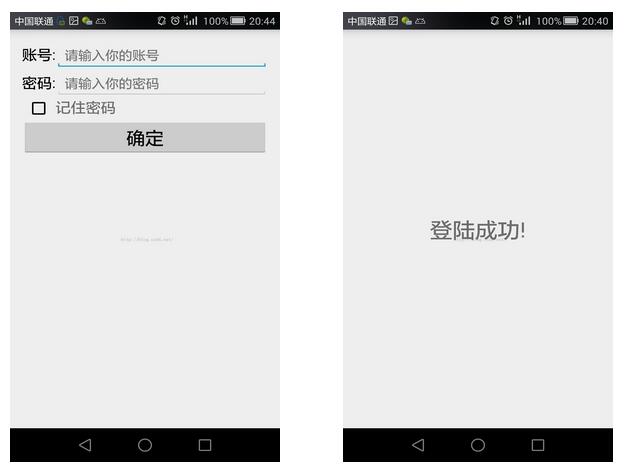
隨後再次打開app可以發現已經記住了密碼。
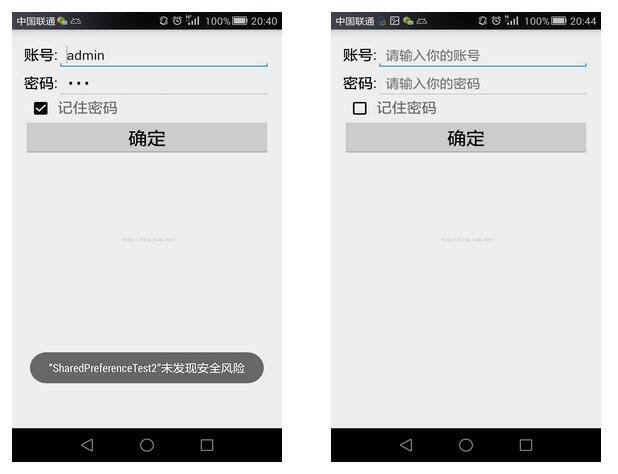
如果輸錯了密碼,或者在登陸的時候沒有選擇記住密碼,那麼會將SharedPreference的文件清空,再次登陸後又會是空的EditText。
MainActivity:
import android.app.Activity;
import android.content.Intent;
import android.content.SharedPreferences;
import android.preference.PreferenceManager;
import android.support.v7.app.AppCompatActivity;
import android.os.Bundle;
import android.view.Menu;
import android.view.MenuItem;
import android.view.View;
import android.view.Window;
import android.widget.Button;
import android.widget.CheckBox;
import android.widget.EditText;
import android.widget.Toast;

public class MainActivity extends Activity {

 //使用SharedPreferences進行讀取
 private SharedPreferences pref;
 //使用SharedPreferences.Editor進行存儲
 private SharedPreferences.Editor editor;

 private Button button;
 private CheckBox checkbox;
 private EditText accountEdit;
 private EditText passwordEdit;
 @Override
 protected void onCreate(Bundle savedInstanceState) {
  super.onCreate(savedInstanceState);
  //取消標題
  requestWindowFeature(Window.FEATURE_NO_TITLE);
  setContentView(R.layout.activity_main);

  //制定SharedPreference的文件名為data
  pref= getSharedPreferences("data",MODE_PRIVATE);
  editor=pref.edit();
  accountEdit=(EditText)findViewById(R.id.account);
  passwordEdit=(EditText)findViewById(R.id.password);
  checkbox=(CheckBox)findViewById(R.id.remember_password);
  button=(Button)findViewById(R.id.button);

  //查看app中是否已經存儲過賬號密碼,有的話就直接顯示出來
  boolean isRemember=pref.getBoolean("remember_password",false);
  if(isRemember){
   String account=pref.getString("account","");
   String password=pref.getString("password","");
   accountEdit.setText(account);
   passwordEdit.setText(password);
   checkbox.setChecked(true);
  }


  button.setOnClickListener(new View.OnClickListener() {
   @Override
   public void onClick(View view) {
    String account=accountEdit.getText().toString();
    String password=passwordEdit.getText().toString();
    //此處設置的賬號為“admin”,密碼為“123”
    if(account.equals("admin")&&password.equals("123")){
     //如果記住密碼被選中,那麼就將賬號密碼存儲起來
     //如果沒有被選中,那麼將存儲的賬號密碼清空
     if(checkbox.isChecked()){
      editor.putBoolean("remember_password",true);
      editor.putString("account",account);
      editor.putString("password",password);
     }else{
      editor.clear();
     }
     //最後千萬不要忘記使用commit將添加的數據提交
     editor.commit();

     //簡單的跳轉界面
     Intent intent=new Intent(MainActivity.this,NextActivity.class);
     startActivity(intent);
     finish();
    }else{
     //如果賬號密碼錯誤,就跳出toast提示,並且清空存儲的賬號密碼
     Toast.makeText(MainActivity.this,"賬號或密碼錯誤!",Toast.LENGTH_LONG).show();

     editor.clear();
     editor.commit();
    }
   }
  });
 }


}
activity_main:
<TableLayout xmlns:android="http://schemas.android.com/apk/res/android"
 xmlns:tools="http://schemas.android.com/tools"
 android:layout_width="match_parent"
 android:layout_height="match_parent"
 android:paddingBottom="@dimen/activity_vertical_margin"
 android:paddingLeft="@dimen/activity_horizontal_margin"
 android:paddingRight="@dimen/activity_horizontal_margin"
 android:paddingTop="@dimen/activity_vertical_margin"
 android:stretchColumns="1"
 tools:context=".MainActivity">

 <TableRow>
  <TextView
   android:textSize="20sp"
   android:text="賬號:"
   android:textColor="#000"
   android:layout_height="wrap_content"/>
  <EditText
   android:id="@+id/account"
   android:hint="請輸入你的賬號"
   />
 </TableRow>

 <TableRow>
  <TextView
   android:textSize="20sp"
   android:text="密碼:"
   android:textColor="#000"
   android:layout_height="wrap_content"/>
  <EditText
   android:id="@+id/password"
   android:hint="請輸入你的密碼"
   android:password="true"
   />
 </TableRow>

 <TableRow>
  <CheckBox
   android:id="@+id/remember_password"
   android:layout_height="wrap_content"
   android:layout_gravity="center"/>
  <TextView
   android:textSize="20sp"
   android:text="記住密碼"
   android:layout_height="wrap_content"/>

 </TableRow>

 <TableRow>
  <Button
   android:id="@+id/button"
   android:layout_span="2"
   android:text="確定"
   android:textSize="25sp"/>
 </TableRow>

</TableLayout>
NextActivity:
import android.app.Activity;
import android.support.v7.app.AppCompatActivity;
import android.os.Bundle;
import android.view.Menu;
import android.view.MenuItem;
import android.view.Window;

public class NextActivity extends Activity {

 @Override
 protected void onCreate(Bundle savedInstanceState) {
  super.onCreate(savedInstanceState);
  requestWindowFeature(Window.FEATURE_NO_TITLE);
  setContentView(R.layout.activity_next);
 }


}
activity_next:
<?xml version="1.0" encoding="utf-8"?>
<LinearLayout xmlns:android="http://schemas.android.com/apk/res/android"
 android:layout_width="match_parent"
 android:layout_height="match_parent"
 android:orientation="vertical"
 android:gravity="center_vertical">

 <TextView
  android:layout_width="wrap_content"
  android:layout_height="wrap_content"
  android:text="登陸成功!"
  android:textSize="30sp"
  android:layout_gravity="center_horizontal"
  />
</LinearLayout>
希望本文所述對大家學習Android程序設計有所幫助。
 高德地圖查看街景方法 手機高德地圖怎麼看街景
手機高德地圖怎麼看街景呢?高德地圖查看街景方法是什麼呢?下面,小編來教教大家如何利用手機高德地圖來看街景。高德地圖app查看街景方法第一步、打開手機版【高德
 Android中Gallery和ImageSwitcher的使用
效果如下:布局文件activity_main.xml如下: MainActivity.java代碼如下:import android.app.Act
 21天學習android開發教程之SurfaceView
上一篇文章介紹了MediaPlayer相關內容,這次用兩篇文章來介紹SurfaceView的用法。網上介紹SurfaceView的用法有很多,寫法也層出不同,例如繼承Su
 Android中利用SurfaceView制作抽獎轉盤的全流程攻略
一、概述今天給大家帶來SurfaceView的一個實戰案例,話說自定義View也是各種寫,一直沒有寫過SurfaceView,這個玩意是什麼東西?什麼時候用比較好呢?可以