編輯:關於Android編程
短信加密此類功能由於新手學習的需求量較小,所以在網上很少有一些簡單的demo供新手參考。小編做到此處也是花了比較多的時間自我構思,具體的過程也是不過多描述了,講一下demo的內容。
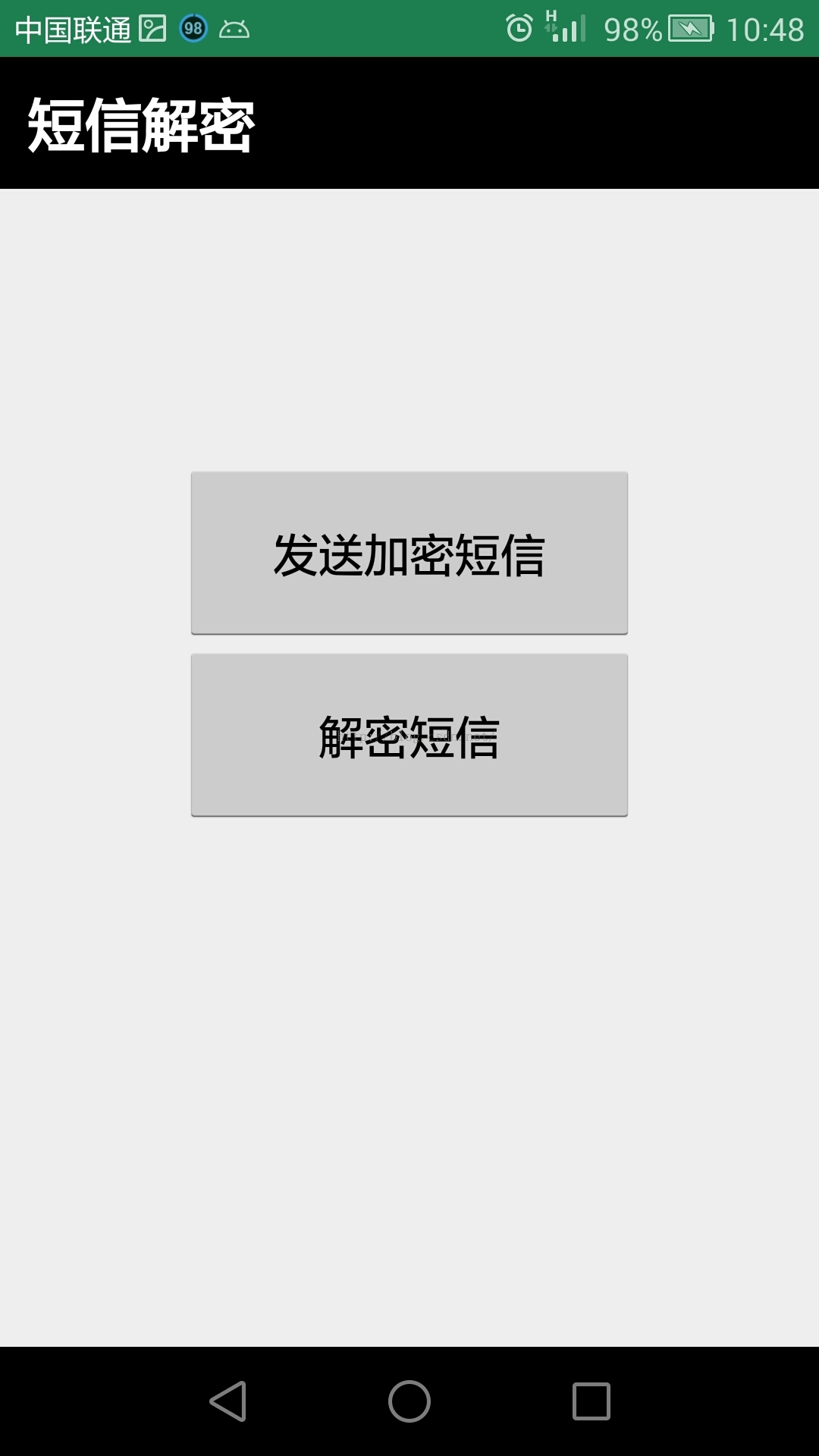
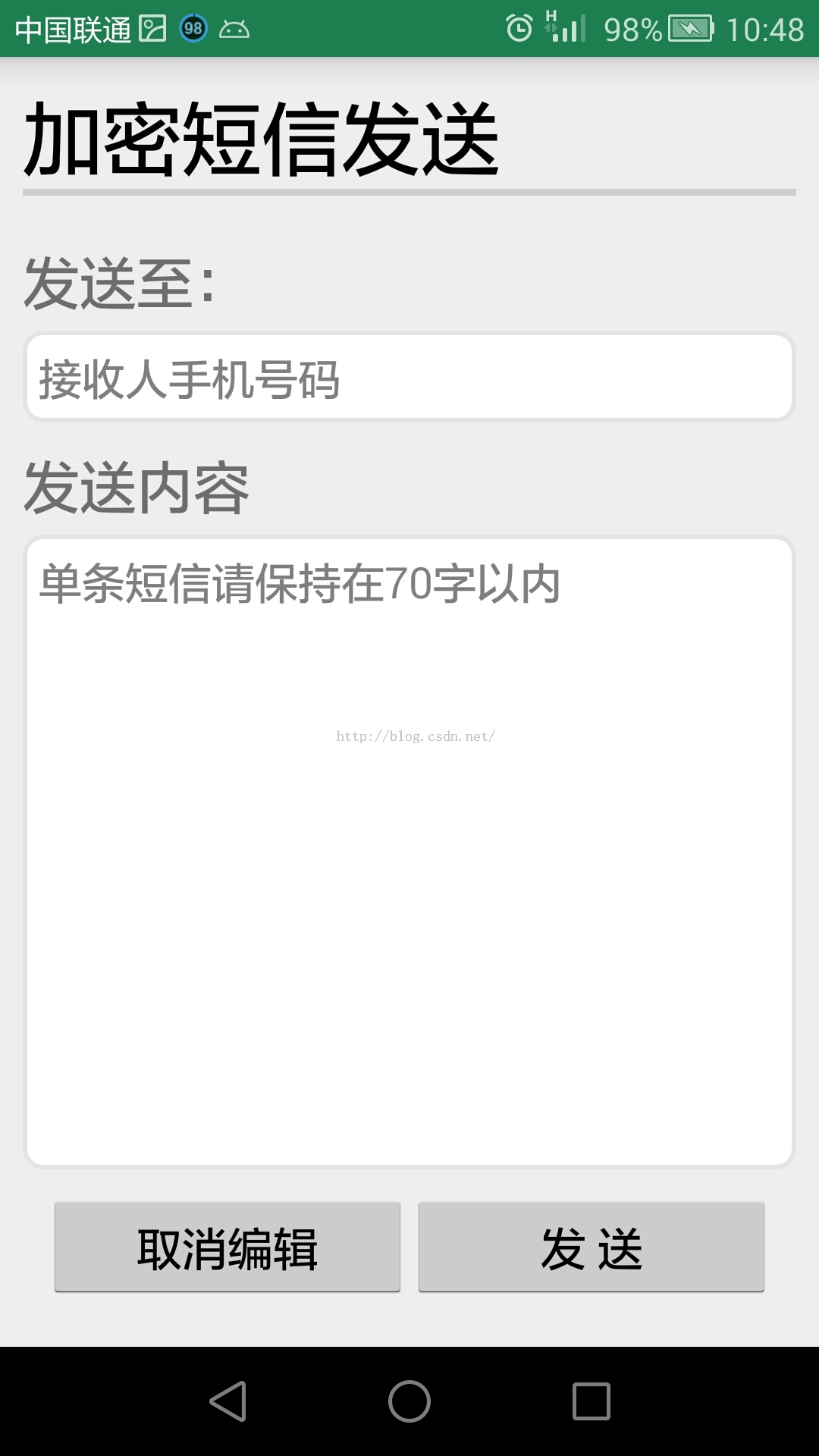
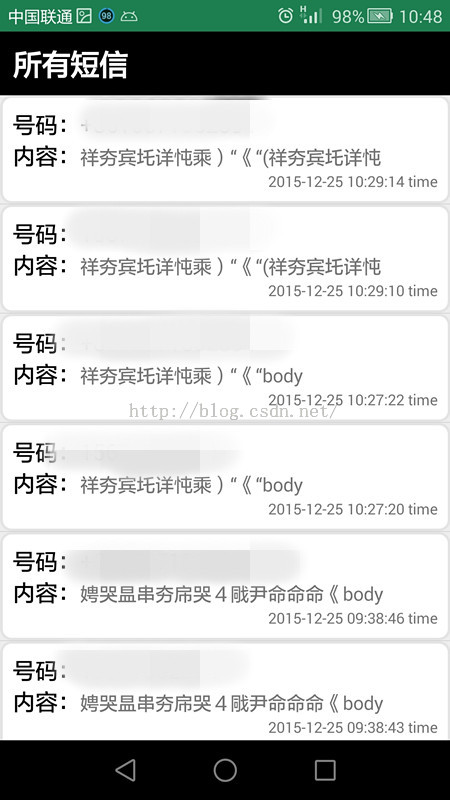
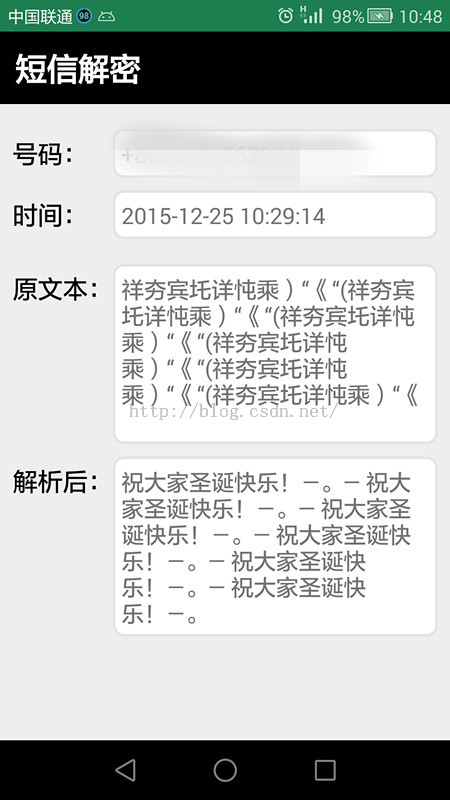
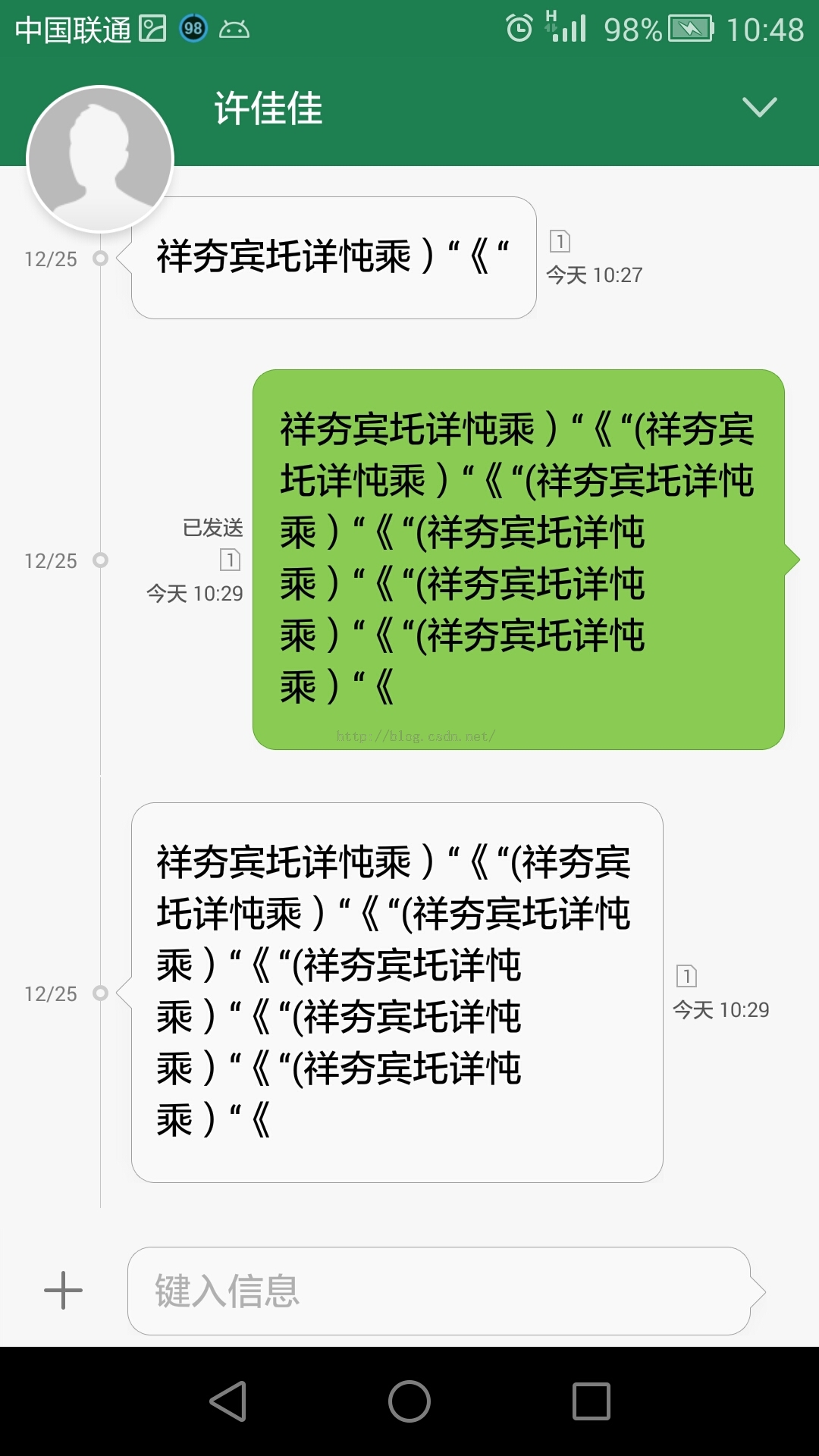
demo功能:
1、可以發送短信並且加密(通過改變string中的char)
2、能夠查看手機中的短信
3、能夠給收到的加密短信解密。
涉及到的知識點:
1、intent bundle傳遞
2、ContentResolver獲取手機短信
3、listveiw與simpleAdapter
4、發送短信以及為發送短信設置要監聽的廣播
遇到的問題:
1、發送短信字符過長會導致發送失敗
解決方法:設置發送每條短信為70個字以內。
原理:每條短信限制160字符以內,每個漢字是2個字符。平時我們發送短信幾乎不限長度,是因為一旦超過了單條短信的長度,手機會自動分多條發送,然後接收方分多條接收後整合在一起顯示。
代碼:
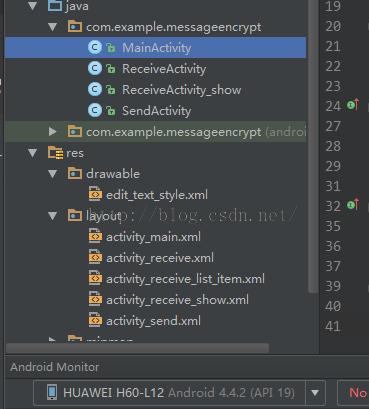
MainActivity:
import android.app.Activity;
import android.content.Intent;
import android.support.v7.app.AppCompatActivity;
import android.os.Bundle;
import android.view.View;
import android.widget.Button;

public class MainActivity extends Activity {

 @Override
 protected void onCreate(Bundle savedInstanceState) {
 super.onCreate(savedInstanceState);
 setContentView(R.layout.activity_main);

 InitView();
 }

 private void InitView() {
 Button send=(Button)findViewById(R.id.bt_send);
 Button receive=(Button)findViewById(R.id.bt_receive);

 send.setOnClickListener(new View.OnClickListener() {
  @Override
  public void onClick(View view) {
  Intent intent=new Intent(MainActivity.this,SendActivity.class);
  startActivity(intent);
  }
 });

 receive.setOnClickListener(new View.OnClickListener() {
  @Override
  public void onClick(View view) {
  Intent intent=new Intent(MainActivity.this,ReceiveActivity.class);
  startActivity(intent);
  }
 });
 }
}
SendActivity:
import android.app.Activity;
import android.app.PendingIntent;
import android.content.BroadcastReceiver;
import android.content.Context;
import android.content.Intent;
import android.content.IntentFilter;
import android.os.Bundle;
import android.telephony.SmsManager;
import android.util.Log;
import android.view.View;
import android.widget.Button;
import android.widget.EditText;
import android.widget.Toast;

/**
 * Created by 佳佳 on 2015/12/21.
 */
public class SendActivity extends Activity {

 private IntentFilter sendFilter;
 private SendStatusReceiver sendStatusReceiver;

 @Override
 protected void onCreate(Bundle savedInstanceState) {
 super.onCreate(savedInstanceState);
 setContentView(R.layout.activity_send);

 InitView();
 }

 private void InitView() {
 Button cancel = (Button) findViewById(R.id.cancel_edit);
 Button send = (Button) findViewById(R.id.send_edit);
 final EditText phone = (EditText) findViewById(R.id.phone_edit_text);
 final EditText msgInput = (EditText) findViewById(R.id.content_edit_text);

 //為發送短信設置要監聽的廣播
 sendFilter = new IntentFilter();
 sendFilter.addAction("SENT_SMS_ACTION");
 sendStatusReceiver = new SendStatusReceiver();
 registerReceiver(sendStatusReceiver, sendFilter);

 send.setOnClickListener(new View.OnClickListener() {
  @Override
  public void onClick(View v) {
  Toast.makeText(SendActivity.this, "加密發送中,請稍後...", Toast.LENGTH_SHORT).show();
  //接收edittext中的內容,並且進行加密
  //倘若char+8超出了表示范圍,則把原字符發過去
  String address = phone.getText().toString();
  String content = msgInput.getText().toString();
  String contents = "";
  for (int i = 0; i < content.length(); i++) {
   try {
   contents += (char) (content.charAt(i) + 8);
   }catch (Exception e) {
   contents += (char) (content.charAt(i));
   }
  }

  //Log.i("hahaha",contents);

  //發送短信
  //並使用sendTextMessage的第四個參數對短信的發送狀態進行監控
  SmsManager smsManager = SmsManager.getDefault();
  Intent sentIntent = new Intent("SENT_SMS_ACTION");
  PendingIntent pi = PendingIntent.getBroadcast(
   SendActivity.this, 0, sentIntent, 0);
  smsManager.sendTextMessage(address, null,
   contents.toString(), pi, null);
  }
 });

 cancel.setOnClickListener(new View.OnClickListener() {
  @Override
  public void onClick(View view) {
  finish();
  }
 });
 }

 class SendStatusReceiver extends BroadcastReceiver {

 @Override
 public void onReceive(Context context, Intent intent) {
  if (getResultCode() == RESULT_OK) {
  //發送成功
  Toast.makeText(context, "Send succeeded", Toast.LENGTH_LONG)
   .show();

  Intent intent1 = new Intent(SendActivity.this, ReceiveActivity.class);
  startActivity(intent1);
  finish();
  } else {
  //發送失敗
  Toast.makeText(context, "Send failed", Toast.LENGTH_LONG)
   .show();
  }
 }

 }

 @Override
 protected void onDestroy() {
 super.onDestroy();
 //在Activity摧毀的時候停止監聽
 unregisterReceiver(sendStatusReceiver);
 }
}
ReceiveActivity:
import android.app.Activity;
import android.content.Intent;
import android.database.Cursor;
import android.net.Uri;
import android.os.Bundle;
import android.util.Log;
import android.view.View;
import android.widget.AdapterView;
import android.widget.ListView;
import android.widget.SimpleAdapter;
import android.widget.TextView;

import java.text.SimpleDateFormat;
import java.util.ArrayList;
import java.util.Date;
import java.util.HashMap;
import java.util.List;
import java.util.Map;


public class ReceiveActivity extends Activity implements AdapterView.OnItemClickListener{
 private TextView Tv_address;
 private TextView Tv_body;
 private TextView Tv_time;
 private ListView listview;
 private List<Map<String, Object>> dataList;
 private SimpleAdapter simple_adapter;

 @Override
 protected void onCreate(Bundle savedInstanceState) {
 super.onCreate(savedInstanceState);
 setContentView(R.layout.activity_receive);

 InitView();
 }

 @Override
 protected void onStart() {
 super.onStart();
 RefreshList();
 }


 private void InitView() {
 Tv_address = (TextView) findViewById(R.id.tv_address);
 Tv_body = (TextView) findViewById(R.id.tv_body);
 Tv_time = (TextView) findViewById(R.id.tv_time);
 listview = (ListView) findViewById(R.id.list_receive);
 dataList = new ArrayList<Map<String, Object>>();

 listview.setOnItemClickListener(this);
 }

 private void RefreshList() {
 //從短信數據庫讀取信息
 Uri uri = Uri.parse("content://sms/");
 String[] projection = new String[]{"address", "body", "date"};
 Cursor cursor = getContentResolver().query(uri, projection, null, null, "date desc");
 startManagingCursor(cursor);

 //此處為了簡化代碼提高效率,僅僅顯示20條最近短信
 for (int i = 0; i < 20; i++) {
  //從手機短信數據庫獲取信息
  if(cursor.moveToNext()) {
  String address = cursor.getString(cursor.getColumnIndex("address"));
  String body = cursor.getString(cursor.getColumnIndex("body"));
  long longDate = cursor.getLong(cursor.getColumnIndex("date"));
  //將獲取到的時間轉換為我們想要的方式
  SimpleDateFormat dateFormat = new SimpleDateFormat("yyyy-MM-dd hh:mm:ss");
  Date d = new Date(longDate);
  String time = dateFormat.format(d);


  Map<String, Object> map = new HashMap<String, Object>();
  map.put("address", address);
  map.put("body", body+"body");
  map.put("time", time+" time");
  dataList.add(map);
  }
 }

 simple_adapter = new SimpleAdapter(this, dataList, R.layout.activity_receive_list_item,
  new String[]{"address", "body", "time"}, new int[]{
  R.id.tv_address, R.id.tv_body, R.id.tv_time});
 listview.setAdapter(simple_adapter);
 }

 @Override
 public void onItemClick(AdapterView<?> adapterView, View view, int i, long l) {
 //獲取listview中此個item中的內容
 //content的內容格式如下
 //{body=[B@43c2da70body, address=+8615671562394address, time=2015-12-24 11:55:50time}
 String content = listview.getItemAtPosition(i) + "";
 String body = content.substring(content.indexOf("body=") + 5,
  content.indexOf("body,"));
 //Log.i("hahaha",body);
 String address = content.substring(content.indexOf("address=") + 8,
  content.lastIndexOf(","));
 //Log.i("hahaha",address);
 String time = content.substring(content.indexOf("time=") + 5,
  content.indexOf(" time}"));
 //Log.i("hahaha",time);

 //使用bundle存儲數據發送給下一個Activity
 Intent intent=new Intent(ReceiveActivity.this,ReceiveActivity_show.class);
 Bundle bundle = new Bundle();
 bundle.putString("body", body);
 bundle.putString("address", address);
 bundle.putString("time", time);
 intent.putExtras(bundle);
 startActivity(intent);

 }
}
ReceiveActivity_show:
import android.app.Activity;
import android.os.Bundle;
import android.widget.TextView;

public class ReceiveActivity_show extends Activity {
 private TextView Address_show;
 private TextView Time_show;
 private TextView Early_body_show;
 private TextView Late_body_show;

 @Override
 protected void onCreate(Bundle savedInstanceState) {
 super.onCreate(savedInstanceState);
 setContentView(R.layout.activity_receive_show);

 InitView();
 }

 private void InitView() {

 Address_show = (TextView) findViewById(R.id.address_show);
 Time_show = (TextView) findViewById(R.id.time_show);
 Early_body_show = (TextView) findViewById(R.id.early_body_show);
 Late_body_show = (TextView) findViewById(R.id.late_body_show);

 //接收內容和id
 Bundle bundle = this.getIntent().getExtras();
 String body = bundle.getString("body");
 String time = bundle.getString("time");
 String address = bundle.getString("address");


 Address_show.setText(address);
 Early_body_show.setText(body);
 Time_show.setText(time);

 //對短信消息進行解密後顯示在textview中
 //倘若char+8超出了表示范圍,則直接按照原字符解析
 String real_content = "";
 for (int i = 0; i < body.length(); i++) {
  try {
  char textchar=(char) (body.charAt(i) + 8);
  real_content += (char) (body.charAt(i) - 8);
  }catch (Exception e){
  real_content += (char) (body.charAt(i));
  }
 }
 Late_body_show.setText(real_content);
 }

}
activity_main:
<?xml version="1.0" encoding="utf-8"?>

<LinearLayout xmlns:android="http://schemas.android.com/apk/res/android"
 android:layout_width="match_parent"
 android:layout_height="match_parent"
 android:orientation="vertical">

 <TextView
 android:layout_width="match_parent"
 android:layout_height="wrap_content"
 android:background="#000"
 android:padding="12dp"
 android:text="加密短信"
 android:textColor="#fff"
 android:textSize="25sp"
 android:text />
 <Button
 android:layout_marginTop="120dp"
 android:id="@+id/bt_send"
 android:layout_width="200dp"
 android:layout_height="80dp"
 android:text="發送加密短信"
 android:layout_gravity="center"
 android:textSize="20dp"/>
 <Button
 android:id="@+id/bt_receive"
 android:layout_width="200dp"
 android:layout_height="80dp"
 android:layout_gravity="center"
 android:text="解密本地短信"
 android:textSize="20dp"
 android:layout_below="@+id/bt_send"/>

</LinearLayout>
activity_send:
<?xml version="1.0" encoding="utf-8"?>

<LinearLayout xmlns:android="http://schemas.android.com/apk/res/android"
 android:layout_width="match_parent"
 android:layout_height="match_parent"
 android:orientation="vertical">


 <LinearLayout
 android:layout_width="match_parent"
 android:layout_height="match_parent"
 android:orientation="vertical"
 android:padding="10dp">

 <TextView
  android:layout_width="match_parent"
  android:layout_height="wrap_content"
  android:text="加密短信發送"
  android:textColor="#000"
  android:textSize="35sp" />

 <View
  android:layout_width="match_parent"
  android:layout_height="3dp"
  android:layout_marginBottom="20dp"
  android:background="#CECECE" />

 <TextView
  android:layout_width="match_parent"
  android:layout_height="wrap_content"
  android:layout_marginBottom="5dp"
  android:text="發送至:"
  android:textSize="25sp" />

 <EditText
  android:id="@+id/phone_edit_text"
  android:layout_width="match_parent"
  android:layout_height="wrap_content"
  android:layout_marginBottom="10dp"
  android:background="@drawable/edit_text_style"
  android:hint="接收人手機號碼"
  android:maxLength="15"
  android:maxLines="1"
  android:textSize="19sp"
  android:singleLine="true" />

 <TextView
  android:layout_width="match_parent"
  android:layout_height="wrap_content"
  android:layout_marginBottom="5dp"
  android:text="發送內容"
  android:textSize="25sp" />

 <EditText
  android:id="@+id/content_edit_text"
  android:layout_width="match_parent"
  android:layout_height="0dp"
  android:layout_weight="1"
  android:background="@drawable/edit_text_style"
  android:gravity="start"
  android:hint="單條短信請保持在70字以內"
  android:maxLength="70"
  android:textSize="19sp"
  />

 <LinearLayout
  android:layout_width="match_parent"
  android:layout_height="wrap_content"
  android:layout_margin="10dp">

  <Button
  android:id="@+id/cancel_edit"
  android:layout_width="0dp"
  android:layout_height="wrap_content"
  android:layout_weight="1"
  android:text="取消編輯"
  android:textSize="20sp" />

  <Button
  android:id="@+id/send_edit"
  android:layout_width="0dp"
  android:layout_height="wrap_content"
  android:layout_weight="1"
  android:text="發 送"
  android:textSize="20sp" />
 </LinearLayout>
 </LinearLayout>
</LinearLayout>
activity_receive:
<?xml version="1.0" encoding="utf-8"?>
<LinearLayout xmlns:android="http://schemas.android.com/apk/res/android"
 android:orientation="vertical" android:layout_width="match_parent"
 android:layout_height="match_parent">

 <TextView
 android:layout_width="match_parent"
 android:layout_height="wrap_content"
 android:padding="10dp"
 android:text="所有短信"
 android:textColor="#fff"
 android:background="#000"
 android:textSize="23sp"
 android:text/>

 <ListView
 android:id="@+id/list_receive"
 android:layout_width="match_parent"
 android:layout_height="match_parent"></ListView>

</LinearLayout>
activity_receive_show:
<?xml version="1.0" encoding="utf-8"?>

<LinearLayout xmlns:android="http://schemas.android.com/apk/res/android"
 android:layout_width="match_parent"
 android:layout_height="match_parent"
 android:orientation="vertical">

 <TextView
 android:layout_width="match_parent"
 android:layout_height="wrap_content"
 android:background="#000"
 android:padding="12dp"
 android:text="短信解密"
 android:textColor="#fff"
 android:textSize="25sp"
 android:text />

 <TableLayout
 android:layout_width="match_parent"
 android:layout_height="match_parent"
 android:orientation="vertical"
 android:padding="10dp"
 android:stretchColumns="1"
 android:shrinkColumns="1">

 <TableRow android:layout_marginTop="10dp"
  android:layout_width="match_parent"
  >

  <TextView
  android:layout_width="wrap_content"
  android:layout_height="wrap_content"
  android:layout_marginBottom="5dp"
  android:text="號碼:"
  android:textColor="#000"
  android:textSize="20sp" />

  <TextView
  android:id="@+id/address_show"
  android:layout_width="wrap_content"
  android:layout_height="wrap_content"
  android:layout_marginBottom="10dp"
  android:background="@drawable/edit_text_style"
  android:maxLines="1"
  android:singleLine="true"
  android:textSize="18sp" />
 </TableRow
  >

 <TableRow
  android:layout_width="match_parent"
  android:layout_marginBottom="10dp"
  >

  <TextView
  android:layout_width="wrap_content"
  android:layout_height="wrap_content"
  android:layout_marginBottom="5dp"
  android:text="時間:"
  android:textColor="#000"
  android:textSize="20sp" />

  <TextView
  android:id="@+id/time_show"
  android:layout_width="wrap_content"
  android:layout_height="wrap_content"
  android:layout_marginBottom="10dp"
  android:background="@drawable/edit_text_style"
  android:maxLines="1"
  android:textSize="18sp" />
 </TableRow>

 <TableRow android:layout_marginBottom="10dp"
  android:layout_width="match_parent">

  <TextView
  android:layout_width="wrap_content"
  android:layout_height="wrap_content"
  android:layout_marginBottom="5dp"
  android:text="原文本:"
  android:textColor="#000"
  android:textSize="20sp" />

  <TextView
  android:id="@+id/early_body_show"
  android:layout_width="wrap_content"
  android:layout_height="wrap_content"
  android:background="@drawable/edit_text_style"
  android:minLines="6"
  android:maxLines="6"
  android:textSize="18sp"
  />
 </TableRow>

 <TableRow
  android:layout_width="match_parent">

  <TextView
  android:layout_width="wrap_content"
  android:layout_height="wrap_content"
  android:layout_marginBottom="5dp"
  android:text="解析後:"
  android:textColor="#000"
  android:textSize="20sp" />

  <TextView
  android:id="@+id/late_body_show"
  android:layout_width="wrap_content"
  android:layout_height="wrap_content"
  android:background="@drawable/edit_text_style"
  android:minLines="6"
  android:maxLines="6"
  android:singleLine="false"
  android:textSize="18sp"
  />
 </TableRow>


 </TableLayout>
</LinearLayout>
以上就是本文的全部內容,android實現短信加密,實現發送加密短信、解密本地短信,希望對大家的學習有所幫助。
 有話微笑說是什麼 有話微笑說怎麼打電話
有話微笑說是什麼?聽名字就覺得很新奇,這款app之所以這麼火爆,就是因為非常可靠,而且打電話非常便宜,有了它,能夠幫你每個月節省很多話費。有話微笑說怎麼打電
 Bitmap的加載簡單優化
Bitmap如何加載Bitmap可以認為是Android系統將圖片加載GPU的一個映射,Android可以讀取png格式的,也可以讀取jpg格式的。那麼Android是如
 android應用開發之spinner控件的簡單使用
Android的控件有很多種,其中就有一個Spinner的控件,這個控件其實就是一個下拉顯示列表。Spinner是位於 android.widget包下的,每
 android自定義趨勢圖
之前項目需求裡有一個需求是要根據每周的天氣溫度去繪制一個趨勢圖,這個圖不基於XY坐標,就是一個單純的趨勢圖,百度後看了一些博客,大體上有了一些思路,下面是整個趨勢圖的效果