編輯:關於Android編程
一、問題描述
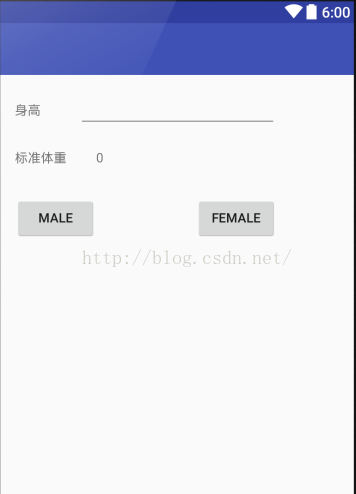
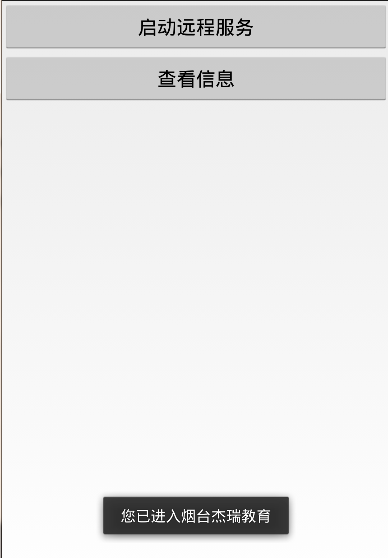
Android應用程序的四大組件中Activity、BroadcastReceiver、ContentProvider、Service都可以進行跨進程。在上一篇我們通過ContentProvider實現了不同應用之間的跨進程調用,但ContentProvider主要是提供數據的共享(如sqlite數據庫),那麼我們希望跨進程調用服務(Service)呢?Android系統采用了遠程過程調用(RPC)方式來實現。與很多其他的基於RPC的解決方案一樣,Android使用一種接口定義語言(Interface Definition Language,IDL)來公開服務的接口。對於Service的跨進程調用需要通過AIDL來實現,AIDL服務應用非常廣泛,如百度地圖API中,就提供跨進程的服務,下面我們就看看如何實現AIDL Service ,案例如圖:
二、實現AIDL服務的步驟
1. 編寫AIDL文件
2. 如果aidl文件的內容是正確的,會自動生成一個Java接口文件(*.java)。
3. 建立一個服務類(Service的子類)。
4. 實現由aidl文件生成的Java接口。
5. 在AndroidManifest.xml文件中配置AIDL服務, 添加<action>標簽的android:name,以便客戶端使用隱式Intent啟動服務
6、客戶端
三、編寫AIDL文件
Android接口定義語言——LocalService.aidl
package com.jereh.remote;
interface LocalService{
    String getLocal();
}
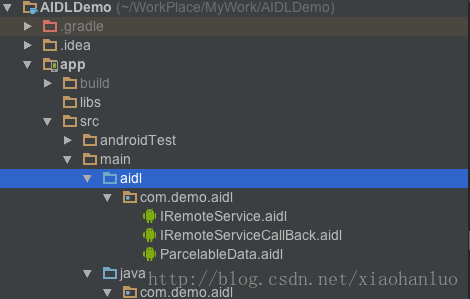
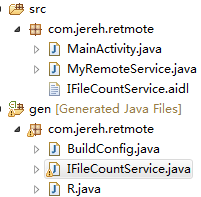
IDE會自動生成LocalService.java 文件 如圖所示:
四、Remote應用實現
1、編寫MyRemoteService
public class MyRemoteService extends Service {
  @Override
  public IBinder onBind(Intent arg0) {
    // TODO Auto-generated method stub
    return new MyRemoteServiceImpl();
  }
  private class MyRemoteServiceImpl extends LocalService.Stub{
    @Override
    public String getLocal() throws RemoteException {
      // TODO Auto-generated method stub
      return "煙台傑瑞教育";
    }
  }
}
2、AndroidManifest.xml配置
<service android:name="com.jereh.retmote.MyRemoteService"
      android:process="remote"
      >
      <intent-filter>
        <action android:name="com.jereh.remote_service"/>
      </intent-filter>
 </service>
五、客戶端實現
1、在客戶端應用中添加LocalService.aidl
注意包名要與文件的在服務端定義的包名相同。如圖所示:
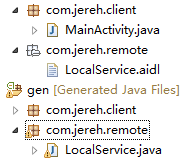
同樣會自動生成LocalService.java 代碼
2、MainActivity代碼:
public class MainActivity extends Activity {
  @Override
  protected void onCreate(Bundle savedInstanceState) {
    super.onCreate(savedInstanceState);
    setContentView(R.layout.activity_main);
  }
  public void startService(View view){
    Intent service=new Intent("com.jereh.remote_service");
    super.bindService(service, conn, Context.BIND_AUTO_CREATE);
  }
  public void showInfo(View view){
    try {
      local=service.getLocal();
      Log.d("jereh", local);
      Toast.makeText(this,
"您已進入"+local,Toast.LENGTH_LONG).show();
    } catch (RemoteException e) {
      // TODO Auto-generated catch block
      e.printStackTrace();
    }
  }
private  LocalService service;
private  String local;
private ServiceConnection conn=new ServiceConnection() {
    @Override
    public void onServiceDisconnected(ComponentName arg0) {
    }
    @Override
    public void onServiceConnected(ComponentName name, IBinder binder) {
      // TODO Auto-generated method stub
      // 獲取遠程Service的onBinder方法返回的對象代理
      service=LocalService.Stub.asInterface(binder);
    }
  };
  @Override
  public boolean onCreateOptionsMenu(Menu menu) {
    // Inflate the menu; this adds items to the action bar if it is present.
    getMenuInflater().inflate(R.menu.main, menu);
    return true;
  }
}
xml文件:
<LinearLayout xmlns:android="http://schemas.android.com/apk/res/android"
  xmlns:tools="http://schemas.android.com/tools"
  android:layout_width="match_parent"
  android:layout_height="match_parent"
  android:orientation="vertical"
  tools:context=".MainActivity" >
  <Button
    android:layout_width="match_parent"
    android:layout_height="wrap_content"
    android:text="啟動遠程服務" android:onClick="startService" />
   <Button
    android:layout_width="match_parent"
    android:layout_height="wrap_content"
    android:text="查看信息" android:onClick="showInfo" />
</LinearLayout>
以上所述就是本文給大家介紹的Android應用程序四大組件之使用AIDL如何實現跨進程調用Service,希望大家喜歡。
 如何自定義手機的Wi-Fi名稱
很多無線路由器都支持防蹭網,但想將那些蹭網設備踢出局的前提是,你要區分哪些設備是你的,哪些設備是別人的。然而,在路由器DHCP列表中所顯示的設備名稱卻多以一
 Android Message和obtainMessage的區別
前幾天需要實現一個以太網功能就看了以太網的源碼部分,看見了源碼部分在消息處理時,發現有一些不同的地方: 平時我在處理消息時: 1、首先創建Handler對
 Cocos2d-x Android.mk文件自動修改器
做cocos2d-x的項目,一般是用電腦進行開發,然後移植到手機平台上。移植到安卓手機需要用eclipse等工具重新編譯打包成apk文件。而用eclipse打包的話
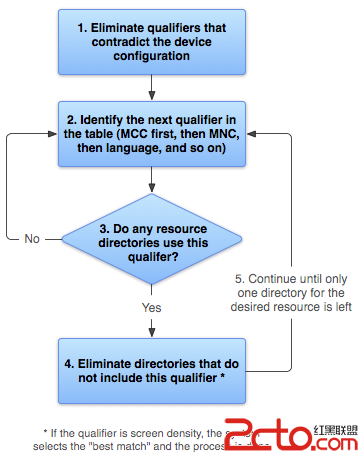 Android是如何根據限定符,來尋找合適的資源文件的?
轉載請注明出處:http://blog.csdn.net/zhaokaiqiang1992 本文主要介紹了當我們使用限定符修飾我們的資源文件夾,例如drawable-en