編輯:關於Android編程
本文實例講述了Android獲取手機電池電量用法。分享給大家供大家參考。具體如下:
原理概述:
手機電池電量的獲取在應用程序的開發中也很常用,Android系統中手機電池電量發生變化的消息是通過Intent廣播來實現的,常用的Intent的Action有 Intent.ACTION_BATTERY_CHANGED(電池電量發生改變時)、Intent.ACTION_BATTERY_LOW(電池電量達到下限時)、和Intent.ACTION_BATTERY_OKAY(電池電量從低恢復到高時)。
當需要在程序中獲取電池電量的信息時,需要為應用程序注冊BroadcastReceiver組件,當特定的Action事件發生時,系統將會發出相應的廣播,應用程序就可以通過BroadcastReceiver來接受廣播,並進行相應的處理。
main.xml布局文件:
<?xml version="1.0" encoding="utf-8"?>
<LinearLayout xmlns:android="http://schemas.android.com/apk/res/android"
  android:orientation="vertical"
  android:layout_width="fill_parent"
  android:layout_height="fill_parent">
  <ToggleButton android:id="@+id/tb"
    android:layout_width="fill_parent"
    android:layout_height="wrap_content"
    android:textOn="停止獲取電量信息"
    android:textOff="獲取電量信息" />
  <TextView android:id="@+id/tv"
    android:layout_width="fill_parent"
    android:layout_height="wrap_content" />
</LinearLayout>
BatteryActivity類:
package com.ljq.activity;
import android.app.Activity;
import android.content.BroadcastReceiver;
import android.content.Context;
import android.content.Intent;
import android.content.IntentFilter;
import android.os.Bundle;
import android.widget.CompoundButton;
import android.widget.TextView;
import android.widget.ToggleButton;
import android.widget.CompoundButton.OnCheckedChangeListener;
public class BatteryActivity extends Activity {
  private ToggleButton tb=null;
  private TextView tv=null;
  private BatteryReceiver receiver=null;
  @Override
  public void onCreate(Bundle savedInstanceState) {
    super.onCreate(savedInstanceState);
    setContentView(R.layout.main);
    receiver=new BatteryReceiver();
    tv=(TextView)findViewById(R.id.tv);
    tb=(ToggleButton)findViewById(R.id.tb);
    tb.setOnCheckedChangeListener(new OnCheckedChangeListener(){
      public void onCheckedChanged(CompoundButton compoundButton, boolean isChecked) {
        //獲取電池電量
        if(isChecked){
          IntentFilter filter=new IntentFilter(Intent.ACTION_BATTERY_CHANGED);
          registerReceiver(receiver, filter);//注冊BroadcastReceiver
        }else {
          //停止獲取電池電量
          unregisterReceiver(receiver);
          tv.setText(null);
        }
      }
    });
  }
  private class BatteryReceiver extends BroadcastReceiver{
    @Override
    public void onReceive(Context context, Intent intent) {
      int current=intent.getExtras().getInt("level");//獲得當前電量
      int total=intent.getExtras().getInt("scale");//獲得總電量
      int percent=current*100/total;
      tv.setText("現在的電量是"+percent+"%。");
    }
  }
}
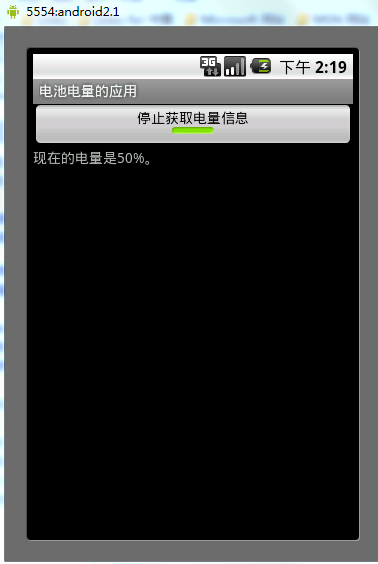
運行結果:
希望本文所述對大家的Android程序設計有所幫助。
 android Handler的使用(一)
Handler的使用(一) Handler基本概念: Handler主要用於異步消息的處理:當發出一個消息之後,首先進入一個消息隊
 Android客戶端實現注冊、登錄詳解(2)
上文中介紹了安卓客戶端與服務器交互,實現注冊功能,Android客戶端實現注冊/登錄詳解(一)本文將繼續介紹App與服務器的交互實現登錄和自動登錄的功能,上文說到請求服務
 Android+Html5混合開發仿微信朋友圈
開發之前大約從去年開始吧, 也可能是前年 Html5好像火得不得了, 不得了...總能從網上聽說到 XXX混合開發, 為了緊跟潮流(雖然有點兒晚了), 咱們也看看Andr
 舉例講解Android中ViewPager中的PagerTitleStrip子控件
先看個簡單的,先上個效果圖,吸引大家一下眼球。三個頁面間的滑動,此時是帶著上面的標題一塊滑動的。看一下android 對於PagerTitleStrip的官方解釋:Pag